> ## Documentation Index
> Fetch the complete documentation index at: https://docs.sevalla.com/llms.txt
> Use this file to discover all available pages before exploring further.
> ## Agent Instructions
> These are the docs for Sevalla, a platform for deploying applications, databases, static sites, object storage and load balancers. The dashboard is at https://app.sevalla.com.
> Bold text in steps is an exact dashboard label.
> To act on a Sevalla account, prefer the Sevalla MCP server (https://mcp.sevalla.com/mcp, see https://docs.sevalla.com/ai-agents/overview.md), then the Sevalla CLI (https://docs.sevalla.com/developer-tools/cli.md), then the REST API (https://api-docs.sevalla.com, OpenAPI spec at https://api.sevalla.com/v3/openapi.json).
> Every page index is at https://docs.sevalla.com/llms.txt.
# Sevalla MCP server
> Connect an AI agent to Sevalla over MCP to deploy, read logs and metrics, and manage services: server URL, sign-in, the 27 tools, permissions and protocol versions.
The Sevalla MCP server lets an AI agent work with your Sevalla company through the [Model Context Protocol](https://modelcontextprotocol.io). The agent can deploy and roll back, read deployment, runtime and access logs, check metrics, manage environment variables, scale processes, add domains, create services, and reach the rest of the [Sevalla API](/developer-tools/api). Every MCP client that supports remote servers connects to the same hosted URL:
```text theme={null}
https://mcp.sevalla.com/mcp
```
## Connect a client
Add the server with `claude mcp add`.
Add Sevalla as a custom connector.
Add the server with `codex mcp add`.
Add the server to `mcp.json`.
Add the server to `mcp_config.json`.
Add the server to `opencode.json`.
Any other client works the same way: give it `https://mcp.sevalla.com/mcp` and let it sign in with OAuth, or send an [API key](#use-an-api-key-instead).
## How it works
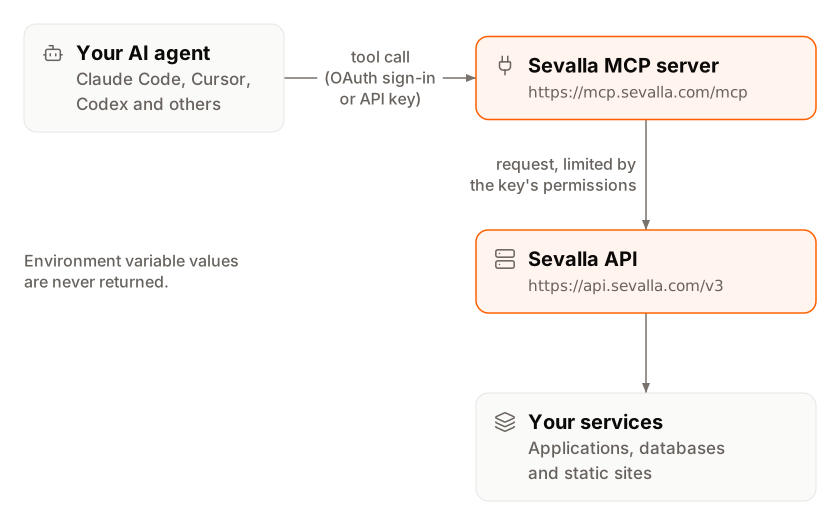
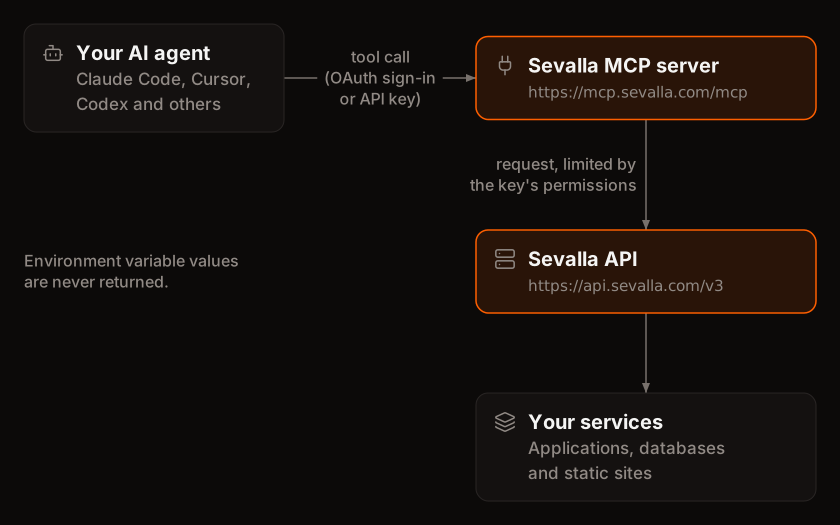 The MCP client sends each tool call to `https://mcp.sevalla.com/mcp` with a bearer token. The server checks the token, turns the call into one or more [Sevalla API](/developer-tools/api) requests made with the API key behind the token, and returns the result to the agent.
| Property | Value |
| - | - |
| URL | `https://mcp.sevalla.com/mcp` |
| Transport | Streamable HTTP (`POST`). The server is stateless and opens no event stream: a `GET` to the URL returns `405`. |
| Protocol versions | `2026-07-28`, and for older clients `2025-11-25`, `2025-06-18`, `2025-03-26` and `2024-11-05`, on the same URL with the same tools |
| Authentication | OAuth 2.1 with PKCE (`S256`), or a Sevalla API key as a bearer token |
| OAuth client registration | OAuth Client ID Metadata Documents, or Dynamic Client Registration for older clients |
| OAuth scope | `mcp:tools` |
| What the agent can reach | One company: the company of the API key behind the connection |
| Data kept between requests | None. Each request creates a new server bound to the caller's key. |
| Source code | [github.com/sevalla-hosting/mcp](https://github.com/sevalla-hosting/mcp) (MIT) |
## Sign in with OAuth
OAuth is the default: you add the URL to your client and sign in through the Sevalla dashboard, with no secret in the client's configuration.
Add the server to your client and start its sign-in (each [client page](#connect-a-client) says how). The client opens `app.sevalla.com` in your browser. If you aren't signed in to Sevalla, sign in first.
The page is titled **Authorize** followed by the client's name. If you belong to more than one company, select the company the agent works in. The agent can only reach that company.
Under **Set permissions**, choose **Predefined role** and pick a role, or choose **Custom capabilities** and tick individual permissions, optionally limited to specific resources. These are the same choices as for any [API key](/developer-tools/api-keys#permissions). Pick **Company viewer** to keep the agent read-only.
Click **Authorize**. The page shows **Authorization successful** and sends you back to the client. To refuse, click **Deny**.
Approving the request creates an API key in the company with the permissions you chose and no expiration. Its name starts with `Sevalla MCP` followed by the client and the time you approved it, and it's listed under **Tools** > **API keys**. The client receives an access token that wraps this key: it works until you disable or delete the key, or until the old token expires after you [rotate it](/developer-tools/api-keys#rotate-an-api-key). Then sign in again from the client.
The request expires 5 minutes after the client starts it. If the page says **This device code has expired**, start the sign-in again from the client.
## Use an API key instead
Clients that can't do OAuth, CI jobs and scripts can send a Sevalla API key directly:
```text theme={null}
Authorization: Bearer svl_...
```
[Create an API key](/developer-tools/api-keys#create-an-api-key) with only the permissions the agent needs, and keep it in an environment variable, never in a file you commit. Each client page shows where the header goes. The key works with the MCP server exactly as it does with the API.
## Tools
The server has 27 tools: 22 for everyday tasks, and 5 generic tools that run the rest of the Sevalla API by operation ID. Every tool has a title (clients show it when they ask for approval) and explicit annotations.
### Discovery
| Tool | Title | What it does | Kind |
| - | - | - | - |
| `list_services` | List Sevalla services | Lists applications, static sites and databases with their IDs, names and status. Filters by type, name or project. | Read |
| `get_application` | Get Sevalla application | Returns one application with its processes and their scaling, its domains with DNS records and verification errors, and its latest deployment. | Read |
| `get_static_site` | Get Sevalla static site | Returns one static site with its build settings, domains and latest deployment. | Read |
| `get_database` | Get Sevalla database | Returns one database: engine, version, status, size, internal and external endpoints, recent backups and internal connections. Passwords aren't included. | Read |
| `get_platform_options` | Get Sevalla regions and sizes | Lists the locations (clusters) and the sizes for application processes and databases, with their CPU, memory and storage. | Read |
| `search_sevalla_docs` | Search Sevalla documentation | Searches docs.sevalla.com and returns the best-matching pages with their most relevant section. | Read |
### Deployments
| Tool | Title | What it does | Kind |
| - | - | - | - |
| `list_deployments` | List Sevalla deployments | Lists the deployments of an application or static site, newest first, with status, trigger, branch, commit and timing. | Read |
| `get_deployment` | Get Sevalla deployment | Returns one deployment: status, steps, branch, commit, image, build error and timing. | Read |
| `get_deployment_logs` | Get Sevalla deployment logs | Returns a deployment's build and rollout log, by default the last 100 lines. Can keep only error lines or lines that contain a text. | Read |
| `trigger_deployment` | Deploy Sevalla service | Deploys an application or static site: by default the latest commit of the default branch, or another branch, a Docker image, or (applications) a restart without a rebuild. | Update |
| `rollback_deployment` | Roll back Sevalla service | Redeploys an earlier successful deployment, reusing its build. Applications go back to their most recent successful deployment, static sites to the deployment you name or the last successful one. | Update |
### Observability
| Tool | Title | What it does | Kind |
| - | - | - | - |
| `search_runtime_logs` | Search Sevalla runtime logs | Returns the stdout and stderr of an application's processes, by default for the last 60 minutes. Filters by severity or text. | Read |
| `search_access_logs` | Search Sevalla access logs | Returns the HTTP requests to an application or static site, by default for the last 60 minutes. Filters by status code or class (`5xx`), method, path prefix or text. | Read |
| `get_metrics` | Get Sevalla metrics | Returns traffic, response time, status code, country and page metrics for an application or static site, CPU, memory, instance and exit code metrics for a process, or CPU, memory and storage for a database. By default for the last 60 minutes. | Read |
### Configuration
| Tool | Title | What it does | Kind |
| - | - | - | - |
| `list_environment_variables` | List Sevalla environment variables | Lists the keys and scoping (build, runtime, preview, branch) of an application's, a static site's or the company's global environment variables. Values are withheld. | Read |
| `set_environment_variables` | Set Sevalla environment variables | Creates or updates environment variables without returning their values. Changes apply at the next deployment, or right away when the agent asks for a redeployment. | Update |
| `delete_environment_variables` | Delete Sevalla environment variables | Deletes environment variables by key. | Delete |
| `scale_process` | Scale Sevalla process | Sets a process's fixed instance count or autoscaling range and its size. By default restarts the application from its current build so the change applies now. | Update |
| `add_domain` | Add Sevalla custom domain | Adds a custom domain to an application or static site and returns the DNS records to create. | Create |
### Create
| Tool | Title | What it does | Kind |
| - | - | - | - |
| `create_application` | Create Sevalla application | Creates an application from a Git repository or Docker image with one web process, and by default starts its first deployment. | Create |
| `create_static_site` | Create Sevalla static site | Creates a static site from a Git repository and starts its first build. Build settings it isn't given are detected. | Create |
| `create_database` | Create Sevalla database | Creates a PostgreSQL, MySQL, MariaDB, Redis or Valkey database. Can also connect it to an application in the same location and store the connection URL in an environment variable (`DATABASE_URL` by default). The password is generated and never returned. | Create |
### Rest of the API
| Tool | Title | What it does | Kind |
| - | - | - | - |
| `sevalla_api_search` | Search Sevalla API operations | Searches the operations of the Sevalla API by keyword and returns their IDs, parameters, body fields and the tool that runs each. Reads the API reference, not your company. | Read |
| `sevalla_api_read` | Read from the Sevalla API | Runs one read-only (`GET`) operation by ID: projects, pipelines, load balancers, buckets, webhooks, usage alerts, users, API keys and more. | Read |
| `sevalla_api_create` | Create through the Sevalla API | Runs one operation that only adds something new, such as a project, pipeline, process, backup, bucket, webhook or load balancer. | Create |
| `sevalla_api_update` | Update through the Sevalla API | Runs one operation that changes existing state: settings, suspend or activate, database restart or backup restore, pipeline promotion, cache purges, maintenance mode, or a command in a running process. | Update |
| `sevalla_api_delete` | Delete through the Sevalla API | Permanently deletes one resource, from a domain, process, backup, webhook or API key up to an application, static site, database, pipeline, project, load balancer or bucket. | Delete |
The generic tools accept only operation IDs from a reviewed list generated from the [API reference](https://api-docs.sevalla.com). The server, not the model, picks the HTTP method and path, and each tool runs only operations of its own kind: `sevalla_api_read` can't run a delete. Operations that have a dedicated tool, such as deployments, must go through that tool. Three operations aren't available at all: creating and polling device codes (part of sign-in) and the interactive terminal session (it needs a WebSocket).
### Annotations
Each tool's kind sets its MCP annotations. Clients use them to decide which calls run without asking and which need your confirmation.
| Kind | `readOnlyHint` | `destructiveHint` | `idempotentHint` | `openWorldHint` |
| - | - | - | - | - |
| Read | `true` | `false` | `true` | `false` |
| Create | `false` | `false` | `false` | `true` |
| Update | `false` | `true` | `false` | `true` |
| Delete | `false` | `true` | `true` | `true` |
Three tools differ from their kind: `set_environment_variables` and `scale_process` have `idempotentHint: true`, and `scale_process` and `create_database` have `openWorldHint: false`.
## Permissions and secrets
The agent can do exactly what the API key behind the connection allows, nothing more. A tool call that needs a permission the key doesn't have fails with the API's `403` message, for example `This API key is missing the APP:UPDATE permission. Grant it to the key or use a key that has it.` To change what an agent can do, [update the key's permissions](/developer-tools/api-keys#update-an-api-key).
| What | How the server handles it |
| - | - |
| Environment variable values | Never returned. The tools list keys and scoping, and set or delete variables without echoing values. |
| Database passwords | Not returned by `get_database` or `create_database`. |
| Everything else in the API | Available within the key's permissions, including deleting whole services and managing API keys. |
| Operations that issue a new secret | Return it to the agent: rolling a webhook secret, regenerating a deploy hook, rotating object storage credentials, creating or rotating an API key. |
| Commands run in a process and application logs | Can contain secrets, and the agent sees them. |
Give an agent the smallest set of permissions it needs. A key with a role such as **Company admin** lets the agent delete applications, databases and their backups, which you can't undo.
## Example prompts
* "Why did the latest deployment of storefront fail?"
* "Deploy the main branch of storefront and tell me when it's live."
* "Summarize the errors in storefront's runtime logs from the last hour."
* "Create a PostgreSQL database called orders-db in Frankfurt and connect it to storefront."
* "Add shop.example.com to storefront and tell me which DNS records to create."
* "Which of my applications returned the most 5xx responses today?"
## Disconnect an agent
Removing the server from a client stops that client from calling it. Each client page has the steps under **Remove the server**. Removing the server doesn't delete the API key in Sevalla: to revoke access everywhere the key is used, [disable or delete the key](/developer-tools/api-keys#disable-or-enable-an-api-key) under **Tools** > **API keys**. From then on, every tool call made with the key fails with `401 Unauthorized`.
## Self-host the server
The server is open source and runs on Node.js 24 or later. To run it yourself, or locally over stdio with an API key in `SEVALLA_API_KEY`, follow the [repository README](https://github.com/sevalla-hosting/mcp#self-hosting). Most people use the hosted server.
This documentation is built and hosted on [Mintlify](https://mintlify.com), a developer documentation platform.
The MCP client sends each tool call to `https://mcp.sevalla.com/mcp` with a bearer token. The server checks the token, turns the call into one or more [Sevalla API](/developer-tools/api) requests made with the API key behind the token, and returns the result to the agent.
| Property | Value |
| - | - |
| URL | `https://mcp.sevalla.com/mcp` |
| Transport | Streamable HTTP (`POST`). The server is stateless and opens no event stream: a `GET` to the URL returns `405`. |
| Protocol versions | `2026-07-28`, and for older clients `2025-11-25`, `2025-06-18`, `2025-03-26` and `2024-11-05`, on the same URL with the same tools |
| Authentication | OAuth 2.1 with PKCE (`S256`), or a Sevalla API key as a bearer token |
| OAuth client registration | OAuth Client ID Metadata Documents, or Dynamic Client Registration for older clients |
| OAuth scope | `mcp:tools` |
| What the agent can reach | One company: the company of the API key behind the connection |
| Data kept between requests | None. Each request creates a new server bound to the caller's key. |
| Source code | [github.com/sevalla-hosting/mcp](https://github.com/sevalla-hosting/mcp) (MIT) |
## Sign in with OAuth
OAuth is the default: you add the URL to your client and sign in through the Sevalla dashboard, with no secret in the client's configuration.
Add the server to your client and start its sign-in (each [client page](#connect-a-client) says how). The client opens `app.sevalla.com` in your browser. If you aren't signed in to Sevalla, sign in first.
The page is titled **Authorize** followed by the client's name. If you belong to more than one company, select the company the agent works in. The agent can only reach that company.
Under **Set permissions**, choose **Predefined role** and pick a role, or choose **Custom capabilities** and tick individual permissions, optionally limited to specific resources. These are the same choices as for any [API key](/developer-tools/api-keys#permissions). Pick **Company viewer** to keep the agent read-only.
Click **Authorize**. The page shows **Authorization successful** and sends you back to the client. To refuse, click **Deny**.
Approving the request creates an API key in the company with the permissions you chose and no expiration. Its name starts with `Sevalla MCP` followed by the client and the time you approved it, and it's listed under **Tools** > **API keys**. The client receives an access token that wraps this key: it works until you disable or delete the key, or until the old token expires after you [rotate it](/developer-tools/api-keys#rotate-an-api-key). Then sign in again from the client.
The request expires 5 minutes after the client starts it. If the page says **This device code has expired**, start the sign-in again from the client.
## Use an API key instead
Clients that can't do OAuth, CI jobs and scripts can send a Sevalla API key directly:
```text theme={null}
Authorization: Bearer svl_...
```
[Create an API key](/developer-tools/api-keys#create-an-api-key) with only the permissions the agent needs, and keep it in an environment variable, never in a file you commit. Each client page shows where the header goes. The key works with the MCP server exactly as it does with the API.
## Tools
The server has 27 tools: 22 for everyday tasks, and 5 generic tools that run the rest of the Sevalla API by operation ID. Every tool has a title (clients show it when they ask for approval) and explicit annotations.
### Discovery
| Tool | Title | What it does | Kind |
| - | - | - | - |
| `list_services` | List Sevalla services | Lists applications, static sites and databases with their IDs, names and status. Filters by type, name or project. | Read |
| `get_application` | Get Sevalla application | Returns one application with its processes and their scaling, its domains with DNS records and verification errors, and its latest deployment. | Read |
| `get_static_site` | Get Sevalla static site | Returns one static site with its build settings, domains and latest deployment. | Read |
| `get_database` | Get Sevalla database | Returns one database: engine, version, status, size, internal and external endpoints, recent backups and internal connections. Passwords aren't included. | Read |
| `get_platform_options` | Get Sevalla regions and sizes | Lists the locations (clusters) and the sizes for application processes and databases, with their CPU, memory and storage. | Read |
| `search_sevalla_docs` | Search Sevalla documentation | Searches docs.sevalla.com and returns the best-matching pages with their most relevant section. | Read |
### Deployments
| Tool | Title | What it does | Kind |
| - | - | - | - |
| `list_deployments` | List Sevalla deployments | Lists the deployments of an application or static site, newest first, with status, trigger, branch, commit and timing. | Read |
| `get_deployment` | Get Sevalla deployment | Returns one deployment: status, steps, branch, commit, image, build error and timing. | Read |
| `get_deployment_logs` | Get Sevalla deployment logs | Returns a deployment's build and rollout log, by default the last 100 lines. Can keep only error lines or lines that contain a text. | Read |
| `trigger_deployment` | Deploy Sevalla service | Deploys an application or static site: by default the latest commit of the default branch, or another branch, a Docker image, or (applications) a restart without a rebuild. | Update |
| `rollback_deployment` | Roll back Sevalla service | Redeploys an earlier successful deployment, reusing its build. Applications go back to their most recent successful deployment, static sites to the deployment you name or the last successful one. | Update |
### Observability
| Tool | Title | What it does | Kind |
| - | - | - | - |
| `search_runtime_logs` | Search Sevalla runtime logs | Returns the stdout and stderr of an application's processes, by default for the last 60 minutes. Filters by severity or text. | Read |
| `search_access_logs` | Search Sevalla access logs | Returns the HTTP requests to an application or static site, by default for the last 60 minutes. Filters by status code or class (`5xx`), method, path prefix or text. | Read |
| `get_metrics` | Get Sevalla metrics | Returns traffic, response time, status code, country and page metrics for an application or static site, CPU, memory, instance and exit code metrics for a process, or CPU, memory and storage for a database. By default for the last 60 minutes. | Read |
### Configuration
| Tool | Title | What it does | Kind |
| - | - | - | - |
| `list_environment_variables` | List Sevalla environment variables | Lists the keys and scoping (build, runtime, preview, branch) of an application's, a static site's or the company's global environment variables. Values are withheld. | Read |
| `set_environment_variables` | Set Sevalla environment variables | Creates or updates environment variables without returning their values. Changes apply at the next deployment, or right away when the agent asks for a redeployment. | Update |
| `delete_environment_variables` | Delete Sevalla environment variables | Deletes environment variables by key. | Delete |
| `scale_process` | Scale Sevalla process | Sets a process's fixed instance count or autoscaling range and its size. By default restarts the application from its current build so the change applies now. | Update |
| `add_domain` | Add Sevalla custom domain | Adds a custom domain to an application or static site and returns the DNS records to create. | Create |
### Create
| Tool | Title | What it does | Kind |
| - | - | - | - |
| `create_application` | Create Sevalla application | Creates an application from a Git repository or Docker image with one web process, and by default starts its first deployment. | Create |
| `create_static_site` | Create Sevalla static site | Creates a static site from a Git repository and starts its first build. Build settings it isn't given are detected. | Create |
| `create_database` | Create Sevalla database | Creates a PostgreSQL, MySQL, MariaDB, Redis or Valkey database. Can also connect it to an application in the same location and store the connection URL in an environment variable (`DATABASE_URL` by default). The password is generated and never returned. | Create |
### Rest of the API
| Tool | Title | What it does | Kind |
| - | - | - | - |
| `sevalla_api_search` | Search Sevalla API operations | Searches the operations of the Sevalla API by keyword and returns their IDs, parameters, body fields and the tool that runs each. Reads the API reference, not your company. | Read |
| `sevalla_api_read` | Read from the Sevalla API | Runs one read-only (`GET`) operation by ID: projects, pipelines, load balancers, buckets, webhooks, usage alerts, users, API keys and more. | Read |
| `sevalla_api_create` | Create through the Sevalla API | Runs one operation that only adds something new, such as a project, pipeline, process, backup, bucket, webhook or load balancer. | Create |
| `sevalla_api_update` | Update through the Sevalla API | Runs one operation that changes existing state: settings, suspend or activate, database restart or backup restore, pipeline promotion, cache purges, maintenance mode, or a command in a running process. | Update |
| `sevalla_api_delete` | Delete through the Sevalla API | Permanently deletes one resource, from a domain, process, backup, webhook or API key up to an application, static site, database, pipeline, project, load balancer or bucket. | Delete |
The generic tools accept only operation IDs from a reviewed list generated from the [API reference](https://api-docs.sevalla.com). The server, not the model, picks the HTTP method and path, and each tool runs only operations of its own kind: `sevalla_api_read` can't run a delete. Operations that have a dedicated tool, such as deployments, must go through that tool. Three operations aren't available at all: creating and polling device codes (part of sign-in) and the interactive terminal session (it needs a WebSocket).
### Annotations
Each tool's kind sets its MCP annotations. Clients use them to decide which calls run without asking and which need your confirmation.
| Kind | `readOnlyHint` | `destructiveHint` | `idempotentHint` | `openWorldHint` |
| - | - | - | - | - |
| Read | `true` | `false` | `true` | `false` |
| Create | `false` | `false` | `false` | `true` |
| Update | `false` | `true` | `false` | `true` |
| Delete | `false` | `true` | `true` | `true` |
Three tools differ from their kind: `set_environment_variables` and `scale_process` have `idempotentHint: true`, and `scale_process` and `create_database` have `openWorldHint: false`.
## Permissions and secrets
The agent can do exactly what the API key behind the connection allows, nothing more. A tool call that needs a permission the key doesn't have fails with the API's `403` message, for example `This API key is missing the APP:UPDATE permission. Grant it to the key or use a key that has it.` To change what an agent can do, [update the key's permissions](/developer-tools/api-keys#update-an-api-key).
| What | How the server handles it |
| - | - |
| Environment variable values | Never returned. The tools list keys and scoping, and set or delete variables without echoing values. |
| Database passwords | Not returned by `get_database` or `create_database`. |
| Everything else in the API | Available within the key's permissions, including deleting whole services and managing API keys. |
| Operations that issue a new secret | Return it to the agent: rolling a webhook secret, regenerating a deploy hook, rotating object storage credentials, creating or rotating an API key. |
| Commands run in a process and application logs | Can contain secrets, and the agent sees them. |
Give an agent the smallest set of permissions it needs. A key with a role such as **Company admin** lets the agent delete applications, databases and their backups, which you can't undo.
## Example prompts
* "Why did the latest deployment of storefront fail?"
* "Deploy the main branch of storefront and tell me when it's live."
* "Summarize the errors in storefront's runtime logs from the last hour."
* "Create a PostgreSQL database called orders-db in Frankfurt and connect it to storefront."
* "Add shop.example.com to storefront and tell me which DNS records to create."
* "Which of my applications returned the most 5xx responses today?"
## Disconnect an agent
Removing the server from a client stops that client from calling it. Each client page has the steps under **Remove the server**. Removing the server doesn't delete the API key in Sevalla: to revoke access everywhere the key is used, [disable or delete the key](/developer-tools/api-keys#disable-or-enable-an-api-key) under **Tools** > **API keys**. From then on, every tool call made with the key fails with `401 Unauthorized`.
## Self-host the server
The server is open source and runs on Node.js 24 or later. To run it yourself, or locally over stdio with an API key in `SEVALLA_API_KEY`, follow the [repository README](https://github.com/sevalla-hosting/mcp#self-hosting). Most people use the hosted server.
This documentation is built and hosted on [Mintlify](https://mintlify.com), a developer documentation platform.