> ## Documentation Index
> Fetch the complete documentation index at: https://docs.sevalla.com/llms.txt
> Use this file to discover all available pages before exploring further.
> ## Agent Instructions
> These are the docs for Sevalla, a platform for deploying applications, databases, static sites, object storage and load balancers. The dashboard is at https://app.sevalla.com.
> Bold text in steps is an exact dashboard label.
> To act on a Sevalla account, prefer the Sevalla MCP server (https://mcp.sevalla.com/mcp, see https://docs.sevalla.com/ai-agents/overview.md), then the Sevalla CLI (https://docs.sevalla.com/developer-tools/cli.md), then the REST API (https://api-docs.sevalla.com, OpenAPI spec at https://api.sevalla.com/v3/openapi.json).
> Every page index is at https://docs.sevalla.com/llms.txt.
# Buildpacks
> Build an application with Heroku's Cloud Native Buildpacks: pack builders, adding and ordering buildpacks, language versions, the Procfile and the start command.
Buildpacks build your application with Heroku's [Cloud Native Buildpacks](https://buildpacks.io/): each buildpack detects one language from the repository, installs it and your dependencies, and the result is a container image that runs like it would on Heroku. Choose Buildpacks when you move an application from Heroku. In the API and in a deployment's details, Buildpacks is the build type `pack`.
## How Buildpacks build your application
Sevalla runs `pack build` with the **Pack builder** you choose, in the [build path](/applications/builds/overview#build-settings):
* With no buildpacks added, the builder detects your languages itself and runs every buildpack that matches.
* With buildpacks added, only those run, in the order of the list.
The web process's start command on the [Processes](/applications/processes) tab runs through the buildpacks' launcher, so the language binaries are on the `PATH`. With an empty start command, the image's default process runs.
## Pack builders
| Pack builder | Base | Notes |
| - | - | - |
| **heroku/builder:24** | Ubuntu 24.04 | Recommended |
| **heroku/builder:22** | Ubuntu 22.04 | Deprecated by Heroku. New applications have it saved until you choose another. |
Both builders support .NET, Go, Java, Node.js, PHP, Python, Ruby and Scala. Moving to a new builder can change the system libraries your application links against: read [Heroku's builder changelogs](https://github.com/heroku/cnb-builder-images) and test the change on a staging application first.
## Use Buildpacks
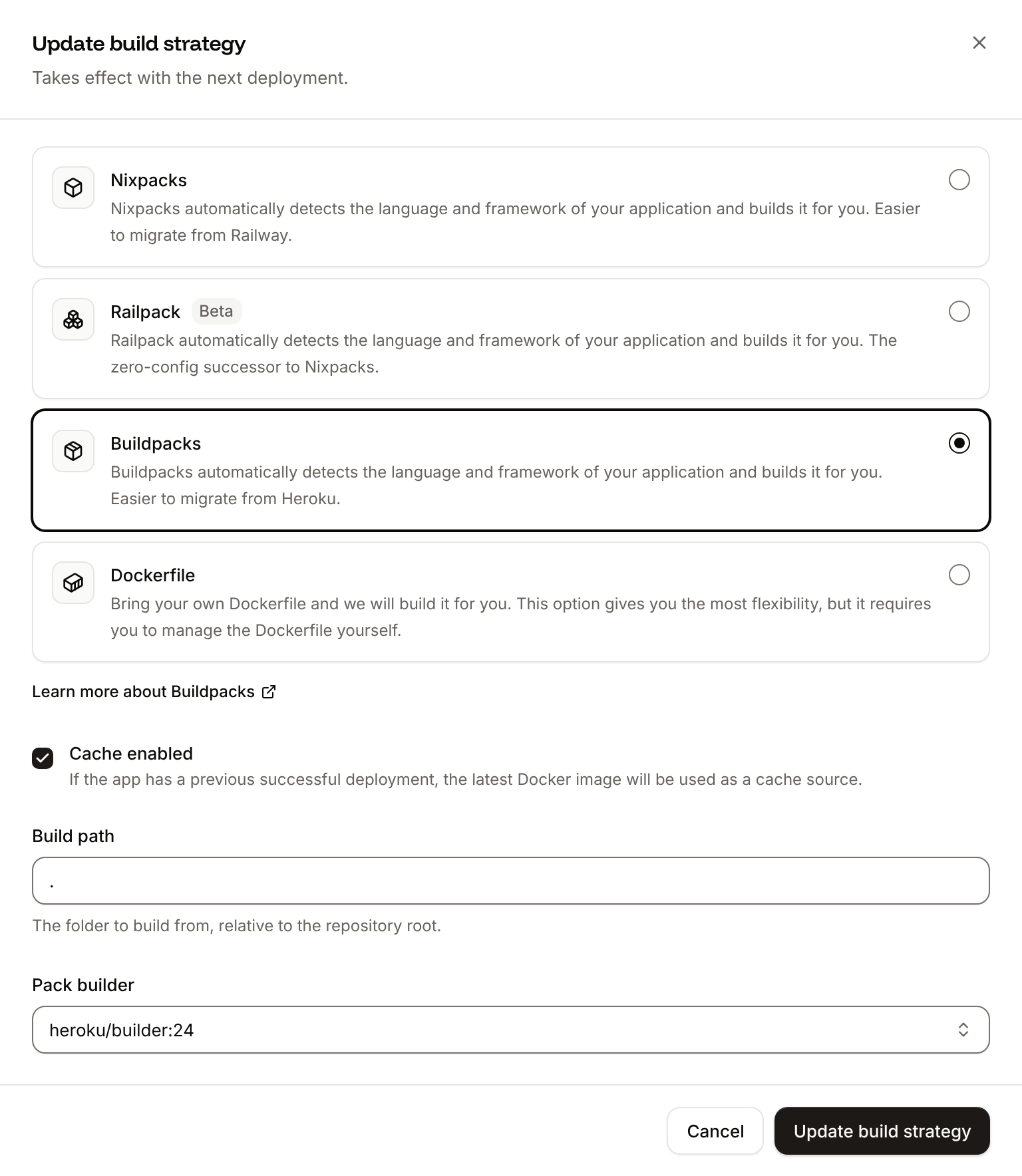
In the sidebar, click **Applications**, then click the application. On the **Settings** tab, in the **Build strategy** section, click **Update build strategy**.
Click **Buildpacks**. Choose the **Pack builder**, and set the **Build path** if the application isn't at the repository root.
To control which buildpacks run, choose one in **Add buildpack**. Repeat for each, then order them under **Buildpack order** with the up and down arrows.
Click **Update build strategy**, then deploy the application.
The **Build strategy** section shows **Buildpacks**, the **Pack builder** and the numbered **Buildpacks** you added.
 ## Add and order buildpacks
**Add buildpack** offers Heroku's buildpacks for Node.js (`heroku/nodejs`), Python (`heroku/python`), PHP (`heroku/php`), Java (`heroku/java`), Scala (`heroku/scala`), Go (`heroku/go`) and Ruby (`heroku/ruby`). Each can be added once.
Buildpacks run in the order listed: **#1** first. Put the buildpack of your application's main language last, after the ones it depends on. For example, a Ruby on Rails application that compiles its assets with Node.js lists `heroku/nodejs` as **#1** and `heroku/ruby` as **#2**. To remove one, click its trash icon.
## Set the language version
Without a version in your repository, a buildpack installs its own default, usually the latest. Pin the version in your files:
| Language | Set the version with |
| - | - |
| Node.js | `engines.node` in `package.json`, for example `"22.x"`. `engines.npm` or `engines.yarn` pin the package manager. |
| Python | A `.python-version` file, for example `3.13` |
| PHP | `require.php` in `composer.json`, for example `"php": "~8.3.0"` |
| Go | The `go` directive in `go.mod` |
| Java | `java.runtime.version` in `system.properties`, for example `java.runtime.version=21` |
| Scala | `java.runtime.version` in `system.properties`, and `sbt.version` in `project/build.properties` |
| Ruby | The `ruby` line in the `Gemfile`, for example `ruby "3.3.6"` |
Dependencies and their versions come from your usual files: `package.json` and its lock file, `requirements.txt`, `poetry.lock` or `uv.lock`, `composer.json`, `Gemfile.lock`, `pom.xml` or `build.gradle`, `go.mod`. Each buildpack's documentation lists every option: see [Heroku's Cloud Native Buildpacks](https://github.com/heroku/buildpacks).
## Configure PHP
To change `php.ini` settings for a folder, add a `.user.ini` file next to your `.php` files; see the [PHP manual](https://www.php.net/manual/en/configuration.file.per-user.php) for the settings it can change. PHP extensions come from the `require` section of `composer.json`, for example `"ext-imagick": "*"`.
## Processes and the Procfile
On Heroku, a `Procfile` names your processes, for example `web: bundle exec puma -C config/puma.rb`. On Sevalla, set each process's command on the [Processes](/applications/processes) tab instead: copy the `web` entry into the web process's start command, and create a background worker, cron job or job for each other entry, for example `bundle exec sidekiq`. Setting the start command explicitly means the web process doesn't depend on which process the buildpacks make the image's default. Sevalla doesn't run a `release` entry: create a [job](/applications/processes#jobs) with the start policy **Before deployment** for it, for example `bundle exec rails db:migrate`.
This documentation is built and hosted on [Mintlify](https://mintlify.com), a developer documentation platform.
## Add and order buildpacks
**Add buildpack** offers Heroku's buildpacks for Node.js (`heroku/nodejs`), Python (`heroku/python`), PHP (`heroku/php`), Java (`heroku/java`), Scala (`heroku/scala`), Go (`heroku/go`) and Ruby (`heroku/ruby`). Each can be added once.
Buildpacks run in the order listed: **#1** first. Put the buildpack of your application's main language last, after the ones it depends on. For example, a Ruby on Rails application that compiles its assets with Node.js lists `heroku/nodejs` as **#1** and `heroku/ruby` as **#2**. To remove one, click its trash icon.
## Set the language version
Without a version in your repository, a buildpack installs its own default, usually the latest. Pin the version in your files:
| Language | Set the version with |
| - | - |
| Node.js | `engines.node` in `package.json`, for example `"22.x"`. `engines.npm` or `engines.yarn` pin the package manager. |
| Python | A `.python-version` file, for example `3.13` |
| PHP | `require.php` in `composer.json`, for example `"php": "~8.3.0"` |
| Go | The `go` directive in `go.mod` |
| Java | `java.runtime.version` in `system.properties`, for example `java.runtime.version=21` |
| Scala | `java.runtime.version` in `system.properties`, and `sbt.version` in `project/build.properties` |
| Ruby | The `ruby` line in the `Gemfile`, for example `ruby "3.3.6"` |
Dependencies and their versions come from your usual files: `package.json` and its lock file, `requirements.txt`, `poetry.lock` or `uv.lock`, `composer.json`, `Gemfile.lock`, `pom.xml` or `build.gradle`, `go.mod`. Each buildpack's documentation lists every option: see [Heroku's Cloud Native Buildpacks](https://github.com/heroku/buildpacks).
## Configure PHP
To change `php.ini` settings for a folder, add a `.user.ini` file next to your `.php` files; see the [PHP manual](https://www.php.net/manual/en/configuration.file.per-user.php) for the settings it can change. PHP extensions come from the `require` section of `composer.json`, for example `"ext-imagick": "*"`.
## Processes and the Procfile
On Heroku, a `Procfile` names your processes, for example `web: bundle exec puma -C config/puma.rb`. On Sevalla, set each process's command on the [Processes](/applications/processes) tab instead: copy the `web` entry into the web process's start command, and create a background worker, cron job or job for each other entry, for example `bundle exec sidekiq`. Setting the start command explicitly means the web process doesn't depend on which process the buildpacks make the image's default. Sevalla doesn't run a `release` entry: create a [job](/applications/processes#jobs) with the start policy **Before deployment** for it, for example `bundle exec rails db:migrate`.
This documentation is built and hosted on [Mintlify](https://mintlify.com), a developer documentation platform.