> ## Documentation Index
> Fetch the complete documentation index at: https://docs.sevalla.com/llms.txt
> Use this file to discover all available pages before exploring further.
# Changelog
> Keep yourself informed about the most recent additions and improvements we’ve made to Sevalla.
## Purge your CDN cache in one click
Serving stale content after a deploy or an upload? You can now clear it
yourself — no need to wait for the cache to expire or reach out to support.
We've added a new **Cache** section to the settings of both static sites and
object storage. Head to **Settings → Cache** and hit **Purge cache** to
instantly clear the cached assets served from our global CDN.
* **Static sites** — purges the **CDN/Edge cache** for your site. Reach for it
right after a deploy when updated assets aren't showing up yet.
* **Object storage** — purges the **CDN cache** for your bucket, so freshly
uploaded or replaced objects are served immediately.
The purge takes effect right away, and you'll get a confirmation the moment
the cache is cleared. Available to anyone with update access to the service.
## Faster deploys with clearer upload progress
We've made a round of optimizations to how static sites are deployed, and your deploys are now noticeably quicker. Across **264 sites**, deploy time dropped by **32.84%** on average - the typical deploy went from **82.51s down to 56.6s**. Nothing changes in how you deploy. Push your code as usual and the speedup is automatic.
Deploy logs are clearer, too. You'll now see a live upload progress bar so you can follow exactly how far along your upload is, instead of waiting on a silent step. Each deploy prints the total number of files being uploaded, a progress bar that advances with file count and total size, and a closing summary with the final count, size, and how long it took. If any files fail, they're clearly flagged.
```
⬆️ Uploading 1842 files...
[████████████░░░░░░░░] 60% · 1105/1842 files · 24.3 MB
✅ Uploaded 1842 files (41.2 MB) in 18.7s
```
## AI support agent
You can now chat with an AI support assistant directly from the Sevalla dashboard. The assistant answers questions about the platform and, with your permission, about the services running in your account - it can check deployment status, error logs, database backups, and more, and help you troubleshoot issues. You can also attach screenshots to your messages.
To enable it, go to **Help > AI support**, review the data processing terms, and choose what the assistant can access. Permissions work like API key permissions: pick a predefined role or scope custom permissions to specific resources. Once enabled, every member of your company can chat with the assistant, so grant only the access you are comfortable exposing to all members. Only company owners and admins can enable AI support or change its permissions.
A few things worth knowing:
* The assistant is powered by Anthropic Claude. Prompts and account data are sent to Anthropic only to generate responses and are not used to train their models.
* Enabling AI support creates a dedicated, managed API key for your company. Disabling it revokes the key immediately.
* The assistant hands the conversation over to our human support team whenever needed.
* Without account access, the assistant still answers questions using the Sevalla documentation.
## Bandwidth chart in analytics
Application and static site **Analytics** tabs now include a **Bandwidth** chart alongside the existing request rate, response time, and status code charts. Use it to see how much traffic your service is serving over time and to spot bandwidth spikes.
The same timeframe and filter controls that apply to the other charts apply to bandwidth as well.
## Git LFS support
Applications and static sites can now pull LFS-tracked files when deploying from repositories that use [Git Large File Storage (LFS)](https://git-lfs.com/). Large assets tracked by LFS - such as images, videos, datasets, or model files - are fetched during the build. Previously, deploys from LFS repositories succeeded but only the LFS pointer files were checked out, not the actual file contents.
Git LFS is enabled by default. You can disable or re-enable it from the application or static site **Settings** tab. The same flag is available through the public API as `git_lfs_enabled` on [update application](https://api-docs.sevalla.com/v3/applications/update-application) and [update static site](https://api-docs.sevalla.com/v3/static-sites/update-static-site).
You can also toggle the flag with [Sevalla CLI v1.10.0](https://github.com/sevalla-hosting/cli/releases/tag/v1.10.0):
```bash theme={null}
sevalla apps update {id} --git-lfs-enabled true
sevalla static-sites update {id} --git-lfs-enabled true
```
And in the [Terraform provider v1.1.0](https://github.com/sevalla-hosting/terraform-provider-sevalla/releases/tag/v1.1.0).
## Restart a database
You can now restart a database on demand from the dashboard. Open the database's **Settings** tab and click **Restart database** in the **Danger zone**.
The database is stopped and started again - existing connections are closed and any in-flight queries or uncommitted transactions are aborted. Stored data is preserved. The restart runs in the background and usually completes within a few minutes. The database is unavailable until it finishes.
Restart is available when the database is not suspended, is in a `ready`, `error`, `passwordChangeFailed`, or `restoringFailed` state, and its backup status is `ready`.
The same action is also available through the public API at [`POST /databases/{id}/restart-database`](https://api-docs.sevalla.com/v3/databases/restart-database) and through the [Sevalla CLI](https://github.com/sevalla-hosting/cli) with `sevalla databases restart {id}`.
## Header-based conditions in `_redirects`
Static site `_redirects` rules can now match on incoming request headers.
Add a `Header:Name=value` option at the end of a rule to apply it only when the request carries a matching header. For example, to serve a Markdown version of a page to clients that ask for it:
```
/quickstart/ /quickstart.md 301 Header:Accept=text/markdown
```
Header names are matched case-insensitively.
## Restore a backup to a different database
You can now restore a database backup into a database other than the one it was taken from, making it easier to clone data between environments or recover into a fresh instance without overwriting the source.
When opening the **Restore backup** dialog, choose between:
* **Restore to source** - Replace the current data in the original database with the backup contents.
* **Restore to different database** - Pick any other compatible database in your company as the target.
Target databases must be the same type (for example, PostgreSQL), the same version, and in the same datacenter as the source. The source database is left untouched when restoring to a different target.
## Delete non-empty object storage
You can now delete an object storage bucket even when it still contains objects. Any objects inside are removed automatically as part of the deletion.
Previously, you had to empty the bucket manually before it could be deleted.
## Roll object storage secrets
You can now rotate the access and secret keys on an object storage bucket without taking your clients offline.
Open the bucket's **Settings** tab and click **Roll secret** in the **Details** section. Pick how long the previous keys should remain valid:
* **Now** - Invalidate the old keys immediately.
* **Up to 168 hours** - Keep the old keys working alongside the new ones during a grace period, then expire them automatically.
The new access and secret keys are shown right after rotation. Update your applications and tooling before the grace period ends so they switch over to the new credentials without disruption.
The same rotation is also available through the public API at `POST /object-storage/{id}/rotate-credentials`.
## Onboarding experience
Newly signed-up customers are now greeted by a guided onboarding sheet that helps them get up and running on Sevalla faster.
Open it from the **Get started** button in the top-right corner of the dashboard and pick one of four quick-start paths:
* **Connect your coding agent** - The featured option. Generate and copy an API key directly from the guide, then plug AI tools into the [Sevalla MCP server](https://mcp.sevalla.com/mcp) to manage your infrastructure through prompts.
* **Deploy an application** - Ship your first app from a Git repository in just a few steps.
* **Deploy a database** - Spin up a managed PostgreSQL, MySQL, MariaDB, or Redis instance.
* **Try a template** - Launch a pre-configured, self-hosted app in a single click.
Each path is structured as a checklist, so you can manually tick off steps as you complete them.
It's all part of giving new customers a warmer, more delightful start on Sevalla.
## Navigation revamp
We've revamped the navigation to address the "lost" feeling some users experienced when moving around the dashboard. The main and context menus are now shown together, and the dashboard has been expanded to full width.
## Usage alerts
Set spending limits for your company or individual projects and get notified by email when usage crosses your chosen thresholds.
You can configure:
* A **spending limit** in USD.
* One or more **threshold percentages** of the limit (up to 10 per alert), for example 50%, 75%, and 90%.
* One or more **email recipients**.
Each threshold fires once per billing period, and thresholds reset automatically when the next period starts. See the [usage alerts documentation](https://docs.sevalla.com/billing/usage-alerts) for details.
## Custom headers for static sites
You can now add custom HTTP headers to your static sites by including a `_headers` file in your repository's root directory. Sevalla parses the file and applies matching header rules to responses automatically.
Supported features include:
* **Wildcard patterns** - Apply headers to broad path matches like `/*` or `/assets/*`.
* **Placeholders** - Match single path segments with `:name` syntax for dynamic routes.
* **Rule combining** - When multiple rules match a path, their headers are merged automatically.
* **Common use cases** - Easily configure security headers, caching policies, CORS rules, and more.
Certain platform-managed headers (e.g., `Content-Encoding`, `Server`, `Transfer-Encoding`) are restricted and cannot be overridden. See the [headers documentation](https://docs.sevalla.com/static-sites/headers) for the full list and detailed examples.
## Project Admin role for user management
Project Admins can manage user access within their projects, giving scoped control over who can access project resources without needing company-level permissions.
As a Project Admin, you can:
* **Invite users** -- Add new or existing users directly to your project with a project-admin or project-developer role.
* **Manage project roles** -- Promote, demote, or remove users within your project.
* **Manage service roles** -- Grant or revoke access to apps and databases that belong to your project.
* **Convert access levels** -- Move a single-project user between project-level and service-level access within your project scope.
Project Admins cannot modify company-level users, or affect users with access outside their project.
## Deploy paths for static sites
Deploy paths are now available for static sites, giving you fine-grained control over which file changes trigger a deployment. This is especially useful for monorepos or repositories where not every commit should result in a new deployment.
In the **Deploy** section of your static site settings, click **Update deploy paths** and choose between:
* **Allow paths** - Only trigger deployments when changed files match specific glob patterns (e.g., `/src/frontend/**`).
* **Ignore paths** - Skip deployments when all changed files match specific glob patterns (e.g., `**/*.md`).
Deploy paths can also be managed via the [Sevalla CLI](https://github.com/sevalla-hosting/cli), the [Terraform Provider](https://github.com/sevalla-hosting/terraform-provider-sevalla), and the [REST API](https://api-docs.sevalla.com/) (available on the [Get](https://api-docs.sevalla.com/v3/static-sites/get-static-site), [Create](https://api-docs.sevalla.com/v3/static-sites/create-static-site), and [Update](https://api-docs.sevalla.com/v3/static-sites/update-static-site) static site endpoints).
## Update source for static sites
You can now change the source repository for your static sites directly from the settings page - no need to delete and recreate the site.
Click **Update source** in the **Deploy** section of your static site settings to switch between a private or public Git repository, change the Git provider (GitHub, GitLab, or Bitbucket), or point to a different repository URL.
## App health
Real-time visibility into application health is now available directly in the dashboard. When something goes wrong with your app - whether it's an out-of-memory crash, a segmentation fault, or a misconfigured start command - you'll see an alert banner at the top of the page with actionable details.
Click the banner to open the App health panel, which shows:
* **Instance status at a glance** - See the state of every running instance across all your process types (web, worker, cron, job), including restart counts and exit codes.
* **Automatic issue detection** - Recognized failure scenarios include OOM kills (exit code 137), segmentation faults (exit code 139), permission errors, missing binaries, application errors, and health check misconfigurations.
* **Troubleshooting guidance** - Each detected issue comes with a plain-language explanation and specific steps to resolve it, so you can diagnose problems without digging through logs.
* **Live updates** - Instance statuses refresh in real time, so you can watch recovery happen as you apply fixes.
The alert banner appears across all application pages, so you'll never miss an issue regardless of where you are in the dashboard.
## Usage page
The new Usage page gives you full visibility into your resource consumption and costs directly in the dashboard.
Get a clear breakdown of spending across all your services - applications, databases, static sites, object storage, and load balancers - with daily cost tracking and period-over-period comparison.
Key highlights:
* **Summary cards** - See your current period total, projected end-of-period cost, and previous period comparison with percentage change indicators at a glance.
* **Interactive charts** - Visualize daily or cumulative costs with stacked bar and area charts, color-coded by usage type.
* **Flexible filtering** - Filter by project, service, or usage type to drill into exactly the costs you care about.
* **Detailed cost table** - Expandable table showing per-service net, gross, and tax amounts grouped by usage category, with deleted services clearly marked.
* **Export and print** - Download your usage data as CSV or JSON, or print a full report for your records.
The Usage page is accessible from the Settings section in the sidebar.
## Sevalla Terraform Provider
The official [Sevalla Terraform Provider](https://github.com/sevalla-hosting/terraform-provider-sevalla) is now available. Define and manage your entire Sevalla infrastructure as code using HashiCorp Terraform.
Provision applications, databases, static sites, and configure domains, environment variables, and scaling - all through declarative HCL configuration files. Perfect for teams that want reproducible, version-controlled infrastructure.
## Sevalla CLI
The official [Sevalla CLI](https://github.com/sevalla-hosting/cli) is here - manage your entire Sevalla infrastructure from the terminal.
Deploy apps, provision databases, manage static sites, configure domains, and monitor your services without leaving the command line. Every action available in the dashboard is now at your fingertips via a clean, consistent command structure.
Install it with your preferred package manager:
```bash theme={null}
# Homebrew
brew install sevalla-hosting/tap/sevalla
# npm (Node.js 22+)
npm install -g @sevalla/cli
# Shell script
bash <(curl -fsSL https://raw.githubusercontent.com/sevalla-hosting/cli/main/install.sh)
```
Key highlights:
* **Full platform coverage** - Applications, databases, static sites, domains, and monitoring all in one tool.
* **Scriptable output** - Every command supports `--json` for easy integration with CI/CD pipelines and automation scripts.
* **Flexible authentication** - Interactive browser-based login for local use, or API token via `SEVALLA_API_TOKEN` for automated workflows.
Run `sevalla --help` to explore all available commands, or check out the [GitHub repository](https://github.com/sevalla-hosting/cli) for full documentation.
## Sevalla MCP server
The official [Sevalla MCP](https://github.com/sevalla-hosting/mcp) (Model Context Protocol) server in now available. You can now give AI agents and coding assistants full access to the Sevalla PaaS API.
You can seamlessly connect popular MCP clients like Claude Code, OpenCode, Cursor, and other coding agents directly to our hosted server at [https://mcp.sevalla.com/mcp](https://mcp.sevalla.com/mcp). Authentication is handled effortlessly via OAuth, meaning you don't need to hardcode API keys in your configuration files.
Now that your AI can spin up and manage infrastructure on command, the only limit is your imagination. Well, that and your prompt engineering skills. 😉
## Sevalla REST API v3
Sevalla now has a fully featured REST API, giving you programmatic access to everything you can do in the dashboard.
The v3 API covers over 200 endpoints across all major resources - applications, databases, static sites, object storage, load balancers, pipelines, webhooks, projects, and more. Whether you're automating deployments, managing environment variables, or scaling processes, the API has you covered.
Key highlights:
* **Full OpenAPI 3.1 specification** - Interactive documentation with field-level descriptions, examples, and error responses available at [api-docs.sevalla.com](https://api-docs.sevalla.com).
* **Granular API key authentication** - Scope each key to specific roles, resources, or actions using the same RBAC system as the dashboard.
* **Clean, predictable design** - Flat JSON responses, consistent snake\_case naming, and proper HTTP methods make integration straightforward.
* **Built-in rate limiting** - Tiered limits per endpoint type protect your services while giving you plenty of room for automation.
* **Error tracking** - Every server error includes a unique reference code you can share with support for fast resolution.
The API is designed to work well with CI/CD pipelines, infrastructure-as-code tools, and AI-powered workflows.
Explore the full API reference at [api-docs.sevalla.com](https://api-docs.sevalla.com) to get started.
## Load balancers
Sevalla now supports load balancers, giving you full control over how traffic is distributed across your services.
Load balancers run at Cloudflare's edge network, routing requests close to your users for faster, smarter traffic decisions. You can route to applications, static sites, object storage buckets, external URLs, or even other load balancers - up to 20 destinations per load balancer.
Two balancing modes are available:
* **Weighted** - Control the proportion of traffic each destination receives. Useful for canary deployments, A/B testing, or gradual migrations between services.
* **Geographic** - Route users to the nearest destination based on their location, reducing latency for globally distributed setups.
Each destination can be individually enabled or disabled without removing it, and traffic weights are adjustable at any time. Custom domains are fully supported with automatic SSL, alongside an auto-generated Sevalla domain available immediately on creation.
This makes it easier to build resilient, multi-region architectures and manage traffic across services without external tooling.
## Projects usage tab
The project page now features a Usage tab, allowing users to track their service costs and consumption during the current billing period and compare them to the previous one.
## RBAC-protected Projects
As your infrastructure grows, keeping things organized and secure is essential. You can now group your services into Projects within your company workspace.
To give you more control over who can access what, we're also rolling out a new Project Developer role. This allows you to grant fine-grained, project-level permissions to your team members. A Project Developer can fully manage the services within their specific project, but they are completely restricted from seeing or touching resources outside of it.
This makes it simpler to onboard new developers and restrict access without slowing down their workflow\.g
## Granular API key permissions
API keys on Sevalla now support fine-grained permission control, giving you full flexibility over what each key can access and do.
You can assign one of the predefined roles - Company Admin, Company Developer, Company Billing, or Company Viewer - or build a custom permission set tailored to your exact needs. Custom permissions let you select specific actions per resource type and scope them down to individual resources.
For example, you can create an API key that only has view access to a single application, or one that can manage databases but nothing else.
This makes it easier to follow the principle of least privilege across your integrations, CI/CD pipelines, and team workflows.
## Access logs for apps and static sites
You can now view access logs for your applications and static sites directly in the Sevalla dashboard.
Access logs give you visibility into incoming HTTP requests — including request paths, status codes, IP addresses, and response times — so you can monitor traffic, debug issues, and understand how your services are being used.
Whether you're troubleshooting a 404, investigating a traffic spike, or just keeping an eye on things, access logs have you covered.
Head to the Logs section of any application or static site to get started.
## Improved logging experience
We've shipped a major upgrade to Sevalla logging, making it easier to explore, analyze, and export your logs.
* **Structured logs support** - Logs are now stored and displayed as structured data, enabling more precise inspection and analysis.
* **Log export** - Download logs in **JSON** or **CSV** format for offline analysis, audits, or sharing.
* **Advanced filtering** - Filter logs with greater flexibility to quickly narrow down relevant entries.
This update improves both day-to-day debugging and longer-term operational workflows, especially for teams working with higher log volumes.
## Analytics updates
We've shipped improvements across **Sevalla Analytics** to make data exploration faster and more intuitive.
* **Chart zooming** across apps, databases, and static sites\
Zooming one chart now shows a **reference line** on other charts on the same page.
* **Application analytics improvements**
* Separate **Compute** and **Web** analytics
* Enhanced Web analytics: **country charts**, **RPM**, **HTTP status codes**, and **improved filters**
* **Static site analytics upgrade**
* Same Web analytics charts and features as applications
These updates make it easier to correlate metrics, investigate traffic patterns, and spot anomalies.
## Single Sign-On (SSO)
You can now sign in to Sevalla using Single Sign-On (SSO). Connect your identity provider and manage team access securely with centralized authentication.
## Global app environment variables
Define global environment variables that can be used across all your applications. These are ideal for shared configurations, such as API keys or global feature flags.
The application-level environment variables page will indicate if any global variables are set and allow you to access them easily.
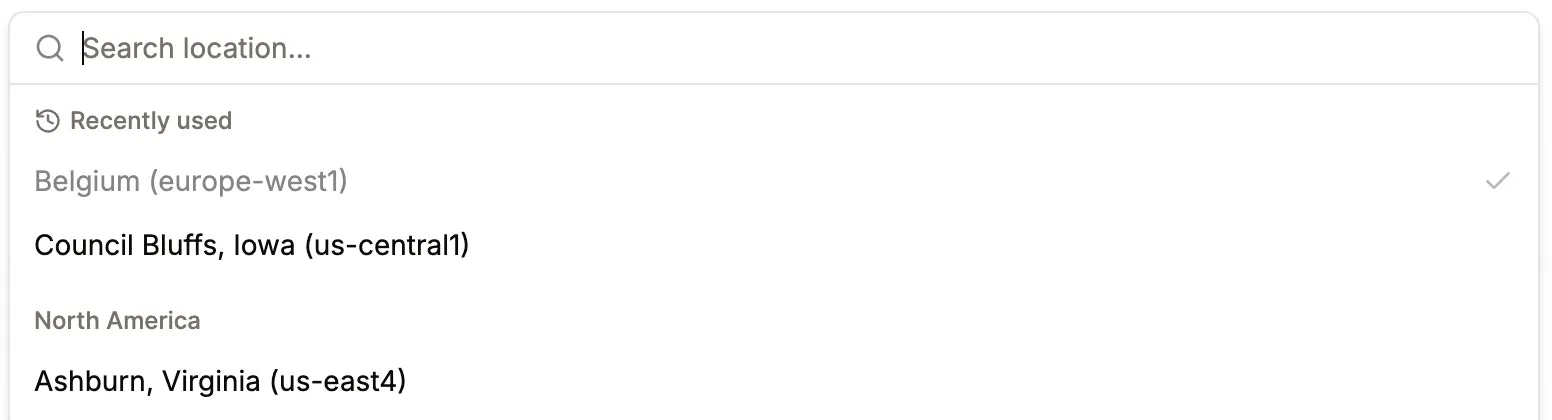
## Display recently used locations in location selector
Recently used locations will appear first in the location selector, making it easier to reuse the same data centers.
 ## Utilize \*.proxy.sevalla.app domain for DB ext connection & TCP proxy
Previously, we used `kinsta.app` domain. After toggling a database connection, it now receives a sevalla domain instead. The same applies to app-level TCP proxies.
## Nixpacks version 1.41
Newest Nixpacks version is available under "Build strategy settings".
## Custom port for healthcheck
The update process sheet now includes a custom internal port health-check setting, allowing you to specify port numbers for either the Readiness or Liveness probe.
## Database public access with IP restriction
Users can now enable external database access with fine-grained control. Previously, connections were either fully open or completely disabled, now you can allow or block access based on specific IPs or IP ranges.
We also introduced a new Networking tab under database, where you’ll now find the external connection toggle, IP restrictions, and connected apps.
## Deployment updates log
You can now view application changes in the Deployments table. Each deployment shows when the updates went live, along with a small badge indicating the number of changes. Detailed information is available on the Deployment details page.
## Create webhooks to receive service event notifications
You can now configure an endpoint to receive event notifications when changes occur in your apps, databases, or static sites.
Each webhook request includes an `svl-signature` header for verification, and failed deliveries are retried up to 12 times, with all attempts visible in the **Event Deliveries** view.
Initial supported event types include:
* `APP_CREATE`, `APP_UPDATE`, `APP_DELETE`, `APP_DEPLOY`
* `DATABASE_CREATE`, `DATABASE_UPDATE`, `DATABASE_DELETE`
* `STATIC_SITE_CREATE`, `STATIC_SITE_UPDATE`, `STATIC_SITE_DELETE`, `STATIC_SITE_DEPLOY`
Learn more in the [documentation](https://docs.sevalla.com/company-settings/webhooks).
## Pretty URLs for static sites
Static sites on Sevalla now support Pretty URLs, which automatically standardize URLs for cleaner paths and improved SEO.
## Utilize \*.proxy.sevalla.app domain for DB ext connection & TCP proxy
Previously, we used `kinsta.app` domain. After toggling a database connection, it now receives a sevalla domain instead. The same applies to app-level TCP proxies.
## Nixpacks version 1.41
Newest Nixpacks version is available under "Build strategy settings".
## Custom port for healthcheck
The update process sheet now includes a custom internal port health-check setting, allowing you to specify port numbers for either the Readiness or Liveness probe.
## Database public access with IP restriction
Users can now enable external database access with fine-grained control. Previously, connections were either fully open or completely disabled, now you can allow or block access based on specific IPs or IP ranges.
We also introduced a new Networking tab under database, where you’ll now find the external connection toggle, IP restrictions, and connected apps.
## Deployment updates log
You can now view application changes in the Deployments table. Each deployment shows when the updates went live, along with a small badge indicating the number of changes. Detailed information is available on the Deployment details page.
## Create webhooks to receive service event notifications
You can now configure an endpoint to receive event notifications when changes occur in your apps, databases, or static sites.
Each webhook request includes an `svl-signature` header for verification, and failed deliveries are retried up to 12 times, with all attempts visible in the **Event Deliveries** view.
Initial supported event types include:
* `APP_CREATE`, `APP_UPDATE`, `APP_DELETE`, `APP_DEPLOY`
* `DATABASE_CREATE`, `DATABASE_UPDATE`, `DATABASE_DELETE`
* `STATIC_SITE_CREATE`, `STATIC_SITE_UPDATE`, `STATIC_SITE_DELETE`, `STATIC_SITE_DEPLOY`
Learn more in the [documentation](https://docs.sevalla.com/company-settings/webhooks).
## Pretty URLs for static sites
Static sites on Sevalla now support Pretty URLs, which automatically standardize URLs for cleaner paths and improved SEO.
 When enabled, Sevalla will:
* Redirect paths like `/about` → `/about/`
* Rewrite paths like `/about.html` → `/about/`
This behavior helps ensure consistent URL structures and better caching performance across our CDN.
You can enable Pretty URLs in your project's **Static Site** > **Settings** > **Redirects** section.
## \_redirects file support for static sites
Static sites on Sevalla now support the `_redirects` file format. If your repository includes a `_redirects` file in its root, Sevalla automatically parses and applies your custom redirect rules.
Supported features include:
* **Custom 404 pages**: Add a `404.html` page, and Sevalla will automatically serve it for missing paths.
* **Force redirects**: Use `!` in your status code to override existing files, ensuring your redirect always takes effect.
* **Splats**: Use wildcards (e.g. `/news/* → /blog/:splat`) to match entire path segments.
* **Placeholders**: Dynamically capture path segments using variables like `:slug` or `:id`.
* **Query parameters**: Match redirects based on query strings (e.g. `/store?id=:id → /blog/:id`).
These additions make it easier to manage complex routing logic directly from your repository with no extra configuration required.
For single-page applications that rely on client-side routing, we recommend adding the rule `/* /index.html 200` so that all paths correctly return `index.html` with a 200 status instead of a 404 on reload.
## A brand-new Sevalla dashboard (with dark mode!)
When enabled, Sevalla will:
* Redirect paths like `/about` → `/about/`
* Rewrite paths like `/about.html` → `/about/`
This behavior helps ensure consistent URL structures and better caching performance across our CDN.
You can enable Pretty URLs in your project's **Static Site** > **Settings** > **Redirects** section.
## \_redirects file support for static sites
Static sites on Sevalla now support the `_redirects` file format. If your repository includes a `_redirects` file in its root, Sevalla automatically parses and applies your custom redirect rules.
Supported features include:
* **Custom 404 pages**: Add a `404.html` page, and Sevalla will automatically serve it for missing paths.
* **Force redirects**: Use `!` in your status code to override existing files, ensuring your redirect always takes effect.
* **Splats**: Use wildcards (e.g. `/news/* → /blog/:splat`) to match entire path segments.
* **Placeholders**: Dynamically capture path segments using variables like `:slug` or `:id`.
* **Query parameters**: Match redirects based on query strings (e.g. `/store?id=:id → /blog/:id`).
These additions make it easier to manage complex routing logic directly from your repository with no extra configuration required.
For single-page applications that rely on client-side routing, we recommend adding the rule `/* /index.html 200` so that all paths correctly return `index.html` with a 200 status instead of a 404 on reload.
## A brand-new Sevalla dashboard (with dark mode!)
 The wait is finally over.
We’ve refreshed Sevalla’s look and feel with a cleaner, more modern design and packed it with visual and usability improvements.
The highlight of this release is **Dark Mode** 🌙, giving you a sleek, eye-friendly experience whether you’re coding late at night or just prefer a darker interface.
A big thank-you to all our beta users who helped us test and refine the new interface. We’re thrilled to share it with everyone, and as always, if you spot any quirks, we’d love your feedback.
## Redis 8 support enabled
Great news! Redis 8 is now available on Sevalla!
We've officially enabled Redis 8 so you can start using the latest version in your apps.
Upgrade today to benefit from improved performance, stability, and new Redis 8 features.
## Docker caching is now available
We've expanded our build caching options! 🚀
In addition to Nixpacks and Buildpacks caching, you can now take advantage of Docker layer caching.
This helps speed up your deployments by reusing unchanged Docker layers, resulting in faster builds and more efficient pipelines.
## Faster app hibernation wake-up
Hibernated apps now wake up much faster, so your app becomes responsive more quickly after a period of inactivity. Previously, apps could take 60–90 seconds to start up after being idle, but now they’re ready in just 8–20 seconds.
Keep in mind that your app needs a redeploy to activate the new hibernation settings.
## Nixpacks version selection is here
You can now select your preferred Nixpacks version for your apps on Sevalla. This gives you more flexibility and control over your deployments, and helps ensure smooth upgrades.
Starting today, all newly created apps will use Nixpacks version 1.39 by default (previously 1.29). If you need to use a different version, simply choose the version that best fits your project.
## System environment variables available in applications
We're introducing automatic injection of several system environment variables into your apps during both build and runtime. This makes it easier to automate tasks and access important deployment details directly from your application.
The following environment variables will be available:
* SVL\_COMPANY\_ID
* SVL\_APP\_ID
* SVL\_APP\_NAME
* SVL\_DEPLOYMENT\_ID
* SVL\_DEPLOYMENT\_INITIATED\_BY
* SVL\_DEPLOYMENT\_TRIGGER
* SVL\_DEPLOYMENT\_COMMIT\_SHA
* SVL\_DEPLOYMENT\_BRANCH
* SVL\_DEPLOYMENT\_DOCKER\_IMAGE
Use these variables for enhanced automation and more flexible app behavior!
## Sevalla official GitHub action
GitHub users can now seamlessly integrate Sevalla deployments into their workflows, just add the official Sevalla GitHub Action to your pipeline and deploy with ease.
[View on GitHub Marketplace](https://github.com/marketplace/actions/sevalla-deploy)
## App analytics improvements
Your feedback is invaluable! We've supercharged the app analytics section with some highly-requested features:
* Charts now auto-refresh, giving you real-time insights!
* Easily track RAM/CPU limits over time.
* Clearly see your processes' instance counts as they scale up or down.
## Updated documentation pages
We’ve just updated our documentation with a refreshed design and enhanced features to make onboarding even smoother. ✨
* Both documentation sites now share a unified, modern look
* Fully compatible with AI crawlers
* AI-powered search assistant is now available
Links:
* [docs.sevalla.com](https://docs.sevalla.com)
* [api-docs.sevalla.com](https://api-docs.sevalla.com)
## Sevalla domains can be updated
You can change your generated domains at any time. This is useful for testing or if you want to use a different domain name for your app or static site.
## 1-click deployable templates are now available
You can now deploy your applications using 1-click deployable templates. This feature allows you to quickly set up and deploy self-hosted, open-source applications with pre-configured settings, making it easier than ever to get started with your projects.
You can find the "Templates" menu item on the Sevalla UI. Simply select the template you want to use, and click "Deploy". The application will be set up and running in no time.
Our list of templates are constantly growing, so be sure to check back often for new additions. If you have any suggestions for templates you'd like to see, please let us know over support, or on [our Discord server](https://discord.gg/sevalla)!
## Object storage CORS settings
You can add CORS settings to your object storage buckets, allowing you to control how resources are shared across different domains.
## Connected services on app overview diagram
You can enable internal network connections between resources, and this is now visually represented in the application overview diagram.
## Deployment status indicator in favicon
The deployment status appears directly in your browser tab, allowing you to quickly see whether it's in progress or complete without switching tabs.
## Wildcard domains
You can now use wildcard domains for your apps and static sites. Perfect for things like custom subdomains (`*.yourdomain.com`) or multi-tenant setups. Just add your wildcard domain, and we'll take care of the rest - automatic SSL included.
## Database Studio
You can now manage your MySQL, MariaDB, and PostgreSQL databases directly from the Sevalla UI. Run custom SQL queries, browse and download data, and take full control of your database - no external tools needed.
## App build settings revamped
We've given the App Build settings tab a complete makeover! Beyond the sleek new interface, we've introduced three functionalities:
**New features:**
* **Docker registry credentials** — Now you can seamlessly connect to private registries for your Dockerfile base images
* **Buildpack builder selection** — Conveniently update your builders:
* `heroku/builder:22`
* `heroku/builder:24`
* **Build environment visibility** — We've added visibility for build environment settings associated with each deployment, and included a button for easy modification of those settings above the deploy logs
## PostGIS is now available for our PostgreSQL databases
Many of you have asked for PostGIS support, and we're announcing that it's now available for PostgreSQL 13+ databases!
PostGIS is a spatial database extension for PostgreSQL, allowing you to store and query geographic information. With PostGIS, you can:
* Store and manage spatial data types like points, lines, and polygons
* Perform spatial queries to analyze and visualize your data
* Build location-aware applications and services
To enable PostGIS, simply create a new PostgreSQL 13+ database and make sure you tick the "PostGIS" option during the creation process.
## Deploy hooks
We're excited to introduce Deploy hooks, making automated deployments even easier!
With Deploy hooks, you can now trigger deployments with a simple POST request to a unique URL, perfect for integrating with your workflow. This powerful feature enables:
* Seamless CI/CD integration: Connect your GitHub Actions, Jenkins, or other CI tools
* Automated deployments: Trigger updates when your content or data changes
* Custom workflow support: Build scripts that deploy your apps when needed
## IP access controls for applications
We've just rolled out powerful new IP restriction capabilities for your app hosting environments:
* **IP Allowlists**: Create a trusted circle of approved IP addresses
* **IP Denylists**: Block specific troublesome IPs or ranges
Both features support individual addresses or CIDR notation for precise network control. Simply choose which approach works best for your security model (note: only one mode can be active at a time).
This highly-requested security enhancement gives you granular control over who can access your applications.
## Preview apps now support advanced pre-configuration
You can now pre-define your preview apps with both disk configurations and TCP proxies right from the start.
We've also published the ["createPreviewApp"](https://api-docs.sevalla.com/v3/pipelines/create-pipeline-stage) endpoint in our public API, enabling programmatic creation of fully-configured preview environments.
## Vector search with pgvector has arrived
We've just integrated [pgvector](https://github.com/pgvector/pgvector) extension support for PostgreSQL databases (version 11+).
This powerful addition enables:
* Lightning-fast vector similarity searches
* Seamless RAG (Retrieval-Augmented Generation) implementations
* Enhanced AI application capabilities right in your database
## Choose your shell in Web terminal
App hosting users, you can now select between three powerful shell types:
* `sh` (for minimalists)
* `bash` (the classic choice)
* `zsh` (for the feature lovers)
Simply choose your preferred shell when launching a terminal session and enjoy a more personalized development experience. Don't worry - if your selected shell isn't available in the container, you'll get a friendly notification so you can choose another option.
## Object storage with S3 compatibility
Our new object storage solution provides unlimited scalability for all your application needs, with zero ingress and egress fees, powered by Cloudflare R2.
Key Features:
* S3-Compatible API: Seamlessly integrate with your existing S3 workflows, making migration and management effortless.
* Global Availability: Choose from 6 global storage locations to optimize data access and comply with data residency requirements.
* Transparent Pricing: Enjoy predictable costs at just \$0.02 per GB per month, with no hidden fees.
## Resource limits in analytics charts
Never hit unexpected resource ceilings again! You can now see your service's configured limits displayed directly on the Analytics charts alongside actual usage metrics.
This visual enhancement helps you:
* Spot when you're approaching capacity limits
* Make data-driven scaling decisions
* Optimize resource allocation for cost efficiency
Check out your App and Database analytics today to see this improvement in action!
## Custom time zone setting for cron jobs
Teams working across the globe! You can now set custom IANA time zones for your cron jobs instead of being locked to UTC.
## Manual cron trigger functionality
You can now manually trigger your cron processes directly from the Sevalla dashboard with just one click.
## Resource usage breakdown chart
Company-level users can visualize daily spending patterns, giving you visibility into where your resources are going.
Key benefits:
* Track spending trends across different cost categories
* Identify cost optimization opportunities at a glance
* No more guesswork about your platform costs.
## Database connection deeplink
Connect to your database instantly with a single click.
No more copying connection strings or credentials.
Hit the new "Open deeplink" button in the external connection card and watch as your local machine connects seamlessly to your database.
## Email notifications for failed deployments
New email notification system for failed deployments across both applications and static sites.
Now you'll instantly know when something goes wrong, allowing you to address issues before they impact your users.
Simply manage your notification preferences under **User > Notifications** to tailor the experience to your needs.
## gRPC support has landed
We shipped `gRPC` support for your applications, unlocking high-performance communication.
Now you can easily toggle between `HTTP` and `gRPC` protocols for your web processes.
## Private network access for builds
Build pods can now securely reach other resources via a private network. Perfect for running database migrations during build time. Enjoy a smoother, more efficient workflow!
## Support env var reference
You can now reference environment variables within other variables using the `${key}` format.
For example:
```text theme={null}
API_URL=https://api.example.com
FRONTEND_URL=${API_URL}/frontend
```
## MySQL 9.0 is available
The long-awaited new version of MySQL is here.
MySQL 9.0 brings a host of new features and improvements, including:
* JavaScript stored programs
* VECTOR data type
* Foreign key improvements
* Performance schema enhancements
* Query optimization
## Expose non-HTTP traffic via TCP proxy
We're announcing support for exposing non-HTTP traffic via TCP proxy.
Now it's effortless to expose services like databases or message queues. Deploy MongoDB, RabbitMQ, and more with ease.
## PostgreSQL 17 is here
PostgreSQL 17 is now available on Sevalla.
Benchmarks claim 20-30% better query performance compared to the previous version.
v17 also brings a bunch of new features and improvements. For more details, check out the [official release statement](https://www.postgresql.org/about/news/postgresql-17-released-2936/)!
## Control database public access
Going forward, every database you create will be private by default.
Toggle public availability of your database on the fly, so feel free to do so whenever you need to.
## Undeployed change-set notifications
We received feedback that it was unclear which actions on Sevalla triggered a deployment and which did not.
You're in control when you'd like to initiate a full rebuild of your app, or just restart it with some fresh configs.
## Revamped environment variables management
We made a major overhaul of our environment variables management in our application hosting product.
You're now able to:
* Export/import variables to/from a file
* Copy all environment variables to the clipboard
* Display the user and timestamp of recent updates/creations
* Copy key-value pairs directly from the table
* Use the new editor in the "Add Network" modal
## Configure CDN / Edge cache settings
Until now, configuring your app's CDN and edge caching settings required a trip to our API.
You can now effortlessly manage these settings directly from your dashboard, under **App > Networking** settings.
## Hibernate your apps to save costs
We're excited to introduce a new feature that will help you save money on your hosting costs.
With our new [Hibernation feature](https://docs.sevalla.com/applications/settings#hibernation), you can now put your applications to sleep when they're not in use. This means you can save on compute resources and only pay for what you use. It's a great way to reduce your hosting costs without sacrificing performance or reliability.
Here's how it works:
* When you hibernate an application, we'll scale down your application's all long-running pods to zero replicas.
* When a request comes in, we'll automatically wake up your application and start serving traffic again.
Hibernate is perfect for applications that have low or intermittent traffic, like side projects, or test environments. You can now save money on hosting costs without having to worry about downtime or performance issues.
## Go fully private
We're thrilled to announce a major update that's all about security! 🔒
As part of our ongoing commitment to protecting your workloads, we've introduced a new feature that exposes private ports & disables ingress on web processes. This means you now have the power to decide who can access your applications and services, and how they can interact with each other.
With this update, you can:
* Expose private ports internally, making it easier to build and run microservices, or integrate services like RabbitMQ or databases that require internal communication.
* Disable ingress on web processes, giving you granular control over who can access your applications and services, and how they can interact with each other.
We're proud to bring you this update, and we're confident that it will help you build and run your applications with even more security and control.
## Sevalla is now ISO 27001 certified
We have earned the coveted ISO 27001 security certificate!
Achieving ISO 27001 certification is no small feat, and it's a testament to the hard work and dedication of our team.
## Utilize deployment hooks with Jobs for application hosting
We're excited to introduce a new process type called, `Job` in our [application hosting](/application-hosting/)! This feature makes it easy to send alerts and perform database migrations for exmaple.
No more manually appending scripts in your start commands - just set up your Job and let it run! You can configure when jobs should run:
* before deployments
* after successful deployments
* after failed ones
## Static site pull request previews feature
We're thrilled to introduce the pull request previews feature, which lets you preview your sites in a dedicated environment before merging them into your default branches.
No more worries about broken links or layout issues - previews ensure a seamless experience for you and your team!
## Static site build logs improved
Debugging your [static site](/static-site-hosting/) builds just got a whole lot easier! We've unleashed a fresh, revamped log structure that's designed to make your life easier. Our new and improved logs are now more readable, organized, and packed with extra context to help you troubleshoot issues!
But that's not all, folks! We've also squashed a pesky node modules path issue that was causing some users to experience a `"Command not found"` error when trying to run commands directly. No more frustration - our fix means you can get back to building and deploying your static sites with ease!
So, what's changed? Our log format has gotten a makeover, with improved formatting, clearer categorization, and additional context to streamline the debugging process. And, behind the scenes, we've made sure that `node_modules` paths are now correctly resolved, so you can focus on what matters most - building fantastic static sites! 🚀
## Analytics overhaul
We're stoked to announce a major overhaul of our analytics charts for [apps](/application-hosting/), [databases](/database-hosting/), and [static sites](/static-site-hosting/)! We've taken a hard look at our infrastructure and chart library, and the result is a completely new and improved experience. Say goodbye to slow data fetching and hello to almost real-time updates, thanks to our latest infrastructure ✨wizardry✨ (hello, Prometheus!).
Here's what's changed:
**Compute data**: We've ripped out the old and replaced it with a brand new, Prometheus-powered system that delivers lightning-fast data and virtually instantaneous updates.
**HTTP data**: No more waiting around for hours! Our new latency is a mere 1-3 minutes, making it easier to spot trends and troubleshoot issues.
**New visuals**: We've swapped out our old chart library for a fresh, improved experience that's easier to use and understand.
And, static site hosting gets in on the action too! You'll now find an Analytics tab, showcasing essential metrics like:
* Requests per minute
* Response time
* Slowest requests
* Top pages
We've also made some behind-the-scenes changes to simplify things and remove clutter. We've merged response time charts (`p90`, `p95`, `p99`, `avg`) for a clearer view and removed runtime charts, as they were more relevant to billing than observability. And, to simplify things, we've hidden `HTTP` charts for processes that aren't exposed.
## Hello world! Welcome to Sevalla
We're your partner in building amazing applications, a platform-as-a-service (PaaS) designed specifically for developers like you, who want to focus on writing code, not managing infrastructure. With Sevalla, you can host your application, managed database, and static site all in one place, and get the scalability, reliability, and security you need to succeed.
We believe that building software should be fun, not frustrating. That's why we're dedicated to providing a seamless development experience, with easy deployment, and automated scaling. Whether you're building a simple web app or a complex enterprise solution, we've got you covered.
So why choose Sevalla? Here are just a few reasons:
* Focus on code, not infrastructure: With Sevalla, you can leave the heavy lifting to us, and focus on what you do best - building great software.
* Scalability and reliability: Our platform is designed to handle sudden spikes in traffic, and our automated monitoring ensures that your app is always available.
* Security: We take security seriously, with access controls, and regular security audits.
* Flexibility: Choose from a range of hosting options, including application, managed database, and static site hosting, to find the solution that's right for you.
Don't forget to keep an eye on our changelog, where we'll be announcing new features, improvements, and other exciting developments. We're always working to make Sevalla better, and we want you to be the first to know about the latest and greatest from our platform.
The wait is finally over.
We’ve refreshed Sevalla’s look and feel with a cleaner, more modern design and packed it with visual and usability improvements.
The highlight of this release is **Dark Mode** 🌙, giving you a sleek, eye-friendly experience whether you’re coding late at night or just prefer a darker interface.
A big thank-you to all our beta users who helped us test and refine the new interface. We’re thrilled to share it with everyone, and as always, if you spot any quirks, we’d love your feedback.
## Redis 8 support enabled
Great news! Redis 8 is now available on Sevalla!
We've officially enabled Redis 8 so you can start using the latest version in your apps.
Upgrade today to benefit from improved performance, stability, and new Redis 8 features.
## Docker caching is now available
We've expanded our build caching options! 🚀
In addition to Nixpacks and Buildpacks caching, you can now take advantage of Docker layer caching.
This helps speed up your deployments by reusing unchanged Docker layers, resulting in faster builds and more efficient pipelines.
## Faster app hibernation wake-up
Hibernated apps now wake up much faster, so your app becomes responsive more quickly after a period of inactivity. Previously, apps could take 60–90 seconds to start up after being idle, but now they’re ready in just 8–20 seconds.
Keep in mind that your app needs a redeploy to activate the new hibernation settings.
## Nixpacks version selection is here
You can now select your preferred Nixpacks version for your apps on Sevalla. This gives you more flexibility and control over your deployments, and helps ensure smooth upgrades.
Starting today, all newly created apps will use Nixpacks version 1.39 by default (previously 1.29). If you need to use a different version, simply choose the version that best fits your project.
## System environment variables available in applications
We're introducing automatic injection of several system environment variables into your apps during both build and runtime. This makes it easier to automate tasks and access important deployment details directly from your application.
The following environment variables will be available:
* SVL\_COMPANY\_ID
* SVL\_APP\_ID
* SVL\_APP\_NAME
* SVL\_DEPLOYMENT\_ID
* SVL\_DEPLOYMENT\_INITIATED\_BY
* SVL\_DEPLOYMENT\_TRIGGER
* SVL\_DEPLOYMENT\_COMMIT\_SHA
* SVL\_DEPLOYMENT\_BRANCH
* SVL\_DEPLOYMENT\_DOCKER\_IMAGE
Use these variables for enhanced automation and more flexible app behavior!
## Sevalla official GitHub action
GitHub users can now seamlessly integrate Sevalla deployments into their workflows, just add the official Sevalla GitHub Action to your pipeline and deploy with ease.
[View on GitHub Marketplace](https://github.com/marketplace/actions/sevalla-deploy)
## App analytics improvements
Your feedback is invaluable! We've supercharged the app analytics section with some highly-requested features:
* Charts now auto-refresh, giving you real-time insights!
* Easily track RAM/CPU limits over time.
* Clearly see your processes' instance counts as they scale up or down.
## Updated documentation pages
We’ve just updated our documentation with a refreshed design and enhanced features to make onboarding even smoother. ✨
* Both documentation sites now share a unified, modern look
* Fully compatible with AI crawlers
* AI-powered search assistant is now available
Links:
* [docs.sevalla.com](https://docs.sevalla.com)
* [api-docs.sevalla.com](https://api-docs.sevalla.com)
## Sevalla domains can be updated
You can change your generated domains at any time. This is useful for testing or if you want to use a different domain name for your app or static site.
## 1-click deployable templates are now available
You can now deploy your applications using 1-click deployable templates. This feature allows you to quickly set up and deploy self-hosted, open-source applications with pre-configured settings, making it easier than ever to get started with your projects.
You can find the "Templates" menu item on the Sevalla UI. Simply select the template you want to use, and click "Deploy". The application will be set up and running in no time.
Our list of templates are constantly growing, so be sure to check back often for new additions. If you have any suggestions for templates you'd like to see, please let us know over support, or on [our Discord server](https://discord.gg/sevalla)!
## Object storage CORS settings
You can add CORS settings to your object storage buckets, allowing you to control how resources are shared across different domains.
## Connected services on app overview diagram
You can enable internal network connections between resources, and this is now visually represented in the application overview diagram.
## Deployment status indicator in favicon
The deployment status appears directly in your browser tab, allowing you to quickly see whether it's in progress or complete without switching tabs.
## Wildcard domains
You can now use wildcard domains for your apps and static sites. Perfect for things like custom subdomains (`*.yourdomain.com`) or multi-tenant setups. Just add your wildcard domain, and we'll take care of the rest - automatic SSL included.
## Database Studio
You can now manage your MySQL, MariaDB, and PostgreSQL databases directly from the Sevalla UI. Run custom SQL queries, browse and download data, and take full control of your database - no external tools needed.
## App build settings revamped
We've given the App Build settings tab a complete makeover! Beyond the sleek new interface, we've introduced three functionalities:
**New features:**
* **Docker registry credentials** — Now you can seamlessly connect to private registries for your Dockerfile base images
* **Buildpack builder selection** — Conveniently update your builders:
* `heroku/builder:22`
* `heroku/builder:24`
* **Build environment visibility** — We've added visibility for build environment settings associated with each deployment, and included a button for easy modification of those settings above the deploy logs
## PostGIS is now available for our PostgreSQL databases
Many of you have asked for PostGIS support, and we're announcing that it's now available for PostgreSQL 13+ databases!
PostGIS is a spatial database extension for PostgreSQL, allowing you to store and query geographic information. With PostGIS, you can:
* Store and manage spatial data types like points, lines, and polygons
* Perform spatial queries to analyze and visualize your data
* Build location-aware applications and services
To enable PostGIS, simply create a new PostgreSQL 13+ database and make sure you tick the "PostGIS" option during the creation process.
## Deploy hooks
We're excited to introduce Deploy hooks, making automated deployments even easier!
With Deploy hooks, you can now trigger deployments with a simple POST request to a unique URL, perfect for integrating with your workflow. This powerful feature enables:
* Seamless CI/CD integration: Connect your GitHub Actions, Jenkins, or other CI tools
* Automated deployments: Trigger updates when your content or data changes
* Custom workflow support: Build scripts that deploy your apps when needed
## IP access controls for applications
We've just rolled out powerful new IP restriction capabilities for your app hosting environments:
* **IP Allowlists**: Create a trusted circle of approved IP addresses
* **IP Denylists**: Block specific troublesome IPs or ranges
Both features support individual addresses or CIDR notation for precise network control. Simply choose which approach works best for your security model (note: only one mode can be active at a time).
This highly-requested security enhancement gives you granular control over who can access your applications.
## Preview apps now support advanced pre-configuration
You can now pre-define your preview apps with both disk configurations and TCP proxies right from the start.
We've also published the ["createPreviewApp"](https://api-docs.sevalla.com/v3/pipelines/create-pipeline-stage) endpoint in our public API, enabling programmatic creation of fully-configured preview environments.
## Vector search with pgvector has arrived
We've just integrated [pgvector](https://github.com/pgvector/pgvector) extension support for PostgreSQL databases (version 11+).
This powerful addition enables:
* Lightning-fast vector similarity searches
* Seamless RAG (Retrieval-Augmented Generation) implementations
* Enhanced AI application capabilities right in your database
## Choose your shell in Web terminal
App hosting users, you can now select between three powerful shell types:
* `sh` (for minimalists)
* `bash` (the classic choice)
* `zsh` (for the feature lovers)
Simply choose your preferred shell when launching a terminal session and enjoy a more personalized development experience. Don't worry - if your selected shell isn't available in the container, you'll get a friendly notification so you can choose another option.
## Object storage with S3 compatibility
Our new object storage solution provides unlimited scalability for all your application needs, with zero ingress and egress fees, powered by Cloudflare R2.
Key Features:
* S3-Compatible API: Seamlessly integrate with your existing S3 workflows, making migration and management effortless.
* Global Availability: Choose from 6 global storage locations to optimize data access and comply with data residency requirements.
* Transparent Pricing: Enjoy predictable costs at just \$0.02 per GB per month, with no hidden fees.
## Resource limits in analytics charts
Never hit unexpected resource ceilings again! You can now see your service's configured limits displayed directly on the Analytics charts alongside actual usage metrics.
This visual enhancement helps you:
* Spot when you're approaching capacity limits
* Make data-driven scaling decisions
* Optimize resource allocation for cost efficiency
Check out your App and Database analytics today to see this improvement in action!
## Custom time zone setting for cron jobs
Teams working across the globe! You can now set custom IANA time zones for your cron jobs instead of being locked to UTC.
## Manual cron trigger functionality
You can now manually trigger your cron processes directly from the Sevalla dashboard with just one click.
## Resource usage breakdown chart
Company-level users can visualize daily spending patterns, giving you visibility into where your resources are going.
Key benefits:
* Track spending trends across different cost categories
* Identify cost optimization opportunities at a glance
* No more guesswork about your platform costs.
## Database connection deeplink
Connect to your database instantly with a single click.
No more copying connection strings or credentials.
Hit the new "Open deeplink" button in the external connection card and watch as your local machine connects seamlessly to your database.
## Email notifications for failed deployments
New email notification system for failed deployments across both applications and static sites.
Now you'll instantly know when something goes wrong, allowing you to address issues before they impact your users.
Simply manage your notification preferences under **User > Notifications** to tailor the experience to your needs.
## gRPC support has landed
We shipped `gRPC` support for your applications, unlocking high-performance communication.
Now you can easily toggle between `HTTP` and `gRPC` protocols for your web processes.
## Private network access for builds
Build pods can now securely reach other resources via a private network. Perfect for running database migrations during build time. Enjoy a smoother, more efficient workflow!
## Support env var reference
You can now reference environment variables within other variables using the `${key}` format.
For example:
```text theme={null}
API_URL=https://api.example.com
FRONTEND_URL=${API_URL}/frontend
```
## MySQL 9.0 is available
The long-awaited new version of MySQL is here.
MySQL 9.0 brings a host of new features and improvements, including:
* JavaScript stored programs
* VECTOR data type
* Foreign key improvements
* Performance schema enhancements
* Query optimization
## Expose non-HTTP traffic via TCP proxy
We're announcing support for exposing non-HTTP traffic via TCP proxy.
Now it's effortless to expose services like databases or message queues. Deploy MongoDB, RabbitMQ, and more with ease.
## PostgreSQL 17 is here
PostgreSQL 17 is now available on Sevalla.
Benchmarks claim 20-30% better query performance compared to the previous version.
v17 also brings a bunch of new features and improvements. For more details, check out the [official release statement](https://www.postgresql.org/about/news/postgresql-17-released-2936/)!
## Control database public access
Going forward, every database you create will be private by default.
Toggle public availability of your database on the fly, so feel free to do so whenever you need to.
## Undeployed change-set notifications
We received feedback that it was unclear which actions on Sevalla triggered a deployment and which did not.
You're in control when you'd like to initiate a full rebuild of your app, or just restart it with some fresh configs.
## Revamped environment variables management
We made a major overhaul of our environment variables management in our application hosting product.
You're now able to:
* Export/import variables to/from a file
* Copy all environment variables to the clipboard
* Display the user and timestamp of recent updates/creations
* Copy key-value pairs directly from the table
* Use the new editor in the "Add Network" modal
## Configure CDN / Edge cache settings
Until now, configuring your app's CDN and edge caching settings required a trip to our API.
You can now effortlessly manage these settings directly from your dashboard, under **App > Networking** settings.
## Hibernate your apps to save costs
We're excited to introduce a new feature that will help you save money on your hosting costs.
With our new [Hibernation feature](https://docs.sevalla.com/applications/settings#hibernation), you can now put your applications to sleep when they're not in use. This means you can save on compute resources and only pay for what you use. It's a great way to reduce your hosting costs without sacrificing performance or reliability.
Here's how it works:
* When you hibernate an application, we'll scale down your application's all long-running pods to zero replicas.
* When a request comes in, we'll automatically wake up your application and start serving traffic again.
Hibernate is perfect for applications that have low or intermittent traffic, like side projects, or test environments. You can now save money on hosting costs without having to worry about downtime or performance issues.
## Go fully private
We're thrilled to announce a major update that's all about security! 🔒
As part of our ongoing commitment to protecting your workloads, we've introduced a new feature that exposes private ports & disables ingress on web processes. This means you now have the power to decide who can access your applications and services, and how they can interact with each other.
With this update, you can:
* Expose private ports internally, making it easier to build and run microservices, or integrate services like RabbitMQ or databases that require internal communication.
* Disable ingress on web processes, giving you granular control over who can access your applications and services, and how they can interact with each other.
We're proud to bring you this update, and we're confident that it will help you build and run your applications with even more security and control.
## Sevalla is now ISO 27001 certified
We have earned the coveted ISO 27001 security certificate!
Achieving ISO 27001 certification is no small feat, and it's a testament to the hard work and dedication of our team.
## Utilize deployment hooks with Jobs for application hosting
We're excited to introduce a new process type called, `Job` in our [application hosting](/application-hosting/)! This feature makes it easy to send alerts and perform database migrations for exmaple.
No more manually appending scripts in your start commands - just set up your Job and let it run! You can configure when jobs should run:
* before deployments
* after successful deployments
* after failed ones
## Static site pull request previews feature
We're thrilled to introduce the pull request previews feature, which lets you preview your sites in a dedicated environment before merging them into your default branches.
No more worries about broken links or layout issues - previews ensure a seamless experience for you and your team!
## Static site build logs improved
Debugging your [static site](/static-site-hosting/) builds just got a whole lot easier! We've unleashed a fresh, revamped log structure that's designed to make your life easier. Our new and improved logs are now more readable, organized, and packed with extra context to help you troubleshoot issues!
But that's not all, folks! We've also squashed a pesky node modules path issue that was causing some users to experience a `"Command not found"` error when trying to run commands directly. No more frustration - our fix means you can get back to building and deploying your static sites with ease!
So, what's changed? Our log format has gotten a makeover, with improved formatting, clearer categorization, and additional context to streamline the debugging process. And, behind the scenes, we've made sure that `node_modules` paths are now correctly resolved, so you can focus on what matters most - building fantastic static sites! 🚀
## Analytics overhaul
We're stoked to announce a major overhaul of our analytics charts for [apps](/application-hosting/), [databases](/database-hosting/), and [static sites](/static-site-hosting/)! We've taken a hard look at our infrastructure and chart library, and the result is a completely new and improved experience. Say goodbye to slow data fetching and hello to almost real-time updates, thanks to our latest infrastructure ✨wizardry✨ (hello, Prometheus!).
Here's what's changed:
**Compute data**: We've ripped out the old and replaced it with a brand new, Prometheus-powered system that delivers lightning-fast data and virtually instantaneous updates.
**HTTP data**: No more waiting around for hours! Our new latency is a mere 1-3 minutes, making it easier to spot trends and troubleshoot issues.
**New visuals**: We've swapped out our old chart library for a fresh, improved experience that's easier to use and understand.
And, static site hosting gets in on the action too! You'll now find an Analytics tab, showcasing essential metrics like:
* Requests per minute
* Response time
* Slowest requests
* Top pages
We've also made some behind-the-scenes changes to simplify things and remove clutter. We've merged response time charts (`p90`, `p95`, `p99`, `avg`) for a clearer view and removed runtime charts, as they were more relevant to billing than observability. And, to simplify things, we've hidden `HTTP` charts for processes that aren't exposed.
## Hello world! Welcome to Sevalla
We're your partner in building amazing applications, a platform-as-a-service (PaaS) designed specifically for developers like you, who want to focus on writing code, not managing infrastructure. With Sevalla, you can host your application, managed database, and static site all in one place, and get the scalability, reliability, and security you need to succeed.
We believe that building software should be fun, not frustrating. That's why we're dedicated to providing a seamless development experience, with easy deployment, and automated scaling. Whether you're building a simple web app or a complex enterprise solution, we've got you covered.
So why choose Sevalla? Here are just a few reasons:
* Focus on code, not infrastructure: With Sevalla, you can leave the heavy lifting to us, and focus on what you do best - building great software.
* Scalability and reliability: Our platform is designed to handle sudden spikes in traffic, and our automated monitoring ensures that your app is always available.
* Security: We take security seriously, with access controls, and regular security audits.
* Flexibility: Choose from a range of hosting options, including application, managed database, and static site hosting, to find the solution that's right for you.
Don't forget to keep an eye on our changelog, where we'll be announcing new features, improvements, and other exciting developments. We're always working to make Sevalla better, and we want you to be the first to know about the latest and greatest from our platform.