> ## Documentation Index
> Fetch the complete documentation index at: https://docs.sevalla.com/llms.txt
> Use this file to discover all available pages before exploring further.
> ## Agent Instructions
> These are the docs for Sevalla, a platform for deploying applications, databases, static sites, object storage and load balancers. The dashboard is at https://app.sevalla.com.
> Bold text in steps is an exact dashboard label.
> To act on a Sevalla account, prefer the Sevalla MCP server (https://mcp.sevalla.com/mcp, see https://docs.sevalla.com/ai-agents/overview.md), then the Sevalla CLI (https://docs.sevalla.com/developer-tools/cli.md), then the REST API (https://api-docs.sevalla.com, OpenAPI spec at https://api.sevalla.com/v3/openapi.json).
> Every page index is at https://docs.sevalla.com/llms.txt.
# Webhooks
> Get an HTTP POST when an application or static site is created, updated, deployed or deleted: events, payloads, verifying the svl-signature header, retries and deliveries.
A webhook sends an HTTP `POST` with a JSON body to your endpoint each time one of the events you pick happens in your company, such as a deployment of an application finishing. Use webhooks to post deploy notifications to chat, start tests after a deployment, or keep another system in sync without polling the [API](/developer-tools/api). A company can have up to 10 webhooks, under **Tools** > **Webhooks**.
## How webhooks work
| Property | Value |
| - | - |
| Request | `POST` to your endpoint, with `content-type: application/json` |
| Authenticity | The `svl-signature` header carries the webhook's signing secret (`whsec_` followed by 30 characters). See [Verify requests](#verify-requests). |
| Success | Any `2xx` response. Anything else, or no response, is a failed delivery. |
| Retries | A failed event is retried up to 10 times over about 2 days and 8 hours. See [Retries](#retries). |
| Order | Not guaranteed. Use the timestamps in your own system or call the API for the current state. |
| Limit | 10 webhooks per company |
| Scope | Every application and static site in the company. You can't limit a webhook to one service; filter on the payload's IDs instead. |
## Before you begin
* You need the **Company owner** or **Company admin** role. See [users and roles](/company/users-and-roles).
* The company needs a valid payment method. Without one, the sheet shows **Add a payment method to create a webhook**.
* Your endpoint must be a public `http://` or `https://` URL. Use `https://`, because the signing secret travels in a header. Endpoints that resolve to private, loopback or link-local addresses are rejected with `The provided endpoint is not allowed.`
## Create a webhook
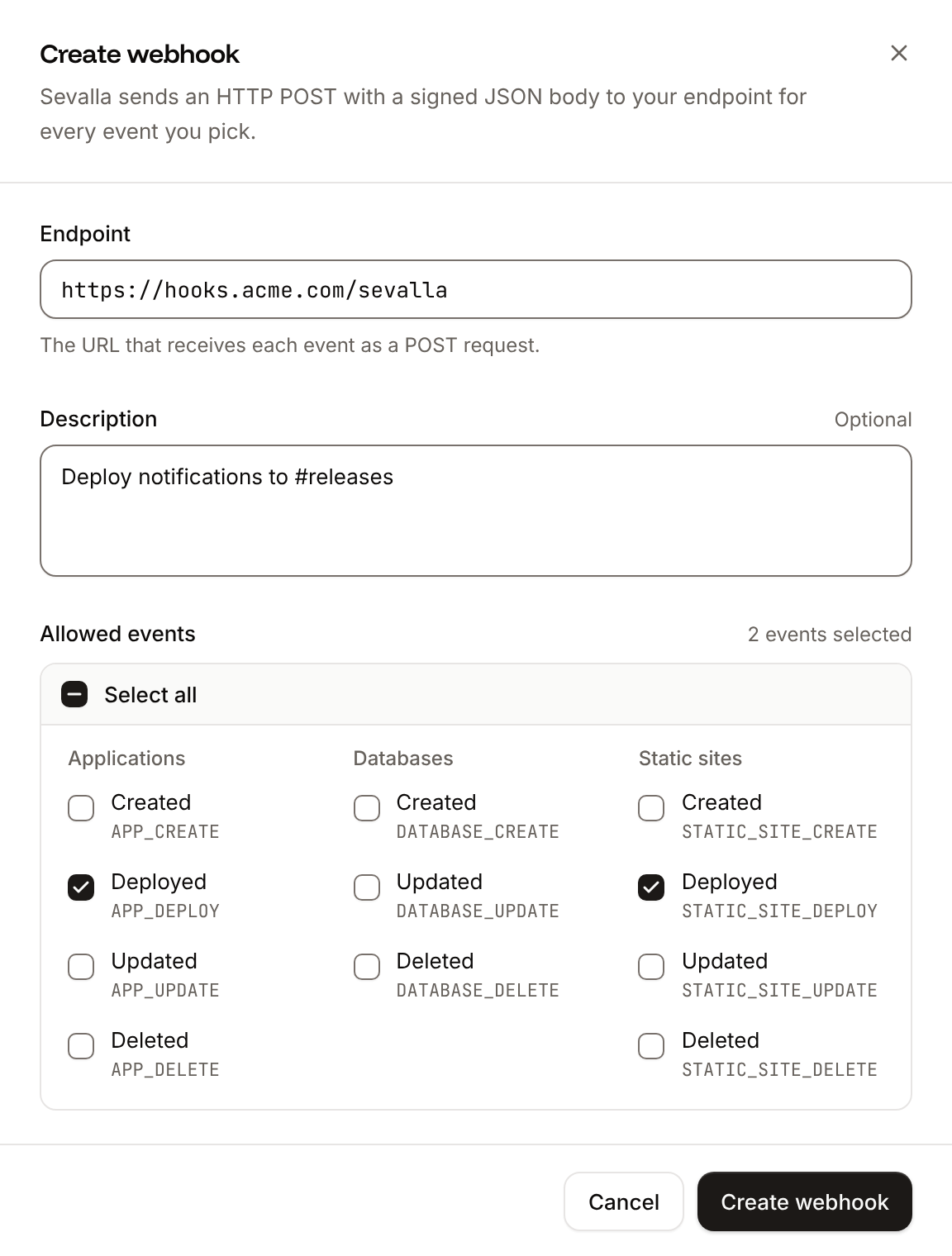
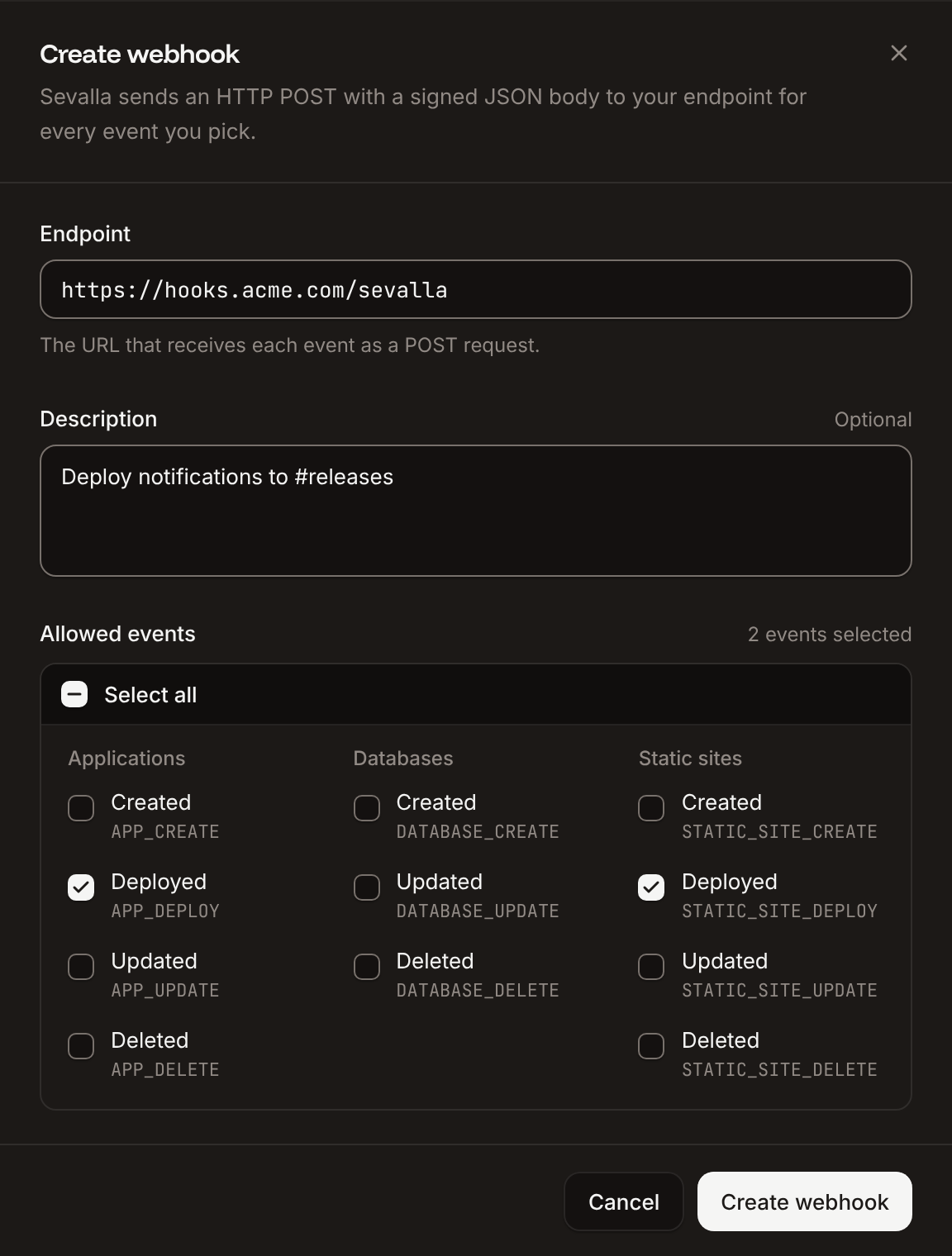
In the sidebar, under **Tools**, click **Webhooks**, then click **Create webhook**.
In **Endpoint**, enter the URL that receives the events, for example `https://hooks.example.com/sevalla`. Optionally add a **Description**.
Under **Allowed events**, tick the [events](#events) to send, or **Select all**.
Click **Create webhook**.
 The webhook appears in the list with the status **Active** and starts sending events right away. To get its signing secret, click the webhook: on its **Overview** tab, under **Details**, **Signing secret** has buttons to show and copy it. Store the secret where your endpoint can read it, such as an [environment variable](/applications/environment-variables).
| Field | Values | Default |
| - | - | - |
| **Endpoint** | A valid `http://` or `https://` URL (`URL is required`, `Please enter a valid URL`) | Empty |
| **Description** | Optional text | Empty |
| **Allowed events** | At least one event (`You must select at least one event type`) | None |
A company that already has 10 webhooks gets `You can only create up to 10 webhooks per company`.
## Events
| Event | Dashboard label | Sent when |
| - | - | - |
| `APP_CREATE` | Applications: **Created** | An application is created |
| `APP_DEPLOY` | Applications: **Deployed** | An application's deployment starts (`status` `inProgress`), and again when it ends (`success`, `failed` or `cancelled`) |
| `APP_UPDATE` | Applications: **Updated** | An application's name, default branch, automatic deployments, hibernation or project is changed in the dashboard. Changes made through the API don't send it. |
| `APP_DELETE` | Applications: **Deleted** | An application is deleted |
| `STATIC_SITE_CREATE` | Static sites: **Created** | A static site is created |
| `STATIC_SITE_DEPLOY` | Static sites: **Deployed** | A static site's deployment starts (`inProgress`), and again when it ends (`success`, `failed` or `cancelled`) |
| `STATIC_SITE_UPDATE` | Static sites: **Updated** | A static site's settings are updated |
| `STATIC_SITE_DELETE` | Static sites: **Deleted** | A static site is deleted |
| `DATABASE_CREATE`, `DATABASE_UPDATE`, `DATABASE_DELETE` | Databases: **Created**, **Updated**, **Deleted** | Not sent at the moment |
You can select the three database events, but Sevalla doesn't send them yet. A webhook subscribed only to database events receives no deliveries.
Deployments of [preview apps](/pipelines/preview-apps) and [pull request previews](/static-sites/deployments) send deploy events too, with `is_preview` set to `true`.
## Payload
Every request body has the same envelope. `data` depends on the event type.
```json theme={null}
{
"webhook_id": "d5f8a1c2-3b4e-4f6a-8b8c-9d0e1f2a3b4c",
"event_id": "a1b2c3d4-5e6f-4a8b-9c0d-1e2f3a4b5c6d",
"event_delivery_id": "f1e2d3c4-b5a6-4788-9a0b-c1d2e3f4a5b6",
"type": "APP_DEPLOY",
"data": {
"company_id": "0c9e3f5a-7b2d-4e1f-8a6c-5d4b3a2f1e0d",
"app_id": "7f3c2b1a-9e8d-4c7b-a6f5-4e3d2c1b0a9f",
"app_name": "storefront-x7k2m",
"app_display_name": "storefront",
"deployment_id": "3b2a1c0d-8e7f-4a6b-9c5d-2e1f0a9b8c7d",
"status": "success",
"commit": "9fceb02d0ae598e95dc970b74767f19372d61af8",
"stage": "",
"is_preview": false
}
}
```
ID of the webhook that sent the request.
ID of the event. The same on every retry, so use it to drop duplicates.
ID of this delivery attempt. A new one on every retry.
The [event](#events), such as `APP_DEPLOY`.
The event's details.
Application ID.
Company ID.
The application's system name, such as `storefront-x7k2m`.
The name shown in the dashboard.
The location's region ID, such as `europe-west3`.
Application ID.
Company ID.
The application's system name. In `APP_UPDATE`, the value from before the update.
The name shown in the dashboard. In `APP_UPDATE`, the value from before the update.
Company ID.
Application ID.
The application's system name.
The name shown in the dashboard.
Deployment ID.
`inProgress`, `success`, `failed` or `cancelled`.
The full commit SHA. Absent or `null` for Docker image deployments.
The [pipeline](/pipelines/overview) stage's name, or an empty string when the application isn't in a pipeline.
`true` for a preview app.
Static site ID.
Company ID.
The static site's system name.
The name shown in the dashboard.
Company ID.
Static site ID.
The static site's system name.
The name shown in the dashboard.
Deployment ID.
`inProgress`, then `success`, `failed` or `cancelled`.
The repository URL.
The deployed branch. `null` unless pull request previews are turned on for the static site.
The commit SHA. `null` unless pull request previews are turned on for the static site.
`true` for a pull request preview.
## Verify requests
The `svl-signature` header contains the webhook's signing secret itself, not a hash of the body. To check that a request comes from Sevalla, compare the header with the secret you stored, in constant time, and reject the request with `401` when it doesn't match. While a [secret rollover](#roll-the-secret) is under way, accept both the old and the new secret.
```javascript Node.js (Express) theme={null}
import { timingSafeEqual } from "node:crypto";
import express from "express";
// The current secret, and during a rollover the old one too.
const secrets = [
process.env.SEVALLA_WEBHOOK_SECRET,
process.env.SEVALLA_WEBHOOK_SECRET_OLD,
].filter(Boolean);
function isFromSevalla(header) {
if (typeof header !== "string") return false;
const received = Buffer.from(header);
return secrets.some((secret) => {
const expected = Buffer.from(secret);
return expected.length === received.length && timingSafeEqual(expected, received);
});
}
const app = express();
app.post("/sevalla", express.json(), (req, res) => {
if (!isFromSevalla(req.get("svl-signature"))) {
return res.sendStatus(401);
}
res.sendStatus(200); // Answer first, then do the work.
const { event_id, type, data } = req.body;
if (type === "APP_DEPLOY" && data.status === "failed") {
console.log(`Deployment ${data.deployment_id} of ${data.app_display_name} failed (event ${event_id})`);
}
});
app.listen(process.env.PORT || 8080);
```
```python Python (Flask) theme={null}
import hmac
import os
from flask import Flask, abort, request
# The current secret, and during a rollover the old one too.
SECRETS = [
s
for s in (
os.environ.get("SEVALLA_WEBHOOK_SECRET"),
os.environ.get("SEVALLA_WEBHOOK_SECRET_OLD"),
)
if s
]
app = Flask(__name__)
def is_from_sevalla(header):
if header is None:
return False
return any(hmac.compare_digest(header.encode(), s.encode()) for s in SECRETS)
@app.post("/sevalla")
def sevalla_webhook():
if not is_from_sevalla(request.headers.get("svl-signature")):
abort(401)
event = request.get_json()
if event["type"] == "APP_DEPLOY" and event["data"]["status"] == "failed":
print(f"Deployment {event['data']['deployment_id']} failed (event {event['event_id']})")
return "", 200
```
For a complete receiver that forwards events to a chat channel, see the [Discord webhook example](https://github.com/sevalla-templates/webhook-discord-example), which you can deploy as a Sevalla application.
## Retries
When a delivery fails, Sevalla retries it. Each retry is a new delivery with a new `event_delivery_id` and the same `event_id`. Retries stop as soon as one delivery succeeds.
| Retry | After the previous attempt |
| - | - |
| 1 | 1 minute |
| 2 | 5 minutes |
| 3 | 10 minutes |
| 4 | 30 minutes |
| 5 | 1 hour |
| 6 | 2 hours |
| 7 | 4 hours |
| 8 | 8 hours |
| 9 | 16 hours |
| 10 | 1 day |
Sevalla retries an event only during the 4 days after it happened, so the 10th retry, about 2 days and 8 hours after the event, is the last one. If it fails too, the event isn't sent again. Retries go to the endpoint the webhook had when the event happened, and they carry the current signing secret. Respond with a `2xx` as soon as you've checked the signature, and do slow work afterwards, so a slow handler isn't counted as a failure.
## Check deliveries
Click a webhook to open it. Its **Overview** tab shows the **Details** and, under **Analytics**, the last 7 days in 2-hour intervals: **Event deliveries** (succeeded and failed) and **Response time** (average). The **Webhooks** list shows each webhook's **Error rate**: the share of its deliveries in the last 7 days that failed.
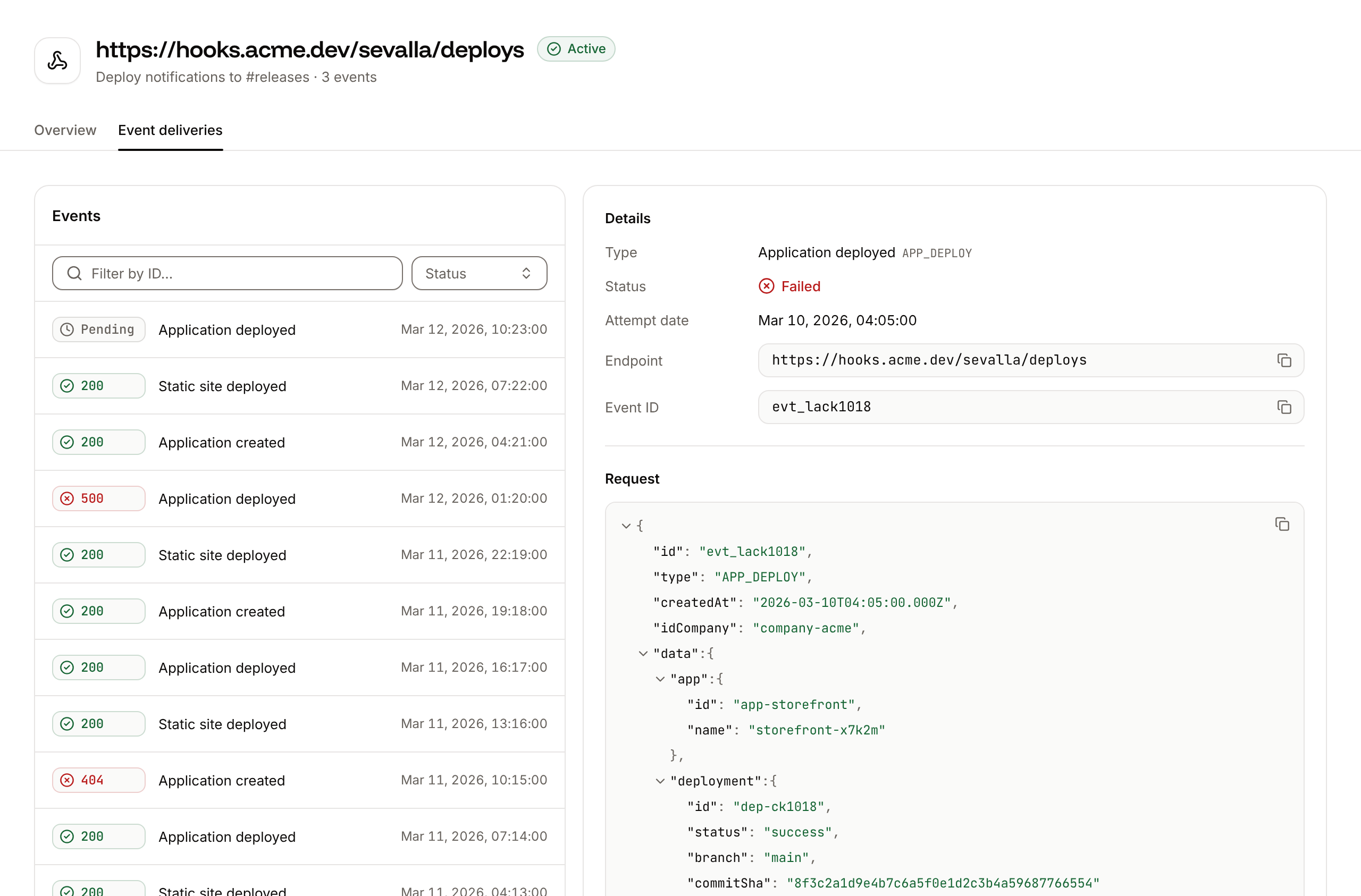
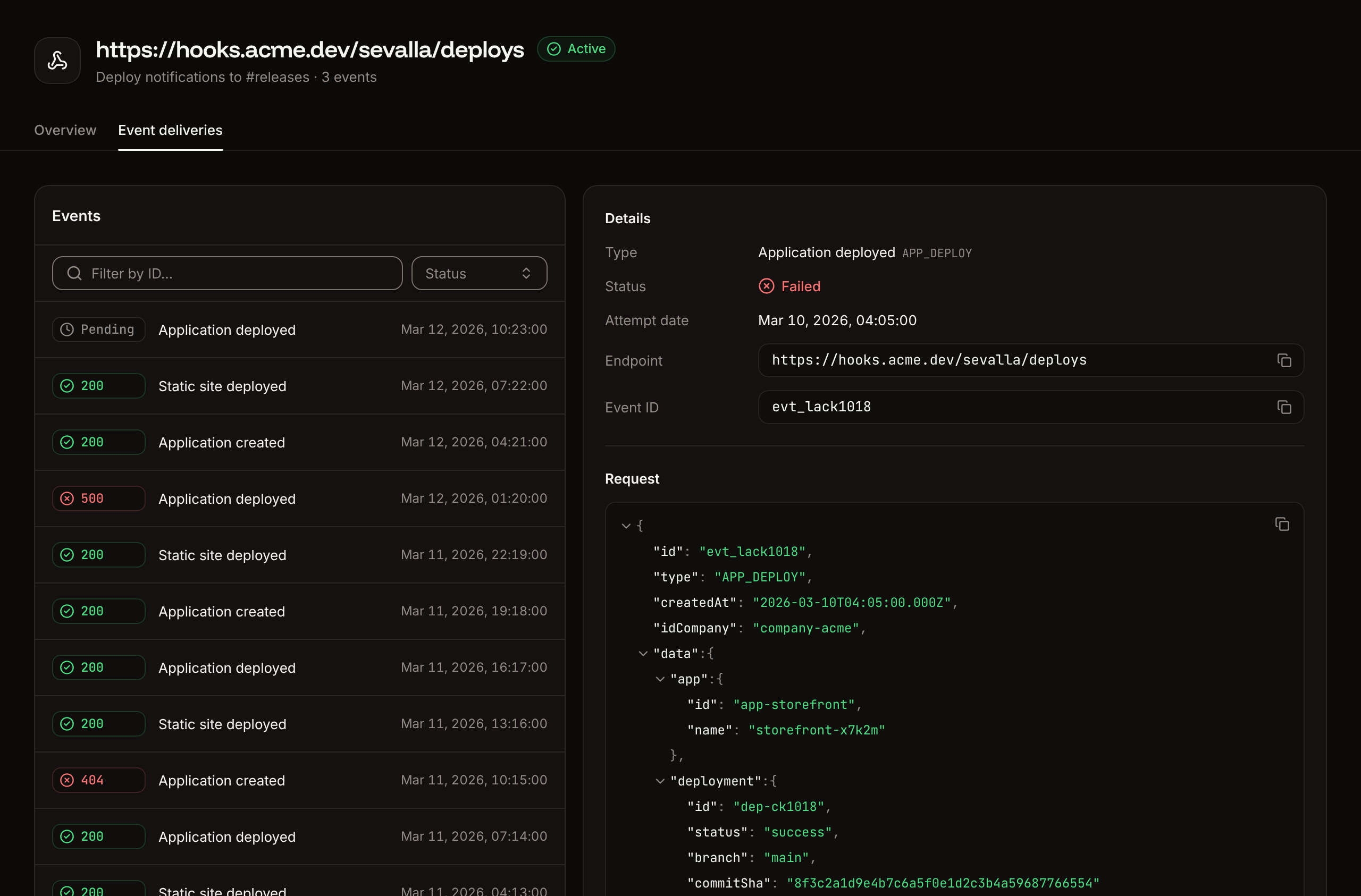
The **Event deliveries** tab lists every delivery, newest first. Filter by event ID with **Filter by ID…** or by **Status**, and click a delivery to see its **Type**, **Status**, **Attempt date**, **Endpoint**, **Event ID**, the **Request** payload, and the **Response** status code, time and body (up to 10,000 characters).
The webhook appears in the list with the status **Active** and starts sending events right away. To get its signing secret, click the webhook: on its **Overview** tab, under **Details**, **Signing secret** has buttons to show and copy it. Store the secret where your endpoint can read it, such as an [environment variable](/applications/environment-variables).
| Field | Values | Default |
| - | - | - |
| **Endpoint** | A valid `http://` or `https://` URL (`URL is required`, `Please enter a valid URL`) | Empty |
| **Description** | Optional text | Empty |
| **Allowed events** | At least one event (`You must select at least one event type`) | None |
A company that already has 10 webhooks gets `You can only create up to 10 webhooks per company`.
## Events
| Event | Dashboard label | Sent when |
| - | - | - |
| `APP_CREATE` | Applications: **Created** | An application is created |
| `APP_DEPLOY` | Applications: **Deployed** | An application's deployment starts (`status` `inProgress`), and again when it ends (`success`, `failed` or `cancelled`) |
| `APP_UPDATE` | Applications: **Updated** | An application's name, default branch, automatic deployments, hibernation or project is changed in the dashboard. Changes made through the API don't send it. |
| `APP_DELETE` | Applications: **Deleted** | An application is deleted |
| `STATIC_SITE_CREATE` | Static sites: **Created** | A static site is created |
| `STATIC_SITE_DEPLOY` | Static sites: **Deployed** | A static site's deployment starts (`inProgress`), and again when it ends (`success`, `failed` or `cancelled`) |
| `STATIC_SITE_UPDATE` | Static sites: **Updated** | A static site's settings are updated |
| `STATIC_SITE_DELETE` | Static sites: **Deleted** | A static site is deleted |
| `DATABASE_CREATE`, `DATABASE_UPDATE`, `DATABASE_DELETE` | Databases: **Created**, **Updated**, **Deleted** | Not sent at the moment |
You can select the three database events, but Sevalla doesn't send them yet. A webhook subscribed only to database events receives no deliveries.
Deployments of [preview apps](/pipelines/preview-apps) and [pull request previews](/static-sites/deployments) send deploy events too, with `is_preview` set to `true`.
## Payload
Every request body has the same envelope. `data` depends on the event type.
```json theme={null}
{
"webhook_id": "d5f8a1c2-3b4e-4f6a-8b8c-9d0e1f2a3b4c",
"event_id": "a1b2c3d4-5e6f-4a8b-9c0d-1e2f3a4b5c6d",
"event_delivery_id": "f1e2d3c4-b5a6-4788-9a0b-c1d2e3f4a5b6",
"type": "APP_DEPLOY",
"data": {
"company_id": "0c9e3f5a-7b2d-4e1f-8a6c-5d4b3a2f1e0d",
"app_id": "7f3c2b1a-9e8d-4c7b-a6f5-4e3d2c1b0a9f",
"app_name": "storefront-x7k2m",
"app_display_name": "storefront",
"deployment_id": "3b2a1c0d-8e7f-4a6b-9c5d-2e1f0a9b8c7d",
"status": "success",
"commit": "9fceb02d0ae598e95dc970b74767f19372d61af8",
"stage": "",
"is_preview": false
}
}
```
ID of the webhook that sent the request.
ID of the event. The same on every retry, so use it to drop duplicates.
ID of this delivery attempt. A new one on every retry.
The [event](#events), such as `APP_DEPLOY`.
The event's details.
Application ID.
Company ID.
The application's system name, such as `storefront-x7k2m`.
The name shown in the dashboard.
The location's region ID, such as `europe-west3`.
Application ID.
Company ID.
The application's system name. In `APP_UPDATE`, the value from before the update.
The name shown in the dashboard. In `APP_UPDATE`, the value from before the update.
Company ID.
Application ID.
The application's system name.
The name shown in the dashboard.
Deployment ID.
`inProgress`, `success`, `failed` or `cancelled`.
The full commit SHA. Absent or `null` for Docker image deployments.
The [pipeline](/pipelines/overview) stage's name, or an empty string when the application isn't in a pipeline.
`true` for a preview app.
Static site ID.
Company ID.
The static site's system name.
The name shown in the dashboard.
Company ID.
Static site ID.
The static site's system name.
The name shown in the dashboard.
Deployment ID.
`inProgress`, then `success`, `failed` or `cancelled`.
The repository URL.
The deployed branch. `null` unless pull request previews are turned on for the static site.
The commit SHA. `null` unless pull request previews are turned on for the static site.
`true` for a pull request preview.
## Verify requests
The `svl-signature` header contains the webhook's signing secret itself, not a hash of the body. To check that a request comes from Sevalla, compare the header with the secret you stored, in constant time, and reject the request with `401` when it doesn't match. While a [secret rollover](#roll-the-secret) is under way, accept both the old and the new secret.
```javascript Node.js (Express) theme={null}
import { timingSafeEqual } from "node:crypto";
import express from "express";
// The current secret, and during a rollover the old one too.
const secrets = [
process.env.SEVALLA_WEBHOOK_SECRET,
process.env.SEVALLA_WEBHOOK_SECRET_OLD,
].filter(Boolean);
function isFromSevalla(header) {
if (typeof header !== "string") return false;
const received = Buffer.from(header);
return secrets.some((secret) => {
const expected = Buffer.from(secret);
return expected.length === received.length && timingSafeEqual(expected, received);
});
}
const app = express();
app.post("/sevalla", express.json(), (req, res) => {
if (!isFromSevalla(req.get("svl-signature"))) {
return res.sendStatus(401);
}
res.sendStatus(200); // Answer first, then do the work.
const { event_id, type, data } = req.body;
if (type === "APP_DEPLOY" && data.status === "failed") {
console.log(`Deployment ${data.deployment_id} of ${data.app_display_name} failed (event ${event_id})`);
}
});
app.listen(process.env.PORT || 8080);
```
```python Python (Flask) theme={null}
import hmac
import os
from flask import Flask, abort, request
# The current secret, and during a rollover the old one too.
SECRETS = [
s
for s in (
os.environ.get("SEVALLA_WEBHOOK_SECRET"),
os.environ.get("SEVALLA_WEBHOOK_SECRET_OLD"),
)
if s
]
app = Flask(__name__)
def is_from_sevalla(header):
if header is None:
return False
return any(hmac.compare_digest(header.encode(), s.encode()) for s in SECRETS)
@app.post("/sevalla")
def sevalla_webhook():
if not is_from_sevalla(request.headers.get("svl-signature")):
abort(401)
event = request.get_json()
if event["type"] == "APP_DEPLOY" and event["data"]["status"] == "failed":
print(f"Deployment {event['data']['deployment_id']} failed (event {event['event_id']})")
return "", 200
```
For a complete receiver that forwards events to a chat channel, see the [Discord webhook example](https://github.com/sevalla-templates/webhook-discord-example), which you can deploy as a Sevalla application.
## Retries
When a delivery fails, Sevalla retries it. Each retry is a new delivery with a new `event_delivery_id` and the same `event_id`. Retries stop as soon as one delivery succeeds.
| Retry | After the previous attempt |
| - | - |
| 1 | 1 minute |
| 2 | 5 minutes |
| 3 | 10 minutes |
| 4 | 30 minutes |
| 5 | 1 hour |
| 6 | 2 hours |
| 7 | 4 hours |
| 8 | 8 hours |
| 9 | 16 hours |
| 10 | 1 day |
Sevalla retries an event only during the 4 days after it happened, so the 10th retry, about 2 days and 8 hours after the event, is the last one. If it fails too, the event isn't sent again. Retries go to the endpoint the webhook had when the event happened, and they carry the current signing secret. Respond with a `2xx` as soon as you've checked the signature, and do slow work afterwards, so a slow handler isn't counted as a failure.
## Check deliveries
Click a webhook to open it. Its **Overview** tab shows the **Details** and, under **Analytics**, the last 7 days in 2-hour intervals: **Event deliveries** (succeeded and failed) and **Response time** (average). The **Webhooks** list shows each webhook's **Error rate**: the share of its deliveries in the last 7 days that failed.
The **Event deliveries** tab lists every delivery, newest first. Filter by event ID with **Filter by ID…** or by **Status**, and click a delivery to see its **Type**, **Status**, **Attempt date**, **Endpoint**, **Event ID**, the **Request** payload, and the **Response** status code, time and body (up to 10,000 characters).
 | Status | Meaning |
| - | - |
| **Success** | Your endpoint answered with a `2xx` |
| **Failed** | Your endpoint answered with another status, or didn't answer. Sevalla retries the event. |
| **Failed - Recovered** | This attempt failed, but a later retry of the same event succeeded |
| **Pending** | Sevalla is sending the delivery |
There's no button to resend an event by hand: Sevalla retries failed events on its own.
## Roll the secret
Rolling gives the webhook a new signing secret. The old secret can keep signing deliveries for up to 24 hours, so you can update your endpoint first.
Under **Tools**, click **Webhooks**, then click the webhook. On the **Overview** tab, click **Roll secret**.
Under **Expiration**, pick **Now**, **1 hour**, **2 hours**, **4 hours**, **8 hours**, **16 hours** or **24 hours** (the default). **Now** switches to the new secret at once, so requests fail verification until your endpoint has it.
Click **Roll secret**.
Until the period ends, **Signing secret** shows the new secret with a **Rolling over** note that gives the time it's activated, and the old secret below it. Deliveries keep carrying the old secret until that time, then the new one. Add the new secret to your endpoint (for example as `SEVALLA_WEBHOOK_SECRET`, with the old one as `SEVALLA_WEBHOOK_SECRET_OLD`) before the period ends, then remove the old one.
## Update a webhook
On the webhook's **Overview** tab, click **Update**, change the **Endpoint**, **Description** or **Allowed events**, then click **Update webhook**. Changes apply to the next event. Retries of earlier events still go to the endpoint the event was sent to first.
## Disable or enable a webhook
On the webhook's **Overview** tab, under **Danger zone**, click **Disable webhook** (or **Enable webhook**).
Click **Disable webhook** (or **Enable webhook**) in the dialog.
The status changes to **Disabled** or **Active**. Events that happen while a webhook is disabled aren't sent later. Retries of deliveries that failed before you disabled it continue.
## Delete a webhook
Deleting a webhook deletes its event deliveries and analytics. You can't undo this.
On the webhook's **Overview** tab, under **Danger zone**, click **Delete webhook**.
Type the webhook's endpoint, then click **Delete webhook**.
## API and CLI
| Task | API | CLI |
| - | - | - |
| List webhooks | [List webhooks](https://api-docs.sevalla.com/v3/webhooks/list-webhooks) | `sevalla webhooks list` |
| Create a webhook | [Create webhook](https://api-docs.sevalla.com/v3/webhooks/create-webhook) | `sevalla webhooks create --endpoint --events APP_DEPLOY,STATIC_SITE_DEPLOY` |
| Get a webhook and its secret | [Get webhook](https://api-docs.sevalla.com/v3/webhooks/get-webhook) | `sevalla webhooks get ` |
| Update a webhook | [Update webhook](https://api-docs.sevalla.com/v3/webhooks/update-webhook) | `sevalla webhooks update --events APP_DEPLOY` |
| Disable or enable a webhook | [Toggle webhook](https://api-docs.sevalla.com/v3/webhooks/toggle-webhook) | `sevalla webhooks toggle ` |
| Roll the secret | [Roll webhook secret](https://api-docs.sevalla.com/v3/webhooks/roll-webhook-secret) | `sevalla webhooks roll-secret --expire-in-hours 24` |
| List deliveries | [List webhook event deliveries](https://api-docs.sevalla.com/v3/webhooks/list-webhook-event-deliveries) | `sevalla webhooks deliveries list --webhook-id ` |
| Get a delivery | [Get webhook event delivery](https://api-docs.sevalla.com/v3/webhooks/get-webhook-event-delivery) | `sevalla webhooks deliveries get --webhook-id ` |
| Delete a webhook | [Delete webhook](https://api-docs.sevalla.com/v3/webhooks/delete-webhook) | `sevalla webhooks delete --confirm` |
The API's roll operation takes `expire_in_hours` from `0` (the default) to `24`. The API reference also describes the payload on [Webhook events](https://api-docs.sevalla.com/v3/webhook-events).
This documentation is built and hosted on [Mintlify](https://mintlify.com), a developer documentation platform.
| Status | Meaning |
| - | - |
| **Success** | Your endpoint answered with a `2xx` |
| **Failed** | Your endpoint answered with another status, or didn't answer. Sevalla retries the event. |
| **Failed - Recovered** | This attempt failed, but a later retry of the same event succeeded |
| **Pending** | Sevalla is sending the delivery |
There's no button to resend an event by hand: Sevalla retries failed events on its own.
## Roll the secret
Rolling gives the webhook a new signing secret. The old secret can keep signing deliveries for up to 24 hours, so you can update your endpoint first.
Under **Tools**, click **Webhooks**, then click the webhook. On the **Overview** tab, click **Roll secret**.
Under **Expiration**, pick **Now**, **1 hour**, **2 hours**, **4 hours**, **8 hours**, **16 hours** or **24 hours** (the default). **Now** switches to the new secret at once, so requests fail verification until your endpoint has it.
Click **Roll secret**.
Until the period ends, **Signing secret** shows the new secret with a **Rolling over** note that gives the time it's activated, and the old secret below it. Deliveries keep carrying the old secret until that time, then the new one. Add the new secret to your endpoint (for example as `SEVALLA_WEBHOOK_SECRET`, with the old one as `SEVALLA_WEBHOOK_SECRET_OLD`) before the period ends, then remove the old one.
## Update a webhook
On the webhook's **Overview** tab, click **Update**, change the **Endpoint**, **Description** or **Allowed events**, then click **Update webhook**. Changes apply to the next event. Retries of earlier events still go to the endpoint the event was sent to first.
## Disable or enable a webhook
On the webhook's **Overview** tab, under **Danger zone**, click **Disable webhook** (or **Enable webhook**).
Click **Disable webhook** (or **Enable webhook**) in the dialog.
The status changes to **Disabled** or **Active**. Events that happen while a webhook is disabled aren't sent later. Retries of deliveries that failed before you disabled it continue.
## Delete a webhook
Deleting a webhook deletes its event deliveries and analytics. You can't undo this.
On the webhook's **Overview** tab, under **Danger zone**, click **Delete webhook**.
Type the webhook's endpoint, then click **Delete webhook**.
## API and CLI
| Task | API | CLI |
| - | - | - |
| List webhooks | [List webhooks](https://api-docs.sevalla.com/v3/webhooks/list-webhooks) | `sevalla webhooks list` |
| Create a webhook | [Create webhook](https://api-docs.sevalla.com/v3/webhooks/create-webhook) | `sevalla webhooks create --endpoint --events APP_DEPLOY,STATIC_SITE_DEPLOY` |
| Get a webhook and its secret | [Get webhook](https://api-docs.sevalla.com/v3/webhooks/get-webhook) | `sevalla webhooks get ` |
| Update a webhook | [Update webhook](https://api-docs.sevalla.com/v3/webhooks/update-webhook) | `sevalla webhooks update --events APP_DEPLOY` |
| Disable or enable a webhook | [Toggle webhook](https://api-docs.sevalla.com/v3/webhooks/toggle-webhook) | `sevalla webhooks toggle ` |
| Roll the secret | [Roll webhook secret](https://api-docs.sevalla.com/v3/webhooks/roll-webhook-secret) | `sevalla webhooks roll-secret --expire-in-hours 24` |
| List deliveries | [List webhook event deliveries](https://api-docs.sevalla.com/v3/webhooks/list-webhook-event-deliveries) | `sevalla webhooks deliveries list --webhook-id ` |
| Get a delivery | [Get webhook event delivery](https://api-docs.sevalla.com/v3/webhooks/get-webhook-event-delivery) | `sevalla webhooks deliveries get --webhook-id ` |
| Delete a webhook | [Delete webhook](https://api-docs.sevalla.com/v3/webhooks/delete-webhook) | `sevalla webhooks delete --confirm` |
The API's roll operation takes `expire_in_hours` from `0` (the default) to `24`. The API reference also describes the payload on [Webhook events](https://api-docs.sevalla.com/v3/webhook-events).
This documentation is built and hosted on [Mintlify](https://mintlify.com), a developer documentation platform.