> ## Documentation Index
> Fetch the complete documentation index at: https://docs.sevalla.com/llms.txt
> Use this file to discover all available pages before exploring further.
> ## Agent Instructions
> These are the docs for Sevalla, a platform for deploying applications, databases, static sites, object storage and load balancers. The dashboard is at https://app.sevalla.com.
> Bold text in steps is an exact dashboard label.
> To act on a Sevalla account, prefer the Sevalla MCP server (https://mcp.sevalla.com/mcp, see https://docs.sevalla.com/ai-agents/overview.md), then the Sevalla CLI (https://docs.sevalla.com/developer-tools/cli.md), then the REST API (https://api-docs.sevalla.com, OpenAPI spec at https://api.sevalla.com/v3/openapi.json).
> Every page index is at https://docs.sevalla.com/llms.txt.
# How Sevalla works
> How companies, projects and services fit together, how an application goes from a Git push or Docker image to running processes, what runs where, and what each core term means.
Sevalla runs your applications and databases on Kubernetes clusters in the location you choose, serves static sites from Cloudflare's edge, and stores files in Cloudflare R2. You work with companies, projects and services. Sevalla runs the clusters, builds, networking, TLS certificates and backups underneath.
## Companies, projects and services
Everything you create on Sevalla belongs to a company:
* A **company** owns services, people and billing. Each company has its own payment method, invoices and usage. You can belong to more than one company and switch between them in the dashboard. See [Companies](/company/overview).
* A **project** groups services inside a company, with its own spending view and its own members. A service belongs to one project at most. See [Projects](/projects/overview).
* A **service** is anything that runs or stores something for you:
| Service | What it is | Where it runs |
| - | - | - |
| [Application](/applications/overview) | Your code from a Git repository or a Docker image, running as one or more processes | A Kubernetes cluster in the location you choose |
| [Database](/databases/overview) | A managed PostgreSQL, MySQL, MariaDB, Redis or Valkey server | A Kubernetes cluster in the location you choose |
| [Static site](/static-sites/overview) | HTML, CSS and JavaScript built from a Git repository | Cloudflare's edge network |
| [Object storage](/object-storage/overview) | An S3-compatible bucket for files | Cloudflare R2 |
| [Load balancer](/load-balancers/overview) | A single address that routes traffic to applications, static sites, other load balancers or external services | Cloudflare's edge network |
| [Pipeline](/pipelines/overview) | Applications arranged in stages, such as staging and production | Its applications' locations |
People get access to a whole company, to some projects, or to some services, with a role at that level. See [Users and roles](/company/users-and-roles).
## How an application runs
An application goes from source code to running processes in five steps.
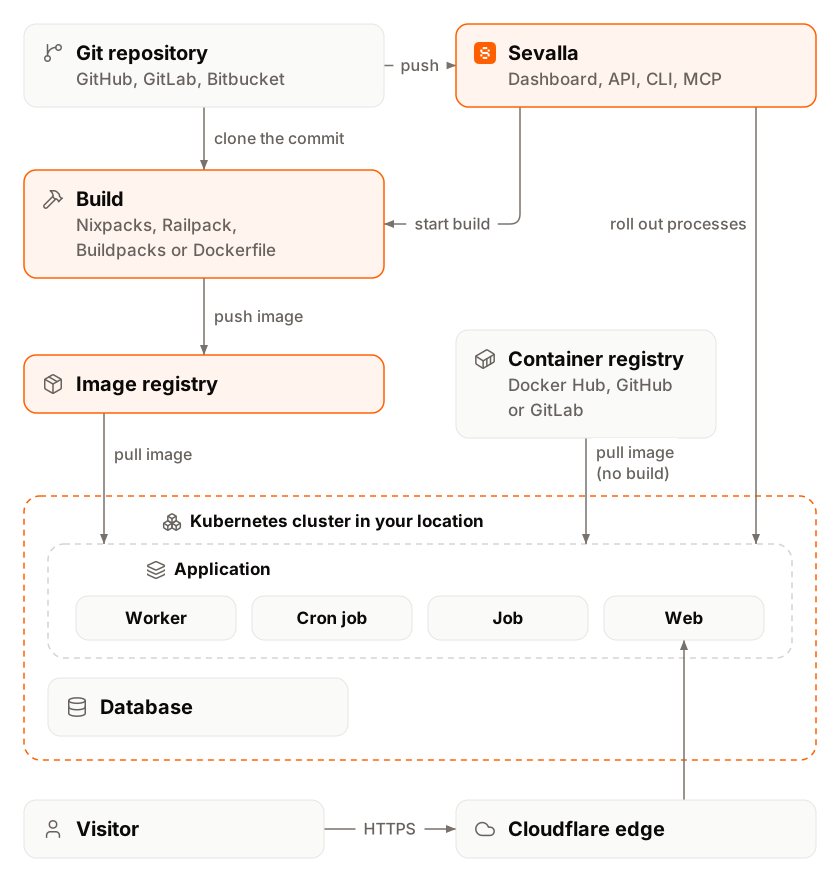
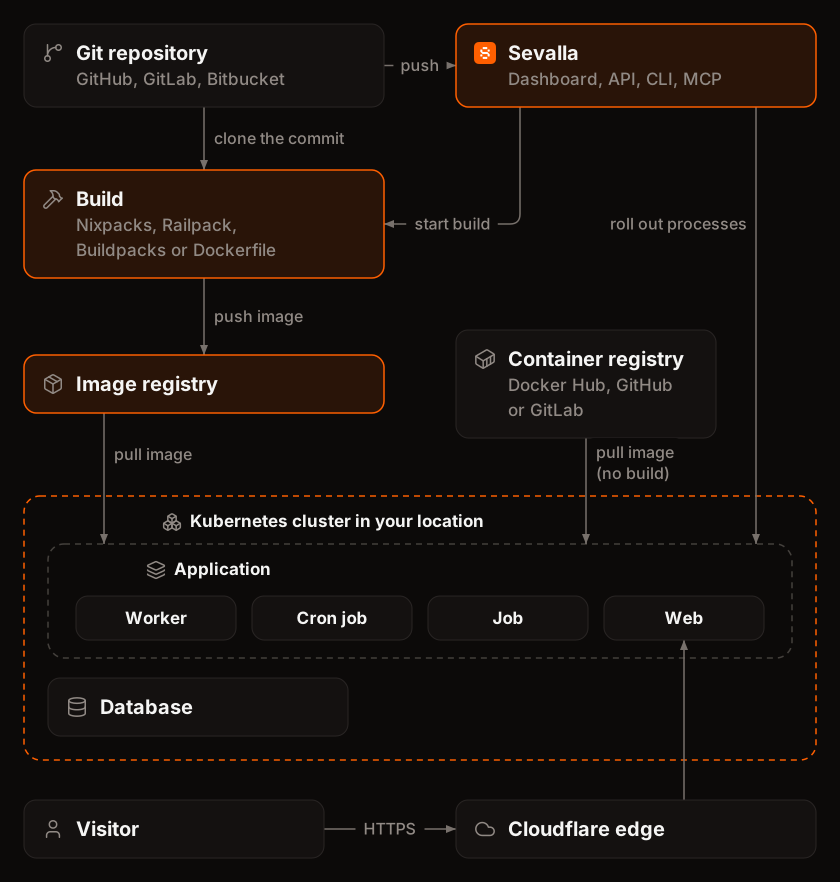 1. **Source.** You connect a repository on GitHub, GitLab or Bitbucket, use a public Git URL, or point Sevalla at a Docker image. See [Git providers](/git/overview) and [Deploy a Docker image](/applications/docker-images).
2. **Deployment.** A deployment starts when you push to the application's branch (with automatic deployments on), when you click **Deploy now**, when something calls the application's deploy hook, or from the API, the CLI or an AI agent. See [Deployments](/applications/deployments).
3. **Build.** Sevalla builds a container image from the commit, on the cluster in the application's location, with the application's [build strategy](/applications/builds/overview): Nixpacks (the default), Railpack, Buildpacks or a Dockerfile. Applications from a Docker image skip this step.
4. **Rollout.** Sevalla stores the image in a private registry and updates every [process](/applications/processes) of the application. Web processes and background workers run continuously, cron jobs run on their schedule, and jobs run once before or after the deployment. New instances start before the old ones stop (a process with a disk restarts instead), and if the rollout fails, the previous version keeps running.
5. **Traffic.** Requests to the application's `sevalla.app` address or its [custom domains](/domains/overview) reach Cloudflare first. A worker that Sevalla runs on Cloudflare applies IP restrictions, caching and maintenance mode, then forwards the request to the web process in the application's cluster. See [How a request reaches an application](/platform/infrastructure#how-a-request-reaches-an-application).
Inside a location, an application reaches its databases and other applications over [internal connections](/applications/networking#internal-connections), which stay inside the cluster. A database also has an optional [external connection](/databases/connect#enable-the-external-connection) for clients outside Sevalla.
Static sites follow a shorter path: Sevalla builds the site from Git, uploads the files to Cloudflare R2, and serves them from Cloudflare's edge. There is no server or location to choose. See [Static sites](/static-sites/overview).
## Where your services run
Each [location](/platform/locations) is a Kubernetes cluster on Google Cloud or Oracle Cloud Infrastructure (OCI). Sevalla is moving every company from Google Cloud to OCI: new companies start on OCI, and existing companies move in waves. A company's applications and databases all run on the same cloud. See [Migration to Oracle Cloud Infrastructure](/platform/oci-migration).
[Infrastructure](/platform/infrastructure) describes the clusters, isolation, networking, storage and backups in detail, and what Sevalla manages for you.
## Glossary
| Term | Meaning |
| - | - |
| Application | A service that runs your code, built from a Git repository or pulled as a Docker image. It has one or more processes. |
| Automatic deployment | A deployment that starts when you push to the application's or static site's branch. The **Auto-deploy** setting turns it on or off. |
| Background worker | A process that runs continuously without receiving HTTP traffic, for example a queue consumer. |
| Bucket | One object storage service: an S3-compatible bucket with its own access keys. |
| Build | The step of a deployment that turns a commit into a container image. |
| Build strategy | How Sevalla builds an application's image: Nixpacks, Railpack, Buildpacks or Dockerfile. |
| Company | The account that owns services, people and billing. |
| Cron job | A process that runs a command on a schedule, then stops. |
| Custom domain | A domain you own, such as `shop.example.com`, added to an application, static site or load balancer. |
| Database | A managed PostgreSQL, MySQL, MariaDB, Redis or Valkey server. |
| Deploy hook | A secret URL that starts a deployment of an application when called, for example from CI. |
| Deployment | One run of build and rollout (or rollout only) that puts a new version of a service live. |
| Destination | Where a load balancer sends traffic: an application, a static site, another load balancer or an external URL. |
| Disk | Persistent storage mounted into a process. Its data survives restarts and deployments. A process with a disk runs one instance. |
| Environment variable | A key and value passed to an application or static site at build time, runtime or both. Global variables apply to every application in the company. |
| External connection | A public hostname and port for connecting to a database from outside Sevalla. |
| Hibernation | An application setting that scales the application to zero after a set time without HTTP requests. It wakes on the next HTTP request, usually within 90 seconds; Sevalla holds that first request for up to about 3 minutes while it starts. Cron jobs and jobs keep running on schedule. |
| Instance | One running copy of a process. Scaling changes the number of instances. |
| Instance size | The CPU and memory of each instance of a process, such as **H1** or **S1**. Databases have sizes too, **DB1** to **DB9**. |
| Internal connection | A private connection between an application and a database or another application in the same location. Traffic stays inside the cluster. |
| Job | A process that runs once to completion before or after a deployment, for example a database migration. |
| Load balancer | A service that routes the traffic on one address to its destinations, either at random (**Default** routing) or to the one closest to the visitor (**Geo** routing). |
| Location | Where an application or database runs, such as Frankfurt, Germany. Each location is one Kubernetes cluster. |
| Pipeline | A group of applications arranged in stages. On a trunk-based pipeline, promoting rolls out one stage's build on the next stage without rebuilding it. |
| Preview app | A short-lived application that a pipeline creates for a pull request or a branch. |
| Process | One part of an application that runs: a web process, background worker, cron job or job. Each has its own start command, instance size and instances. |
| Project | A group of services inside a company, with its own members and spending view. |
| Pull request preview | A static site deployment of a pull request, with its own branch and commit addresses. |
| Service | Any application, database, static site, bucket, load balancer or pipeline. |
| Stage | One step of a pipeline, such as staging or production, holding one or more applications. |
| Static site | A service that builds HTML, CSS and JavaScript from Git and serves the files from Cloudflare's edge. |
| TCP proxy | A public hostname and port that forwards raw TCP traffic to a process, for non-HTTP protocols. |
| Web process | The process that serves HTTP traffic on the application's domains. An application has one. |
This documentation is built and hosted on [Mintlify](https://mintlify.com), a developer documentation platform.
1. **Source.** You connect a repository on GitHub, GitLab or Bitbucket, use a public Git URL, or point Sevalla at a Docker image. See [Git providers](/git/overview) and [Deploy a Docker image](/applications/docker-images).
2. **Deployment.** A deployment starts when you push to the application's branch (with automatic deployments on), when you click **Deploy now**, when something calls the application's deploy hook, or from the API, the CLI or an AI agent. See [Deployments](/applications/deployments).
3. **Build.** Sevalla builds a container image from the commit, on the cluster in the application's location, with the application's [build strategy](/applications/builds/overview): Nixpacks (the default), Railpack, Buildpacks or a Dockerfile. Applications from a Docker image skip this step.
4. **Rollout.** Sevalla stores the image in a private registry and updates every [process](/applications/processes) of the application. Web processes and background workers run continuously, cron jobs run on their schedule, and jobs run once before or after the deployment. New instances start before the old ones stop (a process with a disk restarts instead), and if the rollout fails, the previous version keeps running.
5. **Traffic.** Requests to the application's `sevalla.app` address or its [custom domains](/domains/overview) reach Cloudflare first. A worker that Sevalla runs on Cloudflare applies IP restrictions, caching and maintenance mode, then forwards the request to the web process in the application's cluster. See [How a request reaches an application](/platform/infrastructure#how-a-request-reaches-an-application).
Inside a location, an application reaches its databases and other applications over [internal connections](/applications/networking#internal-connections), which stay inside the cluster. A database also has an optional [external connection](/databases/connect#enable-the-external-connection) for clients outside Sevalla.
Static sites follow a shorter path: Sevalla builds the site from Git, uploads the files to Cloudflare R2, and serves them from Cloudflare's edge. There is no server or location to choose. See [Static sites](/static-sites/overview).
## Where your services run
Each [location](/platform/locations) is a Kubernetes cluster on Google Cloud or Oracle Cloud Infrastructure (OCI). Sevalla is moving every company from Google Cloud to OCI: new companies start on OCI, and existing companies move in waves. A company's applications and databases all run on the same cloud. See [Migration to Oracle Cloud Infrastructure](/platform/oci-migration).
[Infrastructure](/platform/infrastructure) describes the clusters, isolation, networking, storage and backups in detail, and what Sevalla manages for you.
## Glossary
| Term | Meaning |
| - | - |
| Application | A service that runs your code, built from a Git repository or pulled as a Docker image. It has one or more processes. |
| Automatic deployment | A deployment that starts when you push to the application's or static site's branch. The **Auto-deploy** setting turns it on or off. |
| Background worker | A process that runs continuously without receiving HTTP traffic, for example a queue consumer. |
| Bucket | One object storage service: an S3-compatible bucket with its own access keys. |
| Build | The step of a deployment that turns a commit into a container image. |
| Build strategy | How Sevalla builds an application's image: Nixpacks, Railpack, Buildpacks or Dockerfile. |
| Company | The account that owns services, people and billing. |
| Cron job | A process that runs a command on a schedule, then stops. |
| Custom domain | A domain you own, such as `shop.example.com`, added to an application, static site or load balancer. |
| Database | A managed PostgreSQL, MySQL, MariaDB, Redis or Valkey server. |
| Deploy hook | A secret URL that starts a deployment of an application when called, for example from CI. |
| Deployment | One run of build and rollout (or rollout only) that puts a new version of a service live. |
| Destination | Where a load balancer sends traffic: an application, a static site, another load balancer or an external URL. |
| Disk | Persistent storage mounted into a process. Its data survives restarts and deployments. A process with a disk runs one instance. |
| Environment variable | A key and value passed to an application or static site at build time, runtime or both. Global variables apply to every application in the company. |
| External connection | A public hostname and port for connecting to a database from outside Sevalla. |
| Hibernation | An application setting that scales the application to zero after a set time without HTTP requests. It wakes on the next HTTP request, usually within 90 seconds; Sevalla holds that first request for up to about 3 minutes while it starts. Cron jobs and jobs keep running on schedule. |
| Instance | One running copy of a process. Scaling changes the number of instances. |
| Instance size | The CPU and memory of each instance of a process, such as **H1** or **S1**. Databases have sizes too, **DB1** to **DB9**. |
| Internal connection | A private connection between an application and a database or another application in the same location. Traffic stays inside the cluster. |
| Job | A process that runs once to completion before or after a deployment, for example a database migration. |
| Load balancer | A service that routes the traffic on one address to its destinations, either at random (**Default** routing) or to the one closest to the visitor (**Geo** routing). |
| Location | Where an application or database runs, such as Frankfurt, Germany. Each location is one Kubernetes cluster. |
| Pipeline | A group of applications arranged in stages. On a trunk-based pipeline, promoting rolls out one stage's build on the next stage without rebuilding it. |
| Preview app | A short-lived application that a pipeline creates for a pull request or a branch. |
| Process | One part of an application that runs: a web process, background worker, cron job or job. Each has its own start command, instance size and instances. |
| Project | A group of services inside a company, with its own members and spending view. |
| Pull request preview | A static site deployment of a pull request, with its own branch and commit addresses. |
| Service | Any application, database, static site, bucket, load balancer or pipeline. |
| Stage | One step of a pipeline, such as staging or production, holding one or more applications. |
| Static site | A service that builds HTML, CSS and JavaScript from Git and serves the files from Cloudflare's edge. |
| TCP proxy | A public hostname and port that forwards raw TCP traffic to a process, for non-HTTP protocols. |
| Web process | The process that serves HTTP traffic on the application's domains. An application has one. |
This documentation is built and hosted on [Mintlify](https://mintlify.com), a developer documentation platform.