> ## Documentation Index
> Fetch the complete documentation index at: https://docs.sevalla.com/llms.txt
> Use this file to discover all available pages before exploring further.
> ## Agent Instructions
> These are the docs for Sevalla, a platform for deploying applications, databases, static sites, object storage and load balancers. The dashboard is at https://app.sevalla.com.
> Bold text in steps is an exact dashboard label.
> To act on a Sevalla account, prefer the Sevalla MCP server (https://mcp.sevalla.com/mcp, see https://docs.sevalla.com/ai-agents/overview.md), then the Sevalla CLI (https://docs.sevalla.com/developer-tools/cli.md), then the REST API (https://api-docs.sevalla.com, OpenAPI spec at https://api.sevalla.com/v3/openapi.json).
> Every page index is at https://docs.sevalla.com/llms.txt.
# Bitbucket
> Connect Bitbucket Cloud to Sevalla to deploy from your workspaces' repositories, get automatic deployments through a repository webhook, use pull request preview apps, and disconnect it.
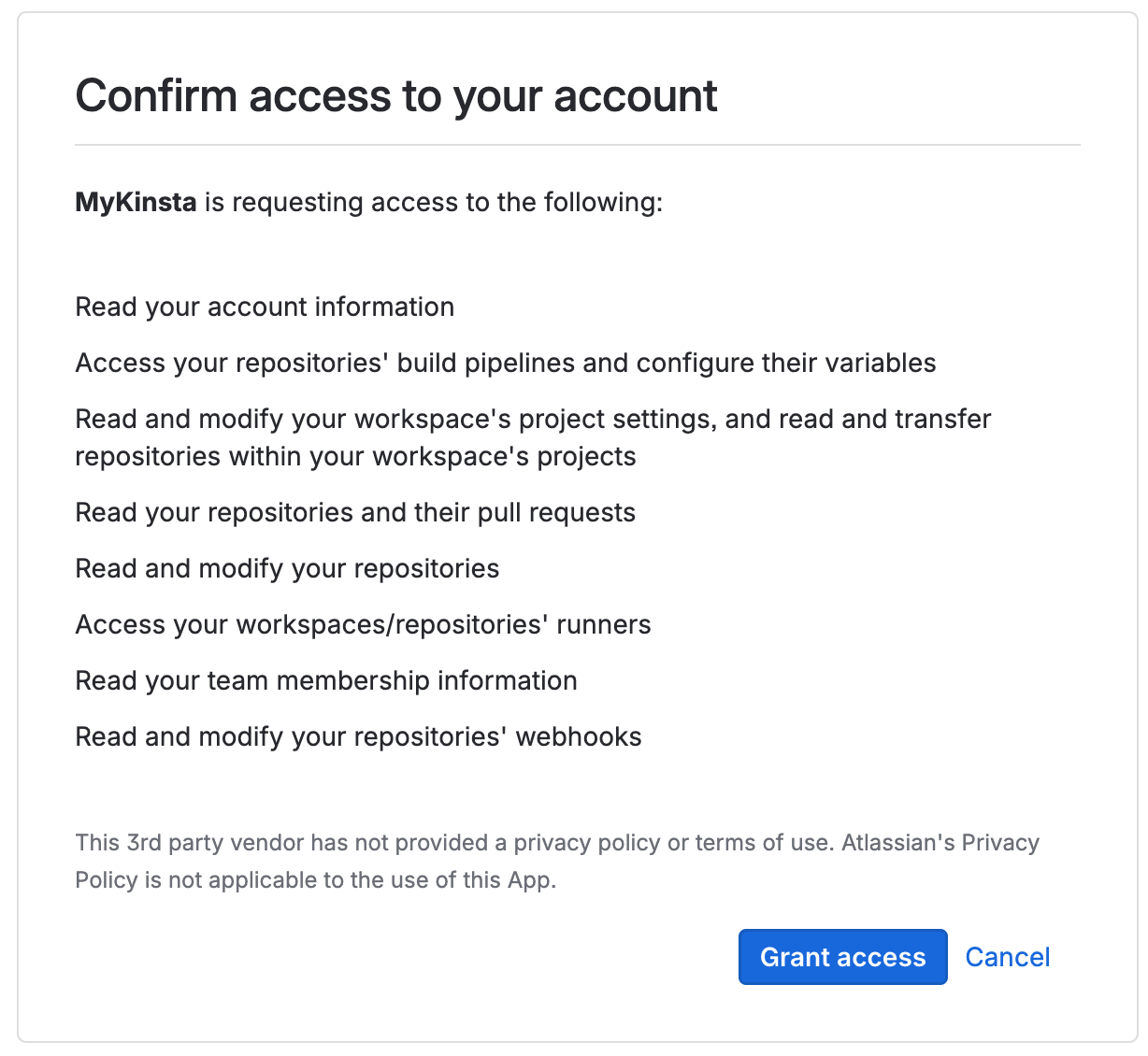
Sevalla connects to Bitbucket Cloud through an OAuth consumer named MyKinsta (Sevalla is a Kinsta product). Once you grant it access, Sevalla lists the repositories of every workspace you belong to, deploys from the one you pick, and adds a webhook to the repository so pushes and pull requests reach Sevalla.
## How the Bitbucket connection works
| Part | Detail |
| - | - |
| Hosting | Bitbucket Cloud (`bitbucket.org`) only. Bitbucket Data Center and Server can't be connected; deploy a repository from them as a [public repository](/git/overview#deploy-a-public-repository) if it's public. |
| Repositories listed | Every repository you're a member of, in every workspace you belong to, shown as `workspace/repository`. Workspaces you can't read are skipped. |
| Cloning | With the account of a Sevalla user who connected Bitbucket and can access the repository. Services keep deploying as long as one of those accounts stays connected. |
| Pushes and pull requests | Through a webhook Sevalla adds to the repository, described as `Kinsta Webhook` (push, commit status, and pull request created, merged and declined events) |
| Comments on pull requests | Posted with the account of a Sevalla user who connected Bitbucket |
## Connect Bitbucket
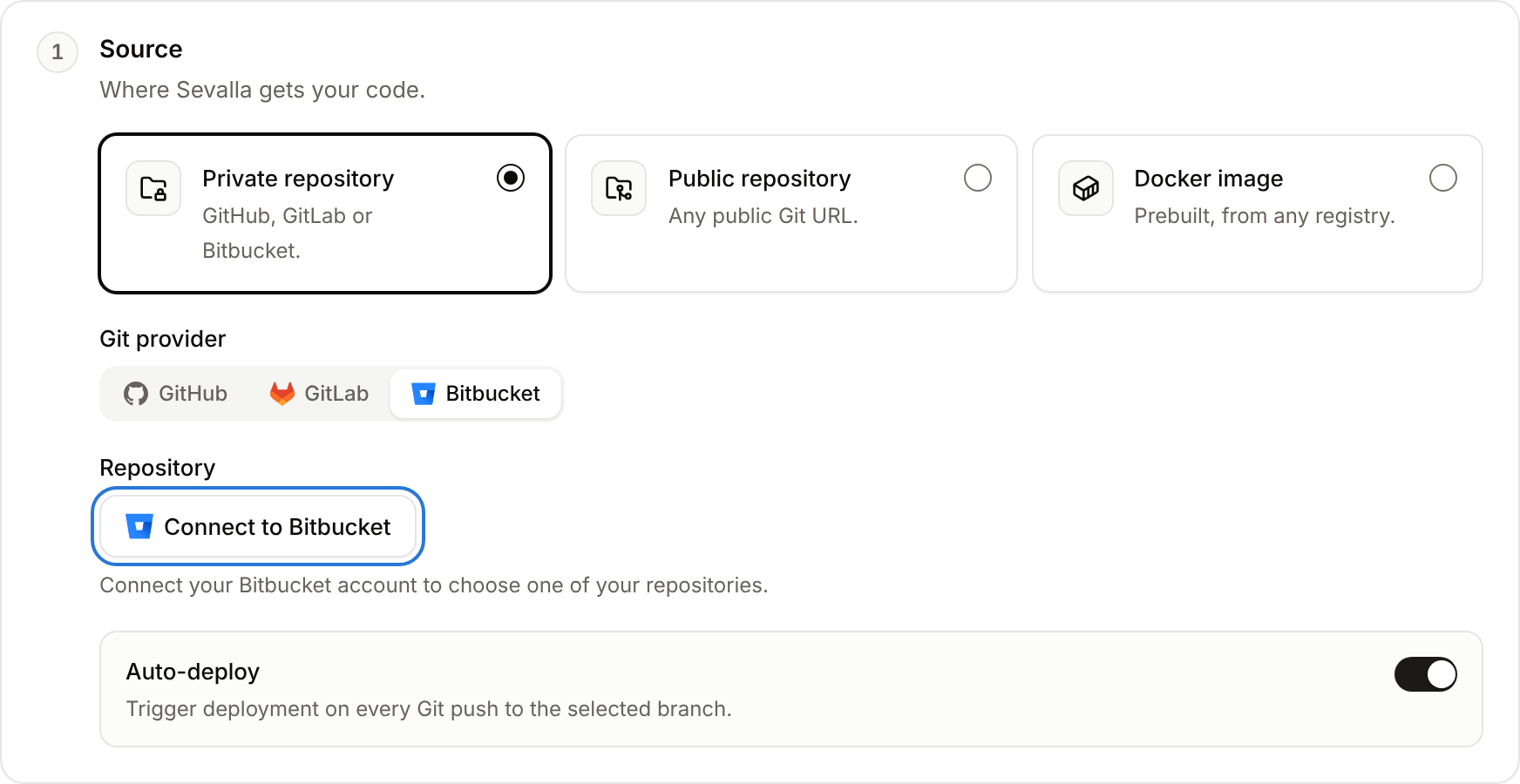
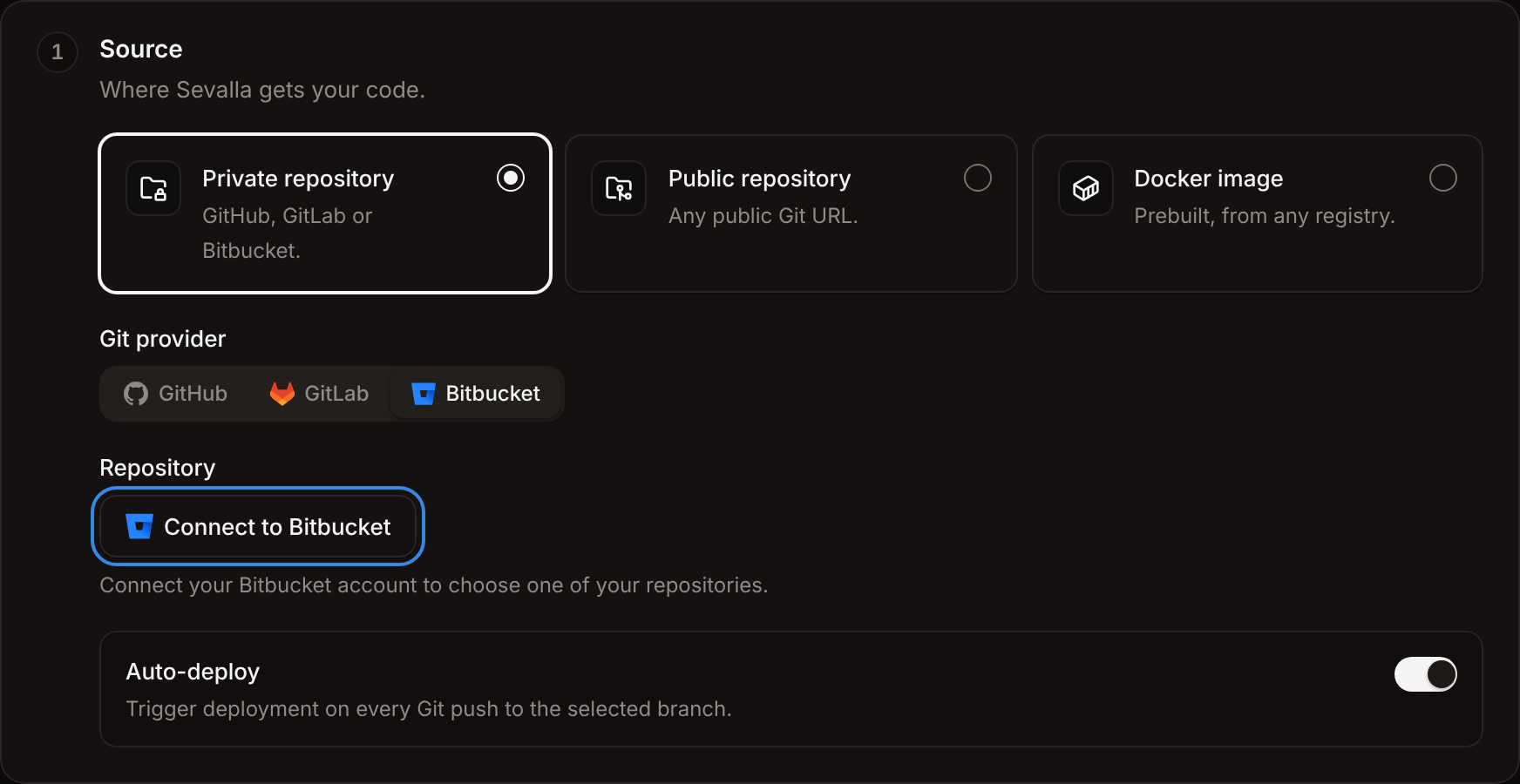
In the sidebar, click **Applications**, then click **Create** and **Application**. Under **Source**, keep **Private repository**, pick **Bitbucket**, then click **Connect to Bitbucket**. The same button shows when you create a static site or set up preview apps.
In the new tab, sign in to Bitbucket if needed. On **Confirm access to your account**, click **Grant access**.
Return to the Sevalla tab. It picks up the connection on its own; if it doesn't, click **Check again**.
 **Repository** now lists your Bitbucket repositories. If you create a repository while the page is open, click the refresh button next to **Repository**.
## Automatic deployments and the webhook
When you turn on automatic deployments for a service, or [preview apps](/pipelines/preview-apps) for a pipeline, Sevalla adds a webhook to the Bitbucket repository, or updates the one it added earlier. You can see it in the repository's **Repository settings** > **Webhooks**. Don't delete it: without it, pushes and pull requests don't reach Sevalla.
Bitbucket lets only repository admins add webhooks. At least one Sevalla user with admin permission on the repository must have connected Bitbucket, or the webhook isn't added and pushes don't deploy.
If pushes don't deploy, check that the webhook exists. To add it again, an admin of the repository connects Bitbucket to Sevalla, then you turn automatic deployments off and on again on the service: see [Deploy automatically on push](/applications/deployments#deploy-automatically-on-push) for applications and [static sites](/static-sites/deployments#deploy-automatically-on-push).
### Pull request preview apps
| On Bitbucket | In Sevalla |
| - | - |
| A pull request is created | With automatic creation on, a preview app is created for it |
| Commits are pushed to its source branch | The preview app redeploys |
| The pull request is merged or declined | The preview app is deleted |
The preview app's status and link are posted as a comment on the pull request. Bitbucket doesn't get deployment statuses from Sevalla.
## Limitations
Bitbucket pushes don't include the list of changed files, so deploy paths can't filter them:
| Service | With deploy paths set |
| - | - |
| Application | Every push is skipped (the deployment shows **Skipped**), and nothing deploys automatically. Remove the [deploy paths](/applications/deployments#deploy-only-when-some-files-change), or deploy by hand. |
| Static site | Every push deploys, whatever its [deploy paths](/static-sites/deployments#choose-which-changes-deploy). |
## Disconnect Bitbucket
In the user menu, click **My account**. In **Git login & repository access**, click **Revoke** on Bitbucket's **Repository access** line, then **Revoke** in the dialog.
If Bitbucket's **Login** is disabled too, Sevalla opens Bitbucket's **App authorizations** page (`https://bitbucket.org/account/settings/app-authorizations/`). Click **Revoke** next to **MyKinsta**.
Repositories that no other connected Sevalla user can access are disconnected, and Sevalla removes their webhooks if your account could manage them. Services that deploy from those repositories stop deploying. See [Revoke repository access](/git/overview#revoke-repository-access).
## If a repository is missing
| Cause | Fix |
| - | - |
| You aren't a member of the repository or its workspace | Ask for access on Bitbucket. |
| The repository was created after the page opened | Click the refresh button next to **Repository**. |
| The repository is on Bitbucket Data Center or Server | It can't be connected. Move it to Bitbucket Cloud, or deploy it as a public repository if it's public. |
| The list stays empty although you have access | In **My account**, revoke **Repository access** for Bitbucket, then [connect Bitbucket](#connect-bitbucket) again. |
For deployments that fail because a repository isn't available anymore, see [Troubleshoot builds and deployments](/applications/troubleshooting/builds-and-deployments).
## API and CLI
| Task | API | CLI |
| - | - | - |
| Get the Bitbucket connect URL | [List Git providers](https://api-docs.sevalla.com/v3/git/list-git-providers) | `sevalla git providers` |
This documentation is built and hosted on [Mintlify](https://mintlify.com), a developer documentation platform.
**Repository** now lists your Bitbucket repositories. If you create a repository while the page is open, click the refresh button next to **Repository**.
## Automatic deployments and the webhook
When you turn on automatic deployments for a service, or [preview apps](/pipelines/preview-apps) for a pipeline, Sevalla adds a webhook to the Bitbucket repository, or updates the one it added earlier. You can see it in the repository's **Repository settings** > **Webhooks**. Don't delete it: without it, pushes and pull requests don't reach Sevalla.
Bitbucket lets only repository admins add webhooks. At least one Sevalla user with admin permission on the repository must have connected Bitbucket, or the webhook isn't added and pushes don't deploy.
If pushes don't deploy, check that the webhook exists. To add it again, an admin of the repository connects Bitbucket to Sevalla, then you turn automatic deployments off and on again on the service: see [Deploy automatically on push](/applications/deployments#deploy-automatically-on-push) for applications and [static sites](/static-sites/deployments#deploy-automatically-on-push).
### Pull request preview apps
| On Bitbucket | In Sevalla |
| - | - |
| A pull request is created | With automatic creation on, a preview app is created for it |
| Commits are pushed to its source branch | The preview app redeploys |
| The pull request is merged or declined | The preview app is deleted |
The preview app's status and link are posted as a comment on the pull request. Bitbucket doesn't get deployment statuses from Sevalla.
## Limitations
Bitbucket pushes don't include the list of changed files, so deploy paths can't filter them:
| Service | With deploy paths set |
| - | - |
| Application | Every push is skipped (the deployment shows **Skipped**), and nothing deploys automatically. Remove the [deploy paths](/applications/deployments#deploy-only-when-some-files-change), or deploy by hand. |
| Static site | Every push deploys, whatever its [deploy paths](/static-sites/deployments#choose-which-changes-deploy). |
## Disconnect Bitbucket
In the user menu, click **My account**. In **Git login & repository access**, click **Revoke** on Bitbucket's **Repository access** line, then **Revoke** in the dialog.
If Bitbucket's **Login** is disabled too, Sevalla opens Bitbucket's **App authorizations** page (`https://bitbucket.org/account/settings/app-authorizations/`). Click **Revoke** next to **MyKinsta**.
Repositories that no other connected Sevalla user can access are disconnected, and Sevalla removes their webhooks if your account could manage them. Services that deploy from those repositories stop deploying. See [Revoke repository access](/git/overview#revoke-repository-access).
## If a repository is missing
| Cause | Fix |
| - | - |
| You aren't a member of the repository or its workspace | Ask for access on Bitbucket. |
| The repository was created after the page opened | Click the refresh button next to **Repository**. |
| The repository is on Bitbucket Data Center or Server | It can't be connected. Move it to Bitbucket Cloud, or deploy it as a public repository if it's public. |
| The list stays empty although you have access | In **My account**, revoke **Repository access** for Bitbucket, then [connect Bitbucket](#connect-bitbucket) again. |
For deployments that fail because a repository isn't available anymore, see [Troubleshoot builds and deployments](/applications/troubleshooting/builds-and-deployments).
## API and CLI
| Task | API | CLI |
| - | - | - |
| Get the Bitbucket connect URL | [List Git providers](https://api-docs.sevalla.com/v3/git/list-git-providers) | `sevalla git providers` |
This documentation is built and hosted on [Mintlify](https://mintlify.com), a developer documentation platform.