> ## Documentation Index
> Fetch the complete documentation index at: https://docs.sevalla.com/llms.txt
> Use this file to discover all available pages before exploring further.
> ## Agent Instructions
> These are the docs for Sevalla, a platform for deploying applications, databases, static sites, object storage and load balancers. The dashboard is at https://app.sevalla.com.
> Bold text in steps is an exact dashboard label.
> To act on a Sevalla account, prefer the Sevalla MCP server (https://mcp.sevalla.com/mcp, see https://docs.sevalla.com/ai-agents/overview.md), then the Sevalla CLI (https://docs.sevalla.com/developer-tools/cli.md), then the REST API (https://api-docs.sevalla.com, OpenAPI spec at https://api.sevalla.com/v3/openapi.json).
> Every page index is at https://docs.sevalla.com/llms.txt.
# Deploy a Dash application
> Deploy a Plotly Dash 4.5 app to Sevalla with Gunicorn: how Ingot finds the Flask server, callbacks over HTTPS, health checks, scaling and a Dockerfile.
A Dash app runs on Sevalla as an application. Dash is built on Flask, so [Ingot](https://docs.sevalla.com/applications/builds/ingot.md), Sevalla's builder, treats it as a Flask application: it installs `requirements.txt`, finds the Flask server that `app.py` creates and starts it with Gunicorn in the web process, on the port in the `PORT` environment variable. Every callback is an HTTP request to `/_dash-update-component`, so the app needs no WebSocket and no sticky sessions.
## At a glance
| | |
| - | - |
| Source | A Git repository |
| Build | [Ingot](https://docs.sevalla.com/applications/builds/ingot.md) (Python 3.14, pip), or the [Dockerfile](#deploy-with-a-dockerfile) |
| Start command | `gunicorn -c /etc/ingot/gunicorn.conf.py app:server`, which Ingot detects from `server = Flask(__name__)` in `app.py` |
| Port | The `PORT` environment variable, `8080` by default |
| Processes | Web process |
| Services | None |
| Disk | None |
| Health check | `GET /healthz` returns `200` with `ok` (readiness probe) |
| Size | **H1** for the web process |
### Environment variables
| Variable | Required | Available during | Secret | Value |
| - | - | - | - | - |
| `WEB_CONCURRENCY` | No | Runtime | No | Gunicorn worker processes, `1` when unset. Raise it on sizes larger than **H1** |
| `PORT` | No | Runtime | No | Set by Sevalla to the web process port |
## Before you begin
* A Sevalla company with a payment method, and a GitHub, GitLab or Bitbucket account for the repository. See [Git providers](https://docs.sevalla.com/git/overview.md).
* Python 3.14 on your computer.
## Create the project
Create a virtual environment and install Dash and Gunicorn:
```bash theme={"theme":{"light":"github-dark-default","dark":"github-dark-default"}}
mkdir sales-dashboard && cd sales-dashboard
python3 -m venv .venv
source .venv/bin/activate
pip install dash gunicorn
```
| Package | What it does |
| - | - |
| `dash` | Dash 4.5, with Flask 3.1 and Plotly 7.1 |
| `gunicorn` | The production WSGI server. Ingot starts the web process with it when it's installed. |
Keep local files out of the repository:
```text .gitignore theme={"theme":{"light":"github-dark-default","dark":"github-dark-default"}}
.venv/
__pycache__/
```
Create the app, a bar chart that a dropdown updates through a callback:
```python app.py theme={"theme":{"light":"github-dark-default","dark":"github-dark-default"}}
import plotly.graph_objects as go
from dash import Dash, Input, Output, dcc, html
from flask import Flask
MONTHS = ["Jul", "Aug", "Sep", "Oct"]
SALES = {"Mugs": [120, 135, 160, 150], "Shirts": [80, 95, 90, 110]}
server = Flask(__name__)
app = Dash(__name__, server=server, title="Storefront sales")
app.layout = html.Div(
[
html.H1("Storefront sales"),
dcc.Dropdown(list(SALES), "Mugs", id="product", clearable=False),
dcc.Graph(id="chart"),
]
)
@app.callback(Output("chart", "figure"), Input("product", "value"))
def update_chart(product):
return go.Figure(go.Bar(x=MONTHS, y=SALES[product]))
@server.get("/healthz")
def healthz():
return "ok"
if __name__ == "__main__":
app.run(debug=True)
```
Run `python app.py` and open `http://127.0.0.1:8050`. The page shows **Storefront sales** and a chart; choose **Shirts** and the chart changes. Press `Ctrl+C` to stop it.
## Prepare the project for Sevalla
### Create the Flask server in app.py
Ingot has no Dash detection of its own. Dash depends on Flask, so Ingot treats the project as a Flask application, looks for a Flask object created at the top level of `main.py`, `app.py` or another common module, and serves it with Gunicorn. `server = Flask(__name__)` is that object, and Dash's `server` argument runs the app on it instead of on a Flask object of its own.
Many Dash apps write `server = app.server` instead. That's the same Flask object, but Ingot can't see it without running the code, so it runs `python app.py`, Dash's development server, which listens on `127.0.0.1` only: see [Troubleshoot](#troubleshoot).
`app.run(debug=True)` sits under `if __name__ == "__main__":`, so it runs only when you start the file yourself. Gunicorn imports `app.py` without running it, so Dash's debug tools and hot reload stay off in production.
### Pin the Python version
Ingot builds on Python 3.14, its default line, unless the project sets a version. Pin the version you develop with in `.python-version`, so the build doesn't change when a new Ingot release moves its default line:
```text .python-version theme={"theme":{"light":"github-dark-default","dark":"github-dark-default"}}
3.14
```
See [Pin the Python version](https://docs.sevalla.com/guides/python/overview.md#pin-the-python-version).
### List the dependencies
Ingot installs `requirements.txt` with pip, into a virtual environment at `/app/.venv` that's on the `PATH`:
```bash theme={"theme":{"light":"github-dark-default","dark":"github-dark-default"}}
pip freeze > requirements.txt
```
`pip freeze` lists Flask, which Dash installed. Ingot looks for the Flask server only when Flask is in `requirements.txt`, so keep it there if you write the file by hand.
| File | Why Sevalla needs it |
| - | - |
| `app.py` | Creates the Flask server that Ingot finds and Gunicorn serves, `app:server`. |
| `requirements.txt` | Ingot installs the exact versions in it, and reads Flask and Gunicorn from it to choose the start command. |
| `.python-version` | Ingot builds on the Python line it names, 3.14. |
### How Ingot starts the app
Ingot starts the web process with `gunicorn -c /etc/ingot/gunicorn.conf.py app:server`, which the build plan shows in its **Start** row:
* Gunicorn listens on `0.0.0.0` and the port in the `PORT` environment variable, which Sevalla sets to the web process's port (`8080` by default).
* Ingot's Gunicorn settings run 1 worker process with 4 threads, so 4 callbacks run at once, and give requests 20 seconds to finish after `SIGTERM`. On a larger size, set the `WEB_CONCURRENCY` environment variable to the number of worker processes, for example `2`: Gunicorn reads it at start.
* Dash serves its JavaScript and CSS from the app itself, so no build step and no static file server are needed.
To start Gunicorn with other options, set the web process's start command; see [Set the start command](https://docs.sevalla.com/applications/builds/ingot.md#set-the-start-command).
Commit everything and push it to your Git provider:
```bash theme={"theme":{"light":"github-dark-default","dark":"github-dark-default"}}
git init
git add .
git commit -m "Prepare for Sevalla"
git branch -M main
git remote add origin https://github.com/acme/sales-dashboard.git
git push -u origin main
```
## Deploy to Sevalla
These steps build with [Ingot](https://docs.sevalla.com/applications/builds/ingot.md). To build from your own Dockerfile instead, see [Deploy with a Dockerfile](#deploy-with-a-dockerfile).
**1. Create the application**
In the sidebar, click **Applications**, then click **Create** > **Application**. Under **Source**, click **Private repository**, then choose the **Git provider**, the **Repository** and the **Branch**. Under **Location**, choose a **Data center**. Keep the **Size** at **H1** or choose a larger one, then click **Create application**. The application opens on its **Overview** tab with the status **Not deployed yet**: creating an application doesn't deploy it.
**2. Deploy**
Click the **Overview** tab, then click **Deploy now** under **Recent deployments**. Check the **Branch** and click **Deploy**.
**3. Turn on auto-deploy**
To deploy every push to the branch automatically, click the **Settings** tab, then click **Update auto-deploy** in the **Auto-deploy** section. Turn on **Auto-deploy** and click **Update auto-deploy**. See [Deployments](https://docs.sevalla.com/applications/deployments.md#deploy-automatically-on-push).
## Verify the deployment
1. On the **Deployments** tab, click the deployment. Its **Build log** shows Ingot's [build plan](https://docs.sevalla.com/applications/builds/ingot.md#read-the-build-plan): Python 3.14 from `.python-version`, pip from `requirements.txt`, and Flask with the Gunicorn command for `app:server`.
```text Build log theme={"theme":{"light":"github-dark-default","dark":"github-dark-default"}}
╭─ ■ Flask · Python 3.14 ─────────────────────────────────────────────────────────────────────╮
│ Python 3.14 .python-version "3.14" │
│ Package manager pip requirements.txt │
│ Framework Flask app.py │
│ Start gunicorn -c /etc/ingot/gunicorn.conf.py app:server Flask │
├─ Image ─────────────────────────────────────────────────────────────────────────────────────┤
│ Build python:3.14-slim-trixie │
│ Runtime python:3.14-slim-trixie │
│ User 1000:1000 │
│ Init tini │
│ Port $PORT, default 8080 │
╰────────────────────────────────────────────────────────────────────────────── Ingot v0.4.1 ─╯
```
2. Wait for the deployment's status to change to **Deployed**. The application's status next to its name changes to **Running**, and the web process's [runtime logs](https://docs.sevalla.com/applications/logs.md) show `Listening at: http://0.0.0.0:8080` and `Using worker: gthread`.
3. Click the domain under the application's name, for example `sales-dashboard-x7k2m.sevalla.app`. The page shows **Storefront sales** and the chart; choose **Shirts** and the chart changes, which means the callback ran on the server.
4. Check the page, the health route and a callback from a terminal, with your application's domain. The last command sends the request that the browser sends when you choose **Shirts**, and prints the chart's values:
```bash theme={"theme":{"light":"github-dark-default","dark":"github-dark-default"}}
curl -s https://sales-dashboard-x7k2m.sevalla.app/ | grep -o '.*'
curl -s https://sales-dashboard-x7k2m.sevalla.app/healthz; echo
curl -s https://sales-dashboard-x7k2m.sevalla.app/_dash-update-component \
-H "Content-Type: application/json" \
-d '{"output":"chart.figure","outputs":{"id":"chart","property":"figure"},"inputs":[{"id":"product","property":"value","value":"Shirts"}],"changedPropIds":["product.value"]}' \
| jq -c '.response.chart.figure.data[0].y'
```
```text theme={"theme":{"light":"github-dark-default","dark":"github-dark-default"}}
Storefront sales
ok
[80,95,90,110]
```
5. To check the deployment through the API, use `APP_ID` and `DEPLOYMENT_ID` from [Deploy with the API](#deploy-with-the-api). [Get deployment](https://api-docs.sevalla.com/v3/applications/get-deployment) (`getDeploymentV3`) returns the status, and [Get application deployment logs](https://api-docs.sevalla.com/v3/applications/get-application-deployment-logs) (`getApplicationDeploymentLogsV3`) returns the build log, which `search` filters:
```bash theme={"theme":{"light":"github-dark-default","dark":"github-dark-default"}}
curl -s https://api.sevalla.com/v3/applications/$APP_ID/deployments/$DEPLOYMENT_ID \
-H "Authorization: Bearer $SEVALLA_API_KEY" | jq -r .status
curl -s "https://api.sevalla.com/v3/applications/$APP_ID/deployments/$DEPLOYMENT_ID/logs?search=has%20been" \
-H "Authorization: Bearer $SEVALLA_API_KEY" | jq -r '.[].message'
```
```text theme={"theme":{"light":"github-dark-default","dark":"github-dark-default"}}
success
🚀 Web has been deployed successfully.
```
The log's messages carry terminal color codes around the text. The CLI has `sevalla apps deployments get` and `sevalla apps deployments logs`, and the MCP server `get_deployment` and `get_deployment_logs`.

If the deployment fails, read its build log, then see [Troubleshoot](#troubleshoot) and [Troubleshoot Ingot builds](https://docs.sevalla.com/applications/builds/ingot.md#troubleshoot-ingot-builds).
## Add a health check
Without a readiness probe, a new instance receives traffic as soon as its container starts, before Gunicorn has imported the app. Point the probe at `/healthz`, the Flask route in `app.py`, which returns `ok`:
**1. Open the web process**
On the application's **Processes** tab, click **⋯** on the **Web** process, then click **Update process**.
**2. Turn on the readiness probe**
Under **Health checks**, turn on **Readiness probe** and set the **Path** to `/healthz`. Keep the **Port** at the web process's port, `8080` unless you changed it.
**3. Save and deploy**
Click **Update process**, then click **Deploy** in the undeployed changes bar at the bottom of the page.
The deployment reaches **Deployed** once the new instance passes the probe. See [Health checks](https://docs.sevalla.com/applications/processes.md#health-checks).
[Deploy with the API](#deploy-with-the-api) sets the same probe. [Get process](https://api-docs.sevalla.com/v3/applications/get-process) (`getProcessV3`) returns it in `readiness_probe`:
```bash theme={"theme":{"light":"github-dark-default","dark":"github-dark-default"}}
curl -s https://api.sevalla.com/v3/applications/$APP_ID/processes/$WEB_ID \
-H "Authorization: Bearer $SEVALLA_API_KEY" | jq -c .readiness_probe
```
```json theme={"theme":{"light":"github-dark-default","dark":"github-dark-default"}}
{"httpGet":{"path":"/healthz","port":8080,"scheme":"HTTP"},"initialDelaySeconds":0,"periodSeconds":10,"timeoutSeconds":1,"successThreshold":1,"failureThreshold":3}
```
## Scale the app
Dash keeps no session on the server: each callback request carries the inputs it needs, so any worker process on any instance can answer it. Scale in two ways:
* **More instances.** On the **Processes** tab, raise the web process's instance count, or turn on autoscaling. Sevalla spreads requests across the instances with no sticky sessions, which Dash doesn't need. See [Scaling](https://docs.sevalla.com/applications/scaling.md).
* **More worker processes per instance.** Set the `WEB_CONCURRENCY` environment variable, for example to `2`. With 2 instances on **H1** and `WEB_CONCURRENCY` set to `2`, each instance used about 140 MB of its 0.3 GB.
Each worker process has its own memory, so a value that one callback stores in a global variable isn't there for the next callback, which can run in another process. Keep per-user data in the browser with `dcc.Store`, and shared data in a [database](https://docs.sevalla.com/databases/overview.md).
## Deploy with a Dockerfile
Ingot needs no Dockerfile. Write your own when you want full control of the image: the base image, the system packages and every layer. Add a `Dockerfile` and a `.dockerignore` to the root of the repository:
```dockerfile Dockerfile theme={"theme":{"light":"github-dark-default","dark":"github-dark-default"}}
FROM python:3.14-slim-trixie
ENV PYTHONUNBUFFERED=1 \
PORT=8080
RUN useradd --uid 1000 --create-home app
WORKDIR /app
COPY requirements.txt .
RUN pip install --no-cache-dir --root-user-action=ignore -r requirements.txt
COPY . .
RUN python -m compileall -q .
USER 1000:1000
EXPOSE 8080
CMD ["gunicorn", "app:server", \
"--threads", "4", "--keep-alive", "0", \
"--graceful-timeout", "20", "--worker-tmp-dir", "/dev/shm"]
```
| Line or choice | Why |
| - | - |
| `python:3.14-slim-trixie` | The Python line that `.python-version` pins, on Debian 13, as Ingot builds it. A line tag picks up each patch release and security fix when you deploy again; a digest would stay on one release. |
| One stage | pip installs prebuilt wheels, so the build needs no compiler and leaves nothing to clean up. |
| `requirements.txt` before the code | Docker reuses the installed packages until `requirements.txt` changes, so a code change rebuilds only the last layers. |
| `pip install` into the image's Python | The image runs one application, so it needs no virtual environment. `--root-user-action=ignore` silences pip's warning about installing as root. |
| `compileall` | Compiles the code at build time, because the app can't write to `/app` when it runs. |
| `useradd` and `USER 1000:1000` | Runs Gunicorn as an unprivileged user with a home directory, where Gunicorn keeps its control socket. The code stays owned by root, so the app can't change it. |
| Gunicorn options | Gunicorn listens on `0.0.0.0` and the port in `PORT` on its own, and reads `WEB_CONCURRENCY`. `--threads 4`, `--graceful-timeout 20` and `--worker-tmp-dir /dev/shm` match Ingot's settings. `--keep-alive 0` closes each connection after its response: otherwise Gunicorn 26.2 waits out the whole graceful timeout before it stops when the proxy holds an idle connection open. |
| No init process | Gunicorn runs as PID 1, handles `SIGTERM` itself, finishes the callbacks in progress and exits. |
```text .dockerignore theme={"theme":{"light":"github-dark-default","dark":"github-dark-default"}}
.git
.venv
**/__pycache__
.env*
Dockerfile
.dockerignore
```
Commit and push both files. Ingot doesn't use the `Dockerfile`, so you can keep it in a repository that builds with Ingot, but it adds the `.dockerignore` patterns to its own: its build plan shows an **Ignored** row with `6 patterns from .dockerignore`. Then switch the application to the Dockerfile build strategy:
**1. Choose the Dockerfile build strategy**
On the application's **Settings** tab, in the **Build strategy** section, click **Update build strategy**. Click **Dockerfile**, keep the **Dockerfile path** `Dockerfile` and the **Docker context** `.`, then click **Update build strategy**.
**2. Deploy**
Click the **Overview** tab, then click **Deploy now** under **Recent deployments**. Check the **Branch** and click **Deploy**.
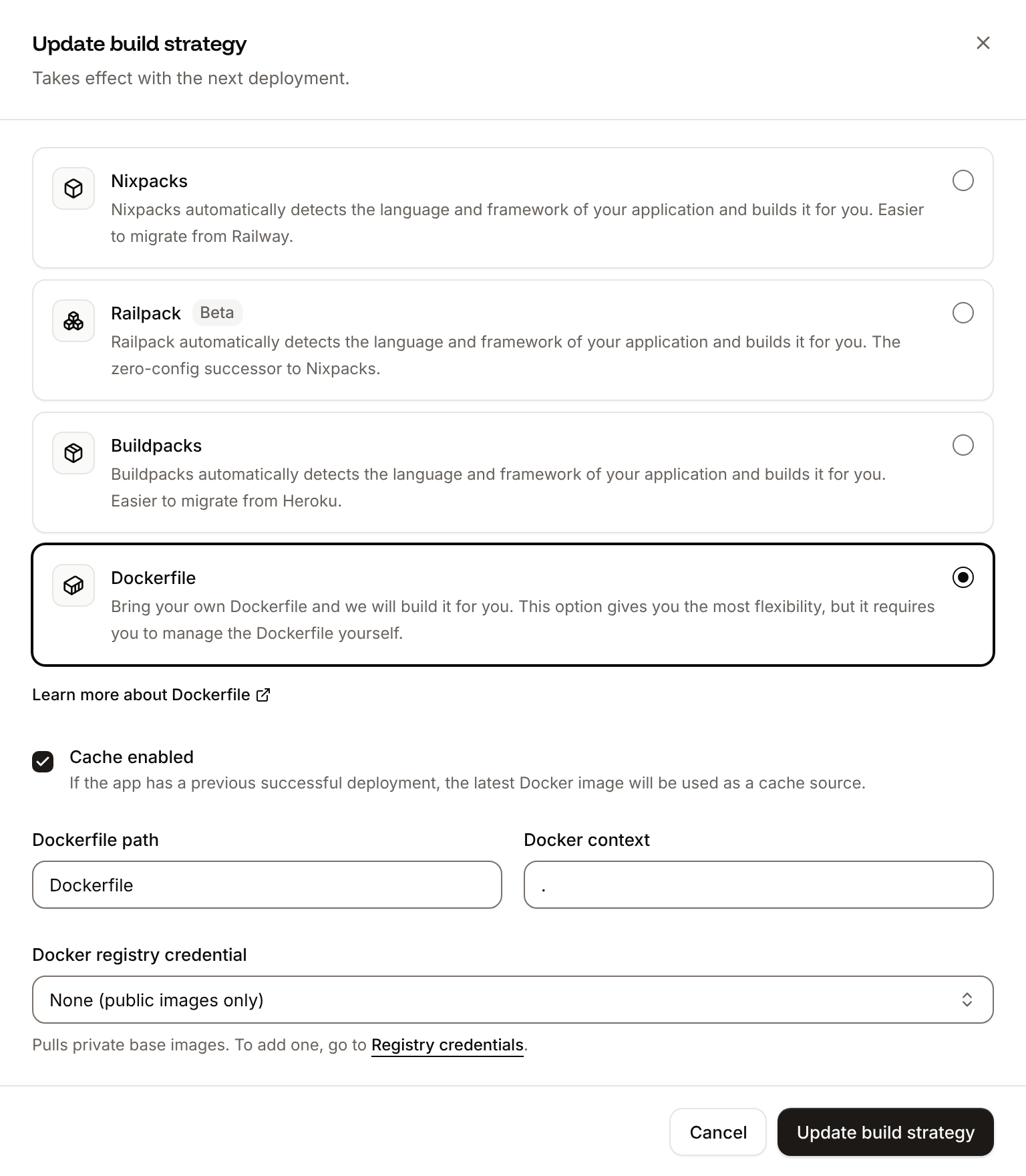
The build log shows `📦 Building and pushing docker image using Dockerfile...` where Ingot's build plan was. The checks in [Verify the deployment](#verify-the-deployment) print the same output, and the deployment's **Dockerfile** tab shows your Dockerfile. When an instance stops, its runtime logs end with `Shutting down: Master`. See [Dockerfile](https://docs.sevalla.com/applications/builds/dockerfile.md), and [Build from the Dockerfile with the API](#build-from-the-dockerfile-with-the-api) to switch with the API.
## Deploy changes
With **Auto-deploy** on, every push to the branch starts a deployment; otherwise, click **Deploy now** for each change. Each deployment builds the image, then replaces the web process's instances. After you install a package, run `pip freeze > requirements.txt` again and commit it. See [Deployments](https://docs.sevalla.com/applications/deployments.md).
## Use environment variables
Keep API keys and connection strings in [environment variables](https://docs.sevalla.com/applications/environment-variables.md) and read them with `os.environ`, for example `os.environ["SALES_API_TOKEN"]` in a callback. Variables apply at the next deployment.
## Add a custom domain
To serve the app from your own domain, such as `dashboard.example.com`, add the domain on the application's **Domains** tab and create the DNS records that Sevalla shows. Dash and Flask accept any host by default, so no code change is needed. Custom domains need a web process larger than **H1**, so [scale](https://docs.sevalla.com/applications/scaling.md) the web process first. See [Custom domains](https://docs.sevalla.com/domains/overview.md).
## Troubleshoot
| Symptom | Cause | Fix |
| - | - | - |
| The build plan's **Start** row shows `python app.py`, and the build log warns `Flask is a dependency, but no module Ingot searches creates its application at the top level, so the image runs app.py`. The runtime logs show `Dash is running on http://127.0.0.1:8080/`, and with the readiness probe the deployment ends with `Failed to deploy Web.` | `app.py` gets the Flask server with `server = app.server`, which Ingot can't see, so the image runs Dash's development server. It listens on `127.0.0.1`, which nothing outside the container reaches. | Create the server with `server = Flask(__name__)` and pass it to `Dash(server=server)`, as in [Create the Flask server in app.py](#create-the-flask-server-in-app-py), then push. |
| The build plan's **Start** row shows `python app.py`, without the warning | `requirements.txt` doesn't list Flask, so Ingot doesn't look for a Flask server. | Run `pip freeze > requirements.txt` and push. |
| The access logs show `200` for paths such as `/.env` or `/wp-config.php` | Dash answers every path it has no route for with its own page, so that multi-page apps can route in the browser. Scanners request such paths on every new domain. | Nothing leaks: the response is the app's HTML. `curl -s https://sales-dashboard-x7k2m.sevalla.app/.env \| grep -o '.*'` prints `Storefront sales`. |
| The runtime logs show `dash.exceptions.DependencyException: "dash" is registered but the path requested is not valid.` | A request for a file under `/_dash-component-suites/` that the installed Dash doesn't have, as scanners send. Dash answers `500`. | Nothing to fix when the path isn't one your pages load. If the app's own pages fail to load a component, check that `requirements.txt` has the Dash version you tested. |
For more causes, see [Troubleshoot Ingot builds](https://docs.sevalla.com/applications/builds/ingot.md#troubleshoot-ingot-builds) and [Troubleshoot builds and deployments](https://docs.sevalla.com/applications/troubleshooting/builds-and-deployments.md).
## Deploy with the API
These calls make the same deployment as [Deploy to Sevalla](#deploy-to-sevalla) and [Add a health check](#add-a-health-check), in an order that a script or an AI agent runs as it is. Each step names the [Sevalla API](https://docs.sevalla.com/developer-tools/api.md) operation, then the [CLI](https://docs.sevalla.com/developer-tools/cli.md) command and the [MCP server](https://docs.sevalla.com/ai-agents/overview.md) tool that do the same. You need:
* An [API key](https://docs.sevalla.com/developer-tools/api-keys.md) with the **Company developer** role, or the `APP:CREATE`, `APP:READ` and `APP:UPDATE` permissions, in the `SEVALLA_API_KEY` environment variable. The CLI reads the key from `SEVALLA_API_TOKEN`.
* The repository on a Git provider that's connected to your Sevalla account. See [Git providers](https://docs.sevalla.com/git/overview.md). Creating the application checks it: when Sevalla can't read the repository, the call returns `400` with `Cannot access repository https://github.com/acme/sales-dashboard: Repository not found or you don't have access.`, followed by where to grant access.
* `curl` and `jq`.
**1. Choose the location**
[List clusters](https://api-docs.sevalla.com/v3/resources/list-clusters) (`listClustersV3`) returns the locations your company can use, each with its `id`, the `display_name` that the dashboard shows and its region ID in `location`. Keep the ID of the one you want by its region ID, such as `eu-frankfurt-1` for Frankfurt, Germany. [Locations](https://docs.sevalla.com/platform/locations.md) lists them all:
```bash theme={"theme":{"light":"github-dark-default","dark":"github-dark-default"}}
CLUSTER_ID=$(curl -s https://api.sevalla.com/v3/resources/clusters \
-H "Authorization: Bearer $SEVALLA_API_KEY" \
| jq -r '.[] | select(.location == "eu-frankfurt-1") | .id')
```
CLI: `sevalla resources clusters`. MCP: `get_platform_options`.
**2. Create the application**
[Create application](https://api-docs.sevalla.com/v3/applications/create-application) (`createApplicationV3`) creates the application with a web process and auto-deploy off. It builds with Ingot (`build_type` is `ingot`) and isn't deployed yet:
```bash theme={"theme":{"light":"github-dark-default","dark":"github-dark-default"}}
APP_ID=$(curl -s -X POST https://api.sevalla.com/v3/applications \
-H "Authorization: Bearer $SEVALLA_API_KEY" \
-H "Content-Type: application/json" \
-d '{"display_name":"sales-dashboard","cluster_id":"'"$CLUSTER_ID"'","source":"privateGit","git_type":"github","repo_url":"https://github.com/acme/sales-dashboard","default_branch":"main"}' \
| jq -r .id)
```
CLI: `sevalla apps create --name sales-dashboard --cluster $CLUSTER_ID --source privateGit --git-type github --repository https://github.com/acme/sales-dashboard --branch main`. MCP: `create_application` with `deploy` set to `false`.
**3. Find the domain**
[List application domains](https://api-docs.sevalla.com/v3/applications/list-application-domains) (`listApplicationDomainsV3`) returns the domain that Sevalla gives the application. It appears a few seconds after the application is created, so ask until it's there:
```bash theme={"theme":{"light":"github-dark-default","dark":"github-dark-default"}}
for i in $(seq 1 24); do
HOST=$(curl -s https://api.sevalla.com/v3/applications/$APP_ID/domains \
-H "Authorization: Bearer $SEVALLA_API_KEY" | jq -r '.data[]? | select(.is_primary) | .name')
[ -n "$HOST" ] && break
sleep 5
done
echo "$HOST"
```
```text theme={"theme":{"light":"github-dark-default","dark":"github-dark-default"}}
sales-dashboard-x7k2m.sevalla.app
```
CLI: `sevalla apps domains list --app-id $APP_ID`. MCP: `get_application`.
**4. Find the web process**
[List processes](https://api-docs.sevalla.com/v3/applications/list-processes) (`listProcessesV3`) returns the web process that the application was created with:
```bash theme={"theme":{"light":"github-dark-default","dark":"github-dark-default"}}
WEB_ID=$(curl -s https://api.sevalla.com/v3/applications/$APP_ID/processes \
-H "Authorization: Bearer $SEVALLA_API_KEY" \
| jq -r '.data[] | select(.type == "web") | .id')
```
CLI: `sevalla apps processes list --app-id $APP_ID`. MCP: `get_application`.
**5. Find the H1 size**
[List process resource types](https://api-docs.sevalla.com/v3/resources/list-process-resource-types) (`listProcessResourceTypesV3`) returns the sizes by `name`, in lowercase:
```bash theme={"theme":{"light":"github-dark-default","dark":"github-dark-default"}}
H1_ID=$(curl -s https://api.sevalla.com/v3/resources/process-resource-types \
-H "Authorization: Bearer $SEVALLA_API_KEY" \
| jq -r '.[] | select(.name == "h1") | .id')
```
CLI: `sevalla resources process-types`. MCP: `get_platform_options`.
**6. Set the size and the readiness probe**
The API creates the web process at **S1**, where the dashboard's default is **H1**. [Update process](https://api-docs.sevalla.com/v3/applications/update-process) (`updateProcessV3`) sets the size and adds the readiness probe from [Add a health check](#add-a-health-check), with the dashboard's default timings. Send `timeoutSeconds`: a probe without it gets 120 seconds, where the dashboard sets 1.
```bash theme={"theme":{"light":"github-dark-default","dark":"github-dark-default"}}
curl -s -X PATCH https://api.sevalla.com/v3/applications/$APP_ID/processes/$WEB_ID \
-H "Authorization: Bearer $SEVALLA_API_KEY" \
-H "Content-Type: application/json" \
-d '{"resource_type_id":"'"$H1_ID"'","readiness_probe":{"httpGet":{"path":"/healthz","port":8080,"scheme":"HTTP"},"initialDelaySeconds":0,"periodSeconds":10,"timeoutSeconds":1,"successThreshold":1,"failureThreshold":3}}' \
| jq -c '{resource_type_name, readiness: .readiness_probe.httpGet.path, timeout: .readiness_probe.timeoutSeconds}'
```
```json theme={"theme":{"light":"github-dark-default","dark":"github-dark-default"}}
{"resource_type_name":"h1","readiness":"/healthz","timeout":1}
```
CLI: `sevalla apps processes update $WEB_ID --app-id $APP_ID --resource-type $H1_ID` sets the size; the CLI can't set probes. MCP: `scale_process` with `size_id` for the size, and `sevalla_api_update` with `updateProcessV3` and the same body for the probe.
**7. Turn on auto-deploy**
[Update application](https://api-docs.sevalla.com/v3/applications/update-application) (`updateApplicationV3`) turns on automatic deployments for every push to the branch:
```bash theme={"theme":{"light":"github-dark-default","dark":"github-dark-default"}}
curl -s -X PATCH https://api.sevalla.com/v3/applications/$APP_ID \
-H "Authorization: Bearer $SEVALLA_API_KEY" \
-H "Content-Type: application/json" \
-d '{"auto_deploy":true}' | jq .auto_deploy
```
```text theme={"theme":{"light":"github-dark-default","dark":"github-dark-default"}}
true
```
CLI: `sevalla apps update $APP_ID --data '{"auto_deploy":true}'`. MCP: `sevalla_api_update` with `updateApplicationV3`.
**8. Deploy**
[Trigger deployment](https://api-docs.sevalla.com/v3/applications/trigger-deployment) (`triggerDeploymentV3`) deploys the latest commit on the branch:
```bash theme={"theme":{"light":"github-dark-default","dark":"github-dark-default"}}
DEPLOYMENT_ID=$(curl -s -X POST https://api.sevalla.com/v3/applications/$APP_ID/deployments \
-H "Authorization: Bearer $SEVALLA_API_KEY" \
-H "Content-Type: application/json" \
-d '{}' | jq -r .id)
```
CLI: `sevalla apps deployments trigger $APP_ID`. MCP: `trigger_deployment`.
**9. Wait for the deployment**
[Get deployment](https://api-docs.sevalla.com/v3/applications/get-deployment) (`getDeploymentV3`) returns the deployment's `status`: `waiting` and `inProgress` while it runs, then `success` or `failed`. Poll it every 15 seconds, for up to 30 minutes, until the status is final:
```bash theme={"theme":{"light":"github-dark-default","dark":"github-dark-default"}}
for i in $(seq 1 120); do
STATUS=$(curl -s "https://api.sevalla.com/v3/applications/$APP_ID/deployments/$DEPLOYMENT_ID" \
-H "Authorization: Bearer $SEVALLA_API_KEY" | jq -r '.status // empty')
case $STATUS in success|failed|cancelled|skipped) break ;; esac
sleep 15
done
echo "$STATUS"
```
```text theme={"theme":{"light":"github-dark-default","dark":"github-dark-default"}}
success
```
CLI: `sevalla apps deployments get $DEPLOYMENT_ID --app-id $APP_ID`. MCP: `get_deployment`.
**10. Read the build log**
[Get application deployment logs](https://api-docs.sevalla.com/v3/applications/get-application-deployment-logs) (`getApplicationDeploymentLogsV3`) returns the build log, oldest line first: the build plan from [Verify the deployment](#verify-the-deployment), the build and the rollout, which ends with `Web has been deployed successfully.` When the status is `failed`, the last lines say why. Without `limit`, the call returns the latest 1,000 lines, so a longer log loses its start; `5000` is the most it allows.
```bash theme={"theme":{"light":"github-dark-default","dark":"github-dark-default"}}
curl -s "https://api.sevalla.com/v3/applications/$APP_ID/deployments/$DEPLOYMENT_ID/logs?limit=5000" \
-H "Authorization: Bearer $SEVALLA_API_KEY" | jq -r '.[].message'
```
CLI: `sevalla apps deployments logs $DEPLOYMENT_ID --app-id $APP_ID`. MCP: `get_deployment_logs`.
**11. Check the app**
Run a callback the way the browser does, on the domain from the **Find the domain** step:
```bash theme={"theme":{"light":"github-dark-default","dark":"github-dark-default"}}
curl -s https://$HOST/_dash-update-component \
-H "Content-Type: application/json" \
-d '{"output":"chart.figure","outputs":{"id":"chart","property":"figure"},"inputs":[{"id":"product","property":"value","value":"Shirts"}],"changedPropIds":["product.value"]}' \
| jq -c '.response.chart.figure.data[0].y'
```
```json theme={"theme":{"light":"github-dark-default","dark":"github-dark-default"}}
[80,95,90,110]
```
### Build from the Dockerfile with the API
After you push the `Dockerfile` from [Deploy with a Dockerfile](#deploy-with-a-dockerfile), [Update application](https://api-docs.sevalla.com/v3/applications/update-application) (`updateApplicationV3`) switches the build strategy. Then repeat the **Deploy**, **Wait for the deployment** and **Check the app** steps:
```bash theme={"theme":{"light":"github-dark-default","dark":"github-dark-default"}}
curl -s -X PATCH https://api.sevalla.com/v3/applications/$APP_ID \
-H "Authorization: Bearer $SEVALLA_API_KEY" \
-H "Content-Type: application/json" \
-d '{"build_type":"dockerfile","dockerfile_path":"Dockerfile","docker_context":"."}' \
| jq -c '{build_type, dockerfile_path, docker_context}'
```
```json theme={"theme":{"light":"github-dark-default","dark":"github-dark-default"}}
{"build_type":"dockerfile","dockerfile_path":"Dockerfile","docker_context":"."}
```
CLI: `sevalla apps update $APP_ID --data '{"build_type":"dockerfile","dockerfile_path":"Dockerfile","docker_context":"."}'`. MCP: `sevalla_api_update` with `updateApplicationV3`.
This documentation is built and hosted on [Mintlify](https://mintlify.com), a developer documentation platform.