> ## Documentation Index
> Fetch the complete documentation index at: https://docs.sevalla.com/llms.txt
> Use this file to discover all available pages before exploring further.
> ## Agent Instructions
> These are the docs for Sevalla, a platform for deploying applications, databases, static sites, object storage and load balancers. The dashboard is at https://app.sevalla.com.
> Bold text in steps is an exact dashboard label.
> To act on a Sevalla account, prefer the Sevalla MCP server (https://mcp.sevalla.com/mcp, see https://docs.sevalla.com/ai-agents/overview.md), then the Sevalla CLI (https://docs.sevalla.com/developer-tools/cli.md), then the REST API (https://api-docs.sevalla.com, OpenAPI spec at https://api.sevalla.com/v3/openapi.json).
> Every page index is at https://docs.sevalla.com/llms.txt.
# Deploy Flask
> Deploy a Flask application to Sevalla from a Git repository, with Gunicorn, Flask-SQLAlchemy-Lite on a PostgreSQL database and Flask-Alembic migrations in a job.
A Flask project runs on Sevalla as an application built from your Git repository: Nixpacks installs it, Gunicorn serves it in the web process, and a job runs its migrations before each deployment. Its data lives in a Sevalla PostgreSQL database that the application reaches over an internal connection.
## Before you begin
* A Sevalla company with a payment method, and a GitHub, GitLab or Bitbucket account for the repository. See [Git providers](/git/overview).
* Python 3.12 or later on your computer.
## Create the project
Create a virtual environment and install Flask, the database extensions, Gunicorn and the PostgreSQL driver:
```bash theme={null}
mkdir storefront && cd storefront
python3 -m venv .venv
source .venv/bin/activate
pip install flask flask-sqlalchemy-lite flask-alembic gunicorn "psycopg[binary]"
mkdir storefront
```
| Package | What it does |
| - | - |
| `flask-sqlalchemy-lite` | Connects SQLAlchemy to the Flask application and its configuration |
| `flask-alembic` | Database migrations, as `flask db` commands |
| `gunicorn` | Production WSGI server for the web process |
| `psycopg[binary]` | PostgreSQL driver |
Keep local files out of the repository:
```text .gitignore theme={null}
.venv/
__pycache__/
.env
instance/
```
Add a model and the extensions:
```python storefront/models.py theme={null}
from sqlalchemy.orm import DeclarativeBase, Mapped, mapped_column
class Model(DeclarativeBase):
pass
class Item(Model):
__tablename__ = "item"
id: Mapped[int] = mapped_column(primary_key=True)
name: Mapped[str]
```
```python storefront/extensions.py theme={null}
from flask_alembic import Alembic
from flask_sqlalchemy_lite import SQLAlchemy
from storefront.models import Model
db = SQLAlchemy()
alembic = Alembic(metadatas=Model.metadata)
```
Add the application factory. Sevalla's connection URLs start with `postgres://`, which SQLAlchemy doesn't accept, so the code switches the scheme to `postgresql+psycopg://`:
```python storefront/__init__.py theme={null}
import os
import sqlalchemy as sa
from flask import Flask
from storefront.extensions import alembic, db
from storefront.models import Item
def database_url() -> str:
url = os.environ.get("DB_URL", "sqlite:///storefront.sqlite")
return url.replace("postgres://", "postgresql+psycopg://", 1)
def create_app() -> Flask:
app = Flask(__name__)
app.config["SQLALCHEMY_ENGINES"] = {"default": database_url()}
# Loads every FLASK_* environment variable, for example FLASK_SECRET_KEY.
app.config.from_prefixed_env()
db.init_app(app)
alembic.init_app(app)
@app.get("/")
def index():
count = db.session.scalar(sa.select(sa.func.count()).select_from(Item))
return {"items": count}
return app
```
`DB_URL` is the variable Sevalla adds when you connect the database; without it, the project uses SQLite in the `instance` folder.
Generate the first migration and apply it to the local database. Flask-Alembic keeps migrations in `storefront/migrations`:
```bash theme={null}
flask --app storefront db revision "Create item table"
flask --app storefront db upgrade
flask --app storefront run
```
## Prepare the project for Sevalla
### Pin the Python version
Nixpacks, the default [build strategy](/applications/builds/nixpacks), reads the Python version from `.python-version`. Nixpacks 1.41 supports Python versions up to 3.13, so pin 3.13:
```text .python-version theme={null}
3.13
```
### Set the start command
Create `nixpacks.toml` in the repository root:
```toml nixpacks.toml theme={null}
[start]
cmd = "gunicorn 'storefront:create_app()' --bind 0.0.0.0:$PORT --workers 2"
```
* Gunicorn calls the application factory and serves the application. The Flask development server isn't meant for production.
* The web process listens on the port in the `PORT` environment variable. Sevalla sets `PORT` to the web process's port, `8080` by default.
* Two Gunicorn workers fit in the smallest size (**H1**, 0.3 GB of memory). Raise `--workers` when you choose a larger size.
* Migrations don't run here. A [job](/applications/processes#jobs) runs them once per deployment.
### List the dependencies
Nixpacks installs `requirements.txt` with pip:
```bash theme={null}
pip freeze > requirements.txt
```
Commit everything, including `storefront/migrations`, and push it to your Git provider:
```bash theme={null}
git init
git add .
git commit -m "Prepare for Sevalla"
git branch -M main
git remote add origin https://github.com/acme/storefront.git
git push -u origin main
```
## Deploy to Sevalla
In the sidebar, click **Databases**, then click **Create database**. Under **Database**, choose **PostgreSQL** and the newest version. Enter `orders-db` as the **Display name**, choose a **Data center** and a **Size**, then click **Create database**. See [Create a database](/databases/create) for every field.
In the sidebar, click **Applications**, then click **Create** > **Application**. Under **Source**, click **Private repository**, then choose the **Git provider**, the **Repository** and the **Branch**. Under **Location**, choose the same **Data center** as the database. Keep the **Size** at **H1** or choose a larger one, then click **Create application**. The application opens on its **Overview** tab with the status **Not deployed yet**: creating an application doesn't deploy it.
Click the **Networking** tab. Under **Connected services**, click **Add internal connection**. Choose `orders-db` as the **Service**, turn on **Add environment variables to the application**, and click **Add internal connection**. Sevalla adds `DB_URL` and the other connection variables to the application. See [Connect an application](/databases/connect#connect-an-application).
Click the **Environment variables** tab, then click **Add environment variables**. Add `FLASK_SECRET_KEY` with a random string of 32 characters or more (generate one with `python -c "import secrets; print(secrets.token_hex(32))"`), keep **Available during runtime** selected, and click **Add environment variables**. Flask signs sessions with it.
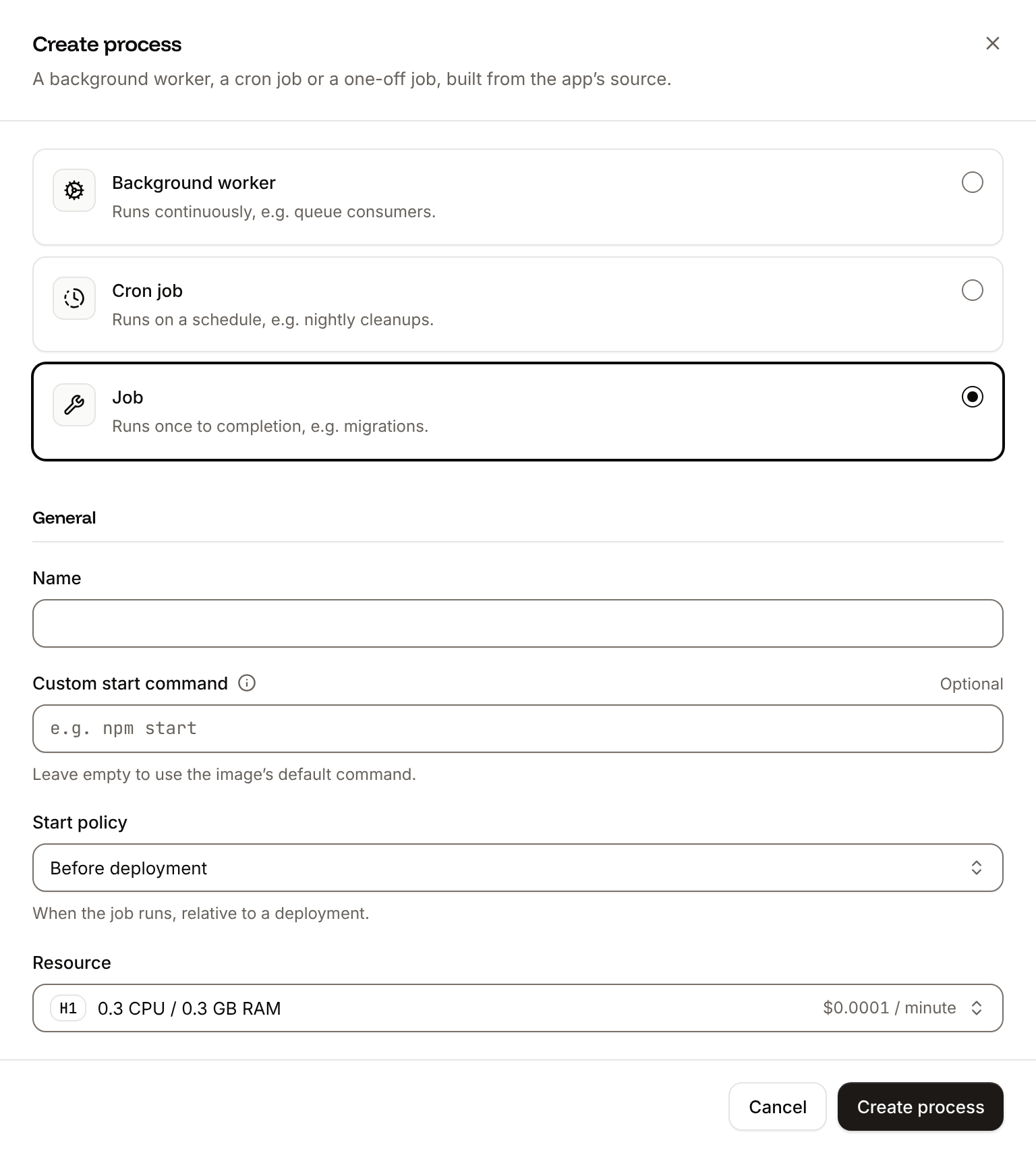
Click the **Processes** tab, then click **Create process**. Choose **Job**, enter `Migrate` as the **Name** and `flask --app storefront db upgrade` as the **Custom start command**. Keep the **Start policy** at **Before deployment** and the **Resource** at **H1**, then click **Create process**.
Click the **Overview** tab, then click **Deploy now** under **Recent deployments**. Check the **Branch** and click **Deploy**.
To deploy every push to the branch automatically, click the **Settings** tab, then click **Update auto-deploy** in the **Auto-deploy** section. Turn on **Auto-deploy** and click **Update auto-deploy**. See [Deployments](/applications/deployments#deploy-automatically-on-push).
 ## Verify the deployment
1. On the **Deployments** tab, wait for the deployment's status to change to **Deployed**. The application's status next to its name changes to **Running**. During the rollout, the deployment's build log shows `Migrate has been successful`. If the job fails, the deployment fails and nothing changes for visitors.
2. Click the domain under the application's name. The response is `{"items":0}`, which shows that the application reads the PostgreSQL database.
## Deploy changes
With **Auto-deploy** on, every push to the branch starts a deployment; otherwise, click **Deploy now** for each change. Each deployment builds the image, runs the `Migrate` job, then replaces the web process's instances. For a schema change, run `flask --app storefront db revision ""` locally and commit the new migration with the code. See [Deployments](/applications/deployments).
## Add a custom domain
[Add the domain](/domains/overview) on the application's **Domains** tab. Flask doesn't check the host, so no code change is needed. Custom domains need a web process larger than **H1**.
## Troubleshoot the deployment
| Symptom | Cause | Fix |
| - | - | - |
| The application or the job crashes with `Can't load plugin: sqlalchemy.dialects:postgres` | The code passes Sevalla's `postgres://` URL to SQLAlchemy unchanged. | Replace the scheme with `postgresql+psycopg://`, as `database_url()` does. |
| The deployment fails at `Migrate has failed` | The migration raised an error, or the application can't reach the database. | Read the job's output in the build log. Check that the internal connection exists, that `DB_URL` is set, and that `storefront/migrations` is in the repository. |
| The web process crashes with `Failed to find attribute 'create_app'` | The module in the start command doesn't match the package with the factory. | Update `[start]` in `nixpacks.toml` to name your package, for example `gunicorn 'app:create_app()'`. |
| The build fails with `Could not find a version that satisfies the requirement` | The build uses a Python version older than a package supports. | Add `.python-version` with `3.13`. |
For more causes, see [Troubleshoot builds and deployments](/applications/troubleshooting/builds-and-deployments). To add caching, background tasks or health checks, see the [Flask guides](/guides/python/flask/overview).
This documentation is built and hosted on [Mintlify](https://mintlify.com), a developer documentation platform.
## Verify the deployment
1. On the **Deployments** tab, wait for the deployment's status to change to **Deployed**. The application's status next to its name changes to **Running**. During the rollout, the deployment's build log shows `Migrate has been successful`. If the job fails, the deployment fails and nothing changes for visitors.
2. Click the domain under the application's name. The response is `{"items":0}`, which shows that the application reads the PostgreSQL database.
## Deploy changes
With **Auto-deploy** on, every push to the branch starts a deployment; otherwise, click **Deploy now** for each change. Each deployment builds the image, runs the `Migrate` job, then replaces the web process's instances. For a schema change, run `flask --app storefront db revision ""` locally and commit the new migration with the code. See [Deployments](/applications/deployments).
## Add a custom domain
[Add the domain](/domains/overview) on the application's **Domains** tab. Flask doesn't check the host, so no code change is needed. Custom domains need a web process larger than **H1**.
## Troubleshoot the deployment
| Symptom | Cause | Fix |
| - | - | - |
| The application or the job crashes with `Can't load plugin: sqlalchemy.dialects:postgres` | The code passes Sevalla's `postgres://` URL to SQLAlchemy unchanged. | Replace the scheme with `postgresql+psycopg://`, as `database_url()` does. |
| The deployment fails at `Migrate has failed` | The migration raised an error, or the application can't reach the database. | Read the job's output in the build log. Check that the internal connection exists, that `DB_URL` is set, and that `storefront/migrations` is in the repository. |
| The web process crashes with `Failed to find attribute 'create_app'` | The module in the start command doesn't match the package with the factory. | Update `[start]` in `nixpacks.toml` to name your package, for example `gunicorn 'app:create_app()'`. |
| The build fails with `Could not find a version that satisfies the requirement` | The build uses a Python version older than a package supports. | Add `.python-version` with `3.13`. |
For more causes, see [Troubleshoot builds and deployments](/applications/troubleshooting/builds-and-deployments). To add caching, background tasks or health checks, see the [Flask guides](/guides/python/flask/overview).
This documentation is built and hosted on [Mintlify](https://mintlify.com), a developer documentation platform.