> ## Documentation Index
> Fetch the complete documentation index at: https://docs.sevalla.com/llms.txt
> Use this file to discover all available pages before exploring further.
> ## Agent Instructions
> These are the docs for Sevalla, a platform for deploying applications, databases, static sites, object storage and load balancers. The dashboard is at https://app.sevalla.com.
> Bold text in steps is an exact dashboard label.
> To act on a Sevalla account, prefer the Sevalla MCP server (https://mcp.sevalla.com/mcp, see https://docs.sevalla.com/ai-agents/overview.md), then the Sevalla CLI (https://docs.sevalla.com/developer-tools/cli.md), then the REST API (https://api-docs.sevalla.com, OpenAPI spec at https://api.sevalla.com/v3/openapi.json).
> Every page index is at https://docs.sevalla.com/llms.txt.
# Deploy an MkDocs site
> Deploy an MkDocs site with Material for MkDocs to Sevalla as a free static site that installs Python with uv during the build, or as an application built from a Dockerfile.
An MkDocs site builds to static files: `mkdocs build` turns the Markdown in `docs` into HTML in the `site` folder, here with the Material for MkDocs theme. Sevalla publishes that folder as a static site, served from Cloudflare's edge and free up to 100 GB of bandwidth a month. The static site build runs on Node.js and has no Python, so the project's build script installs Python and the packages with [uv](https://docs.astral.sh/uv/) before it runs MkDocs. To run the site as an [application](#deploy-with-a-dockerfile) instead, build it from a Dockerfile.
## At a glance
| | |
| - | - |
| Source | A Git repository |
| Build | Static site: `npm run build`, which runs `build.sh`: uv installs Python 3.14 and the packages in `requirements.txt`, then `mkdocs build --strict` writes `site`. Application: the [Dockerfile](#deploy-with-a-dockerfile) only; Ingot can't serve an MkDocs site |
| Start command | Application: `caddy run --config /etc/caddy/Caddyfile --adapter caddyfile`, the `Dockerfile`'s `CMD` |
| Port | Application: the `PORT` environment variable, `8080` by default |
| Processes | Application: web process |
| Disk | None |
| Size | Static site: none to choose. Application: **H1** for the web process |
### Environment variables
The site needs no environment variables, as a static site or as an application.
## Before you begin
* A Sevalla company with a payment method, and a GitHub, GitLab or Bitbucket account for the repository. See [Git providers](https://docs.sevalla.com/git/overview.md).
* Python 3.14 and Git on your computer.
* Node.js 24 or later on your computer, to write `package-lock.json`.
## Create the project
Create a folder with a virtual environment, install Material for MkDocs, which installs MkDocs with it, and create a site, as in Material's [Getting started](https://squidfunk.github.io/mkdocs-material/getting-started/):
```bash theme={"theme":{"light":"github-dark-default","dark":"github-dark-default"}}
mkdir storefront
cd storefront
python3 -m venv .venv
source .venv/bin/activate
pip install mkdocs-material
mkdocs new .
```
`mkdocs new` writes `mkdocs.yml` and `docs/index.md`. Turn on the Material theme and add a second page:
```yaml mkdocs.yml theme={"theme":{"light":"github-dark-default","dark":"github-dark-default"}}
site_name: Storefront
site_url: https://docs.example.com/
theme:
name: material
nav:
- Home: index.md
- Getting started: getting-started.md
```
```markdown docs/getting-started.md theme={"theme":{"light":"github-dark-default","dark":"github-dark-default"}}
# Getting started
Install the Storefront client, then sign in with your API key.
```
Set `site_url` to the address the site will have: MkDocs writes it into the sitemap and the canonical links, and the build doesn't need it to be right. Run `mkdocs serve` and open `http://localhost:8000` to check the site locally.
## Prepare the project for Sevalla
Pin every package version, pin the Python version, and add the npm files that a static site's build needs, with a `build` script that runs `build.sh`:
```bash theme={"theme":{"light":"github-dark-default","dark":"github-dark-default"}}
pip freeze > requirements.txt
echo "3.14" > .python-version
npm init -y
npm pkg set scripts.build="bash build.sh"
npm install
```
Add `build.sh`, which installs uv, a pinned release whose checksum it checks, then Python, the packages and the site:
```bash build.sh theme={"theme":{"light":"github-dark-default","dark":"github-dark-default"}}
#!/usr/bin/env bash
# Installs uv, which installs Python and the packages in requirements.txt, then builds the site.
set -euo pipefail
UV_VERSION=0.13.6
UV_SHA256=f29c3e94ffabd7e6f3ba521dba169a9b7ec12100bf3257087f0f24f6123f3645
curl -fsSL -o /tmp/uv.tar.gz "https://github.com/astral-sh/uv/releases/download/$UV_VERSION/uv-x86_64-unknown-linux-gnu.tar.gz"
echo "$UV_SHA256 /tmp/uv.tar.gz" | sha256sum -c -
tar -xzf /tmp/uv.tar.gz -C /tmp
/tmp/uv-x86_64-unknown-linux-gnu/uv run --no-project --with-requirements requirements.txt mkdocs build --strict
```
Keep the virtual environment, the dependencies and the build output out of the repository:
```text .gitignore theme={"theme":{"light":"github-dark-default","dark":"github-dark-default"}}
site/
.venv/
node_modules/
```
| File | Why Sevalla needs it |
| - | - |
| `requirements.txt` | Every build installs the same versions: MkDocs 1.6.1 and Material for MkDocs 9.8.0 at the time of writing, with their dependencies. |
| `.python-version` | uv installs the newest Python 3.14 release, 3.14.10 at the time of writing, and the [Dockerfile](#deploy-with-a-dockerfile) uses the same line. |
| `package.json` `scripts.build` | The static site's **Build command**, `npm run build`, runs it. Without a `package.json`, the deployment fails before the build. |
| `package-lock.json` | Sevalla installs with the package manager whose lock file it finds; without one, the build log warns `There is no lock file.` The project has no npm packages, so the install takes less than a second. |
| `build.sh` | The static site's build container has Node.js but no Python. uv downloads a Python build and installs the packages into a temporary environment, then runs MkDocs in it. `--strict` fails the build on a broken link instead of publishing it. The script checks the SHA-256 of the uv release it downloads; to update uv, change `UV_VERSION` and `UV_SHA256` to the values on its [releases page](https://github.com/astral-sh/uv/releases). |
MkDocs reads only `docs` and `mkdocs.yml`, so the npm files and `build.sh` never reach the site. Commit everything and push it to your Git provider:
```bash theme={"theme":{"light":"github-dark-default","dark":"github-dark-default"}}
git init
git add .
git commit -m "Create the storefront docs"
git branch -M main
git remote add origin https://github.com/acme/storefront.git
git push -u origin main
```
## Deploy as a static site
**1. Choose the repository**
In the sidebar, click **Static sites**, then click **Create static site**. Under **Source**, click **Private repository**, then choose the **Git provider**, the **Repository** and the **Branch**.
**2. Set the build settings**
Under **Build settings**, Sevalla fills in `npm run build` and `dist` from `package.json`. MkDocs builds to `site`, so change the **Publish directory**:
| Field | Value |
| - | - |
| **Build site before publishing** | On |
| **Node version** | **Latest LTS** |
| **Build command** | `npm run build` |
| **Root directory** | Empty, for the repository root |
| **Publish directory** | `site` |
**3. Create the static site**
Enter a **Name** under **Details**, then click **Create static site**. Sevalla starts the first deployment right away, and deploys every push to the branch while **Auto-deploy** is on.
The build log shows `/tmp/uv.tar.gz: OK`, then `Downloading cpython-3.14.10-linux-x86_64-gnu`, `Installed 30 packages` and MkDocs's `Documentation built in` line. The build takes about a minute. uv warns that `/etc/pki/tls/certs`, listed in the build container's `SSL_CERT_DIR`, doesn't exist; the warning doesn't stop the build. Material for MkDocs 9.8 also prints a notice that it reaches end of life on May 5, 2027, with Zensical as its successor; add the [environment variable](https://docs.sevalla.com/static-sites/environment-variables.md) `NO_MKDOCS_2_WARNING` with the value `1` to hide it. See [Build settings](https://docs.sevalla.com/static-sites/build-settings.md) for every field.
### Verify the static site
1. On the **Deployments** tab, wait for the deployment's status to change to **Deployed**. The site's **Status** on the **Overview** tab changes to **Live**.
2. On the **Overview** tab, click **Visit site**. The Material home page opens with the title **Storefront**, and **Getting started** opens `/getting-started/`.
3. From a terminal, with your site's domain:
```bash theme={"theme":{"light":"github-dark-default","dark":"github-dark-default"}}
curl -s https://storefront-docs-x7k2m.sevalla.page/ | grep -o '[^<]*'
curl -s https://storefront-docs-x7k2m.sevalla.page/getting-started/ | grep -o '[^<]*'
```
```text theme={"theme":{"light":"github-dark-default","dark":"github-dark-default"}}
Storefront
Getting started - Storefront
```
With the API, [Get static site deployment](https://api-docs.sevalla.com/v3/static-sites/get-static-site-deployment) returns the deployment's status; see [Deploy with the API](#deploy-with-the-api).

A path with no page returns Sevalla's 404 page. To show Material's `404.html` instead, see [Custom 404 pages](https://docs.sevalla.com/static-sites/redirects.md#custom-404-pages). If the deployment fails, open it on the **Deployments** tab and read its build log, then see [Troubleshoot](#troubleshoot).
## Deploy with a Dockerfile
Ingot, the default build strategy for applications, can't serve an MkDocs site: it finds no server to start and stops with `✗ No start command found`. An MkDocs site runs as an application only from a Dockerfile. Use one when the site needs something only applications have, such as promoting one build through the stages of a [pipeline](https://docs.sevalla.com/pipelines/overview.md). Add a `Dockerfile`, a `Caddyfile` and a `.dockerignore` to the root of the repository:
```dockerfile Dockerfile theme={"theme":{"light":"github-dark-default","dark":"github-dark-default"}}
FROM python:3.14-slim-trixie AS build
WORKDIR /site
COPY requirements.txt ./
RUN pip install --no-cache-dir --root-user-action=ignore -r requirements.txt
COPY . .
RUN mkdocs build --strict
FROM caddy:2-alpine AS caddy
RUN setcap -r /usr/bin/caddy
FROM alpine:3
COPY --from=caddy /usr/bin/caddy /usr/bin/caddy
COPY --from=caddy /etc/mime.types /etc/mime.types
COPY Caddyfile /etc/caddy/Caddyfile
COPY --from=build /site/site /srv
ENV XDG_CONFIG_HOME=/tmp XDG_DATA_HOME=/tmp
USER 1000:1000
EXPOSE 8080
CMD ["caddy", "run", "--config", "/etc/caddy/Caddyfile", "--adapter", "caddyfile"]
```
```text Caddyfile theme={"theme":{"light":"github-dark-default","dark":"github-dark-default"}}
{
admin off
auto_https off
persist_config off
}
:{$PORT:8080} {
root * /srv
encode zstd gzip
file_server
handle_errors 404 {
rewrite * /404.html
file_server
}
}
```
| Line or choice | Why |
| - | - |
| `python:3.14-slim-trixie` | Python 3.14, the line `.python-version` pins, on Debian 13, for the build only. A line tag, not a digest, so each build picks up Python and Debian security fixes. |
| `requirements.txt` before the source | The [build cache](https://docs.sevalla.com/applications/builds/overview.md#build-cache) reuses the `pip install` layer until `requirements.txt` changes, so a change to your docs doesn't reinstall the packages. `--no-cache-dir` keeps pip's download cache out of the layer, and `--root-user-action=ignore` silences pip's warning about installing as root in a build stage that's thrown away. |
| Three stages | The `build` stage runs MkDocs. The `caddy` stage takes Caddy from its official image and removes the file capability that lets it bind ports below 1024, which a server running as a regular user on port 8080 doesn't need. The final image is Alpine Linux with Caddy and `site`: no Python, no packages and no source. |
| `USER 1000:1000` | Caddy runs as a regular user, not root. The copied files stay owned by root, so the server can read them but not change them. Caddy keeps its state in `/tmp`, which `XDG_CONFIG_HOME` and `XDG_DATA_HOME` point to. |
| `handle_errors 404` | Answers missing pages with Material's `404.html` and status `404`. Folder URLs such as `/getting-started` redirect to `/getting-started/`, which serves `index.html`. |
| `:{$PORT:8080}` | Caddy listens on `PORT`, which Sevalla sets to the web process's port, or `8080` when it isn't set. Caddy stops gracefully on `SIGTERM` by itself, so the image needs no init process. |
```text .dockerignore theme={"theme":{"light":"github-dark-default","dark":"github-dark-default"}}
.git
site
.venv
node_modules
.env*
*.log
Dockerfile
.dockerignore
```
The image doesn't use `build.sh` or uv, so the site builds the same way with or without the static site setup. Commit and push the three files, then create the application:
**1. Create the application**
In the sidebar, click **Applications**, then click **Create** > **Application**. Under **Source**, click **Private repository**, then choose the **Git provider**, the **Repository** and the **Branch**. Under **Location**, choose a **Data center**. Keep the **Size** at **H1** or choose a larger one, then click **Create application**. The application opens on its **Overview** tab with the status **Not deployed yet**: creating an application doesn't deploy it.
**2. Choose the Dockerfile build strategy**
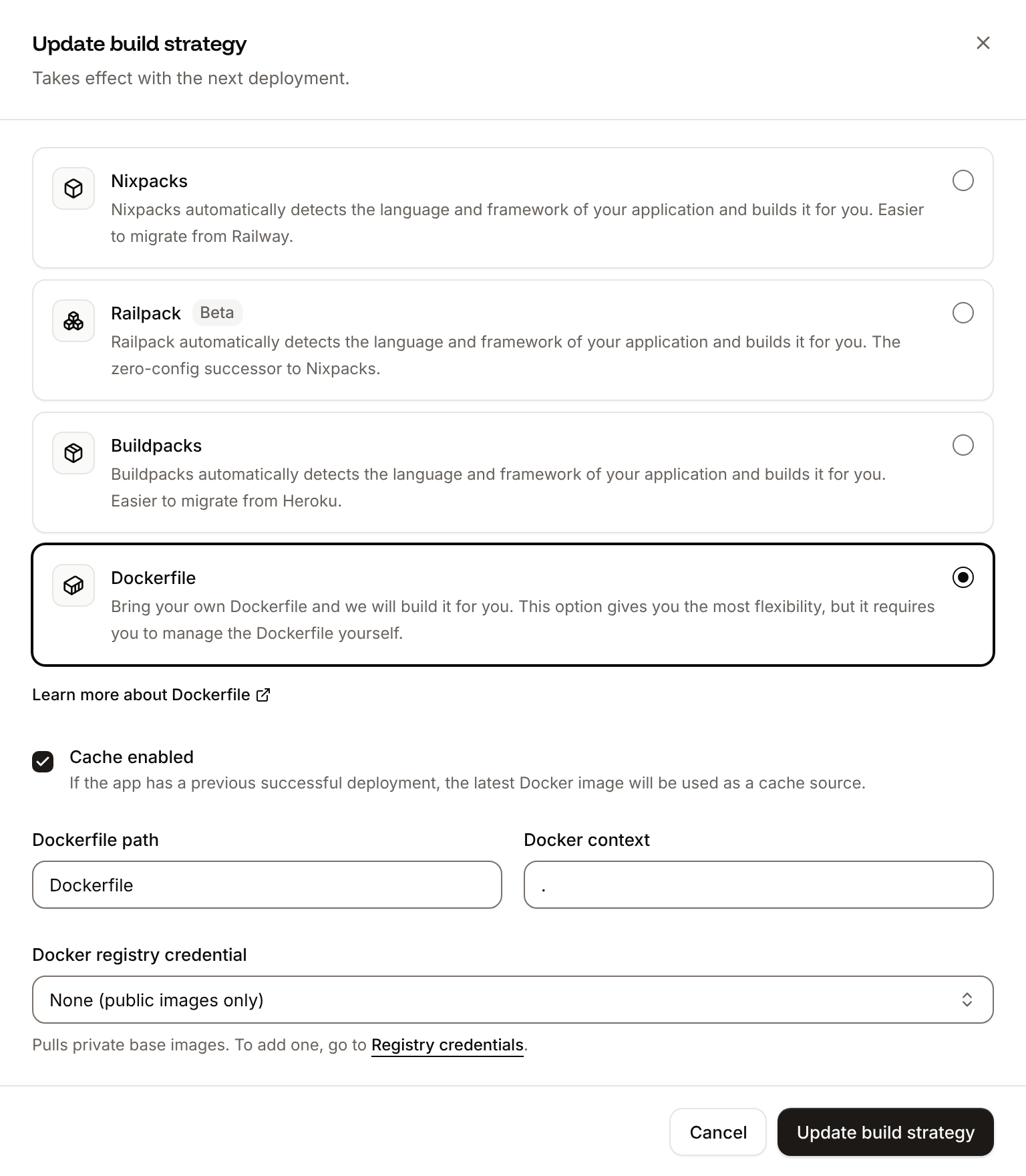
On the **Settings** tab, in the **Build strategy** section, click **Update build strategy**. Click **Dockerfile**, keep the **Dockerfile path** `Dockerfile` and the **Docker context** `.`, then click **Update build strategy**.
**3. Deploy**
Click the **Overview** tab, then click **Deploy now** under **Recent deployments**. Check the **Branch** and click **Deploy**.
The deployment's build log shows `📦 Building and pushing docker image using Dockerfile...`, then pip's install and MkDocs's summary, and its **Dockerfile** tab shows your file. When the status changes to **Deployed**, click the domain under the application's name: the Material home page opens. From a terminal:
```bash theme={"theme":{"light":"github-dark-default","dark":"github-dark-default"}}
curl -s https://storefront-x7k2m.sevalla.app/getting-started/ | grep -o '[^<]*'
curl -s -o /dev/null -w '%{http_code}\n' https://storefront-x7k2m.sevalla.app/no-such-page
```
```text theme={"theme":{"light":"github-dark-default","dark":"github-dark-default"}}
Getting started - Storefront
404
```
If you deploy before you switch the build strategy, Ingot stops with `✗ No start command found`: switch to **Dockerfile** and deploy again. See [Dockerfile](https://docs.sevalla.com/applications/builds/dockerfile.md).
## Deploy changes
With **Auto-deploy** on, every push to the branch starts a deployment of the static site or the application; otherwise, deploy each change from the **Deployments** tab. To move to newer MkDocs or Material releases, run `pip install --upgrade mkdocs-material`, check the site locally, and write `requirements.txt` again with `pip freeze > requirements.txt`. See [Static site deployments](https://docs.sevalla.com/static-sites/deployments.md) and [Deployments](https://docs.sevalla.com/applications/deployments.md).
## Add a custom domain
To serve the site from your own domain, such as `docs.example.com`, add the domain on the static site's **Domains** tab and create the DNS records that Sevalla shows, then set `site_url` in `mkdocs.yml` to `https://docs.example.com/`. Applications have a **Domains** tab too, but custom domains need a web process larger than **H1**. See [Custom domains](https://docs.sevalla.com/domains/overview.md).
## Troubleshoot
| Symptom | Cause | Fix |
| - | - | - |
| The static site's deployment fails at the install step with `Could not read package.json: Error: ENOENT: no such file or directory, open '/workspace/source/package.json'` | Static site builds install npm packages before the build command, and the repository has no `package.json` | Add `package.json` and `package-lock.json` as in [Prepare the project for Sevalla](#prepare-the-project-for-sevalla) |
| The build fails with `WARNING - Doc file 'index.md' contains a link 'pricing.md', but the target is not found among documentation files.`, then `Aborted with 1 warnings in strict mode!` | `mkdocs build --strict` treats every warning, here a link to a page that doesn't exist, as an error | Fix the link, or add the page, and check with `mkdocs build --strict` locally before you push |
| An application's build log shows `📦 Generating Dockerfile using ingot...`, then `✗ No start command found` and `Add a main.py or app.py, a Procfile with a web process, or set "start" in ingot.json.` | The application builds with Ingot, which finds no server to start in an MkDocs site | Switch the build strategy to **Dockerfile** and deploy again, as in [Deploy with a Dockerfile](#deploy-with-a-dockerfile) |
For more causes, see [Troubleshoot static sites](https://docs.sevalla.com/static-sites/troubleshooting.md) and [Troubleshoot builds and deployments](https://docs.sevalla.com/applications/troubleshooting/builds-and-deployments.md).
## Deploy with the API
This sequence creates the static site from [Deploy as a static site](#deploy-as-a-static-site) and the application from [Deploy with a Dockerfile](#deploy-with-a-dockerfile) through the [Sevalla API](https://docs.sevalla.com/developer-tools/api.md), so an agent or a script can run it as is. Run the first four steps for the static site, the rest for the application. Each step names the operation, shows the `curl` command, and gives the matching [CLI](https://docs.sevalla.com/developer-tools/cli.md) command and [MCP server](https://docs.sevalla.com/ai-agents/overview.md) tool.
You need:
* An [API key](https://docs.sevalla.com/developer-tools/api-keys.md) with the **Company developer** role, in the `SEVALLA_API_KEY` environment variable. The CLI reads the same key from `SEVALLA_API_TOKEN`.
* `curl` and `jq`, and the project pushed to GitHub as in [Prepare the project for Sevalla](#prepare-the-project-for-sevalla), with the files from [Deploy with a Dockerfile](#deploy-with-a-dockerfile).
* A GitHub account that can read the repository, connected to Sevalla. See [Git providers](https://docs.sevalla.com/git/overview.md). The API can't list connected accounts: when none can read the repository, [Create static site](https://api-docs.sevalla.com/v3/static-sites/create-static-site) and [Create application](https://api-docs.sevalla.com/v3/applications/create-application) fail with `400` and `Cannot access repository https://github.com/acme/storefront: Repository not found or you don't have access.`
A call that fails returns `status` and `message` instead of the resource, and `jq -r .id` prints `null`: stop and read the message.
**1. Create the static site**
[Create static site](https://api-docs.sevalla.com/v3/static-sites/create-static-site) (`createStaticSiteV3`) takes the build settings: `node_version` `lts` is the dashboard's **Latest LTS**, and `published_directory` is the **Publish directory**.
```bash theme={"theme":{"light":"github-dark-default","dark":"github-dark-default"}}
SITE_ID=$(curl -s https://api.sevalla.com/v3/static-sites \
-H "Authorization: Bearer $SEVALLA_API_KEY" \
-H "Content-Type: application/json" \
-d @- <[^<]*'
```
```text theme={"theme":{"light":"github-dark-default","dark":"github-dark-default"}}
Getting started - Storefront
```
CLI: `sevalla static-sites get "$SITE_ID"`. MCP: `get_static_site`.
**5. Look up the location and the size**
[List clusters](https://api-docs.sevalla.com/v3/resources/list-clusters) (`listClustersV3`) returns every location your company can use, with its region ID. This guide uses Frankfurt, Germany, `eu-frankfurt-1`. [List process resource types](https://api-docs.sevalla.com/v3/resources/list-process-resource-types) (`listProcessResourceTypesV3`) returns the process sizes.
```bash theme={"theme":{"light":"github-dark-default","dark":"github-dark-default"}}
CLUSTER_ID=$(curl -s https://api.sevalla.com/v3/resources/clusters \
-H "Authorization: Bearer $SEVALLA_API_KEY" | jq -r '.[] | select(.location == "eu-frankfurt-1") | .id')
H1_ID=$(curl -s https://api.sevalla.com/v3/resources/process-resource-types \
-H "Authorization: Bearer $SEVALLA_API_KEY" | jq -r '.[] | select(.name == "h1") | .id')
```
CLI: `sevalla resources clusters` and `sevalla resources process-types`. MCP: `get_platform_options`.
**6. Create the application**
[Create application](https://api-docs.sevalla.com/v3/applications/create-application) (`createApplicationV3`) creates the application with a web process and doesn't deploy it.
```bash theme={"theme":{"light":"github-dark-default","dark":"github-dark-default"}}
APP_ID=$(curl -s https://api.sevalla.com/v3/applications \
-H "Authorization: Bearer $SEVALLA_API_KEY" \
-H "Content-Type: application/json" \
-d @- <[^<]*'
curl -s -o /dev/null -w '%{http_code}\n' $APP_URL/no-such-page
```
After the build log, the output is the same title as for the static site, then `404` from Caddy for a missing page.
CLI: `sevalla apps deployments logs "$DEPLOYMENT_ID" --app-id "$APP_ID"` and `sevalla apps domains list --app-id "$APP_ID"`. MCP: `get_deployment_logs` and `get_application`.
This documentation is built and hosted on [Mintlify](https://mintlify.com), a developer documentation platform.