> ## Documentation Index
> Fetch the complete documentation index at: https://docs.sevalla.com/llms.txt
> Use this file to discover all available pages before exploring further.
> ## Agent Instructions
> These are the docs for Sevalla, a platform for deploying applications, databases, static sites, object storage and load balancers. The dashboard is at https://app.sevalla.com.
> Bold text in steps is an exact dashboard label.
> To act on a Sevalla account, prefer the Sevalla MCP server (https://mcp.sevalla.com/mcp, see https://docs.sevalla.com/ai-agents/overview.md), then the Sevalla CLI (https://docs.sevalla.com/developer-tools/cli.md), then the REST API (https://api-docs.sevalla.com, OpenAPI spec at https://api.sevalla.com/v3/openapi.json).
> Every page index is at https://docs.sevalla.com/llms.txt.
# Infrastructure
> How Sevalla runs your services: Kubernetes clusters on Oracle Cloud Infrastructure and Google Cloud, Cloudflare in front, builds, isolation, networking, storage, backups and where your data lives.
Sevalla runs applications and databases on Kubernetes clusters, one per location, on Oracle Cloud Infrastructure (OCI) or Google Cloud. Cloudflare sits in front of every application, static site and load balancer, and Cloudflare R2 stores static site files and object storage. Sevalla operates all of it: you deploy code and choose sizes, never servers.
## Clouds and clusters
Each [location](/platform/locations) is one Kubernetes cluster: Oracle Kubernetes Engine (OKE) on OCI, or Google Kubernetes Engine (GKE) on Google Cloud. All of a company's applications and databases run on the same cloud.
Sevalla is moving every company from Google Cloud to OCI. New companies start on OCI, existing companies move in waves, and static site builds already run on OCI for everyone. Static sites, buckets and load balancers don't move: they run on Cloudflare. Where the two clouds differ, this page says so. [Migration to Oracle Cloud Infrastructure](/platform/oci-migration) covers the schedule and what changes for you.
| Part | Runs on |
| - | - |
| Applications, their builds and disks | The Kubernetes cluster in the application's location |
| Databases and their storage | The Kubernetes cluster in the database's location |
| Static site builds | Sevalla's build cluster in Oracle Cloud's US East (Ashburn) data center |
| Static site files | Cloudflare R2, served from Cloudflare's edge |
| Object storage | Cloudflare R2 |
| Load balancers | Cloudflare's edge |
| DNS, TLS certificates, caching and the first line of DDoS protection | Cloudflare |
## Applications
### Builds and images
Every deployment from Git builds a new container image. The build runs as a sandboxed job on the cluster in the application's location, with the application's [build strategy](/applications/builds/overview) (Nixpacks, Railpack, Buildpacks or Dockerfile). On OCI, builds run on nodes reserved for builds, apart from running applications. By default, a build that runs longer than 30 minutes fails.
Sevalla stores each image in a private registry on the application's cloud. Each image is tagged with its deployment, which is what lets Sevalla roll back and lets pipelines promote an image to another application without rebuilding it.
An application from a [Docker image](/applications/docker-images) skips the build: the cluster pulls the image from its registry on every deployment.
### Processes and instances
Each application gets its own Kubernetes namespace, and each of its [processes](/applications/processes) runs there as its own set of containers:
| Process | How it runs |
| - | - |
| Web process | Runs continuously and receives the application's HTTP traffic |
| Background worker | Runs continuously, with no public traffic |
| Cron job | Starts a container on each run of its schedule |
| Job | Starts a container once before, or after, each deployment |
Each instance of a process is one container with the CPU and memory of the process's [instance size](/applications/scaling#instance-sizes). During a rollout, Kubernetes starts new instances before it stops the old ones. If the new version isn't ready within 20 minutes, the deployment fails and the previous version, which kept serving traffic, stays live. A process with a [disk](/applications/disks) runs one instance and is restarted instead (the old instance stops before the new one starts), so its deployments have a short interruption.
### How a request reaches an application
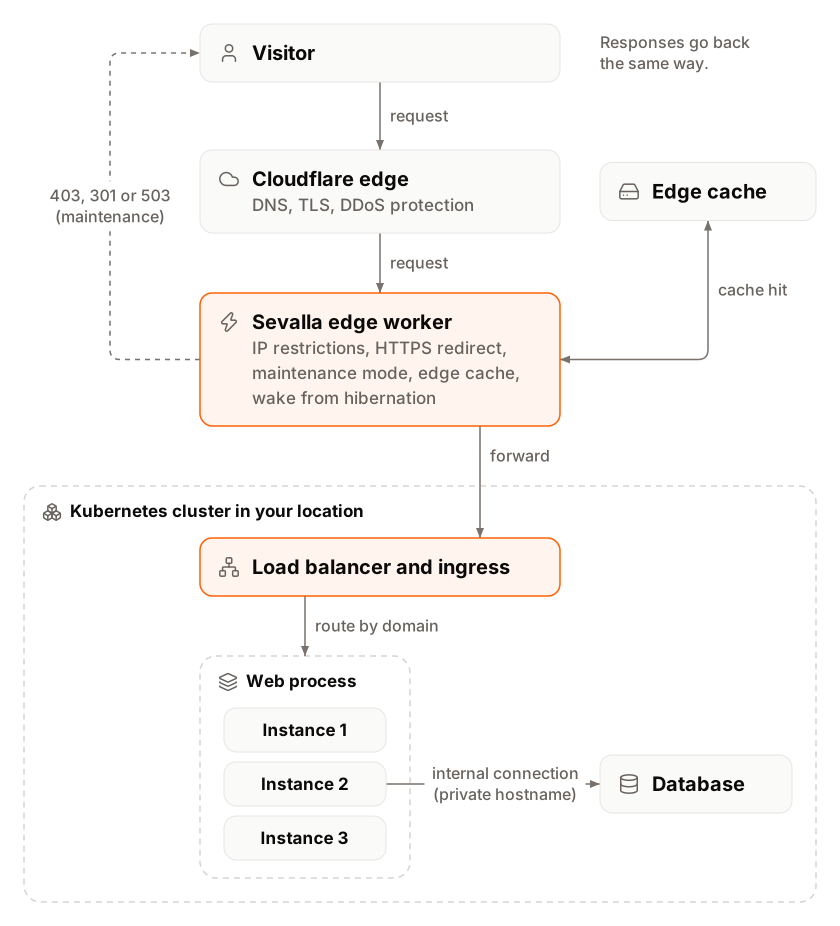
 1. **Cloudflare.** The application's `sevalla.app` address and its [custom domains](/domains/overview) point to Cloudflare. Cloudflare ends the TLS connection with a certificate it issues for each domain, and applies its DDoS protection. See [DDoS protection](/security/ddos-protection).
2. **Sevalla's application worker.** A Cloudflare Worker that Sevalla runs at the edge reads the domain's settings and, in this order: blocks IP addresses outside the application's [IP restrictions](/applications/networking#ip-restrictions) with `403`, redirects HTTP to HTTPS with `301`, answers with `503` and `Retry-After: 300` while [maintenance mode](/applications/maintenance-mode) is on, and serves the response from the edge cache when [CDN or edge caching](/applications/caching) has a copy. If the application is [hibernating](/applications/scaling#hibernation), the worker holds the request while the application wakes up, for up to about 3 minutes.
3. **The cluster.** The worker forwards the request to the cluster in the application's location, where Sevalla's ingress matches the domain to the application's web process.
4. **The web process.** Kubernetes spreads requests across the web process's instances. The instance answers, often after querying a database over an internal connection.
5. **The response** goes back the same way. The worker stores it at the edge if caching applies, and adds an `Access-Control-Allow-Origin: *` header when the application didn't set one.
[Request headers](/applications/http-headers) lists the headers Cloudflare and Sevalla add on the way.
### Private networking
Services in the same location talk over the cluster's private network. Each web process, background worker and database has a private hostname inside the cluster. By default, a namespace doesn't accept traffic from other namespaces: an [internal connection](/applications/networking#internal-connections) opens the path between an application and a database, or between two applications. Internal connections only work within one location.
A [TCP proxy](/applications/networking#tcp-proxies) gives a process a public hostname and port for protocols other than HTTP. It goes through Sevalla's TCP proxy in the location, not through Cloudflare.
### Outbound traffic
* **On OCI,** each location sends outbound traffic from one fixed IP address.
* **On Google Cloud,** outbound traffic comes from any of Google Cloud's published IP ranges for the region.
The application's **Networking** tab lists its egress IP addresses, as described in [Egress IP addresses](/applications/networking#egress-ip-addresses).
Outbound connections to the cloud's instance metadata address and to email ports are blocked: TCP ports `25`, `465` and `587` on both clouds, and also `2525` on OCI. To send email, use your email provider's HTTP API.
## Databases
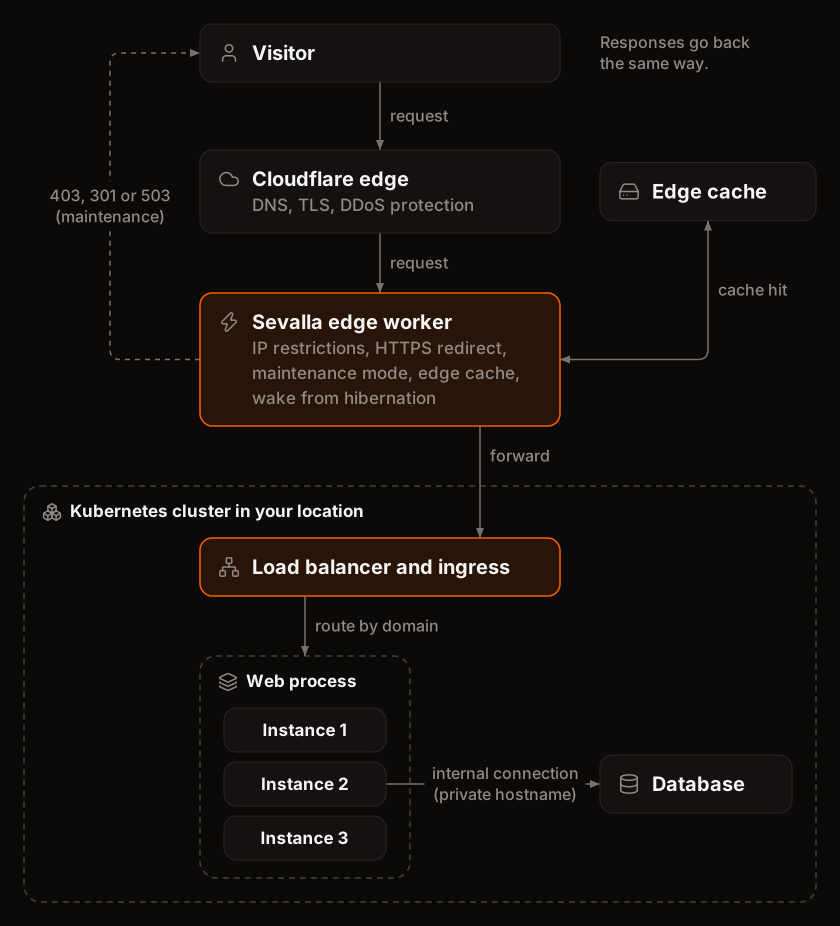
1. **Cloudflare.** The application's `sevalla.app` address and its [custom domains](/domains/overview) point to Cloudflare. Cloudflare ends the TLS connection with a certificate it issues for each domain, and applies its DDoS protection. See [DDoS protection](/security/ddos-protection).
2. **Sevalla's application worker.** A Cloudflare Worker that Sevalla runs at the edge reads the domain's settings and, in this order: blocks IP addresses outside the application's [IP restrictions](/applications/networking#ip-restrictions) with `403`, redirects HTTP to HTTPS with `301`, answers with `503` and `Retry-After: 300` while [maintenance mode](/applications/maintenance-mode) is on, and serves the response from the edge cache when [CDN or edge caching](/applications/caching) has a copy. If the application is [hibernating](/applications/scaling#hibernation), the worker holds the request while the application wakes up, for up to about 3 minutes.
3. **The cluster.** The worker forwards the request to the cluster in the application's location, where Sevalla's ingress matches the domain to the application's web process.
4. **The web process.** Kubernetes spreads requests across the web process's instances. The instance answers, often after querying a database over an internal connection.
5. **The response** goes back the same way. The worker stores it at the edge if caching applies, and adds an `Access-Control-Allow-Origin: *` header when the application didn't set one.
[Request headers](/applications/http-headers) lists the headers Cloudflare and Sevalla add on the way.
### Private networking
Services in the same location talk over the cluster's private network. Each web process, background worker and database has a private hostname inside the cluster. By default, a namespace doesn't accept traffic from other namespaces: an [internal connection](/applications/networking#internal-connections) opens the path between an application and a database, or between two applications. Internal connections only work within one location.
A [TCP proxy](/applications/networking#tcp-proxies) gives a process a public hostname and port for protocols other than HTTP. It goes through Sevalla's TCP proxy in the location, not through Cloudflare.
### Outbound traffic
* **On OCI,** each location sends outbound traffic from one fixed IP address.
* **On Google Cloud,** outbound traffic comes from any of Google Cloud's published IP ranges for the region.
The application's **Networking** tab lists its egress IP addresses, as described in [Egress IP addresses](/applications/networking#egress-ip-addresses).
Outbound connections to the cloud's instance metadata address and to email ports are blocked: TCP ports `25`, `465` and `587` on both clouds, and also `2525` on OCI. To send email, use your email provider's HTTP API.
## Databases
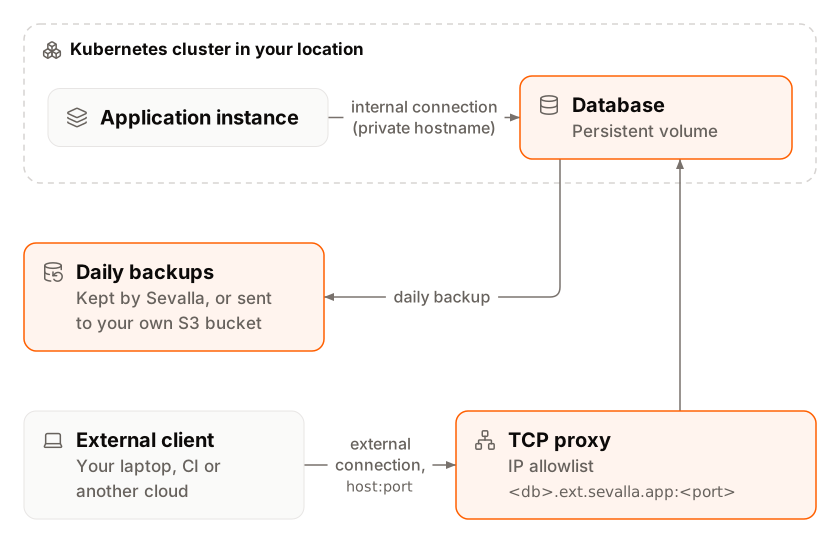
 Each [database](/databases/overview) runs in its own namespace on the cluster of its location, with its data on a persistent volume in that location. Sevalla runs and configures the engine for you on both clouds. The engine versions on offer differ between Google Cloud and OCI locations: see [Engines and versions](/databases/overview#engines-and-versions).
Applications reach a database over an [internal connection](/databases/connect#connect-an-application). Clients outside Sevalla use its external connection: a hostname under `ext.sevalla.app` with its own port, through Sevalla's TCP proxy in the location. That traffic doesn't pass through Cloudflare, and the database's IP restrictions apply at the proxy. The [legacy external connection hostnames](/platform/oci-migration#legacy-tcp-proxy-and-external-connection-endpoints) were turned off on Oct 15, 2026.
Backups depend on the cloud:
* **On Google Cloud,** Sevalla takes a daily snapshot of the database's volume and keeps it for 7 days. You can also take manual backups.
* **On OCI,** Sevalla writes compressed dumps of the database (for example `.sql.gz`) on a schedule to the backup targets you add: Sevalla object storage buckets or your own S3-compatible storage. A database on OCI without a backup target has no backups.
[Backups](/databases/backups) covers schedules, restores and limits.
## Static sites
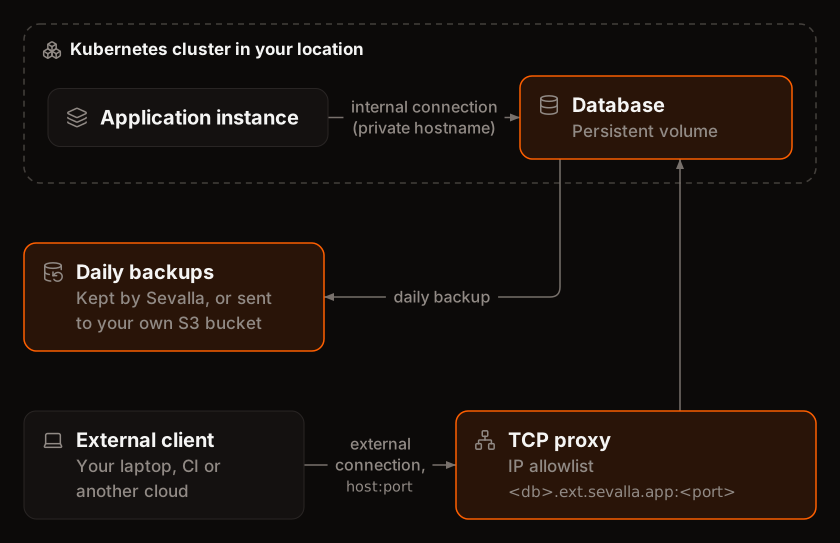
Each [database](/databases/overview) runs in its own namespace on the cluster of its location, with its data on a persistent volume in that location. Sevalla runs and configures the engine for you on both clouds. The engine versions on offer differ between Google Cloud and OCI locations: see [Engines and versions](/databases/overview#engines-and-versions).
Applications reach a database over an [internal connection](/databases/connect#connect-an-application). Clients outside Sevalla use its external connection: a hostname under `ext.sevalla.app` with its own port, through Sevalla's TCP proxy in the location. That traffic doesn't pass through Cloudflare, and the database's IP restrictions apply at the proxy. The [legacy external connection hostnames](/platform/oci-migration#legacy-tcp-proxy-and-external-connection-endpoints) were turned off on Oct 15, 2026.
Backups depend on the cloud:
* **On Google Cloud,** Sevalla takes a daily snapshot of the database's volume and keeps it for 7 days. You can also take manual backups.
* **On OCI,** Sevalla writes compressed dumps of the database (for example `.sql.gz`) on a schedule to the backup targets you add: Sevalla object storage buckets or your own S3-compatible storage. A database on OCI without a backup target has no backups.
[Backups](/databases/backups) covers schedules, restores and limits.
## Static sites
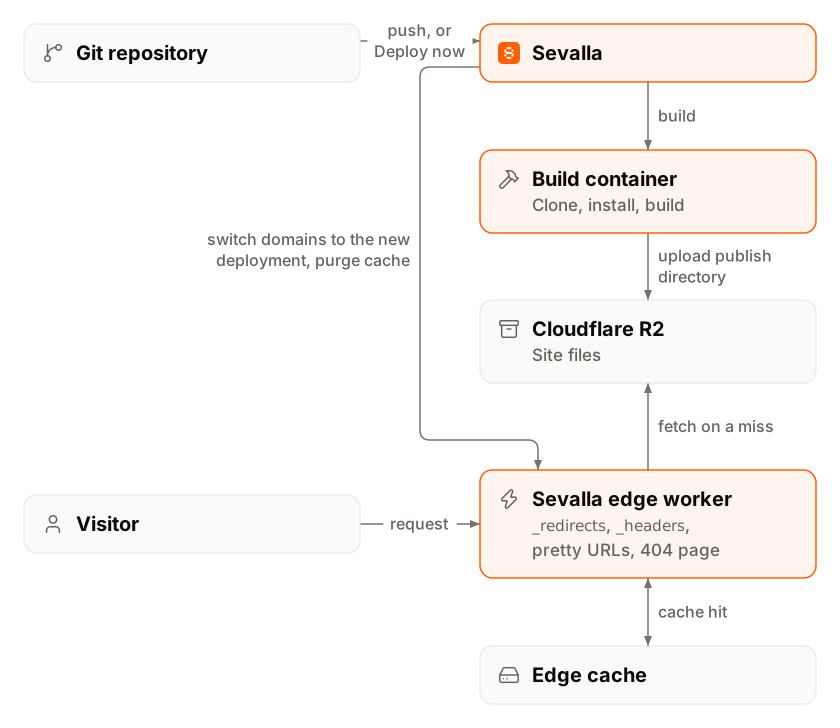
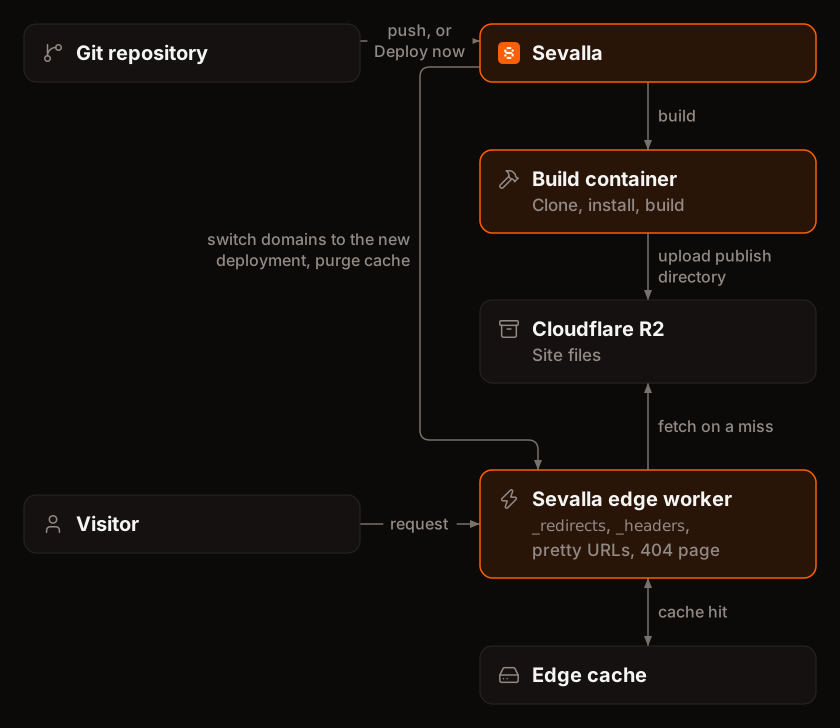 Sevalla builds every static site in a sandboxed container on its build cluster in Oracle Cloud's US East (Ashburn) data center, uploads the files that changed to Cloudflare R2, and switches the site's domains to the new deployment in one step. A Cloudflare Worker that Sevalla runs at the edge then serves each request from Cloudflare's cache or from R2. A static site has no server, no location and no instances to scale. [How static sites work](/static-sites/overview#how-static-sites-work) describes each step.
## Object storage
Sevalla builds every static site in a sandboxed container on its build cluster in Oracle Cloud's US East (Ashburn) data center, uploads the files that changed to Cloudflare R2, and switches the site's domains to the new deployment in one step. A Cloudflare Worker that Sevalla runs at the edge then serves each request from Cloudflare's cache or from R2. A static site has no server, no location and no instances to scale. [How static sites work](/static-sites/overview#how-static-sites-work) describes each step.
## Object storage
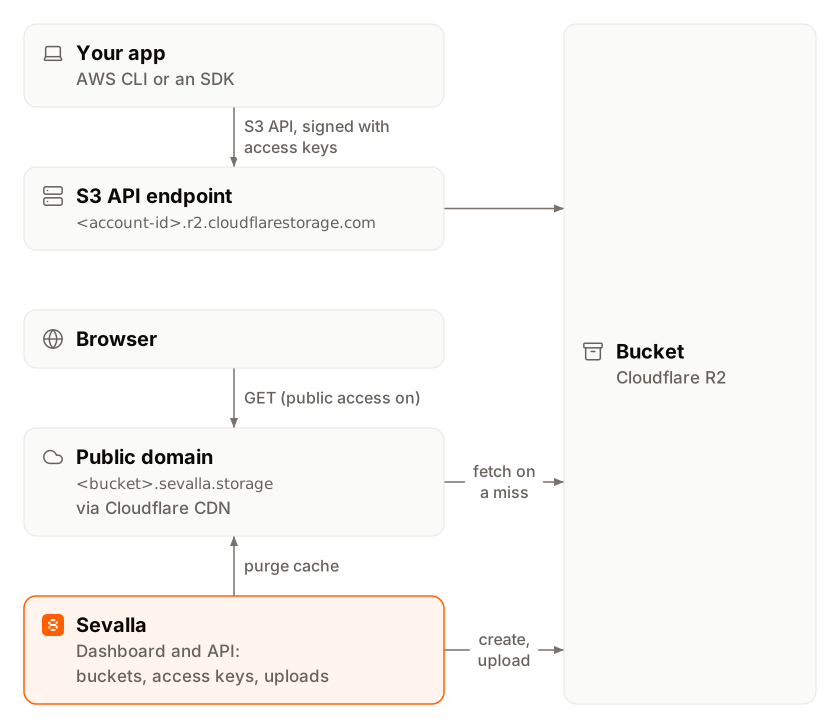
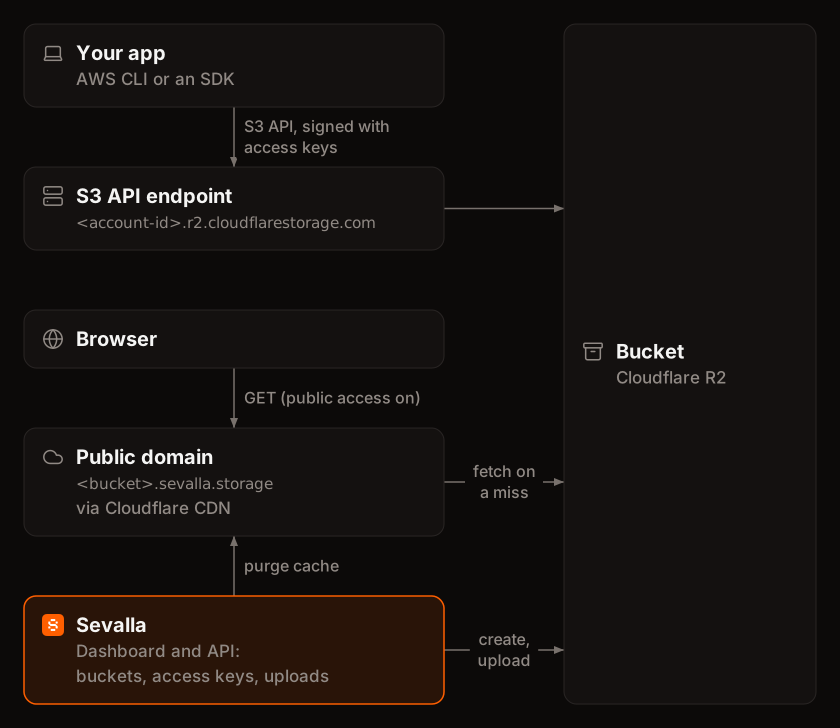 Each [bucket](/object-storage/overview) is a Cloudflare R2 bucket in Sevalla's Cloudflare account, with its own access keys that only work for that bucket.
* **S3 API.** Applications and tools connect to the bucket's R2 endpoint with any S3-compatible client. See [Connect with the S3 API](/object-storage/connect).
* **Dashboard uploads.** Files you upload in the dashboard go through Sevalla's API to the bucket, up to 300 MB per file.
* **Public access.** When you turn it on, the bucket gets a public domain, `.sevalla.storage`, served through Cloudflare's CDN.
## Logs and metrics
* **Access logs** come from Cloudflare: every request through the edge is logged, then attributed to its service.
* **Runtime logs** are collected from your processes' output (`stdout` and `stderr`).
* **Metrics** such as CPU, memory, storage and instance counts come from the cluster.
Sevalla stores logs in its own log store, which feeds the **Logs** and **Analytics** tabs. See [Logs](/applications/logs) and [Analytics](/applications/analytics).
## Isolation
* **One namespace per service.** Every application and every database has its own Kubernetes namespace, and namespaces don't accept traffic from each other unless an internal connection allows it.
* **Sandboxed containers.** Application instances and builds run in sandboxed containers that isolate each container in its own user namespace, without access to the Kubernetes API.
* **Resource limits.** Each instance gets the CPU and memory of its instance size, with up to 20 GB of ephemeral storage that doesn't survive a restart.
* **Edge protection.** For HTTP traffic, Cloudflare handles TLS and absorbs DDoS attacks before requests reach a cluster. TCP proxies and database external connections don't go through Cloudflare.
See [Security](/security/overview) for certifications, encryption and access controls.
## What Sevalla manages and what you manage
| Sevalla manages | You manage |
| - | - |
| Clusters, nodes, operating systems and Kubernetes upgrades | Your code, its dependencies and its security |
| Build infrastructure and image registries | The build strategy, start commands and processes |
| Networking, load balancing and TLS certificates | DNS records for your custom domains |
| Database servers, storage and backup jobs | Your database schemas, data and backup settings |
| Edge caching, the application and static site workers, DDoS protection at Cloudflare | Cache settings, IP restrictions and environment variables |
| Monitoring of the platform | Sizes, instances and autoscaling for your load |
[Shared responsibility](/security/shared-responsibility) covers security duties in detail.
## Where your data is
Applications, their disks and databases store their data in the location you choose. Data leaves that location only in these cases:
* **Cached copies.** With CDN or edge caching on, and for every static site, Cloudflare keeps copies of responses in its edge locations near your visitors.
* **Static site files and object storage** live in Cloudflare R2.
* **Logs.** Cloudflare processes every request to your services, and Sevalla keeps access and runtime logs for the **Logs** and **Analytics** tabs.
* **Database backups on OCI** go to the backup targets you add.
* **Support conversations.** Anything you share in a support chat is stored by Sevalla's chat provider.
This documentation is built and hosted on [Mintlify](https://mintlify.com), a developer documentation platform.
Each [bucket](/object-storage/overview) is a Cloudflare R2 bucket in Sevalla's Cloudflare account, with its own access keys that only work for that bucket.
* **S3 API.** Applications and tools connect to the bucket's R2 endpoint with any S3-compatible client. See [Connect with the S3 API](/object-storage/connect).
* **Dashboard uploads.** Files you upload in the dashboard go through Sevalla's API to the bucket, up to 300 MB per file.
* **Public access.** When you turn it on, the bucket gets a public domain, `.sevalla.storage`, served through Cloudflare's CDN.
## Logs and metrics
* **Access logs** come from Cloudflare: every request through the edge is logged, then attributed to its service.
* **Runtime logs** are collected from your processes' output (`stdout` and `stderr`).
* **Metrics** such as CPU, memory, storage and instance counts come from the cluster.
Sevalla stores logs in its own log store, which feeds the **Logs** and **Analytics** tabs. See [Logs](/applications/logs) and [Analytics](/applications/analytics).
## Isolation
* **One namespace per service.** Every application and every database has its own Kubernetes namespace, and namespaces don't accept traffic from each other unless an internal connection allows it.
* **Sandboxed containers.** Application instances and builds run in sandboxed containers that isolate each container in its own user namespace, without access to the Kubernetes API.
* **Resource limits.** Each instance gets the CPU and memory of its instance size, with up to 20 GB of ephemeral storage that doesn't survive a restart.
* **Edge protection.** For HTTP traffic, Cloudflare handles TLS and absorbs DDoS attacks before requests reach a cluster. TCP proxies and database external connections don't go through Cloudflare.
See [Security](/security/overview) for certifications, encryption and access controls.
## What Sevalla manages and what you manage
| Sevalla manages | You manage |
| - | - |
| Clusters, nodes, operating systems and Kubernetes upgrades | Your code, its dependencies and its security |
| Build infrastructure and image registries | The build strategy, start commands and processes |
| Networking, load balancing and TLS certificates | DNS records for your custom domains |
| Database servers, storage and backup jobs | Your database schemas, data and backup settings |
| Edge caching, the application and static site workers, DDoS protection at Cloudflare | Cache settings, IP restrictions and environment variables |
| Monitoring of the platform | Sizes, instances and autoscaling for your load |
[Shared responsibility](/security/shared-responsibility) covers security duties in detail.
## Where your data is
Applications, their disks and databases store their data in the location you choose. Data leaves that location only in these cases:
* **Cached copies.** With CDN or edge caching on, and for every static site, Cloudflare keeps copies of responses in its edge locations near your visitors.
* **Static site files and object storage** live in Cloudflare R2.
* **Logs.** Cloudflare processes every request to your services, and Sevalla keeps access and runtime logs for the **Logs** and **Analytics** tabs.
* **Database backups on OCI** go to the backup targets you add.
* **Support conversations.** Anything you share in a support chat is stored by Sevalla's chat provider.
This documentation is built and hosted on [Mintlify](https://mintlify.com), a developer documentation platform.