> ## Documentation Index
> Fetch the complete documentation index at: https://docs.sevalla.com/llms.txt
> Use this file to discover all available pages before exploring further.
# Static Sites - Environment variables
> Set up environment variables for your static sites.
Environment Variables are useful for feeding the build process of your static site information from outside of your site’s code. This allows for information like API keys to be stored and provided securely, rather than in your site’s code as clear text.
## Special characters in environment variables
In the environment variable keys, you can only use a-z, 0-9, or underscore (`_`). Environment variable values are applied literally, with the exception of parentheses, commas, and double quotes.
### Parentheses
Parentheses can cause the [build and rollout process to fail](/applications/troubleshooting/failed-deployment/#failed-rollout). They cannot be used in environment variables.
### Commas
Unescaped commas are interpreted as delimiters and cannot be used in environment variables.
* For example: `write_stock,read_orders` will cause the rollout process to fail.
* To keep a comma inside a string, escape it with a backslash (`\`) like this: `write_stock\,read_orders` — which will be applied as `write_stock,read_orders`.
### Double quotes
Unescaped double quotes are either disregarded or will cause the rollout process to fail.
* For example, `"my_example_variable"` will be applied as `my_example_variable`.
* To keep double quotes around a variable, escape them with a backslash (`\`) like this: `\"my_example_var\"` — which will be applied as `"my_example_var"`.
* If double quotes are inside of a string (e.g. `my_exampl"e_text`), the [rollout process will fail](/applications/troubleshooting/failed-deployment/#failed-rollout).
* To keep double quotes inside a string, escape them with a backslash (`\`) like this: `my_examp\"le_var` — which will be applied as `my_examp"le_var`.
## Add environment variables
You can add environment variables in the **Build settings** step when [adding a static site](/static-sites/get-started/add-a-static-site) or on your site’s [**Settings page**](/static-sites/settings) after deployment.
You can reference another environment variable using the `${key}` format. For example, to reference an environment variable with the key `DB_PASSWORD` use `${DB_PASSWORD}`.
### In build settings
To add environment variables when adding your site, expand the **Environment variables** section and enter the key-value pairs.
### After deployment
To add environment variables after deployment, go to **Environment variables**, and click **Add environment variables**. Add the key-value pairs and click **Add environment variables**.
If you enable [pull request previews](/static-sites/settings#pull-request-previews), you can select whether to use the environment variables in the production environment, preview environment, or both.
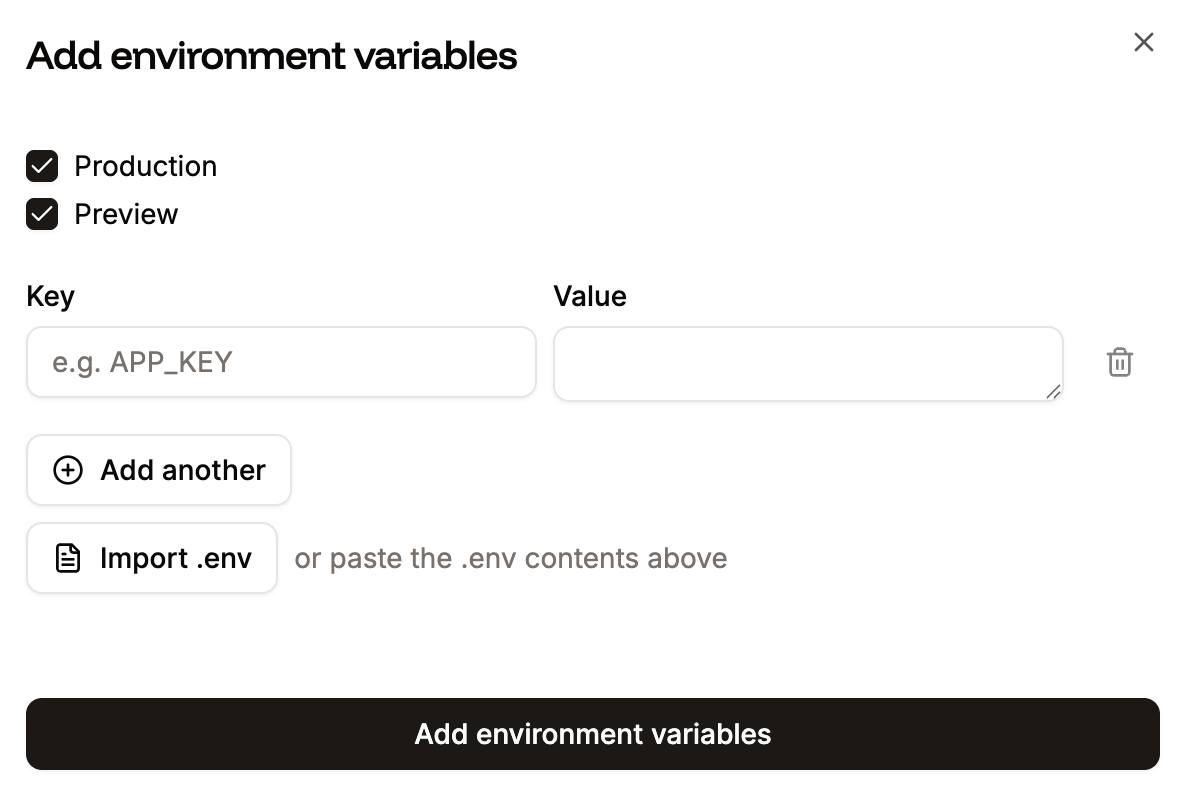
 If you add or update an Environment variable, you must redeploy the site.
## Edit environment variables
You can edit variable names (keys) or values within **Environment variables**. To edit a variable, click the ellipsis (three dots), click **Update**, make your changes, and click **Update environment variable**.
If you add or update an Environment variable, you must redeploy the site.
## Edit environment variables
You can edit variable names (keys) or values within **Environment variables**. To edit a variable, click the ellipsis (three dots), click **Update**, make your changes, and click **Update environment variable**.