> ## Documentation Index
> Fetch the complete documentation index at: https://docs.sevalla.com/llms.txt
> Use this file to discover all available pages before exploring further.
> ## Agent Instructions
> These are the docs for Sevalla, a platform for deploying applications, databases, static sites, object storage and load balancers. The dashboard is at https://app.sevalla.com.
> Bold text in steps is an exact dashboard label.
> To act on a Sevalla account, prefer the Sevalla MCP server (https://mcp.sevalla.com/mcp, see https://docs.sevalla.com/ai-agents/overview.md), then the Sevalla CLI (https://docs.sevalla.com/developer-tools/cli.md), then the REST API (https://api-docs.sevalla.com, OpenAPI spec at https://api.sevalla.com/v3/openapi.json).
> Every page index is at https://docs.sevalla.com/llms.txt.
# Get help
> Chat with Sevalla support from the dashboard's Help menu, reach a person, include the right details in a request, and find the docs, changelog and Discord.
Sevalla support is a chat inside the dashboard: click **Help**, then **Chat with support**. Stella, Sevalla's AI support agent, answers first and hands the conversation to a person when one is needed.
## The Help menu
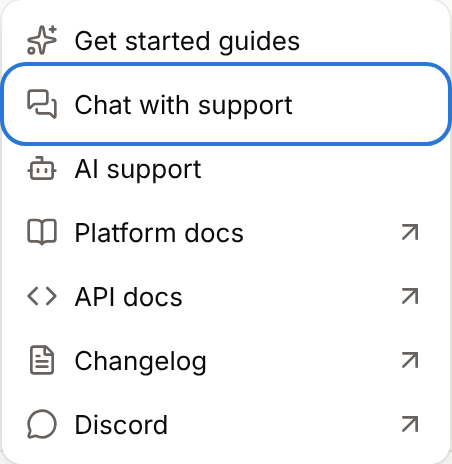
The **Help** menu is at the bottom of the sidebar. A dot on **Help** and a number beside **Chat with support** show unread replies.
| Item | What it does |
| - | - |
| **Get started guides** | Opens **Get started with Sevalla**: guides to connect an AI agent, deploy your own service or deploy a database |
| **Chat with support** | Opens the support chat |
| **AI support** | Opens the page where company owners and admins give Stella access to the account. See [AI support](/support/ai-support). Only owners and admins see it. |
| **Platform docs** | Opens these docs |
| **API docs** | Opens the [API reference](https://api-docs.sevalla.com) |
| **Changelog** | Opens the [changelog](/changelog) |
| **Discord** | Opens the [Sevalla Discord](https://discord.gg/sevalla) community |
 ## Chat with support
Sign in to [Sevalla](https://app.sevalla.com) and switch to the company your question is about. The chat uses the company you have open.
In the sidebar, click **Help**, then **Chat with support**.
Write your message, attach screenshots if they help, and send it.
**Stella (AI)** replies in the chat, in the language you write in. It answers from the documentation and, if your company has turned on [AI support](/support/ai-support), it can look at your services and act on them with the permissions the company granted.
Stella hands the conversation to a person when you ask for one, and for billing disputes, security or abuse issues, legal or data requests, and user account deletions you can't do yourself. See [Hand-off to a person](/support/ai-support#hand-off-to-a-person). Human support is for companies with an active paid service, in English, Monday to Friday, 08:00 to 17:00 UTC. Replies you haven't read show in the **Help** menu.
### If the chat does not open
If the chat can't load, the dashboard shows `Support chat didn’t load. If a content blocker is on, allow intercom.io, or reach us on Discord.` Ad blockers, privacy extensions and some VPNs block the chat: allow `intercom.io` in the blocker or turn the VPN off, then reload the page.
### If you cannot sign in
Email [support@sevalla.com](mailto:support@sevalla.com) from the email address of your Sevalla account. For sign-in problems, first try [Forgot your password?](/account/sign-in) on the sign-in page.
## What to include in a request
A request with these details gets an answer without back-and-forth:
| Detail | Example |
| - | - |
| The service, its type and its company | Application `storefront` in Acme Inc |
| What you did and what you expected | "Deployed the `main` branch, expected the new homepage" |
| What happened instead | "The deployment failed at the build step" |
| Exact error messages, copied as text | `Error: Cannot find module 'express'` |
| When it happened, with a time zone | Oct 18, 2026, 09:40 UTC |
| The URL or domain involved | `https://shop.example.com/checkout` |
| What you've already tried | "Redeployed with the build cache cleared" |
Don't share passwords, API keys or other secrets in the chat.
## Other ways to get help
| Where | For |
| - | - |
| [These docs](/) | How every feature works, limits and settings |
| [API reference](https://api-docs.sevalla.com) | Every API operation and the CLI |
| [System status](/platform/system-status) | Ongoing incidents and maintenance |
| [Discord](https://discord.gg/sevalla) | The community: other developers sharing ideas and helping each other. It isn't official support. |
| [Report a vulnerability](/security/vulnerability-disclosure) | Security issues in Sevalla itself |
To find out what support covers and what it doesn't, see [Scope of support](/support/scope-of-support).
This documentation is built and hosted on [Mintlify](https://mintlify.com), a developer documentation platform.
## Chat with support
Sign in to [Sevalla](https://app.sevalla.com) and switch to the company your question is about. The chat uses the company you have open.
In the sidebar, click **Help**, then **Chat with support**.
Write your message, attach screenshots if they help, and send it.
**Stella (AI)** replies in the chat, in the language you write in. It answers from the documentation and, if your company has turned on [AI support](/support/ai-support), it can look at your services and act on them with the permissions the company granted.
Stella hands the conversation to a person when you ask for one, and for billing disputes, security or abuse issues, legal or data requests, and user account deletions you can't do yourself. See [Hand-off to a person](/support/ai-support#hand-off-to-a-person). Human support is for companies with an active paid service, in English, Monday to Friday, 08:00 to 17:00 UTC. Replies you haven't read show in the **Help** menu.
### If the chat does not open
If the chat can't load, the dashboard shows `Support chat didn’t load. If a content blocker is on, allow intercom.io, or reach us on Discord.` Ad blockers, privacy extensions and some VPNs block the chat: allow `intercom.io` in the blocker or turn the VPN off, then reload the page.
### If you cannot sign in
Email [support@sevalla.com](mailto:support@sevalla.com) from the email address of your Sevalla account. For sign-in problems, first try [Forgot your password?](/account/sign-in) on the sign-in page.
## What to include in a request
A request with these details gets an answer without back-and-forth:
| Detail | Example |
| - | - |
| The service, its type and its company | Application `storefront` in Acme Inc |
| What you did and what you expected | "Deployed the `main` branch, expected the new homepage" |
| What happened instead | "The deployment failed at the build step" |
| Exact error messages, copied as text | `Error: Cannot find module 'express'` |
| When it happened, with a time zone | Oct 18, 2026, 09:40 UTC |
| The URL or domain involved | `https://shop.example.com/checkout` |
| What you've already tried | "Redeployed with the build cache cleared" |
Don't share passwords, API keys or other secrets in the chat.
## Other ways to get help
| Where | For |
| - | - |
| [These docs](/) | How every feature works, limits and settings |
| [API reference](https://api-docs.sevalla.com) | Every API operation and the CLI |
| [System status](/platform/system-status) | Ongoing incidents and maintenance |
| [Discord](https://discord.gg/sevalla) | The community: other developers sharing ideas and helping each other. It isn't official support. |
| [Report a vulnerability](/security/vulnerability-disclosure) | Security issues in Sevalla itself |
To find out what support covers and what it doesn't, see [Scope of support](/support/scope-of-support).
This documentation is built and hosted on [Mintlify](https://mintlify.com), a developer documentation platform.