

Applications
Cron run history
Sevalla now records every run of a cron job, scheduled or started with Run now, and keeps it for 30 days. On the Processes tab, a cron job’s card shows its last 30 runs at a glance, and its status is the status of its latest run: Running, Succeeded or Failed. Click Run history to see every run with when it was due, how long it took, how many times it was retried and why it failed (its exit code, its max run time, or replaced by the next run). Click a run’s time to open its logs.The List cron runs API operation returns the same history. See Check cron runs.ApplicationsPipelines
Ingot, Sevalla’s own builder
New applications and preview apps from Git now build with Ingot, Sevalla’s own builder. Ingot detects your language, framework, language version and package manager, writes a production Dockerfile and builds it: on official language images, from your lock file, running as a non-root user, with the same Dockerfile for the same commit. It supports Node.js, Bun, Deno, Python, PHP, Ruby, Go, Rust, Java, .NET, Elixir, Gleam, Zig, C and C++, static sites and shell scripts. Override what it detects with aningot.json file or INGOT_* environment variables.Existing applications keep their build strategy. To switch one, click Update build strategy on its Settings tab and choose Ingot; Move to Ingot lists what to check first. Nixpacks is deprecated, and applications that build with it keep working.Applications that build with Ingot or their own Dockerfile also keep a Dockerfile history: every Dockerfile they were built from, which one is running, and what changed between any two. A deployment’s new Dockerfile tab shows the file its image was built from, and the List Dockerfiles and Get Dockerfile API operations return the same history.PipelinesApplications
Preview apps and disks in the API and CLI
You can now set up preview apps without the dashboard. The Enable pipeline preview and Update pipeline preview settings API operations take the preview app settings aspreview_app: location, build, hibernation, processes with their disks and TCP proxies, and environment variables. Create preview app creates a preview app for a branch or pull request and starts its first deployment. See Preview apps.Disks have their own operations too: List disk resource types, Attach or update process disk and Detach process disk, with the same rules as the dashboard. See Persistent storage.The CLI has matching commands: sevalla pipelines preview create-app, --preview-app on sevalla pipelines preview enable and update, sevalla apps processes disk update and delete, and sevalla resources disk-types.Applications
Patched Node.js for Nixpacks builds
Nixpacks builds install Node.js 22.23.4 and 24.22.1, the releases that fix CVE-2026-111497 and 9 other vulnerabilities from the Node.js security release of Oct 21, 2026. CVE-2026-111497 is an out-of-bounds write in the Brotli decoder that can let an attacker run code. This covers Nixpacks 1.29, 1.39 and 1.41, and the Node.js that Nixpacks adds to PHP and Ruby applications.When the repository doesn’t set a Node.js version, Nixpacks installs Node.js 22 instead of Node.js 18. Node.js 18 and 20 are end of life and get no fix: an application that pins one of them keeps it, so pin22 or 24 instead, with engines.node in package.json or NIXPACKS_NODE_VERSION. Node.js 24 needs Nixpacks 1.41: on 1.29 and 1.39, a request for 24 builds with Node.js 22. See Set the language version.To upgrade a running application, redeploy its latest deployment with Skip build cache selected. This change covers Nixpacks builds only: Railpack, Buildpacks and Dockerfile builds install Node.js themselves.Applications
Deploy a specific commit
The Manual deploy sheet of a Git application has a new Commit field, so you can deploy any commit of a branch, not only its latest one. Paste the commit’s full SHA, or its link from GitHub, GitLab or Bitbucket, and Sevalla builds that commit with the application’s current settings and environment variables. Browse commits opens the branch’s commits in your Git provider to find one. Leave the field empty to deploy the branch’s latest commit, as before.The Trigger deployment API operation takes the same commit ascommit_sha. See Deploy your application.Applications
PHP security advisory
PHP released 8.5.12, 8.4.27, 8.3.36 and 8.2.35 to fix two critical vulnerabilities, CVE-2026-109618 and CVE-2026-109619, that let an attacker run code on a server with a crafted HTTP request. Every PHP application on an older release is affected, whatever its build strategy.Protect PHP applications from CVE-2026-109618 and CVE-2026-109619 starts with a quick fix: three PHP settings that take one deployment and no changes to your code, with the steps for Nixpacks, Railpack, Buildpacks and Dockerfile builds. It also shows how to upgrade to the patched PHP release for each build strategy.Platform
Support in the top bar
A Support button at the right end of the dashboard’s top bar opens the support chat from every page, in one click. On narrow screens it’s a chat icon. The number of replies you haven’t read shows on the button. Chat with support stays in the Help menu.The Help menu item for company owners and admins that gives Stella access to your account is now AI support settings. See Get help and AI support.Applications
A new web terminal
The web terminal now works like a terminal on your own machine, for your shell and for agent CLIs such as Claude Code:- Sessions that survive drops. A shell keeps running for 15 minutes after its connection drops, so a network change, a laptop that slept or a page reload no longer ends it. The terminal reconnects by itself and replays the output it missed. When the image has
tmux, Start in tmux keeps a shell running even if the terminal service restarts. - Tabs and split panes. Open up to 8 tabs per application, each in any web process or background worker with
sh,bashorzsh, and split them right or down. Your browser remembers the layout of each application. - Copy files. Upload files and folders by dropping them on a pane, and download files or folders (as
.tar.gz), up to 100 MB, from the new Files menu. Copying files needs permission to update the application. - A terminal that fits. The shell’s size follows the window, so
tmux,vimand other full-screen programs use all of it, and the shell starts withTERM=xterm-256colorand a UTF-8 locale. - Keys, settings and notifications. Shortcuts match local terminals on macOS, Windows and Linux, and Settings sets the font size, theme, cursor, scrollback and more. When a program rings the bell, for example an agent waiting for approval, the tab gets a dot and you can get a desktop notification.
- Connection details. The toolbar shows the connection’s status and round trip; click it for the region, reconnects and the last close.
- Phones and tablets. A key bar adds Esc, Tab, Ctrl, Alt and the arrow keys above the on-screen keyboard.
Platform
A refreshed dashboard, docs and API reference
The Sevalla dashboard, these docs and the API reference have a new design, built on one shared brand. The structure stays the same: the sidebar, the tabs on each service and the flows you use every day are where you left them. What changes is consistency: the same thing looks and works the same way on every page and on all three sites.Dashboard- Every list page has the same layout: a title with its main action, then search, a count and the list. Every service page opens with the same header: its name, status, actions and tabs.
- Settings run down the page in sections, and the actions you can’t take back, or that take a service offline, sit last in one Danger zone card, the same on every service.
- Every status shows a color, an icon and a word, so no state depends on color alone.
- Breadcrumbs sit in the top bar on every page, and on a service or project page the last one switches to another of the same kind. Press
⌘K(Ctrl+Kon Windows and Linux) to jump to any page, service or project. - Long names, hostnames and commit messages are never cut off without a way to read them: hover over or focus the text to see all of it.
- Every screen works at phone width. On a pipeline, narrow screens show one stage at a time, with a control to switch between stages.
- Browser tabs name the page and the service, for example
Deployments · Storefront · Sevalla. - Every page, sheet and dialog is checked against WCAG 2.2 AA in both the light and dark theme.
/llms.txt.API referenceThe API reference shares its design and layout with the docs, so the logo, sidebar and text sit in the same place on both sites. Operations are grouped by product, with the names and order the dashboard uses. Rewritten guides cover errors, rate limits and pagination, and a new long-running operations guide lists which operations return before the work finishes and how to poll them. The CLI reference covers every command of CLI 1.10.1. The reference documents API v3 only, and old v2 links redirect to v3.Nothing changes in how your services, the API, the CLI or the MCP server work, so you don’t need to update anything.Platform
Sevalla MCP server now has dedicated tools
The Sevalla MCP server no longer runs AI-generated code in a sandbox. Thesearch and execute tools are replaced by 27 dedicated tools that cover everyday workflows directly:- Discovery: list your services, inspect applications, static sites, and databases, and search the Sevalla docs.
- Deployments: trigger deployments, roll back, and read deployment logs.
- Observability: search runtime and access logs and fetch metrics.
- Configuration: manage environment variables, scale processes, and add custom domains.
- Create: create applications, static sites, and databases.
sevalla_api_* tools find operations by keyword and run them. Reads, creates, updates, and deletes each have their own tool. Every tool is marked as read-only or destructive, so clients like Claude run read-only tools without asking and confirm before destructive actions. Environment variable values are never returned to the agent.The server also supports the latest MCP protocol version, 2026-07-28, and keeps working with clients on earlier versions. Existing connections keep working, so you don’t need to reconnect or change your configuration.See the full tool list in the MCP docs.DatabasesApplications
New hostnames and ports for database external connections and TCP proxies
Database external connections and application TCP proxies now have a new hostname and port. Existing ones keep their legacy hostname and port for now, and both work in parallel, so you can move your clients to the new endpoint at any time without downtime. The new connection details are shown in the dashboard:- Databases: Networking > Public networking > External connection, and Overview > External connection.
- TCP proxies: Networking > Public networking > TCP proxies on your application.
Applications
Egress IP addresses for applications
You can now see which public IP addresses your application’s outbound traffic originates from. Open Networking > Egress IP addresses on any application and allowlist the addresses on external databases and APIs that restrict access by IP.Applications in Oracle Cloud data centers get a single fixed IP address. Applications in Google Cloud data centers get the IPv4 ranges Google publishes for their region, with a Copy all button to grab the whole list at once.The same list is available through the API (see Get egress IPs). Read more in the Networking docs.Static sites
Preview deployments now build in parallel
Static site pull request previews no longer wait in line behind each other. Previews for different branches now build at the same time, and they run alongside your production deployments instead of queueing behind them. Pushes to the same preview branch still run one after another, so the latest commit on a branch is always the one you end up previewing.Production deployments are unchanged. They still run one at a time per site, so the most recent deployment is always the one that goes live.Preview builds also no longer affect your site’s status. A failed or in-progress preview will not mark your site as failed or block updates to the site.Applications
Maintenance mode for applications
You can now put an application into maintenance mode from Settings > Maintenance mode. While it is on, every visitor on every domain of the application sees a maintenance page with a503 status and a Retry-After header instead of your application. The application keeps running and you can still deploy, so it is ideal for database migrations and other planned work.By default we serve a simple maintenance page. Point Maintenance page URL at any HTTPS page, for example a free Sevalla static site, and we serve that page’s content on your own domain instead.Maintenance mode is also available through the API (see Get maintenance mode and Update maintenance mode). Read more in the Settings docs.Databases
Database Studio now works with Redis and Valkey
The Database Studio is no longer SQL only. Open Studio on any Redis or Valkey database and you get a full key-value workspace, with noredis-cli or third-party GUI needed.Browse the keyspace: scan keys with pattern and type filters, switch between a flat key list and a namespace tree, and select multiple keys to delete them or set their TTL in one go. A database selector lets you move between logical databases.Update every key type: dedicated editors for string, hash, list, set, sorted set, stream, and JSON keys, with JSON highlighting, bracket matching, and folding in the value editor. Add, rename, and delete keys, and manage TTLs with a live countdown.Run commands: a redis-cli style console with autocomplete, command history, and an inline command reference.Inspect the server: an overview of memory, clients, throughput, and keyspace, every INFO field in a searchable view, the slow log, and the list of connected clients.You can also export the loaded key list to .csv or .json. See Database Studio for more.Platform
Sevalla is moving to Oracle Cloud Infrastructure
Starting in early September, Sevalla will begin gradually moving workloads from Google Cloud to Oracle Cloud Infrastructure.The migration happens in waves, beginning with static site builds. For most customers, no action is needed.Read the full announcement for migration details, expected impact, location changes, IP changes, and FAQs.Applications
More control over how cron jobs run
Cron jobs now expose two Kubernetes scheduling controls, so a run that hangs can no longer quietly wedge your schedule (the exact situation that used to leave a cron job stuck after a deployment until you recreated it).Concurrency policy: decide what happens when a run is triggered while the previous one is still going:Forbid(default): skip the new run until the current one finishes. Nothing changes for your existing cron jobs.Replace: cancel the still-running job and start a fresh one. This is the self-healing option: a stuck run gets cleared on the next tick instead of blocking every run after it.
0) for no limit.Both settings live in your process settings and through the API (see Create process and Update process). They apply to cron processes only.Applications
Railpack build strategy (beta)
You can now build your applications with Railpack, the successor to Nixpacks. Railpack analyzes your repository and builds an optimized container image with zero configuration, powered by BuildKit.To try it, choose Railpack as the build strategy in your application’s build settings (Settings > Build strategy > Update build strategy). It is also available through the public API by settingbuild_type to railpack.Railpack detects and builds Node.js, Python, Go, PHP, Java, Ruby, .NET, Deno, Rust, and Elixir out of the box. Custom start commands work the same way as with other build strategies: if your web process has a start command set, it overrides the one Railpack detects.Railpack support is currently in beta. Nixpacks remains the default build strategy for new applications.Static sitesObject storage
Purge your CDN cache in one click
If you’re serving stale content after a deployment or an upload, you can now clear it yourself, with no need to wait for the cache to expire or reach out to support.We’ve added a new Cache section to the settings of both static sites and object storage. Head to Settings → Cache and hit Purge cache to instantly clear the cached assets served from our global CDN.- Static sites: purges the CDN/Edge cache for your site. Reach for it right after a deployment when updated assets aren’t showing up yet.
- Object storage: purges the CDN cache for your bucket, so freshly uploaded or replaced objects are served immediately.
Static sites
Faster deployments with clearer upload progress
We’ve made a round of optimizations to how static sites are deployed, and your deployments are now noticeably quicker. Across 264 sites, deployment time dropped by 32.84% on average: the typical deployment went from 82.51 s down to 56.6 s. Nothing changes in how you deploy. Push your code as usual and the speedup is automatic.Deploy logs are clearer, too. You’ll now see a live upload progress bar so you can follow exactly how far along your upload is, instead of waiting on a silent step. Each deployment prints the total number of files being uploaded, a progress bar that advances with file count and total size, and a closing summary with the final count, size, and how long it took. If any files fail, they’re clearly flagged.Platform
AI support agent
You can now chat with an AI support assistant directly from the Sevalla dashboard. The assistant answers questions about the platform and, with your permission, about the services running in your account: it can check deployment status, error logs, database backups, and more, and help you troubleshoot issues. You can also attach screenshots to your messages.To enable it, go to Help > AI support settings, review the data processing terms, and choose what the assistant can access. Permissions work like API key permissions: pick a predefined role or scope custom permissions to specific resources. Once enabled, every member of your company can chat with the assistant, so grant only the access you are comfortable exposing to all members. Only company owners and admins can enable AI support or change its permissions.A few things worth knowing:- The assistant is powered by Anthropic Claude. Prompts and account data are sent to Anthropic only to generate responses and are not used to train their models.
- Enabling AI support creates a dedicated, managed API key for your company. Disabling it revokes the key immediately.
- The assistant hands the conversation over to our human support team whenever needed.
- Without account access, the assistant still answers questions using the Sevalla documentation.
ApplicationsStatic sites
Bandwidth chart in analytics
Application and static site Analytics tabs now include a Bandwidth chart alongside the existing request rate, response time, and status code charts. Use it to see how much traffic your service is serving over time and to spot bandwidth spikes.The same timeframe and filter controls that apply to the other charts apply to bandwidth as well.ApplicationsStatic sites
Git LFS support
Applications and static sites can now pull LFS-tracked files when deploying from repositories that use Git Large File Storage (LFS). Large assets tracked by LFS (such as images, videos, datasets, or model files) are fetched during the build. Previously, deployments from LFS repositories succeeded but only the LFS pointer files were checked out, not the actual file contents.Git LFS is enabled by default. You can disable or re-enable it from the application or static site Settings tab. The same flag is available through the public API asgit_lfs_enabled on update application and update static site.You can also toggle the flag with Sevalla CLI v1.10.0:Databases
Restart a database
You can now restart a database on demand from the dashboard. Open the database’s Settings tab and click Restart database in the Danger zone.The database is stopped and started again: existing connections are closed and any in-flight queries or uncommitted transactions are aborted. Stored data is preserved. The restart runs in the background and usually completes within a few minutes. The database is unavailable until it finishes.Restart is available when the database is not suspended, is in aready, error, passwordChangeFailed, or restoringFailed state, and its backup status is ready.The same action is also available through the public API at POST /databases/{id}/restart-database and through the Sevalla CLI with sevalla databases restart {id}.Static sites
Header-based conditions in _redirects
Static site _redirects rules can now match on incoming request headers.Add a Header:Name=value option at the end of a rule to apply it only when the request carries a matching header. For example, to serve a Markdown version of a page to clients that ask for it:Databases
Restore a backup to a different database
You can now restore a database backup into a database other than the one it was taken from, making it easier to clone data between environments or recover into a fresh instance without overwriting the source.When opening the Restore backup dialog, choose between:- Restore to source: Replace the current data in the original database with the backup contents.
- Restore to different database: Pick any other compatible database in your company as the target.
Object storage
Delete non-empty object storage
You can now delete an object storage bucket even when it still contains objects. Any objects inside are removed automatically as part of the deletion.Previously, you had to empty the bucket manually before it could be deleted.Object storage
Roll object storage secrets
You can now rotate the access and secret keys on an object storage bucket without taking your clients offline.Open the bucket’s Settings tab and click Roll secret in the Details section. Pick how long the previous keys should remain valid:- Now: Invalidate the old keys immediately.
- Up to 168 hours: Keep the old keys working alongside the new ones during a grace period, then expire them automatically.
POST /object-storage/{id}/rotate-credentials.Platform
Onboarding experience
Newly signed-up customers are now greeted by a guided onboarding sheet that helps them get up and running on Sevalla faster.Open it from the Get started button in the top-right corner of the dashboard and pick one of four quick-start paths:- Connect your coding agent: The featured option. Generate and copy an API key directly from the guide, then plug AI tools into the Sevalla MCP server at
https://mcp.sevalla.com/mcpto manage your infrastructure through prompts. - Deploy an application: Ship your first app from a Git repository in a few steps.
- Deploy a database: Spin up a managed PostgreSQL, MySQL, MariaDB, or Redis instance.
- Try a template: Launch a pre-configured, self-hosted app in a single click.
Platform
Navigation revamp
We’ve revamped the navigation to address the “lost” feeling some users experienced when moving around the dashboard. The main and context menus are now shown together, and the dashboard has been expanded to full width.Platform
Usage alerts
Set spending limits for your company or individual projects and get notified by email when usage crosses your chosen thresholds.You can configure:- A spending limit in USD.
- One or more threshold percentages of the limit (up to 10 per alert), for example 50%, 75%, and 90%.
- One or more email recipients.
Static sites
Custom headers for static sites
You can now add custom HTTP headers to your static sites by including a_headers file in your repository’s root directory. Sevalla parses the file and applies matching header rules to responses automatically.Supported features include:- Wildcard patterns: Apply headers to broad path matches like
/*or/assets/*. - Placeholders: Match single path segments with
:namesyntax for dynamic routes. - Rule combining: When multiple rules match a path, their headers are merged automatically.
- Common use cases: Configure security headers, caching policies, CORS rules, and more.
Content-Encoding, Server, Transfer-Encoding) are restricted and cannot be overridden. See the headers documentation for the full list and detailed examples.Platform
Project Admin role for user management
Project Admins can manage user access within their projects, giving scoped control over who can access project resources without needing company-level permissions.As a Project Admin, you can:- Invite users: Add new or existing users directly to your project with a project-admin or project-developer role.
- Manage project roles: Promote, demote, or remove users within your project.
- Manage service roles: Grant or revoke access to apps and databases that belong to your project.
- Convert access levels: Move a single-project user between project-level and service-level access within your project scope.
Static sites
Deploy paths for static sites
Deploy paths are now available for static sites, giving you fine-grained control over which file changes trigger a deployment. This is especially useful for monorepos or repositories where not every commit should result in a new deployment.In the Deploy section of your static site settings, click Update deploy paths and choose between:- Allow paths: Only trigger deployments when changed files match specific glob patterns (e.g.,
src/frontend/**). - Ignore paths: Skip deployments when all changed files match specific glob patterns (e.g.,
**/*.md).
Static sites
Update source for static sites
You can now change the source repository for your static sites directly from the settings page, without deleting and recreating the site.Click Update source in the Deploy section of your static site settings to switch between a private or public Git repository, change the Git provider (GitHub, GitLab, or Bitbucket), or point to a different repository URL.Applications
App health
Real-time visibility into application health is now available directly in the dashboard. When something goes wrong with your app (whether it’s an out-of-memory crash, a segmentation fault, or a misconfigured start command), you’ll see an alert banner at the top of the page with actionable details.Click the banner to open the App health panel, which shows:- Instance status at a glance: See the state of every running instance across all your process types (web, worker, cron, job), including restart counts and exit codes.
- Automatic issue detection: Recognized failure scenarios include OOM kills (exit code 137), segmentation faults (exit code 139), permission errors, missing binaries, application errors, and health check misconfigurations.
- Troubleshooting guidance: Each detected issue comes with a plain-language explanation and specific steps to resolve it, so you can diagnose problems without digging through logs.
- Live updates: Instance statuses refresh in real time, so you can watch recovery happen as you apply fixes.
Platform
Usage page
The new Usage page gives you full visibility into your resource consumption and costs directly in the dashboard.Get a clear breakdown of spending across all your services (applications, databases, static sites, object storage, and load balancers), with daily cost tracking and period-over-period comparison.Key highlights:- Summary cards: See your current period total, projected end-of-period cost, and previous period comparison with percentage change indicators at a glance.
- Interactive charts: Visualize daily or cumulative costs with stacked bar and area charts, color-coded by usage type.
- Flexible filtering: Filter by project, service, or usage type to drill into exactly the costs you care about.
- Detailed cost table: Expandable table showing per-service net, gross, and tax amounts grouped by usage category, with deleted services clearly marked.
- Export and print: Download your usage data as CSV or JSON, or print a full report for your records.
Platform
Sevalla Terraform provider
The official Sevalla Terraform Provider is now available. Define and manage your entire Sevalla infrastructure as code using HashiCorp Terraform.Provision applications, databases, static sites, and configure domains, environment variables, and scaling, all through declarative HCL configuration files. Perfect for teams that want reproducible, version-controlled infrastructure.Platform
Sevalla CLI
The official Sevalla CLI is here: manage your entire Sevalla infrastructure from the terminal.Deploy apps, provision databases, manage static sites, configure domains, and monitor your services without leaving the command line. Every action available in the dashboard is now at your fingertips via a clean, consistent command structure.Install it with your preferred package manager:- Full platform coverage: Applications, databases, static sites, domains, and monitoring all in one tool.
- Scriptable output: Every command supports
--jsonfor easy integration with CI/CD pipelines and automation scripts. - Flexible authentication: Interactive browser-based sign-in for local use, or API token via
SEVALLA_API_TOKENfor automated workflows.
sevalla --help to explore all available commands, or check out the GitHub repository for full documentation.Platform
Sevalla MCP server
The official Sevalla MCP (Model Context Protocol) server is now available. You can now give AI agents and coding assistants full access to the Sevalla PaaS API.You can connect popular MCP clients like Claude Code, OpenCode, Cursor, and other coding agents directly to our hosted server athttps://mcp.sevalla.com/mcp. Authentication is handled via OAuth, meaning you don’t need to hardcode API keys in your configuration files.Now that your AI can spin up and manage infrastructure on command, the only limit is your imagination. Well, that and your prompt engineering skills.Platform
Sevalla REST API v3
Sevalla now has a fully featured REST API, giving you programmatic access to everything you can do in the dashboard.The v3 API covers over 200 endpoints across all major resources: applications, databases, static sites, object storage, load balancers, pipelines, webhooks, projects, and more. Whether you’re automating deployments, managing environment variables, or scaling processes, the API has you covered.Key highlights:- Full OpenAPI 3.1 specification: Interactive documentation with field-level descriptions, examples, and error responses available at api-docs.sevalla.com.
- Granular API key authentication: Scope each key to specific roles, resources, or actions using the same RBAC system as the dashboard.
- Clean, predictable design: Flat JSON responses, consistent snake_case naming, and proper HTTP methods make integration straightforward.
- Built-in rate limiting: Tiered limits per endpoint type protect your services while giving you plenty of room for automation.
- Error tracking: Every server error includes a unique reference code you can share with support for fast resolution.
Load balancers
Load balancers
Sevalla now supports load balancers, giving you full control over how traffic is distributed across your services.Load balancers run at Cloudflare’s edge network, routing requests close to your users for faster, smarter traffic decisions. You can route to applications, static sites, object storage buckets, external URLs, or even other load balancers (up to 20 destinations per load balancer).Two balancing modes are available:- Weighted: Control the proportion of traffic each destination receives. Useful for canary deployments, A/B testing, or gradual migrations between services.
- Geographic: Route users to the nearest destination based on their location, reducing latency for globally distributed setups.
Platform
Projects usage tab
The project page now features a Usage tab, so you can track your service costs and consumption during the current billing period and compare them to the previous one.Platform
RBAC-protected projects
As your infrastructure grows, keeping things organized and secure is essential. You can now group your services into projects within your company workspace.To give you more control over who can access what, we’re also rolling out a new Project Developer role. This lets you grant fine-grained, project-level permissions to your team members. A Project Developer can fully manage the services within their specific project, but they are completely restricted from seeing or touching resources outside of it.This makes it simpler to onboard new developers and restrict access without slowing down their workflow.Platform
Granular API key permissions
API keys on Sevalla now support fine-grained permission control, giving you full flexibility over what each key can access and do.You can assign one of the predefined roles (Company Admin, Company Developer, Company Billing, or Company Viewer) or build a custom permission set tailored to your exact needs. Custom permissions let you select specific actions per resource type and scope them down to individual resources.For example, you can create an API key that only has view access to a single application, or one that can manage databases but nothing else.This makes it easier to follow the principle of least privilege across your integrations, CI/CD pipelines, and team workflows.ApplicationsStatic sites
Access logs for apps and static sites
You can now view access logs for your applications and static sites directly in the Sevalla dashboard.Access logs give you visibility into incoming HTTP requests (including request paths, status codes, IP addresses, and response times), so you can monitor traffic, debug issues, and understand how your services are being used.Whether you’re troubleshooting a 404, investigating a traffic spike, or keeping an eye on things, access logs have you covered.Head to the Logs section of any application or static site to get started.ApplicationsStatic sites
Improved logging experience
We’ve shipped a major upgrade to Sevalla logging, making it easier to explore, analyze, and export your logs.- Structured logs support: Logs are now stored and displayed as structured data, enabling more precise inspection and analysis.
- Log export: Download logs in JSON or CSV format for offline analysis, audits, or sharing.
- Advanced filtering: Filter logs with greater flexibility to quickly narrow down relevant entries.
ApplicationsDatabasesStatic sites
Analytics updates
We’ve shipped improvements across Sevalla Analytics to make data exploration faster and more intuitive.- Chart zooming across apps, databases, and static sites
Zooming one chart now shows a reference line on other charts on the same page. - Application analytics improvements
- Separate Compute and Web analytics
- Enhanced Web analytics: country charts, RPM, HTTP status codes, and improved filters
- Static site analytics upgrade
- Same Web analytics charts and features as applications
Platform
Single sign-on (SSO)
You can now sign in to Sevalla using single sign-on (SSO). Connect your identity provider and manage team access securely with centralized authentication.Applications
Global app environment variables
Define global environment variables that can be used across all your applications. These are ideal for shared configurations, such as API keys or global feature flags.The application-level environment variables page will indicate if any global variables are set and let you access them.ApplicationsDatabases
Display recently used locations in location selector
Recently used locations will appear first in the location selector, making it easier to reuse the same data centers.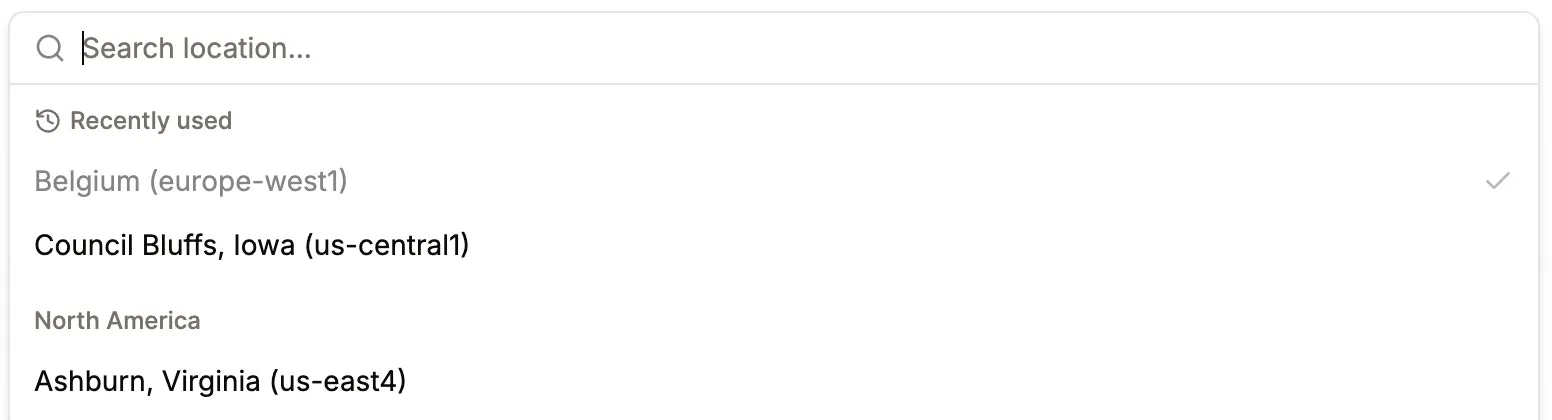
ApplicationsDatabases
Utilize *.proxy.sevalla.app domain for DB ext connection & TCP proxy
Previously, we usedkinsta.app domain. After toggling a database connection, it now receives a Sevalla domain instead. The same applies to app-level TCP proxies.Applications
Nixpacks version 1.41
Newest Nixpacks version is available under “Build strategy settings”.Applications
Custom port for healthcheck
The update process sheet now includes a custom internal port health-check setting, so you can specify port numbers for either the Readiness or Liveness probe.Databases
Database public access with IP restriction
You can now enable external database access with fine-grained control. Previously, connections were either fully open or completely disabled, now you can allow or block access based on specific IPs or IP ranges.We also introduced a new Networking tab under database, where you’ll now find the external connection toggle, IP restrictions, and connected apps.Applications
Deployment updates log
You can now view application changes in the Deployments table. Each deployment shows when the updates went live, along with a small badge indicating the number of changes. Detailed information is available on the Deployment details page.ApplicationsDatabasesStatic sites
Create webhooks to receive service event notifications
You can now configure an endpoint to receive event notifications when changes occur in your apps, databases, or static sites.Each webhook request includes ansvl-signature header for verification, and failed deliveries are retried up to 12 times, with all attempts visible in the Event Deliveries view.Initial supported event types include:APP_CREATE,APP_UPDATE,APP_DELETE,APP_DEPLOYDATABASE_CREATE,DATABASE_UPDATE,DATABASE_DELETESTATIC_SITE_CREATE,STATIC_SITE_UPDATE,STATIC_SITE_DELETE,STATIC_SITE_DEPLOY
Static sites
Pretty URLs for static sites
Static sites on Sevalla now support Pretty URLs, which automatically standardize URLs for cleaner paths and improved SEO.
- Redirect paths like
/about→/about/ - Rewrite paths like
/about.html→/about/
Static sites
_redirects file support for static sites
Static sites on Sevalla now support the_redirects file format. If your repository includes a _redirects file in its root, Sevalla automatically parses and applies your custom redirect rules.Supported features include:- Custom 404 pages: Add a
404.htmlpage, and Sevalla will automatically serve it for missing paths. - Force redirects: Use
!in your status code to override existing files, ensuring your redirect always takes effect. - Splats: Use wildcards (e.g.
/news/* → /blog/:splat) to match entire path segments. - Placeholders: Dynamically capture path segments using variables like
:slugor:id. - Query parameters: Match redirects based on query strings (e.g.
/store?id=:id → /blog/:id).
/* /index.html 200 so that all paths correctly return index.html with a 200 status instead of a 404 on reload.Platform
A brand-new Sevalla dashboard with dark mode

Databases
Redis 8 support enabled
Great news: Redis 8 is now available on Sevalla.We’ve officially enabled Redis 8 so you can start using the latest version in your apps.Upgrade today to benefit from improved performance, stability, and new Redis 8 features.Applications
Docker caching is now available
We’ve expanded our build caching options.In addition to Nixpacks and Buildpacks caching, you can now take advantage of Docker layer caching.This helps speed up your deployments by reusing unchanged Docker layers, resulting in faster builds and more efficient pipelines.Applications
Faster app hibernation wake-up
Hibernated apps now wake up much faster, so your app becomes responsive more quickly after a period of inactivity. Previously, apps could take 60 to 90 seconds to start up after being idle, but now they’re ready in 8 to 20 seconds.Redeploy your app to activate the new hibernation settings.Applications
Nixpacks version selection is here
You can now select your preferred Nixpacks version for your apps on Sevalla. This gives you more flexibility and control over your deployments, and helps ensure smooth upgrades.Starting today, all newly created apps will use Nixpacks version 1.39 by default (previously 1.29). If you need to use a different version, choose the version that best fits your project.Applications
System environment variables available in applications
We’re introducing automatic injection of several system environment variables into your apps during both build and runtime. This makes it easier to automate tasks and access important deployment details directly from your application.The following environment variables will be available:- SVL_COMPANY_ID
- SVL_APP_ID
- SVL_APP_NAME
- SVL_DEPLOYMENT_ID
- SVL_DEPLOYMENT_INITIATED_BY
- SVL_DEPLOYMENT_TRIGGER
- SVL_DEPLOYMENT_COMMIT_SHA
- SVL_DEPLOYMENT_BRANCH
- SVL_DEPLOYMENT_DOCKER_IMAGE
Platform
Sevalla official GitHub action
GitHub users can now integrate Sevalla deployments into their workflows. Add the official Sevalla GitHub Action to your pipeline and deploy.View on GitHub MarketplaceApplications
App analytics improvements
Your feedback is invaluable. We’ve supercharged the app analytics section with some highly-requested features:- Charts now auto-refresh, giving you real-time insights.
- Track RAM/CPU limits over time.
- Clearly see your processes’ instance counts as they scale up or down.
Platform
Updated documentation pages
We’ve updated our documentation with a refreshed design and enhanced features to make onboarding even smoother.- Both documentation sites now share a unified, modern look
- Fully compatible with AI crawlers
- AI-powered search assistant is now available
ApplicationsStatic sites
Sevalla domains can be updated
You can change your generated domains at any time. This is useful for testing or if you want to use a different domain name for your app or static site.Applications
1-click deployable templates are now available
You can now deploy your applications using 1-click deployable templates. This feature lets you quickly set up and deploy self-hosted, open-source applications with pre-configured settings, making it easier than ever to get started with your projects.You can find the “Templates” menu item on the Sevalla UI. Select the template you want to use, and click “Deploy”. The application will be set up and running in no time.Our list of templates is constantly growing, so be sure to check back often for new additions. If you have any suggestions for templates you’d like to see, let us know over support.Object storage
Object storage CORS settings
You can add CORS settings to your object storage buckets, so you can control how resources are shared across different domains.Applications
Connected services on app overview diagram
You can enable internal network connections between resources, and this is now visually represented in the application overview diagram.ApplicationsStatic sites
Deployment status indicator in favicon
The deployment status appears directly in your browser tab, so you can quickly see whether it’s in progress or complete without switching tabs.ApplicationsStatic sites
Wildcard domains
You can now use wildcard domains for your apps and static sites. Perfect for things like custom subdomains (*.yourdomain.com) or multi-tenant setups. Add your wildcard domain, and we’ll take care of the rest (automatic SSL included).Databases
Database Studio
You can now manage your MySQL, MariaDB, and PostgreSQL databases directly from the Sevalla UI. Run custom SQL queries, browse and download data, and take full control of your database, with no external tools needed.Applications
App build settings revamped
We’ve given the App Build settings tab a complete makeover. Beyond the sleek new interface, we’ve introduced three functionalities:New features:- Docker registry credentials: Now you can connect to private registries for your Dockerfile base images
- Buildpack builder selection: Conveniently update your builders:
heroku/builder:22heroku/builder:24
- Build environment visibility: We’ve added visibility for build environment settings associated with each deployment, and included a button for easy modification of those settings above the deploy logs
Databases
PostGIS is now available for our PostgreSQL databases
Many of you have asked for PostGIS support, and we’re announcing that it’s now available for PostgreSQL 13+ databases.PostGIS is a spatial database extension for PostgreSQL that lets you store and query geographic information. With PostGIS, you can:- Store and manage spatial data types like points, lines, and polygons
- Perform spatial queries to analyze and visualize your data
- Build location-aware applications and services
Applications
Deploy hooks
We’re excited to introduce deploy hooks, making automated deployments even easier.With deploy hooks, you can now trigger deployments with a simple POST request to a unique URL, perfect for integrating with your workflow. This feature enables:- CI/CD integration: Connect your GitHub Actions, Jenkins, or other CI tools
- Automated deployments: Trigger updates when your content or data changes
- Custom workflow support: Build scripts that deploy your apps when needed
Applications
IP access controls for applications
We’ve rolled out new IP restriction capabilities for your app hosting environments:- IP Allowlists: Create a trusted circle of approved IP addresses
- IP Denylists: Block specific troublesome IPs or ranges
Applications
Preview apps now support advanced pre-configuration
You can now pre-define your preview apps with both disk configurations and TCP proxies right from the start.We’ve also published the “createPreviewApp” endpoint in our public API, enabling programmatic creation of fully-configured preview environments.Databases
Applications
Choose your shell in Web terminal
Application hosting users, you can now select between three shell types:sh(for minimalists)bash(the classic choice)zsh(for the feature lovers)
Object storage
Object storage with S3 compatibility
Our new object storage solution provides unlimited scalability for all your application needs, with zero ingress and egress fees, powered by Cloudflare R2.Key Features:- S3-Compatible API: Integrate with your existing S3 workflows, making migration and management straightforward.
- Global Availability: Choose from 6 global storage locations to optimize data access and comply with data residency requirements.
- Transparent Pricing: Enjoy predictable costs at $0.02 per GB per month, with no hidden fees.
ApplicationsDatabases
Resource limits in analytics charts
Never hit unexpected resource ceilings again. You can now see your service’s configured limits displayed directly on the Analytics charts alongside actual usage metrics.This visual enhancement helps you:- Spot when you’re approaching capacity limits
- Make data-driven scaling decisions
- Optimize resource allocation for cost efficiency
Applications
Custom time zone setting for cron jobs
Teams working across the globe: you can now set custom IANA time zones for your cron jobs instead of being locked to UTC.Applications
Manual cron trigger functionality
You can now manually trigger your cron processes directly from the Sevalla dashboard with one click.Platform
Resource usage breakdown chart
Company-level users can visualize daily spending patterns, giving you visibility into where your resources are going.Key benefits:- Track spending trends across different cost categories
- Identify cost optimization opportunities at a glance
- No more guesswork about your platform costs.
Databases
Database connection deeplink
Connect to your database instantly with a single click.No more copying connection strings or credentials.Hit the new “Open deeplink” button in the external connection card and watch as your local machine connects to your database.ApplicationsStatic sites
Email notifications for failed deployments
New email notification system for failed deployments across both applications and static sites.Now you’ll instantly know when something goes wrong, so you can address issues before they impact your users.Manage your notification preferences under User > Notifications to tailor the experience to your needs.Applications
gRPC support has landed
We shippedgRPC support for your applications, unlocking high-performance communication.Now you can toggle between HTTP and gRPC protocols for your web processes.Applications
Private network access for builds
Build pods can now securely reach other resources via a private network. Perfect for running database migrations during build time. Enjoy a smoother, more efficient workflow.ApplicationsStatic sites
Support environment variable reference
You can now reference environment variables within other variables using the${key} format.For example:Databases
MySQL 9.0 is available
The long-awaited new version of MySQL is here.MySQL 9.0 brings a host of new features and improvements, including:- JavaScript stored programs
- VECTOR data type
- Foreign key improvements
- Performance schema enhancements
- Query optimization
Applications
Expose non-HTTP traffic via TCP proxy
We’re announcing support for exposing non-HTTP traffic via TCP proxy.Now you can expose services like databases or message queues. Deploy MongoDB, RabbitMQ, and more.Databases
PostgreSQL 17 is here
PostgreSQL 17 is now available on Sevalla.Benchmarks claim 20 to 30% better query performance compared to the previous version.v17 also brings a bunch of new features and improvements. For more details, check out the official release statement.Databases
Control database public access
Going forward, every database you create will be private by default.Toggle public availability of your database on the fly, whenever you need to.Applications
Undeployed change-set notifications
We received feedback that it was unclear which actions on Sevalla triggered a deployment and which did not.You’re in control when you’d like to initiate a full rebuild of your app, or restart it with some fresh configs.ApplicationsStatic sites
Revamped environment variables management
We made a major overhaul of our environment variables management in Application hosting.You’re now able to:- Export/import variables to/from a file
- Copy all environment variables to the clipboard
- Display the user and timestamp of recent updates/creations
- Copy key-value pairs directly from the table
- Use the new editor in the “Add Network” modal
Applications
Configure CDN / Edge cache settings
Until now, configuring your app’s CDN and edge caching settings required a trip to our API.You can now manage these settings directly from your dashboard, under App > Networking settings.Applications
Hibernate your apps to save costs
We’re excited to introduce a new feature that will help you save money on your hosting costs.With our new Hibernation feature, you can now put your applications to sleep when they’re not in use. This means you can save on compute resources and only pay for what you use. It’s a great way to reduce your hosting costs without sacrificing performance or reliability.Here’s how it works:- When you hibernate an application, we’ll scale down your application’s all long-running pods to zero replicas.
- When a request comes in, we’ll automatically wake up your application and start serving traffic again.
Go fully private
We’re thrilled to announce a major update that’s all about security.As part of our ongoing commitment to protecting your workloads, we’ve introduced a new feature that exposes private ports & disables ingress on web processes. This means you now have the power to decide who can access your applications and services, and how they can interact with each other.With this update, you can:- Expose private ports internally, making it easier to build and run microservices, or integrate services like RabbitMQ or databases that require internal communication.
- Disable ingress on web processes, giving you granular control over who can access your applications and services, and how they can interact with each other.
Platform
Sevalla is now ISO 27001 certified
We have earned the coveted ISO 27001 security certificate.Achieving ISO 27001 certification is no small feat, and it’s a testament to the hard work and dedication of our team.Applications
Utilize deployment hooks with Jobs for Application hosting
We’re excited to introduce a new process type called,Job in our Application hosting. This feature makes it easy to send alerts and perform database migrations, for example.No more manually appending scripts in your start commands: set up your Job and let it run. You can configure when jobs should run:- before deployments
- after successful deployments
- after failed ones
Static sites
Static site pull request previews feature
We’re thrilled to introduce the pull request previews feature, which lets you preview your sites in a dedicated environment before merging them into your default branches.No more worries about broken links or layout issues: previews ensure a smooth experience for you and your team.Static sites
Static site build logs improved
Debugging your static site builds is now a whole lot easier. We’ve unleashed a fresh, revamped log structure that’s designed to make your life easier. Our new and improved logs are now more readable, organized, and packed with extra context to help you troubleshoot issues.But that’s not all, folks. We’ve also squashed a pesky node modules path issue that was causing some users to experience a"Command not found" error when trying to run commands directly. No more frustration: our fix means you can get back to building and deploying your static sites.Our log format has gotten a makeover, with improved formatting, clearer categorization, and additional context to streamline the debugging process. And, behind the scenes, we’ve made sure that node_modules paths are now correctly resolved, so you can focus on what matters most: building fantastic static sites.ApplicationsDatabasesStatic sites
Analytics overhaul
We’re stoked to announce a major overhaul of our analytics charts for apps, databases, and static sites. We’ve taken a hard look at our infrastructure and chart library, and the result is a completely new and improved experience. Say goodbye to slow data fetching and hello to almost real-time updates, thanks to our latest infrastructure wizardry (hello, Prometheus).Here’s what’s changed:Compute data: We’ve ripped out the old and replaced it with a brand new, Prometheus-powered system that delivers fast data and virtually instantaneous updates.HTTP data: No more waiting around for hours. Our new latency is a mere 1 to 3 minutes, making it easier to spot trends and troubleshoot issues.New visuals: We’ve swapped out our old chart library for a fresh, improved experience that’s easier to use and understand.And, Static site hosting gets in on the action too. You’ll now find an Analytics tab, showcasing essential metrics like:- Requests per minute
- Response time
- Slowest requests
- Top pages
p90, p95, p99, avg) for a clearer view and removed runtime charts, as they were more relevant to billing than observability. And, to simplify things, we’ve hidden HTTP charts for processes that aren’t exposed.Platform
Hello world, welcome to Sevalla
We’re your partner in building amazing applications, a platform-as-a-service (PaaS) designed specifically for developers like you, who want to focus on writing code, not managing infrastructure. With Sevalla, you can host your application, managed database, and static site all in one place, and get the scalability, reliability, and security you need to succeed.We believe that building software should be fun, not frustrating. That’s why we’re dedicated to providing a smooth development experience, with easy deployment, and automated scaling. Whether you’re building a simple web app or a complex enterprise solution, we’ve got you covered.Here are a few reasons to choose Sevalla:- Focus on code, not infrastructure: With Sevalla, you can leave the heavy lifting to us, and focus on what you do best: building great software.
- Scalability and reliability: Our platform is designed to handle sudden spikes in traffic, and our automated monitoring ensures that your app is always available.
- Security: We take security seriously, with access controls, and regular security audits.
- Flexibility: Choose from a range of hosting options, including application, managed database, and static site hosting, to find the solution that’s right for you.