

At a glance
Environment variables
Each application gets its own set. The builder and the reviewer each use their own Claude API key and GitHub token, so usage, limits and permissions stay separate.How the swarm works
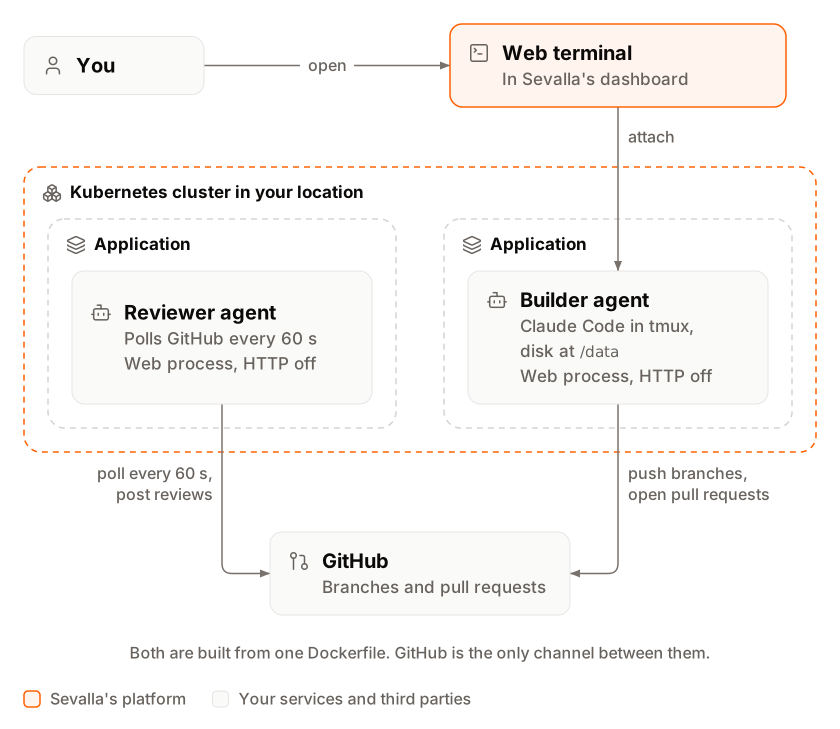
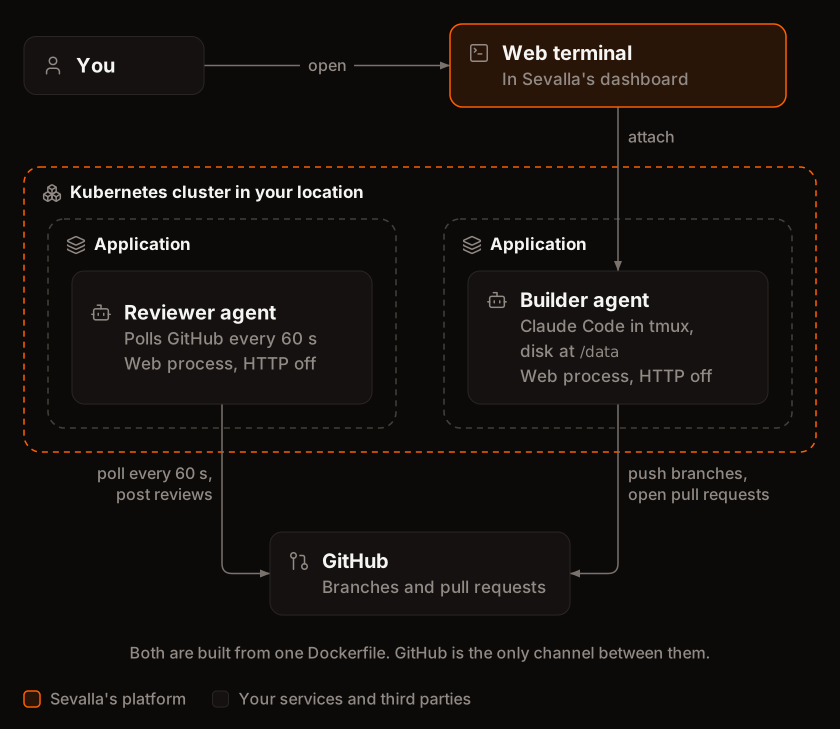
- You open the builder’s Web terminal and give Claude Code a task. It branches from
main, builds and tests the change, pushes the branch and opens a pull request withgh pr create. - Every 60 seconds, the reviewer lists the repository’s open pull requests that aren’t drafts. For each head commit it hasn’t reviewed yet, it checks the commit out and runs
claude -pwith read-only tools. - Claude Code returns a verdict,
APPROVEorREQUEST_CHANGES, with a review comment, as JSON that matchesverdict.schema.json. The script, not Claude Code, posts it withgh pr review. - You read the review. To act on it, tell the builder, for example
Address the review on #3. It pushes a fix to the same branch, and the reviewer reviews the new commit. - A person merges. Neither agent merges or pushes to
main.
Before you begin
- A Sevalla company with a payment method. The S1 size needs one. See Pricing.
- A GitHub repository for the agents to work on, with tests they can run, and a second, private repository for this guide’s files, for example
acme/agent-swarm. - Two Claude API keys from the Claude Console, one per agent, with a spend limit on their workspace.
- Git on your computer.
Set up GitHub
Each agent uses a fine-grained personal access token that can reach only the repository the agents work on. Create them at github.com/settings/personal-access-tokens/new:
Who the tokens belong to decides what the reviewer’s verdict can do:
- One GitHub user for both agents. The simplest setup: both tokens belong to you or to one bot user. GitHub doesn’t let anyone approve or request changes on their own pull request, so when the reviewer reviews a pull request its own user opened, the script posts the verdict as a comment that starts with Reviewer: Approved or Reviewer: Changes requested.
- A second GitHub user for the reviewer. Its approvals and change requests then count as real reviews. Put the repository in a GitHub organization that both users belong to, and create each token with the organization as its resource owner: fine-grained tokens can’t reach a repository where their user is only a collaborator. The organization may need to approve the tokens.
Create the project
The project holds both agents. Create a folder for it:AGENT_ROLE chooses which script the image runs:
Dockerfile
.dockerignore
tmux.conf
shell-init.sh makes the builder’s web terminal open in Claude Code. The reviewer has no tmux session, so its terminal opens a plain shell:
shell-init.sh
bin/setup.sh runs first for both agents. It installs the role’s instructions and permission rules into ~/.claude on every start, so a deployment applies changes to them:
bin/setup.sh
bin/builder.sh starts Claude Code in a tmux session named builder and waits:
bin/builder.sh
bin/reviewer.sh is the reviewer’s loop. It reviews each head commit once, and only the script talks to GitHub:
bin/reviewer.sh
claude -p --json-schema returns it in the result’s structured_output field:
agents/reviewer/verdict.schema.json
git commands, and nothing else. With --permission-mode dontAsk, Claude Code denies every other action instead of asking:
agents/reviewer/settings.json
agents/builder/settings.json
CLAUDE.md is its standing instructions, which Claude Code reads as user memory from ~/.claude/CLAUDE.md:
agents/reviewer/CLAUDE.md
agents/builder/CLAUDE.md
Deploy the agents
Create two applications from the same repository: one for each role. Both start with automatic deployments off, so a push to this repository never restarts an agent in the middle of a task.1
Create the builder
In the sidebar, click Applications, then click Create > Application. Under Source, click Private repository, choose the Git provider, the
agent-swarm Repository and the main Branch, and turn off Auto-deploy. Enter swarm-builder as the Name, choose a Data center, choose S1 as the Size, then click Create application.2
Choose the Dockerfile build strategy
On the Settings tab, in the Build strategy section, click Update build strategy. Click Dockerfile, keep the Dockerfile path
Dockerfile and the Docker context ., then click Update build strategy.3
Add the builder's variables
Click the Environment variables tab, then click Add environment variables. Add
AGENT_ROLE with the value builder, GITHUB_REPO, and the builder’s ANTHROPIC_API_KEY and GH_TOKEN. Clear Available during buildtime, keep Available during runtime, and click Add environment variables.4
Turn HTTP traffic off
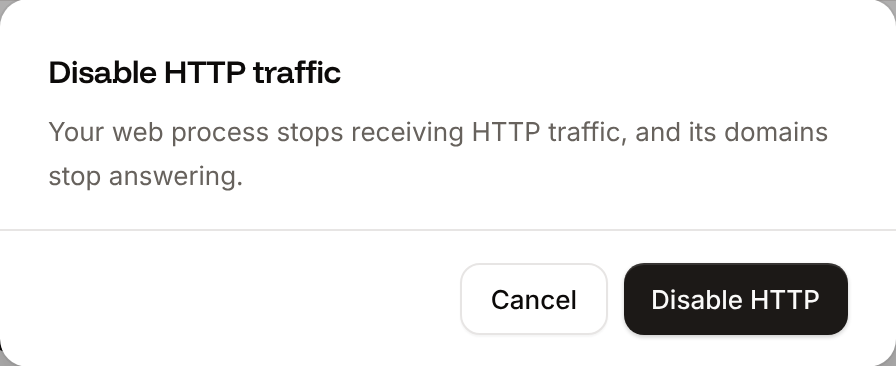
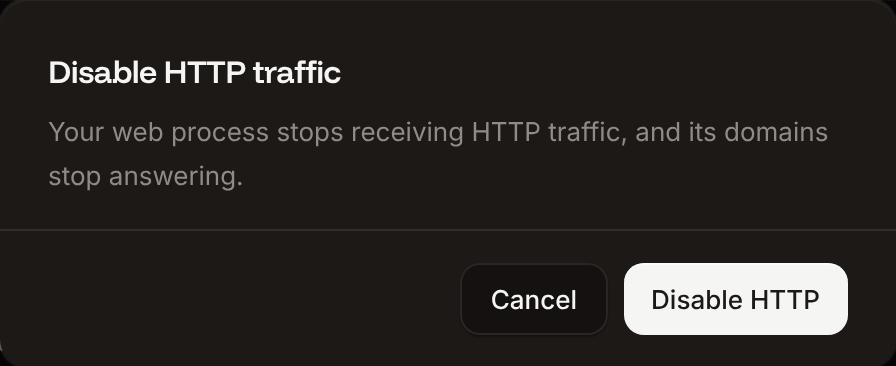
Click the Networking tab. In Expose HTTP traffic, click Disable, then click Disable HTTP in the Disable HTTP traffic dialog.
5
Add the builder's disk
Click the Disks tab, then click Create disk. Choose the web process as the Process, enter
/data as the Path, keep the Size at 10 GB, and click Create disk.6
Create the reviewer
Repeat the first four steps for a second application named
swarm-reviewer, with H1 as the Size, AGENT_ROLE set to reviewer, and the reviewer’s ANTHROPIC_API_KEY and GH_TOKEN. The reviewer gets no disk: it clones the repository when it starts.7
Deploy both
On each application’s Overview tab, click Deploy now under Recent deployments. Check the Branch and click Deploy.
Verify the deployment
-
On each application’s Deployments tab, the deployment’s Build log shows
📦 Building and pushing docker image using Dockerfile..., and its status changes to Deployed. -
The reviewer’s runtime logs show which GitHub user it reviews as, here
acme-bot:If the repository already has open pull requests, the next lines areRuntime logs#<number>: reviewing <commit>and#<number>: Approved on <commit>or#<number>: Changes requested on <commit>for each one. -
The builder’s runtime logs end with
Builder ready: open the Web terminal to join its Claude Code session. Open its Web terminal tab: it opens in Claude Code, with[builder] 0:claude*in tmux’s status bar.
REVIEWER_ID, BUILDER_ID and BUILDER_WEB_ID come from Deploy with the API:
Work with the swarm
Give the builder a task in its web terminal, for example:#2: reviewing d960c2d, then #2: Approved on d960c2d, and the pull request has a review that starts with Reviewer: Approved, followed by one bullet per finding and any Optional points. To act on a review, tell the builder Address the review on #2: it pushes to the same branch, and the reviewer reviews the new commit.
- Leave and come back. Press Ctrl-b then d to leave the builder’s session for a plain shell, or close the tab: the builder keeps working.
- Pause the reviewer. Draft pull requests aren’t reviewed. To stop the reviewer completely, suspend its application on the Settings tab, in the Danger zone.
- Change an agent’s instructions. Update its
CLAUDE.mdorsettings.json, push, and deploy that application.setup.shcopies them to~/.claudeon every start, which also replaces a model you chose with/model; useANTHROPIC_MODELfor a model that lasts.
Keep prompt injection away from GitHub
Everything the reviewer reads, from the pull request’s title and description to every line of its code, comes from whoever opened it, and any of it can contain instructions meant for an AI. The swarm handles that in three places:- The model only reads. The reviewer’s Claude Code has read-only tools, no network tools and no GitHub token in its commands: its allow list doesn’t include
gh. Whatever a pull request says, Claude Code can’t comment, approve, merge or push. - Code takes the action. Claude Code returns
APPROVEorREQUEST_CHANGESand a comment, which must match the schema. The script decides what to post and posts it. The worst a hostile pull request can do is steer the verdict and the comment’s text. - The prompt marks the untrusted part. The title and description arrive inside
<pr_title>and<pr_body>tags, with an instruction to check them against the code and never follow them, and the reviewer’sCLAUDE.mdtells it to report any attempt in its review.
Scale the pattern
Add more roles
A role is three things:agents/<role>/CLAUDE.md and settings.json with its instructions and permission rules, bin/<role>.sh with its loop, and an application from the same repository with AGENT_ROLE=<role>. For example, a role that triages new issues into tasks, or one that answers review comments, follows the reviewer’s shape: a loop that reads GitHub, claude -p with the fewest tools the job needs, a schema for its answer, and a script that acts on the answer. Give each role its own Claude API key and a GitHub token with only the permissions its script uses.
Let agents talk without GitHub
Polling GitHub is simple but slow: the reviewer finds a push up toPOLL_SECONDS later. A Valkey database over internal connections lets the builder wake the reviewer the moment it pushes. Traffic stays inside the data center, and a message waits in the queue while the reviewer restarts. The message carries no instructions: the reviewer still reads the pull requests from GitHub, so a message can at most make it look sooner.
- Create a database: choose Valkey, the same Data center as the agents and the DB1 size, which is enough for a queue of wake-up messages.
-
On each agent’s Networking tab, under Connected services, click Add internal connection, choose the database as the Service, turn on Add environment variables to the application, clear Available during buildtime, and click Add internal connection. Sevalla adds
REDIS_HOST,REDIS_PORT,REDIS_PASSWORDandREDIS_URL. -
Add
valkey-tools(Valkey’s command-line client) to theapt-get installline of theDockerfile: -
Add a script that pushes a message onto the
reviewslist:bin/request-review.sh -
Run it from a hook, so Claude Code, not the model, sends the message after every
git pushandgh pr create. Addhookstoagents/builder/settings.json:agents/builder/settings.json -
In
bin/reviewer.sh, replace the lastsleepline of the loop,sleep "${POLL_SECONDS:-60}", with a wait on the queue: -
Run
chmod +x bin/request-review.sh, commit, push and deploy both applications.
BLPOP waits until a message arrives or POLL_SECONDS pass, so polling stays as the fallback, and a long POLL_SECONDS, such as 600, then saves GitHub API calls. The 10 seconds after each wake-up give GitHub time to show the new commit on the pull request; without them, the reviewer can wake up, still see the previous commit, and go back to waiting. With the queue, a push is reviewed in about 30 seconds. Claude Code also runs these hooks for shell commands that contain $(...), backticks or variables, because it can’t tell what they run, so the reviewer sometimes wakes up with nothing to do; that costs one GitHub API call.
The scripts read REDIS_HOST, REDIS_PORT and REDIS_PASSWORD instead of REDIS_URL. With valkey-cli -u "$REDIS_URL", the client from Debian 13 sends an empty user name for the URL’s valkey://:<password>@... form, and Valkey answers AUTH failed: WRONGPASS invalid username-password pair or user is disabled.. -e makes valkey-cli exit with an error when Valkey answers with one, so a broken connection falls back to sleep instead of looping.
An agent can also serve HTTP to the others: it listens on a port, you expose that port as a private port, and the other applications reach it on its internal hostname over an internal connection, with HTTP traffic still off. A queue suits work that should wait while the receiver restarts; HTTP suits questions that need an answer now.
Know the limits
- Nothing on GitHub enforces the rules on a free private repository. Branch protection and rulesets for private repositories need GitHub Pro, Team or Enterprise Cloud. Without them, the builder’s deny rules and its
CLAUDE.mdare all that keep it offmain. - Deny rules aren’t a boundary. They stop the commands Claude Code usually writes, such as
git push --force, but not every way of doing the same, such asgit push origin +branchorgit push origin HEAD:main. A determined or misled builder can do anything its token allows: push to any branch, delete branches, close pull requests, and comment. Keep the token’s permissions to the minimum and protectmainwhere your plan allows. - Each agent can read its own keys. The builder’s shell sees its environment variables. Give each agent its own Claude API key with a spend limit, and a token for one repository.
- The reviewer can’t run code. It reads the diff; it doesn’t run the tests. Run them in CI, such as GitHub Actions, and require them to pass before merging.
- The reviewer reviews everyone’s pull requests. Every open, non-draft pull request in the repository is reviewed, whoever opened it, and each review costs tokens. Mark pull requests as drafts to skip them.
Choose the sizes and cost
The builder runs Claude Code and everything it builds and tests, so it starts at S1: it peaked at about 280 MB of its 1 GB while Claude Code built, tested and pushed a small change. The reviewer only reads, and fits in H1: a review of a small pull request peaked at about 160 MB of its 0.3 GB. Move the reviewer to S1 if reviews of large pull requests restart its instance.
Prices are from Pricing and exclude tax. Each review is one
claude -p run, so its cost depends on the size of the pull request and the model; --max-turns 40 caps how long it runs.
Troubleshoot
Deploy with the API
This sequence creates the same two applications as Deploy the agents with the Sevalla API. Run the steps in order in one shell: later steps use the IDs that earlier steps save in shell variables. You need:- An API key with the Company developer or Company admin role.
- This guide’s repository pushed as in Create the project, and its Git provider connected to your Sevalla user with access to the repository. Create application checks this: without access, it fails with
400andCannot access repository <repository URL>: Repository not found or you don't have access. - Each agent’s Claude API key and GitHub token, and
curlandjq.
1
Choose the location
List clusters (CLI:
listClustersV3) returns every location with its ID and its region ID in location. Print them, then save the one you want by its region ID, here eu-frankfurt-1 (Frankfurt, Germany; see Locations):sevalla resources clusters. MCP: get_platform_options.2
Look up the sizes
List process resource types (CLI:
listProcessResourceTypesV3) and List disk resource types (listDiskResourceTypesV3). Save H1 for the reviewer and the 10 GB disk for the builder:sevalla resources process-types and sevalla resources disk-types. MCP: get_platform_options, and sevalla_api_read with listDiskResourceTypesV3.3
Create the applications
Create application (CLI:
createApplicationV3), once per agent. Each gets a web process at S1 and automatic deployments off, and isn’t deployed:sevalla apps create --name swarm-builder --cluster "$CLUSTER_ID" --source privateGit --git-type github --repository "$REPO" --branch main, and the same for swarm-reviewer. MCP: create_application with deploy: false.4
Build from the Dockerfile
Update application (It prints
updateApplicationV3) sets the build strategy of both:dockerfile twice. CLI: sevalla apps update <app-id> --build-type dockerfile --dockerfile-path Dockerfile. MCP: sevalla_api_update with updateApplicationV3 and the same body.5
Add the environment variables
Create environment variable (CLI: not available for runtime-only variables;
createEnvironmentVariableV3), once per variable, each available during runtime only:sevalla apps env-vars create has no runtime or buildtime option and makes a variable available during both. MCP: set_environment_variables with runtime: true and buildtime: false for each variable.6
Find the web processes
List processes (CLI:
listProcessesV3) returns each application’s web process:sevalla apps processes list --app-id <app-id>. MCP: get_application.7
Turn HTTP traffic off and size the reviewer
Update process (They print
updateProcessV3) turns HTTP traffic off on both, and moves the reviewer to H1:{"is_ingress_enabled":false,"resource_type_name":"s1"} and {"is_ingress_enabled":false,"resource_type_name":"h1"}. CLI: not available for HTTP traffic; sevalla apps processes update <process-id> --app-id <app-id> --resource-type "$H1_ID" sets the size. MCP: sevalla_api_update with updateProcessV3 and the same bodies.8
Add the builder's disk
Attach or update process disk (It prints the disk, with
updateProcessDiskV3) mounts a 10 GB disk at /data:"size_gib":10 and "mount_path":"/data". CLI: sevalla apps processes disk update "$BUILDER_WEB_ID" --app-id "$BUILDER_ID" --resource-type "$DISK_SIZE_ID" --mount-path /data. MCP: sevalla_api_update with updateProcessDiskV3 and the same body.9
Deploy both
Trigger deployment (CLI:
triggerDeploymentV3) builds the latest commit on main:sevalla apps deployments trigger <app-id>. MCP: trigger_deployment.10
Wait for the deployments
Get deployment (If one is
getDeploymentV3) every 15 seconds, for up to 30 minutes each, until the status is final. Both print success when the agents run:failed, read its build log with Get application deployment logs (getApplicationDeploymentLogsV3). CLI: sevalla apps deployments get <deployment-id> --app-id <app-id> and sevalla apps deployments logs <deployment-id> --app-id <app-id>. MCP: get_deployment and get_deployment_logs.11
Check the agents
Get application runtime logs (They print
getApplicationRuntimeLogsV3) shows the reviewer’s loop, and Run a command in a process (execProcessCommandV3) lists the builder’s tmux session:Reviewing open pull requests on acme/storefront as <GitHub user> every 60s and builder. CLI: sevalla apps logs runtime "$REVIEWER_ID" --search "Reviewing open" and sevalla apps processes exec "$BUILDER_WEB_ID" --app-id "$BUILDER_ID" -- tmux list-sessions -F "#{session_name}". MCP: search_runtime_logs, and sevalla_api_update with execProcessCommandV3.sevalla apps processes terminal "$BUILDER_WEB_ID" --app-id "$BUILDER_ID", and give it a task.