

At a glance
Environment variables
The internal connection also adds
DB_HOST, DB_PORT, DB_DATABASE, DB_USERNAME and DB_PASSWORD, which the site doesn’t read.
Before you begin
- A Sevalla company with a payment method, and a GitHub, GitLab or Bitbucket account for the repository. See Git providers.
- Python 3.14 on your computer. Wagtail 8.0 supports Python 3.10 to 3.14, and Django 6.1 needs 3.12 or later.
Create the project
Create a virtual environment, install Wagtail and the packages the site needs in production, and start a project namedstorefront in the current folder:
wagtail start writes the project: the home and search apps, settings split into storefront/settings/base.py, dev.py and production.py, and a Dockerfile with its .dockerignore. The rm removes those two: the template’s .dockerignore lists .python-version, which hides the Python version from Ingot, and its Dockerfile runs the migrations each time a container starts. Deploy with a Dockerfile gives a replacement.
Keep local files out of the repository:
.gitignore
http://127.0.0.1:8000: the page says Welcome to your new Wagtail site! The admin is at http://127.0.0.1:8000/admin/. Press Ctrl+C to stop the server. manage.py and storefront/wsgi.py load storefront.settings.dev unless DJANGO_SETTINGS_MODULE says otherwise, so your computer runs with debug mode on and SQLite.
Prepare the project for Sevalla
Serve static files with WhiteNoise
Instorefront/settings/base.py, add WhiteNoise right after SecurityMiddleware:
storefront/settings/base.py
staticfiles storage to WhiteNoise’s:
storefront/settings/base.py
base.py, not production.py, because the build collects the static files with the dev settings: see How Ingot builds and starts the project.
Read production settings from environment variables
Replacestorefront/settings/production.py with settings that come from the environment:
storefront/settings/production.py
DB_URLis the variable Sevalla adds when you connect the database. django-environ accepts thepostgres://URL that Sevalla generates.django.contrib.postgresgives Wagtail’s database search backend the PostgreSQL full-text indexes it creates. Without it, the migrations stop with(postgres.E005) 'django.contrib.postgres' must be in INSTALLED_APPS in order to use GinIndex.WAGTAILADMIN_BASE_URLis the address Wagtail puts in notification emails and in links from the admin. It’s the first host inALLOWED_HOSTS, over HTTPS.- The
defaultstorage saves every image, rendition and document that editors upload to the bucket.custom_domainandquerystring_authmake their URLs permanent links on the bucket’s public domain, which pages can embed and browsers can cache.file_overwritekeeps two uploads with the same name apart. - Django sees HTTPS requests as secure without
SECURE_PROXY_SSL_HEADER: Ingot’s image trusts theX-Forwarded-Protoheader that Sevalla’s proxy sets (see proxy headers), so signing in to the admin passes Django’s CSRF check withoutCSRF_TRUSTED_ORIGINS.
Choose the settings module
On Sevalla, set theDJANGO_SETTINGS_MODULE environment variable to storefront.settings.production, Available during runtime only. The web process, the Migrate job and the web terminal then load the production settings. Without the variable, they load the dev settings, and the job migrates a SQLite file inside the container instead of PostgreSQL.
Keep it out of the build. The build runs collectstatic, which only needs the dev settings, and with the production settings it would need the secret key, the database and the bucket’s keys during the build too.
Pin the Python version
Ingot builds on Python 3.14, its default line, unless the project sets a version. Pin 3.14 in.python-version, so the build doesn’t change when a new Ingot release moves its default line:
.python-version
List the dependencies
Ingot installsrequirements.txt with pip, into a virtual environment at /app/.venv that’s on the PATH. wagtail start wrote one with version ranges; replace it with the exact versions you tested:
How Ingot builds and starts the project
The project needs no build or start configuration. Ingot findsmanage.py and Django in requirements.txt, and then:
- Installs the dependencies and runs
python manage.py collectstatic --noinput, which collects Wagtail’s admin files and your own into/app/static, part of the image. WithDJANGO_SETTINGS_MODULEavailable during runtime only,collectstaticloads the dev settings, which read no environment variables. The build plan still warnsDjango's collectstatic runs during the build, and the settings read environment variables without a default, because Ingot readsproduction.pytoo; the build passes. - Starts the web process with
gunicorn -c /etc/ingot/gunicorn.conf.py storefront.wsgi:application. Gunicorn listens on the port in thePORTenvironment variable, which Sevalla sets to the web process’s port (8080by default). - Doesn’t run migrations. A job runs them once per deployment, before the new version starts.
WEB_CONCURRENCY environment variable to the number of worker processes, for example 2. To run another server or other options, see Set the start command.
Commit everything and push it to your Git provider:
Deploy to Sevalla
These steps build with Ingot. To build from your own Dockerfile instead, see Deploy with a Dockerfile.1
Create the database
In the sidebar, click Databases, then click Create database. Under Database, choose PostgreSQL and the newest version. Enter
orders-db as the Display name, choose a Data center and a Size, then click Create database. See Create a database for every field.2
Create the bucket
In the sidebar, click Object storage, then click Create object storage. Enter
storefront-media as the Name, choose the Location closest to the application, and click Create object storage. On the bucket’s Settings tab, click Enable public access under Public access, then click Enable public access in the dialog. See Connect with the S3 API.3
Create the application
In the sidebar, click Applications, then click Create > Application. Under Source, click Private repository, then choose the Git provider, the Repository and the Branch. Under Location, choose the same Data center as the database. Keep the Size at H1 or choose a larger one, then click Create application. The application opens on its Overview tab with the status Not deployed yet: creating an application doesn’t deploy it.
4
Connect the database
Click the Networking tab. Under Connected services, click Add internal connection. Choose
orders-db as the Service, turn on Add environment variables to the application, and click Add internal connection. Sevalla adds DB_URL and the other connection variables to the application. See Connect an application.5
Add the environment variables
Click the Environment variables tab, then click Add environment variables. Add these variables, keep Available during runtime selected, clear Available during buildtime, and click Add environment variables:
6
Create the migration job
Click the Processes tab, then click Create process. Choose Job, enter
Migrate as the Name and python manage.py migrate --noinput as the Custom start command. Keep the Start policy at Before deployment and the Resource at H1, then click Create process.7
Deploy
Click the Overview tab, then click Deploy now under Recent deployments. Check the Branch and click Deploy.
8
Turn on auto-deploy
To deploy every push to the branch automatically, click the Settings tab, then click Update auto-deploy in the Auto-deploy section. Turn on Auto-deploy and click Update auto-deploy. See Deployments.
Verify the deployment
-
On the Deployments tab, wait for the deployment’s status to change to Deployed. The application’s status next to its name changes to Running. Open the deployment to read its build log. Ingot’s build plan comes first:
Under the plan, the log shows the warning that How Ingot builds and starts the project explains. Later,Build log
collectstaticreports217 static files copied to '/app/static', 631 post-processed., and, during the rollout,Migrate has been successful. If the job fails, the deployment fails and nothing changes for visitors. See Read the build plan. With the API, Get deployment (getDeploymentV3) returns the status,successfor Deployed, and Get application deployment logs (getApplicationDeploymentLogsV3) returns the build log, whichsearchfilters.APP_IDandDEPLOYMENT_IDcome from Deploy with the API:The log’s messages carry terminal color codes around the text. -
Click the domain under the application’s name, for example
storefront-x7k2m.sevalla.app. The page says Welcome to your new Wagtail site!, with its styles, which shows that the site reads PostgreSQL, where the migrations created the home page, and that WhiteNoise serves the static files. From a shell, with your application’s domain:
Sign in to the admin
The database starts without users. Create the first admin: click the Web terminal tab, and in the shell that opens in the Web process, run:/admin/ on the application’s domain and sign in. The admin opens on its dashboard. The sign-in form posts over HTTPS through Sevalla’s proxy, and Django’s CSRF check accepts it, because Gunicorn passes on the https scheme from the X-Forwarded-Proto header.
A script or an AI agent can create the user without a terminal with Run a command in a process (execProcessCommandV3), which runs a command in a running instance. createsuperuser --noinput reads the password from DJANGO_SUPERUSER_PASSWORD. APP_ID and WEB_ID come from Deploy with the API:
sevalla apps processes exec $WEB_ID --app-id $APP_ID -- env DJANGO_SUPERUSER_PASSWORD=$ADMIN_PASSWORD python manage.py createsuperuser --noinput --username admin --email admin@example.com. MCP: sevalla_api_update with execProcessCommandV3.
Sign in the way a browser does, with the CSRF token from the sign-in page and an Origin header, then open the dashboard:
Upload images and documents
In the admin, click Images, then Add an image, and upload a picture. Wagtail saves the original underoriginal_images/ in the bucket, and each size that a template asks for, a rendition, under images/. In the sidebar of the Sevalla dashboard, click Object storage, click the bucket, and the Objects tab lists both files. Documents works the same way, under documents/, and a document’s link on the site redirects to the file on the bucket’s public domain. See Manage objects.
Public access applies to the whole bucket: anyone who has a file’s URL can download it, documents in private collections included.
Wagtail resizes images in the web process, so large photos need memory. On H1 (0.3 GB), uploading a 12-megapixel photo took the web process to about 250 MB, and a second Python process in the same instance, such as manage.py shell in the web terminal, ran out of memory resizing one. When editors upload photos, choose S1 (1 GB) or larger for the web process; see Scaling.
A script or an AI agent can check the storage with Run a command in a process (execProcessCommandV3): the command saves a 640 by 480 PNG as a Wagtail image and prints the URL of a 320-pixel-wide rendition. Then it downloads the rendition, and List objects (listObjectStorageObjectsV3) lists the bucket. APP_ID, WEB_ID and BUCKET_ID come from Deploy with the API:
sevalla apps processes exec and sevalla object-storage objects list --bucket-id $BUCKET_ID. MCP: sevalla_api_update with execProcessCommandV3, and sevalla_api_read with listObjectStorageObjectsV3.
Deploy with a Dockerfile
Ingot needs no Dockerfile. Write your own when you want full control of the image: the base image, the system packages and every layer. It replaces theDockerfile that wagtail start wrote. Add a Dockerfile and a .dockerignore to the root of the repository:
Dockerfile
.dockerignore
Dockerfile, so you can keep it in a repository that builds with Ingot, but it adds the .dockerignore patterns to its own: its build plan shows an Ignored row with 9 patterns from .dockerignore. Then switch the application to the Dockerfile build strategy:
1
Choose the Dockerfile build strategy
On the application’s Settings tab, in the Build strategy section, click Update build strategy. Click Dockerfile, keep the Dockerfile path
Dockerfile and the Docker context ., then click Update build strategy.2
Deploy
Click the Overview tab, then click Deploy now under Recent deployments. Check the Branch and click Deploy.
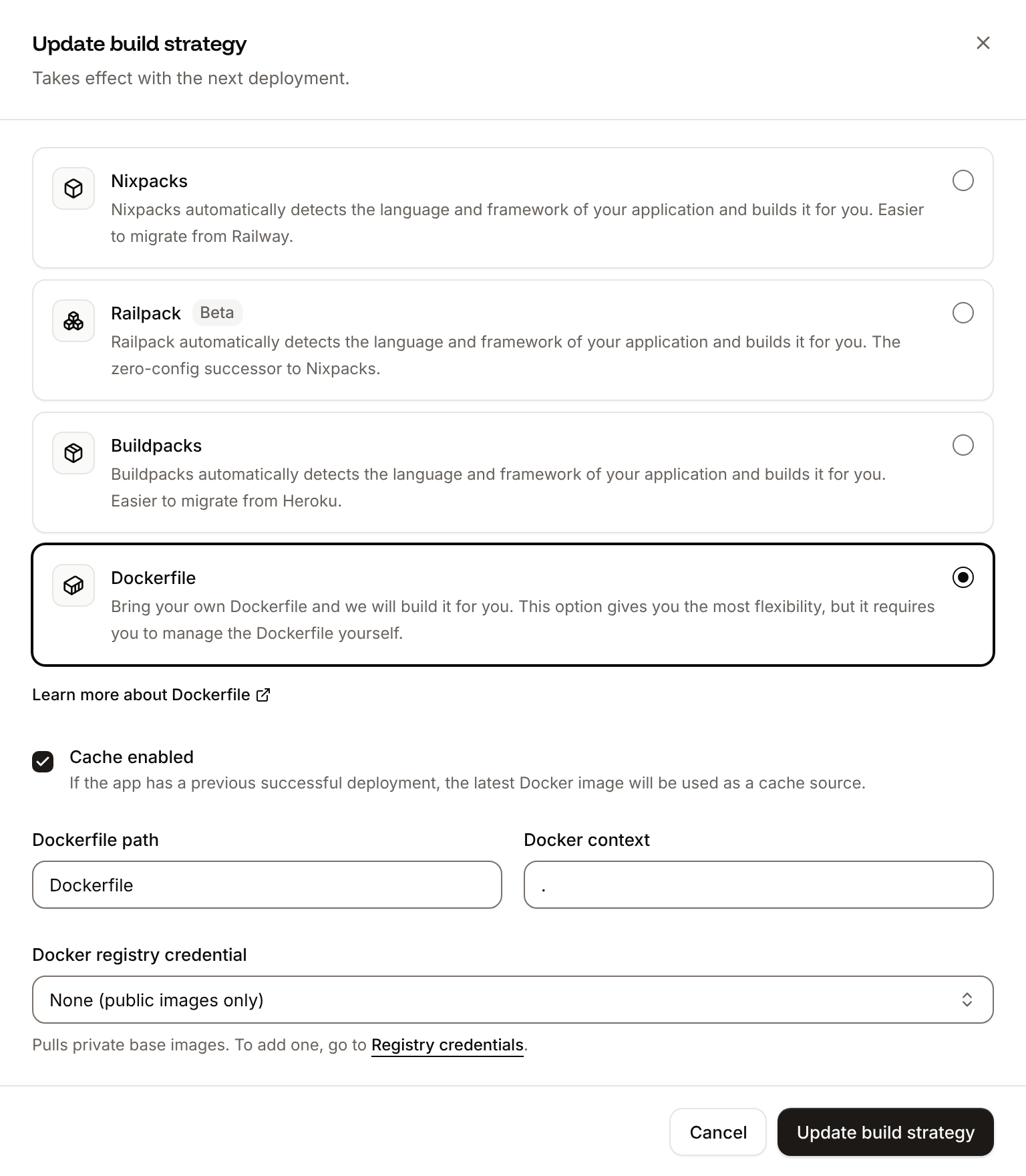
📦 Building and pushing docker image using Dockerfile... where Ingot’s build plan was, then 217 static files copied to '/app/static', 631 post-processed. and Migrate has been successful: the job runs python manage.py migrate --noinput in the new image. The checks in Verify the deployment and Sign in to the admin print the same output, uploads still go to the bucket, and the deployment’s Dockerfile tab shows your Dockerfile. See Dockerfile, and Build from the Dockerfile with the API to switch with the API.
Deploy changes
With Auto-deploy on, every push to the branch starts a deployment; otherwise, click Deploy now for each change. Each deployment builds the image, runs theMigrate job, then replaces the web process’s instances. When you change a page model, run python manage.py makemigrations on your computer and commit the new migration with the code. When you add a package, run pip freeze > requirements.txt again and commit it. See Deployments.
Add a custom domain
Add the domain on the application’s Domains tab, then put it first inALLOWED_HOSTS, for example shop.example.com,storefront-x7k2m.sevalla.app, so that WAGTAILADMIN_BASE_URL uses it, and deploy. In the Wagtail admin, click Settings > Sites, open the site, set Hostname to shop.example.com and Port to 443, and save: Wagtail builds the full URLs of pages, such as in its sitemap, from them. Custom domains need a web process larger than H1.
Troubleshoot
For more causes, see Troubleshoot Ingot builds and Troubleshoot builds and deployments. For more on media files, see Store Django media in object storage.
Deploy with the API
These calls make the same deployment as Deploy to Sevalla, in an order that a script or an AI agent runs as it is. Each step names the Sevalla API operation, then the CLI command and the MCP server tool that do the same. You need:- An API key with the Company developer role in the
SEVALLA_API_KEYenvironment variable. The CLI reads the key fromSEVALLA_API_TOKEN. - The repository on a Git provider that’s connected to your Sevalla account. See Git providers. Creating the application checks it: when Sevalla can’t read the repository, the call returns
400withCannot access repository https://github.com/acme/storefront: Repository not found or you don't have access., followed by where to grant access. curl,jq,opensslandpython3.
1
Choose the location
List clusters (CLI:
listClustersV3) returns the locations your company can use, each with its id, the display_name that the dashboard shows and its region ID in location. Keep the ID of the one you want by its region ID, such as eu-frankfurt-1 for Frankfurt, Germany. Locations lists them all:sevalla resources clusters. MCP: get_platform_options.2
Find the sizes
List process resource types (CLI:
listProcessResourceTypesV3) and List database resource types (listDatabaseResourceTypesV3) return the sizes by name, in lowercase. Keep H1 for the processes and DB1, the smallest, for the database:sevalla resources process-types and sevalla resources db-types. MCP: get_platform_options.3
Create the database
Create database (CLI:
createDatabaseV3) starts creating a PostgreSQL 18 database. You choose the password here, because the API never returns it and DB_URL needs it:sevalla databases create --name orders-db --type postgresql --db-version 18 --cluster $CLUSTER_ID --resource-type $DB1_ID --db-name storefront --db-user storefront --db-password $DB_PASSWORD. MCP: create_database, which generates a password it never returns. Call it once the application exists, with connect_to_application_id set to the application and env_var_name set to DB_URL: it also adds the internal connection and DB_URL, as a postgresql:// URL that django-environ accepts too, in place of the Connect the database step and the DB_URL line of Add the environment variables.4
Create the bucket
Create object storage bucket (It prints the bucket name, such as
createObjectStorageV3) creates a private bucket. location is where most requests come from, here weur (Western Europe) for a site in Frankfurt. The response is the only one that contains the access key and the secret key, so keep it in a shell variable and don’t print it:storefront-media-q8w2e. CLI: sevalla object-storage create --name storefront-media --location weur. MCP: sevalla_api_create with createObjectStorageV3 and the same body.5
Turn on public access
Enable CDN domain (It prints the domain, such as
createObjectStorageDomainV3) turns on public access, as Enable public access does in the dashboard, and returns the public domain:storefront-media-q8w2e.sevalla.storage. CLI: sevalla object-storage cdn-domain enable $BUCKET_ID. MCP: sevalla_api_create with createObjectStorageDomainV3.6
Create the application
Create application (CLI:
createApplicationV3) creates the application with a web process and auto-deploy off. It builds with Ingot (build_type is ingot) and isn’t deployed yet:sevalla apps create --name storefront --cluster $CLUSTER_ID --source privateGit --git-type github --repository https://github.com/acme/storefront --branch main. MCP: create_application with deploy set to false; by default it starts a deployment before the variables and the job exist.7
Find the domain
List application domains (CLI:
listApplicationDomainsV3) returns the domain that Sevalla gives the application, which ALLOWED_HOSTS needs. It appears a few seconds after the application is created, so ask until it’s there:sevalla apps domains list --app-id $APP_ID. MCP: get_application.8
Size the web process
The API creates the web process at S1, where the dashboard’s default is H1. List processes (CLI:
listProcessesV3) finds the web process, and Update process (updateProcessV3) sets H1:sevalla apps processes update $WEB_ID --app-id $APP_ID --resource-type $H1_ID. MCP: scale_process with size_id and apply_now set to false.9
Wait for the database
Get database (CLI:
getDatabaseV3) until its status is ready, for up to 10 minutes, then keep its internal hostname and port:sevalla databases get $DB_ID --json. MCP: get_database.10
Connect the database
Create internal connection (CLI:
createApplicationInternalConnectionV3) lets the application reach the database on Sevalla’s private network, and returns the connection’s id:sevalla apps internal-connections create $APP_ID --target-id $DB_ID --target-type database. MCP: sevalla_api_create with createApplicationInternalConnectionV3 and the same body.11
Add the environment variables
Create environment variable (It prints each key as it’s added. CLI:
createEnvironmentVariableV3), once per variable, each available during runtime only. Unlike the dashboard, the API doesn’t add the connection’s variables, so DB_URL is built here in the dashboard’s format:sevalla apps env-vars create $APP_ID --key DJANGO_SETTINGS_MODULE --value storefront.settings.production, once per variable; the CLI makes every variable available during build and runtime. With DJANGO_SETTINGS_MODULE in the build, collectstatic loads the production settings and fails with ImproperlyConfigured: Set the ALLOWED_HOSTS environment variable while the other variables are runtime only, so add DJANGO_SETTINGS_MODULE with the API or MCP (see Choose the settings module). MCP: set_environment_variables with buildtime set to false.12
Create the migration job
Create process (CLI:
createProcessV3). A job needs job_start_policy, and every process needs resource_type_id and scaling_strategy:sevalla apps processes create $APP_ID --name Migrate --type job --command "python manage.py migrate --noinput" --job-start-policy beforeDeployment --resource-type $H1_ID. MCP: sevalla_api_create with createProcessV3 and the same body.13
Turn on auto-deploy
Update application (CLI:
updateApplicationV3) turns on automatic deployments for every push to the branch:sevalla apps update $APP_ID --data '{"auto_deploy":true}'. MCP: sevalla_api_update with updateApplicationV3.14
Deploy
Trigger deployment (CLI:
triggerDeploymentV3) deploys the latest commit on the branch:sevalla apps deployments trigger $APP_ID. MCP: trigger_deployment.15
Wait for the deployment
Get deployment (CLI:
getDeploymentV3) returns the deployment’s status: waiting and inProgress while it runs, then success or failed. Poll it every 15 seconds, for up to 30 minutes, until the status is final:sevalla apps deployments get $DEPLOYMENT_ID --app-id $APP_ID. MCP: get_deployment.16
Read the build log
Get application deployment logs (CLI:
getApplicationDeploymentLogsV3) returns the build log, oldest line first: the build plan from Verify the deployment, the build with collectstatic, Migrate has been successful and the rollout, which ends with Web has been deployed successfully. When the status is failed, the last lines say why. Without limit, the call returns the latest 1,000 lines, so a longer log loses its start; 5000 is the most it allows.sevalla apps deployments logs $DEPLOYMENT_ID --app-id $APP_ID. MCP: get_deployment_logs.$HOST in place of storefront-x7k2m.sevalla.app.
Build from the Dockerfile with the API
After you push theDockerfile from Deploy with a Dockerfile, Update application (updateApplicationV3) switches the build strategy. Then repeat the Deploy and Wait for the deployment steps:
sevalla apps update $APP_ID --data '{"build_type":"dockerfile","dockerfile_path":"Dockerfile","docker_context":"."}'. MCP: sevalla_api_update with updateApplicationV3.