

https://openrouter.ai/api/v1, for models from Anthropic, OpenAI, Google and many other providers. A Sevalla application calls it over HTTPS with an API key in a runtime-only environment variable, so switching models or providers is a change to a model ID, not to your infrastructure. This guide deploys a small Express server that streams answers from OpenRouter with a fallback model and a data policy, logs the cost of every answer, and then uses OpenRouter as the model provider for LiteLLM, Open WebUI, n8n and the AI SDK.
At a glance
Environment variables
Before you begin
- A Sevalla company with a payment method, and a GitHub, GitLab or Bitbucket account for the repository. See Git providers.
- Node.js 24 or later on your computer.
- An OpenRouter account. Paid models need credits on the account; free models don’t.
Create an OpenRouter API key
Give every application its own OpenRouter key. You can then cap what each application spends, see its usage, and revoke one key without touching the others.1
Create the key
Open openrouter.ai/settings/keys and click Create API Key. Name it after the application, for example
storefront-assistant.2
Set a credit limit
Under Key limit, enter a Credit limit in US dollars, for example
5, and pick whether it resets daily, weekly or monthly or never. When the key has spent its limit, its requests fail until the limit resets or you raise it.3
Copy the key
Copy the key, which starts with
sk-or-v1-, into your password manager.GET /api/v1/key:
limit is the key’s credit limit and usage what it has spent, in US dollars. A key with no limit shows null.
Create the project
Create a folder, set the package’s module type, start script and Node.js version, and install Express and the OpenAI SDK:openai package works with it when you change the base URL. Create the server:
server.js
- One client for every model. The OpenAI SDK sends requests to
https://openrouter.ai/api/v1withOPENROUTER_API_KEY. The model is a field of each request, so the same client calls Anthropic, OpenAI and any other model on OpenRouter. - A fallback model and a data policy. OpenRouter answers with
anthropic/claude-haiku-5.5and, if that model fails, withopenai/gpt-6-luna.data_collection: "deny"keeps requests away from providers that store prompts. Both are explained in Choose models and providers. To use other models, changeMODELandFALLBACKS. - Little reasoning. Both models reason before they answer unless told otherwise, and reasoning tokens count against
max_tokensand cost money.effort: "low"keeps answers fast and within the 1,000-token limit. See Reasoning and empty answers. - Streaming.
POST /chattakes{"message": "..."}and writes the answer as plain text as it’s generated. When the client disconnects, the server aborts the request, and OpenRouter stops the generation and its billing. - Cost in the logs. The last chunk of every stream carries
usage, with the tokens and the cost in US dollars. The server prints it as one JSON line. See Track cost. - A bearer token.
requireTokencompares theAuthorizationheader withBearerandAPP_TOKENin constant time and answers401to anything else, so nobody can spend your credits through the endpoint. The server refuses to start withoutAPP_TOKEN./healthstays public. - Errors. An OpenRouter error before the answer starts returns
502to the client and prints the reason, such asOpenRouter error: 402 ..., in the logs. The OpenAI SDK retries429and5xxresponses twice first. - Shutdown. Sevalla sends
SIGTERMto each instance it replaces during a deployment.server.close()stops accepting connections and lets streams in progress finish.
.gitignore
Daily Grind.
Prepare the project for Sevalla
The project already has what Ingot, Sevalla’s builder, needs:
The server reads
PORT, which Sevalla sets to the web process’s port (8080 by default), and listens on all interfaces.
Commit everything and push it to your Git provider:
Deploy to Sevalla
These steps build with Ingot. To build from your own Dockerfile instead, see Deploy with a Dockerfile. To run them with the Sevalla API, see Deploy with the API. Generate the token that clients send, and keep it in your password manager:1
Create the application
In the sidebar, click Applications, then click Create > Application. Under Source, click Private repository, then choose the Git provider, the Repository and the Branch. Under Location, choose a Data center. Keep the Size at H1 or choose a larger one, then click Create application. The application opens on its Overview tab with the status Not deployed yet: creating an application doesn’t deploy it.
2
Add the keys
Click the Environment variables tab, then click Add environment variables. Enter
OPENROUTER_API_KEY as the key and your OpenRouter key as the value. Click Add another, then enter APP_TOKEN and the token you generated. Under Availability, clear Available during buildtime, so the keys reach only the running server, then click Add environment variables.3
Deploy
Click the Overview tab, then click Deploy now under Recent deployments. Check the Branch and click Deploy.
4
Turn on auto-deploy
To deploy every push to the branch automatically, click the Settings tab, then click Update auto-deploy in the Auto-deploy section. Turn on Auto-deploy and click Update auto-deploy. See Deployments.
Verify the deployment
-
On the Deployments tab, click the deployment. Its Build log shows Ingot’s build plan: Node.js 24 from
engines.node, npm frompackage-lock.json, and the start command from thestartscript.With the API, read the deployment’s status with Get deployment and its build log with Get application deployment logs, as in Deploy with the API.Build log -
Wait for the deployment’s status to change to Deployed. The application’s status next to its name changes to Running, and its runtime logs show
Listening on port 8080. -
Copy the domain under the application’s name, for example
storefront-assistant-x7k2m.sevalla.app, and check the server. The health check is public:A chat request without the token is refused:With the token, the answer streams back. Its wording varies from run to run: -
On the Logs tab, each answer adds a runtime log line
OpenRouter usage. Click it to see its attributes:model,provider,tokens,costand the generationid. See Track cost.


502, read the runtime logs and see Troubleshoot.
Choose models and providers
Each request names the models it may use and how OpenRouter picks a provider to run them. Everything in this section is a field of the request body, so with the OpenAI SDK you add it tochat.completions.create(), as server.js does.
Model IDs
A model ID isprovider/model, for example anthropic/claude-haiku-5.5 or openai/gpt-6-luna. Find IDs and prices on openrouter.ai/models, or list them with curl -s https://openrouter.ai/api/v1/models | jq -r '.data[].id'. OpenRouter’s IDs aren’t always the provider’s own: Anthropic’s API calls the same model claude-haiku-5-5.
An ID that doesn’t exist fails the whole request with 400 and anthropic/claude-haiku-9 is not a valid model ID, even when it’s only one of the fallbacks.
Fallback models
models lists the models to try, in order, when model fails: when its providers are down, rate limited, or refuse the request. OpenRouter bills the model that answered and names it in the model field of every chunk, which the server logs. To see each attempt, send the X-OpenRouter-Metadata: enabled header. In this request, the first model is a free model that was rate limited at the time:
Provider preferences
Most models run at several providers. By default, OpenRouter picks one by price, speed and reliability, and retries another provider of the same model when one fails. Theprovider object changes that:
For example,
"provider": {"order": ["amazon-bedrock", "anthropic"]} sent anthropic/claude-haiku-5.5 to Amazon Bedrock. With "order": ["deepinfra"], "allow_fallbacks": false, a provider that doesn’t host the model, the request failed with 404 and No endpoints found for anthropic/claude-haiku-5.5. Every candidate endpoint was removed during routing. To apply a data policy to every request of every key, set it in your OpenRouter privacy settings instead.
Use free models
A model ID that ends in:free, such as google/gemma-4-31b-it:free, is a free variant: it costs nothing, and its limits are low. OpenRouter documents these limits for free variants:
GET /api/v1/key reports the daily count in free_model_daily_requests, for example {"used":24,"limit":50,"remaining":26}. Free models also run on shared capacity at their providers, so they’re often rate limited regardless of your own count. The request then fails with 429 and Provider returned error, and the error’s metadata.raw says google/gemma-4-31b-it:free is temporarily rate-limited upstream. Please retry shortly, or add your own key to accumulate your rate limits.
Free models suit tests and side projects, not a service your customers rely on. A paid model in models after a free one makes the request reliable but no longer free: OpenRouter bills the fallback at its own price.
Reasoning and empty answers
anthropic/claude-haiku-5.5 and openai/gpt-6-luna reason at medium effort unless the request says otherwise. Reasoning tokens are billed as output and count against max_tokens, and the answer starts only after them. In a test without reasoning, a request for a 250-word text spent 999 of its 1,000 tokens reasoning and returned no text, with finish_reason length. With reasoning: { effort: "low" }, the first words arrived after about 0.7 seconds. Set effort to "none" to turn reasoning off, or raise max_tokens for models that need to think. Each model’s reasoning object in GET /api/v1/models lists the efforts it supports.
Attribution headers
Requests that carry anHTTP-Referer header with your site’s URL count toward your app in OpenRouter’s public rankings and its analytics. X-OpenRouter-Title sets the app’s display name (X-Title still works). Add them to the client:
server.js
HTTP-Referer creates a public app page on OpenRouter. To keep the app out of the public rankings, add "X-OpenRouter-App-Visibility": "hidden" to the first request that creates it; OpenRouter ignores the header for apps that already exist.
Stream responses through Sevalla
Streamed answers reach the client unbuffered through Cloudflare and Sevalla’s proxy: no proxy setting or extra header is needed. The server sendsContent-Type: text/plain; charset=utf-8 and Cache-Control: no-cache, and writes each piece of text as OpenRouter sends it. To compare the time to the first byte with the total time, discard the body and print curl’s timings:
What OpenRouter streams
Under the SDK, OpenRouter streams Server-Sent Events. While a model works before its first token, OpenRouter sends a comment line about every 0.4 seconds to keep the connection open. In a raw stream fromcurl -N against OpenRouter, with the JSON cut short:
- The OpenAI SDK and the AI SDK skip the comment lines. If you parse the stream yourself, skip every line that starts with
:before you callJSON.parse, which throws on them. - The last chunk before
data: [DONE]carriesusage. The server reads its cost from there. - An error after the stream has started arrives as a
data:event with anerrorobject andfinish_reason"error", because the200status was already sent. The OpenAI SDK throws it as an error, and the server ends the response.
Long requests
Sevalla’s proxy closes a request that sends nothing for too long, see 504 Gateway Timeout and Cloudflare error 524. The comment lines keep OpenRouter’s connection to your server open, but they don’t reach your client:server.js forwards only text. A model that reasons for minutes before it writes sends your client nothing in that time, so keep reasoning low for requests that answer a person, and run long jobs in a background worker that stores the result.
Track cost
Every OpenRouter response includesusage: the prompt, completion and reasoning tokens, and cost, what the request cost in US dollars. You don’t need to ask for it.
Read cost in the runtime logs
server.js prints one JSON line per answer. Sevalla reads a runtime log line that is a JSON object as attributes: the line shows its message, OpenRouter usage, and the other keys become attributes. On the Logs tab, click a line to see them, or filter with Add filter on a key such as attributes.model, for example to find answers that came from the fallback model. See Filter by attribute. With the API:
anthropic/claude-haiku-5.5 cost about $0.0003.
Look up a generation
Each answer has a generation ID, theid in the log line. OpenRouter’s generation endpoint returns its details a few seconds after it finishes:
latency is the time to the first token and generation_time the whole generation, both in milliseconds. provider_responses lists every attempt, including failed fallbacks. When a client disconnected after 1.5 seconds, the record showed "cancelled":true and 63 completion tokens billed instead of a full answer.
Cap spending
- One key per application, each with a credit limit, as in Create an OpenRouter API key.
GET /api/v1/keyshows what the key has spent and has left. max_tokenson every request, so one request can’t run long. OpenRouter also checks before it starts that your balance covers the request’s largest possible cost.- Authentication on every endpoint that calls a model. An open
/chatlets anyone spend your credits.
Use the AI SDK
The AI SDK has an official OpenRouter provider,@openrouter/ai-sdk-provider, maintained by OpenRouter. Version 3 works with AI SDK 7 and Node.js 22 or later. In the same project, replace the OpenAI SDK:
server.js, replace the openai import, the client and the MODEL and FALLBACKS constants with the provider and a model, and the /chat route with one that uses streamText. The rest of the file stays the same:
server.js
models, provider and reasoning fields as the request body, and the cost is in providerMetadata.openrouter.usage.cost. One difference: pipeTextStreamToResponse sends 200 before OpenRouter answers, so when a request fails, for example with an unknown model ID, the client gets 200 with an empty body, and the reason is in the runtime logs, such as OpenRouter error: anthropic/claude-haiku-9 is not a valid model ID.
Use OpenRouter in other AI guides
OpenRouter can be the model provider of the other applications in these guides. Each needs only the OpenRouter key, as an environment variable of that application with Available during buildtime cleared, and the model IDs.LiteLLM
In the LiteLLM proxy, prefix an OpenRouter model ID withopenrouter/ and pass the key. Add the models to model_list in config.yaml, next to the models from Add Anthropic and OpenAI models:
config.yaml
OPENROUTER_API_KEY to the litellm application’s environment variables, then commit, push and deploy. Your applications call claude-haiku-5.5 through LiteLLM with their virtual keys. LiteLLM passes models to OpenRouter as fallbacks and extra_body as it is, and records the cost OpenRouter reports for each request: a chat through ghcr.io/berriai/litellm-non_root:v1.106.6 returned x-litellm-response-cost: 1.97e-05, the same as OpenRouter’s usage.cost.
Open WebUI
Open WebUI connects to OpenRouter as an OpenAI-compatible connection. In Open WebUI, go to Admin Panel > Settings > Connections. Next to Manage OpenAI API Connections, click +. In Add Connection, enter the URLhttps://openrouter.ai/api/v1 and your OpenRouter key as the API Key. Under Advanced, add the models you offer in Model IDs, such as anthropic/claude-haiku-5.5 and openai/gpt-6-luna, then click Save. With Model IDs empty, the model picker lists every model on OpenRouter.
For a new Open WebUI whose only connection is OpenRouter, set the connection with environment variables before the first start instead:
Open WebUI
v0.12.5-slim with these variables listed the two models and streamed their answers. Open WebUI reads them only on its first start; see Change settings after the first start.
n8n
n8n has its own OpenRouter Chat Model node. In a workflow, add it as the chat model of an AI Agent or Basic LLM Chain node. In the node, create an OpenRouter credential with your key as the API Key. Set Model to an ID such asanthropic/claude-haiku-5.5. Under Options, you can set Reasoning Effort, Maximum Number of Tokens, and Provider Routing with Order, Allow Fallbacks and Data Collection. In n8n 2.45.6, a webhook workflow with an AI Agent and this node answered {"output":"Daily Grind"}. See Deploy n8n.
AI SDK applications
Any application built with the AI SDK, such as the AI SDK chatbot, switches to OpenRouter by swapping its provider forcreateOpenRouter() and its model ID for an OpenRouter ID, as in Use the AI SDK. Replace the provider’s key variable with OPENROUTER_API_KEY.
Deploy with a Dockerfile
Ingot needs no Dockerfile. Write your own when you want full control of the image: the base image, the system packages and every layer. Add aDockerfile and a .dockerignore to the root of the repository:
Dockerfile
The image holds no secrets:
OPENROUTER_API_KEY and APP_TOKEN reach the container at runtime.
.dockerignore
Dockerfile, so you can keep it in a repository that builds with Ingot, but it adds the .dockerignore patterns to its own: its build plan shows an Ignored row with 6 patterns from .dockerignore. Then switch the application to the Dockerfile build strategy:
1
Choose the Dockerfile build strategy
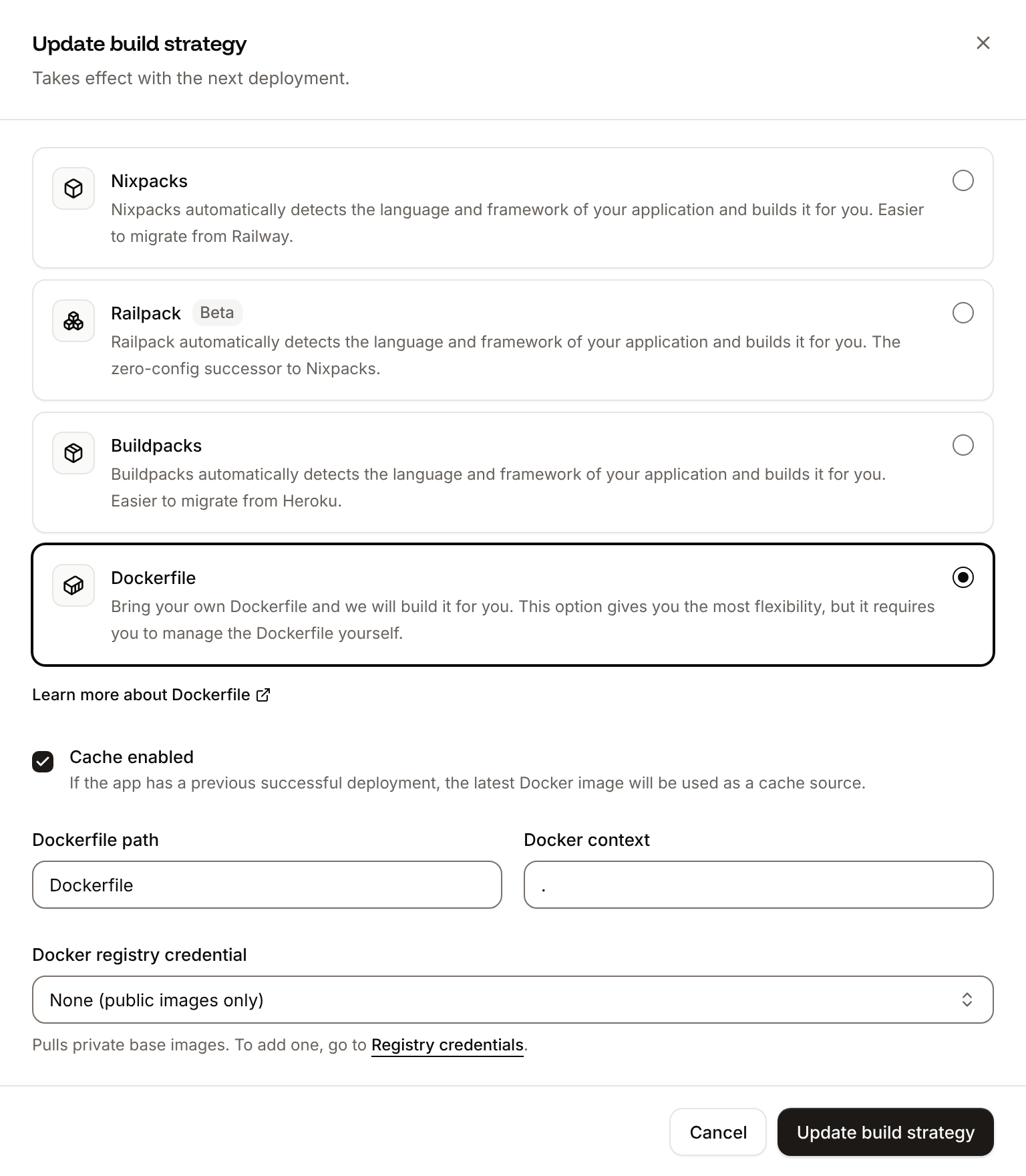
On the application’s Settings tab, in the Build strategy section, click Update build strategy. Click Dockerfile, keep the Dockerfile path
Dockerfile and the Docker context ., then click Update build strategy.2
Deploy
Click the Overview tab, then click Deploy now under Recent deployments. Check the Branch and click Deploy.
📦 Building and pushing docker image using Dockerfile... instead of Ingot’s build plan, and its Dockerfile tab shows your Dockerfile. When the deployment is Deployed, the curl requests in Verify the deployment return the same results. With the API, the same switch is Update application (updateApplicationV3) with {"build_type":"dockerfile","dockerfile_path":"Dockerfile","docker_context":"."}, followed by a deployment. See Dockerfile for build arguments and private base images.
Deploy changes
With Auto-deploy on, every push to the branch starts a deployment; otherwise, click Deploy now for each change. Each deployment builds the image, then replaces the web process’s instances. Changing a model is a change toMODEL or FALLBACKS in server.js, followed by a deployment. See Deployments.
Add a custom domain
To serve the endpoint from your own domain, such asassistant.example.com, add the domain on the application’s Domains tab and create the DNS records that Sevalla shows. Custom domains need a web process larger than H1, so scale the web process first. See Custom domains.
Troubleshoot
The server prints OpenRouter’s errors in the runtime logs asOpenRouter error: <status> <message>.
For build and runtime failures every application shares, see Troubleshoot builds and deployments.
Deploy with the API
These steps create and deploy the same application with the Sevalla API, as an AI agent or a script would. Each step names the Sevalla CLI command and the Sevalla MCP server tool that do the same. You need:- A Sevalla API key that can create and update applications and deployments, in
SEVALLA_API_KEY. - The repository on a Git provider connected to your Sevalla company. If Sevalla can’t read the repository, Create application fails with
400andCannot access repository <url>: Repository not found or you don't have access., followed by where to grant access. List Git providers (listGitProvidersV3) returns each provider’sconnect_url, and for GitHub asettings_urlfor repository access. OPENROUTER_API_KEYandAPP_TOKENin the shell, andcurlandjq.
1
Pick the location
List clusters (CLI:
listClustersV3) returns every location. Pick one by its location, for example Frankfurt, Germany (eu-frankfurt-1):sevalla resources clusters. MCP: get_platform_options.2
Create the application
Create application (CLI:
createApplicationV3) creates the application with a web process and doesn’t deploy it:sevalla apps create --name storefront-assistant --cluster "$CLUSTER_ID" --source privateGit --git-type github --repository https://github.com/acme/storefront-assistant --branch main. MCP: create_application with deploy: false.3
Set the size to H1
The API creates the web process at S1, not the dashboard’s H1. List processes (The output is
listProcessesV3) and List process resource types (listProcessResourceTypesV3) give the IDs, and Update process (updateProcessV3) sets the size:h1. CLI: sevalla apps processes update "$WEB_ID" --app-id "$APP_ID" --resource-type "$H1_ID"; the CLI’s --json lists are arrays, so select with .[] instead of .data[]. MCP: scale_process with size_id and apply_now: false.4
Add the environment variables
Create environment variable (CLI:
createEnvironmentVariableV3), once per variable, available during runtime only. The response includes the value, so the commands print only the key:sevalla apps env-vars create "$APP_ID" --key APP_TOKEN --value "$APP_TOKEN" makes the variable available during build and runtime, and has no option for runtime only, so use the API or MCP for keys. MCP: set_environment_variables with scope: "application", and runtime: true, buildtime: false on each variable.5
Deploy
Trigger deployment (CLI:
triggerDeploymentV3) deploys the latest commit on the default branch:sevalla apps deployments trigger "$APP_ID". MCP: trigger_deployment.6
Wait for the deployment
Get deployment (The loop ends with
getDeploymentV3) reports waiting, inProgress, then success or failed. Poll it, then read the build plan with Get application deployment logs (getApplicationDeploymentLogsV3):success, and the log contains the build plan from Verify the deployment. CLI: sevalla apps deployments get "$DEPLOYMENT_ID" --app-id "$APP_ID" and sevalla apps deployments logs "$DEPLOYMENT_ID" --app-id "$APP_ID". MCP: get_deployment and get_deployment_logs.7
Check the application
List application domains (The first request prints
listApplicationDomainsV3) returns the domain:ok and the second a name. Then Get application runtime logs (getApplicationRuntimeLogsV3) with search=OpenRouter%20usage returns the usage line, as in Read cost in the runtime logs. CLI: sevalla apps domains list --app-id "$APP_ID" and sevalla apps logs runtime "$APP_ID" --search "OpenRouter usage". MCP: sevalla_api_read with listApplicationDomainsV3, and search_runtime_logs.8
Turn on auto-deploy
Update application (The output is
updateApplicationV3) with auto_deploy:true. CLI: sevalla apps update "$APP_ID" --data '{"auto_deploy":true}'. MCP: sevalla_api_update with updateApplicationV3 and the same body.