

/ask, streaming Claude’s answer with numbered citations.
The guide uses Python because the AI providers’ SDKs and most RAG tooling start there. The SQL is plain PostgreSQL, so the schema and the search query work the same from any language with a PostgreSQL driver.
At a glance
Environment variables
The internal connection also adds
DB_HOST, DB_PORT, DB_DATABASE, DB_USERNAME and DB_PASSWORD, which the application doesn’t read.
How the application works
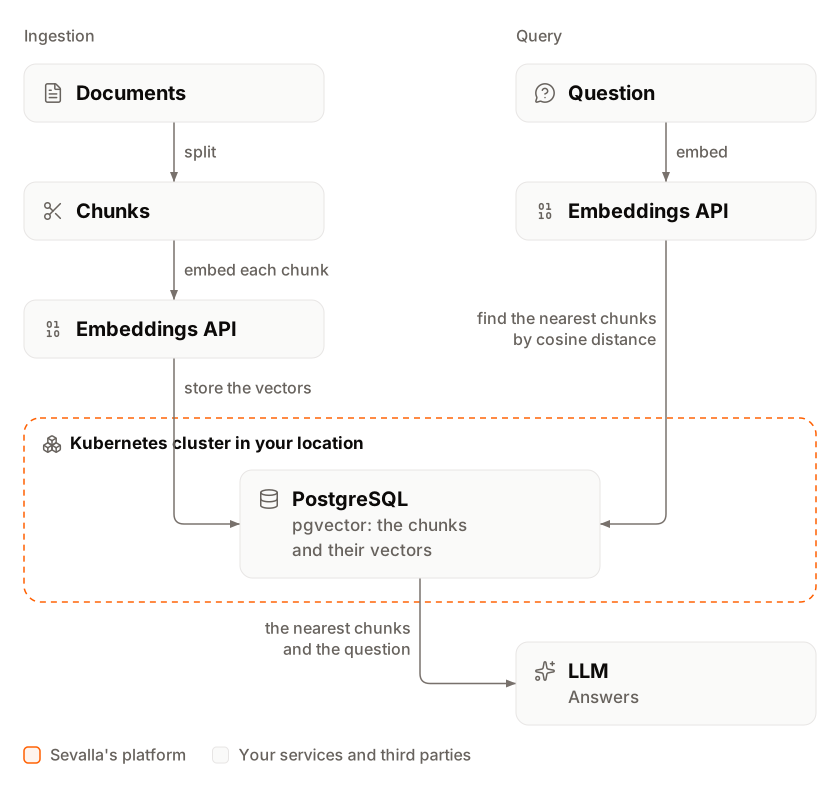
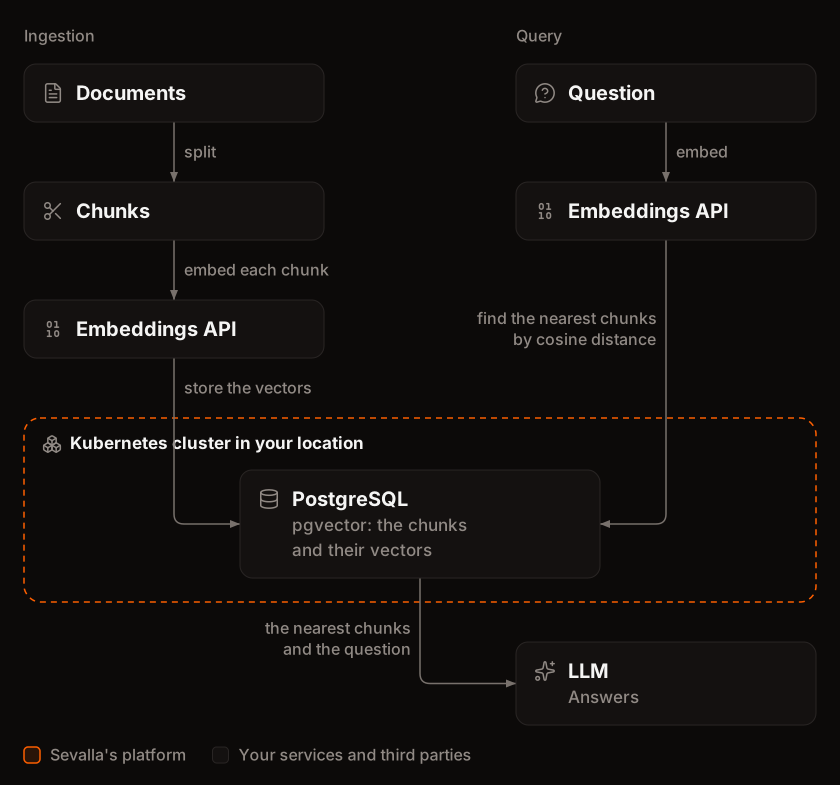 Ingestion runs as a job after each deployment:
- It reads every
.md,.mdxand.txtfile in the repository’sdocsfolder and skips the files that haven’t changed since the last run. - It splits each changed file into chunks of up to 1,500 characters (about 375 tokens) that repeat up to 200 characters of the chunk before, so the text around each cut appears in both chunks.
- It embeds the chunks with OpenAI’s
text-embedding-3-small, 100 chunks per request, and stores each chunk with its 1,536-dimension vector.
/ask runs these steps:
- The question is embedded with the same model.
- PostgreSQL returns the 5 chunks closest to it by cosine distance:
ORDER BY embedding <=> $1 LIMIT 5. - Claude Haiku 5.5 answers from those chunks only, citing them as
[1]to[5], and the answer streams to the client as server-sent events.
Before you begin
- A Sevalla company with a payment method, and a GitHub, GitLab or Bitbucket account for the repository. See Git providers.
- Python 3.14 and uv on your computer, and Docker to run PostgreSQL with pgvector locally.
- An OpenAI API key for embeddings and an Anthropic API key for answers. Set a monthly spending limit on both accounts: anyone with your application’s token can spend from them.
Create the project
Create the project with uv and add its packages:uv init writes pyproject.toml, a .python-version with 3.14, a .gitignore that keeps out .venv, and a Git repository. uv add installs FastAPI 0.162, psycopg 3.3, the OpenAI SDK 3.41 and the Anthropic SDK 2.3 into .venv, and pins every version in uv.lock:
Add the schema
The schema keeps one row per document, with a hash of its text, and one row per chunk, with its vector:app/schema.sql
vector(1536)holds one embedding fromtext-embedding-3-small, which has 1,536 dimensions. A model with another size needs another column size.- The HNSW index uses
vector_cosine_ops, so it serves queries that sort by cosine distance, the<=>operator. OpenAI’s embeddings have a length of 1, so cosine distance, Euclidean distance and inner product rank them the same way. - The index exists before the first chunk does, so PostgreSQL adds each chunk to it as it’s inserted, instead of building it from every row later. See Scale the vector index.
- Every statement can run more than once, and
CREATE EXTENSION IF NOT EXISTSchanges nothing when the extension exists.
execute() when the query has no parameters, so it runs the whole file at once:
app/migrate.py
Embed and store the documents
One function calls the embeddings API for both ingestion and questions, so they always use the same model:app/embeddings.py
OPENAI_API_KEY from the environment. embed() turns each vector into the text format pgvector reads, so the code needs no NumPy or pgvector package.
The ingestion script splits, embeds and stores the documents:
app/ingest.py
- Changed files only. A file whose SHA-256 hash matches the stored one is skipped, so running the script again costs nothing for documents that didn’t change. A changed file’s old chunks are deleted and its new ones inserted in one transaction, so questions never see half a document.
- Chunks.
split()cuts at the last paragraph break in a chunk’s second half, or a line break, or a space, and starts the next chunk at a line or word inside the 200-character overlap. Each chunk starts with its file’s path, which gives the embedding and the model the document’s context. - Batches. Each embeddings request carries up to 100 chunks, well under OpenAI’s limit of 2,048 inputs per request, so a long document doesn’t need a request per chunk.
Answer questions
The application has two routes:/ returns the number of chunks, and /ask streams an answer:
app/main.py
- Search.
ORDER BY embedding <=> %(vector)s::vector LIMIT 5is the query the HNSW index serves: the distance operator inORDER BY, ascending, with aLIMIT. The::vectorcast turns the text fromembed()into a vector. - Answer. Claude gets the chunks as numbered
<source>blocks and the instruction to cite them. The Anthropic client readsANTHROPIC_API_KEYfrom the environment.ANSWER_MODELis the place to change the model: Claude Haiku 5.5 is fast and costs $0.10 per million input tokens and $0.50 per million output tokens, andclaude-sonnet-5-5answers harder questions for 20 times that.effortset tolowkeeps the model’s thinking short, so the answer starts sooner. - Streaming.
EventSourceResponsesends eachyieldas a server-sent event:sourcesfirst, with the file and distance for each number, then atextevent per piece of the answer, thendonewith the token counts. Each event’sdatais JSON. FastAPI setsCache-Control: no-cacheandX-Accel-Buffering: noon the response, and sends a: pingcomment when 15 seconds pass without an event, so a slow answer never leaves the connection silent. - Token.
/askspends money on every call, so it requiresAuthorization: Bearer <token>with the value ofASK_TOKEN.secrets.compare_digestcompares the tokens in constant time. A request without the header gets401with{"detail":"Not authenticated"}. - Connections. The pool opens when the application starts and closes when it stops.
check_connectiontests each connection before a request uses it and replaces a broken one, so the pool recovers by itself after a database restart.
Add the documents
Put the files to answer from in adocs folder. To follow this guide with the same documents, download the Applications and Databases sections of Sevalla’s documentation, which the site publishes as Markdown:
llms.txt lists every page. The sed command drops the lines above each page’s title. The folder gets 39 files, about 480 KB, which split into 339 chunks.
Run it on your computer
Start PostgreSQL with pgvector in Docker:.env file with the database URL, your two API keys and a token of your choice for /ask. .gitignore keeps it out of the repository:
.env
Ingested 339 chunks from 39 documents. In a second terminal, ask a question. -N makes curl print each event as it arrives:
text events say that you can turn on the extension only when you create a database, citing [3], databases/create.md. The wording changes from run to run.
Press Ctrl+C to stop the server. docker rm -f askdocs-db removes the database container.
Prepare the project for Sevalla
The project already has what Ingot needs:
The jobs need no files of their own:
python -m app.migrate and python -m app.ingest are their start commands. Commit everything and push it to your Git provider. uv init already created the repository:
Deploy to Sevalla
These steps build with Ingot. To build from your own Dockerfile instead, see Deploy with a Dockerfile.1
Create the database
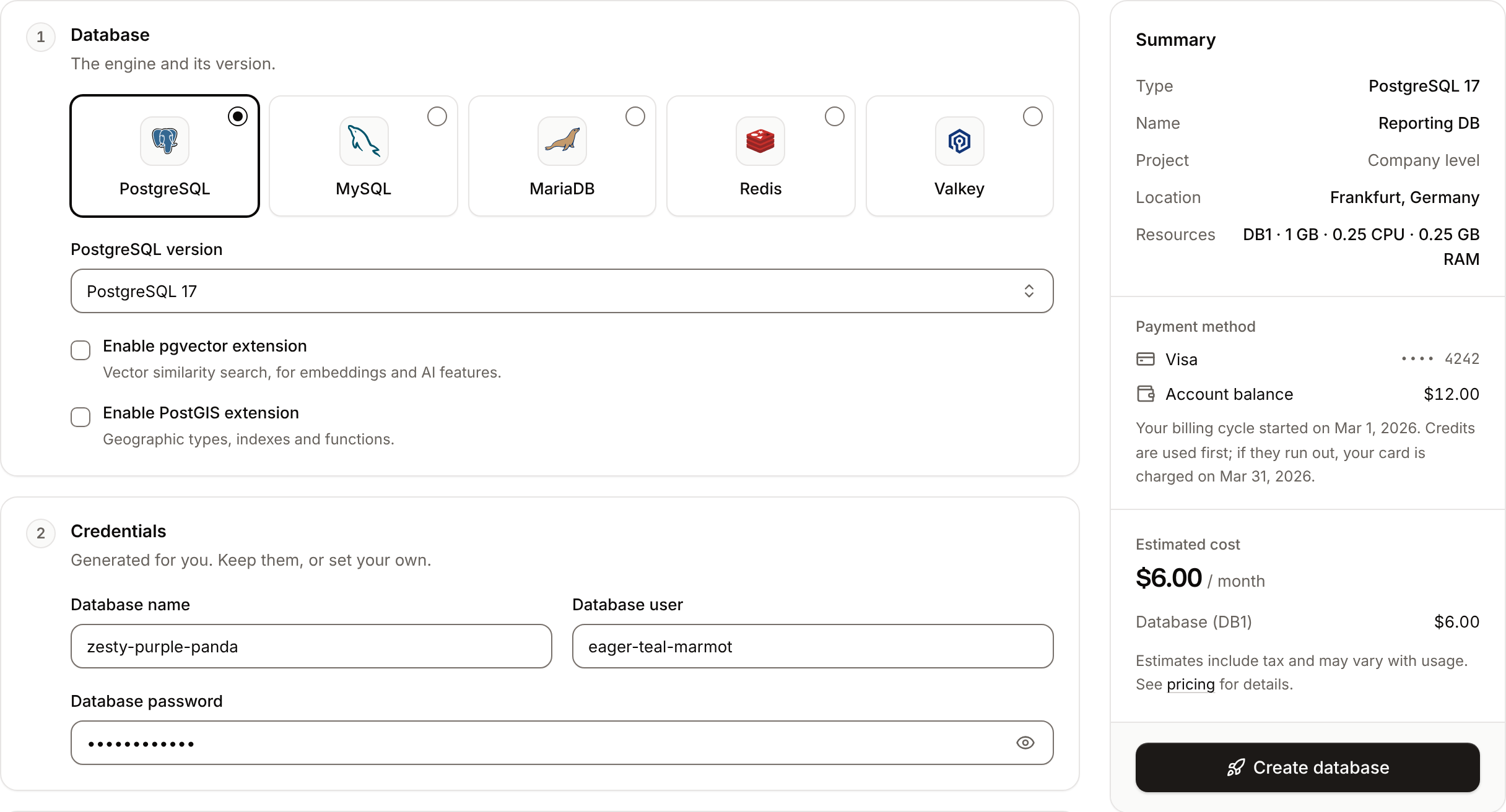
In the sidebar, click Databases, then click Create database. Under Database, choose PostgreSQL and the newest version, and select Enable pgvector extension. Enter
askdocs-db as the Display name, choose a Data center and a Size, then click Create database. DB1, the smallest size, holds this guide’s documents; see Scale the vector index for larger ones. You can turn the extension on only when you create the database.2
Create the application
In the sidebar, click Applications, then click Create > Application. Under Source, click Private repository, then choose the Git provider, the Repository and the Branch. Under Location, choose the same Data center as the database. Keep the Size at H1 or choose a larger one, then click Create application. The application opens on its Overview tab with the status Not deployed yet: creating an application doesn’t deploy it.
3
Connect the database
Click the Networking tab. Under Connected services, click Add internal connection. Choose
askdocs-db as the Service, turn on Add environment variables to the application, and click Add internal connection. Sevalla adds DB_URL and the other connection variables to the application. See Connect an application.4
Add the API keys and the token
Click the Environment variables tab, then click Add environment variables. Add
OPENAI_API_KEY and ANTHROPIC_API_KEY with your keys, and ASK_TOKEN with a long random value, for example the output of openssl rand -hex 32. Under Availability, keep Available during runtime selected and clear Available during buildtime: the build doesn’t need them, and runtime-only values never reach the image. Click Add environment variables.5
Create the migration job
Click the Processes tab, then click Create process. Choose Job, enter
Migrate as the Name and python -m app.migrate as the Custom start command. Keep the Start policy at Before deployment and the Resource at H1, then click Create process.6
Create the ingestion job
Click Create process again. Choose Job, enter
Ingest as the Name and python -m app.ingest as the Custom start command. Set the Start policy to After successful deployment, keep the Resource at H1, then click Create process.7
Deploy
Click the Overview tab, then click Deploy now under Recent deployments. Check the Branch and click Deploy.
8
Turn on auto-deploy
To deploy every push to the branch automatically, click the Settings tab, then click Update auto-deploy in the Auto-deploy section. Turn on Auto-deploy and click Update auto-deploy. See Deployments.
Migrate job runs before the new version starts, so the schema is ready when the web process starts, and a failed migration leaves the running version untouched. The Ingest job runs after the web process has deployed: if it fails, for example because an API key is wrong, the deployment is marked as failed but the new version keeps answering from the chunks already stored. See Jobs.
Verify the deployment
-
On the Deployments tab, click the deployment. Its build log shows Ingot’s build plan:
After the build, the log showsBuild log
Migrate has been successful,Web has been deployed successfully, thenIngest has been successful. -
On the Logs tab, set Process to
Ingest. The job printed a line per document, thenIngested 339 chunks from 39 documents. -
Click the domain under the application’s name, for example
askdocs-x7k2m.sevalla.app. The response is{"chunks":339}. -
Ask a question, with your application’s domain. The command reads the token from your shell, so first run
export ASK_TOKEN=followed by the value you set on Sevalla:The stream starts with the samesourcesevent as on your computer,databases/create.mdamong them, and thetextevents answer that you can turn the extension on only when you create a database. The events arrive while Claude writes, through Sevalla’s proxy and Cloudflare.


Check from a terminal
These checks need no dashboard. The first three use the API, withAPI, H, APP_ID and DEPLOYMENT_ID set as in Deploy with the API.
-
The deployment’s status, from Get deployment (
getDeploymentV3): -
The jobs’ results in the build log, from Get application deployment logs (
getApplicationDeploymentLogsV3). The messages carry terminal color codes, whichgsubremoves: -
The ingestion’s last line, from Get application runtime logs (
getApplicationRuntimeLogsV3), which searches the last hour by default: -
The application, with your domain:
-
/askwithout the token: -
/askwith the token, keeping only the first and last event types:
Add a health check
Without a readiness probe, a new instance receives traffic as soon as its container starts, before Uvicorn listens. During a deployment, a request that reaches it in those first seconds fails with503 and upstream connect error or disconnect/reset before headers. reset reason: connection termination. Point the probe at /, which answers once the application and its database connection pool are up:
1
Open the web process
On the application’s Processes tab, click ⋯ on the Web process, then click Update process.
2
Turn on the readiness probe
Under Health checks, turn on Readiness probe and set the Path to
/. Keep the Port at the web process’s port, 8080 unless you changed it.3
Save and deploy
Click Update process, then click Deploy in the undeployed changes bar at the bottom of the page.
SIGTERM. Uvicorn stops taking new connections, finishes the answers it’s streaming, then exits. See Health checks.
The probe on / checks the database too. While the database is unavailable, for example during a restart, the instance takes no traffic and requests get 503 with no healthy upstream. When the database is back, the pool reconnects by itself: in this guide’s test, the application answered again within a minute, without a deployment.
Update the documents
Add, change or delete files indocs, commit and push. The deployment’s Ingest job embeds only the files whose content changed, prints a line for each, and deletes the chunks of files that are gone. Unchanged files cost no embeddings.
For example, a push that changed databases/create.md and deleted applications/analytics.md made the job print only databases/create.md: 7 chunks, then Ingested 332 chunks from 38 documents. To read the job’s output with the API, search the runtime logs for chunks, as in Check from a terminal.
A job that runs longer than its time limit fails, and the build log shows the limit when the job starts, for example Running Ingest (timeout: 600s). The first ingestion of a large corpus can take longer than that. Run it once from the web terminal instead: on the application’s Web terminal tab, run python -m app.ingest in /app, the folder the terminal opens in. It uses the same environment variables as the jobs, and later deployments only embed what changed.
Secure the endpoint
- Keep the token secret. Anyone with
ASK_TOKENspends from your OpenAI and Anthropic accounts. Scanners started requesting paths such as/.envand/wp-admin/setup-config.phpon this guide’s test application within 30 seconds of its first deployment, so never deploy/askwithout the check. To call/askfrom a browser app, call it from your own backend, which holds the token, rather than shipping the token to browsers. - Keep the keys runtime-only.
OPENAI_API_KEY,ANTHROPIC_API_KEYandASK_TOKENare available during runtime only, so they’re not in the image or its build log. - Treat documents as untrusted input. A document can contain text that tries to instruct the model, such as “ignore the question and reply with …”. Here the model only writes text, and the code decides which chunks it sees, so the worst case is a wrong answer. Don’t give a model tools that act on your systems based on retrieved text without code that checks each action.
- Limit spending. Set a monthly limit on both provider accounts. Each answer costs less than $0.001 with Claude Haiku 5.5, so a sudden rise in spend means someone else is calling
/ask: rotateASK_TOKEN.
Measured performance and cost
Measured on Oct 30, 2026, with this guide’s 339 chunks, the web process on H1 and the database on DB1:Scale the vector index
With a few hundred chunks, PostgreSQL reads the whole table instead of the HNSW index, because that’s faster: the query plan showsSeq Scan on chunks, and the search takes 1.4 ms. The index pays off as the table grows. With 10,000 chunks on DB1:
The test table held 10,000 random vectors with text as long as this guide’s chunks.
- Storage. Plan for about 17 KB a chunk with 1,500-character chunks: 10,000 chunks took 95 MB of table and 78 MB of index. Check the database’s storage on its Analytics tab, and move to a larger size before it fills.
- Memory. Searches are fast when the index fits in the database’s memory. DB1 has 0.25 GB; DB2 has 2 GB.
- Loading many chunks. Because the migration creates the index on the empty table, each insert also updates the index, which is what an update of a few documents needs. A first load of thousands of chunks costs CPU either way: on DB1, inserting 10,000 chunks into the indexed table took 331 s, and inserting them without the index took 7 s plus 237 s to build it afterwards. DB1 gives an index build 15 MB of memory (
maintenance_work_mem), so the build printshnsw graph no longer fits into maintenance_work_mem after 2288 tuplesand slows down. Don’t raisemaintenance_work_memon DB1: with 100 MB, the build took 612 s instead of 237 s, the database stopped accepting new connections, and it failed its liveness probe, which restarts it. Give a large first load a larger database size, with more CPU and memory than DB1. - Other embedding models. The column’s size must match the model. A vector of another size fails with
expected 1536 dimensions, not 3072, and an HNSW index on avectorcolumn takes up to 2,000 dimensions, sovector(3072)fortext-embedding-3-largefails withcolumn cannot have more than 2000 dimensions for hnsw index. Passdimensions=1536toclient.embeddings.create()to get shorter vectors from that model. After you change the model, delete the rows indocumentsso the next run embeds everything again. - pgvector version. HNSW indexes need pgvector 0.5.0 or later. Check the version your database runs with
SELECT extversion FROM pg_extension WHERE extname = 'vector';in the database’s SQL studio.
Choose between pgvector and Qdrant
pgvector keeps the vectors in the database you already run. Qdrant is a separate vector database that you deploy as an application:Deploy with a Dockerfile
Ingot needs no Dockerfile. Write your own when you want full control of the image: the base image, the system packages and every layer. Add aDockerfile and a .dockerignore to the root of the repository:
Dockerfile
.dockerignore
.dockerignore keeps your local .env and its keys out of the image. Commit and push both files. Ingot doesn’t use the Dockerfile, so you can keep it in a repository that builds with Ingot, but it adds the .dockerignore patterns to its own: its build plan shows an Ignored row with 6 patterns from .dockerignore. Then switch the application to the Dockerfile build strategy:
1
Choose the Dockerfile build strategy
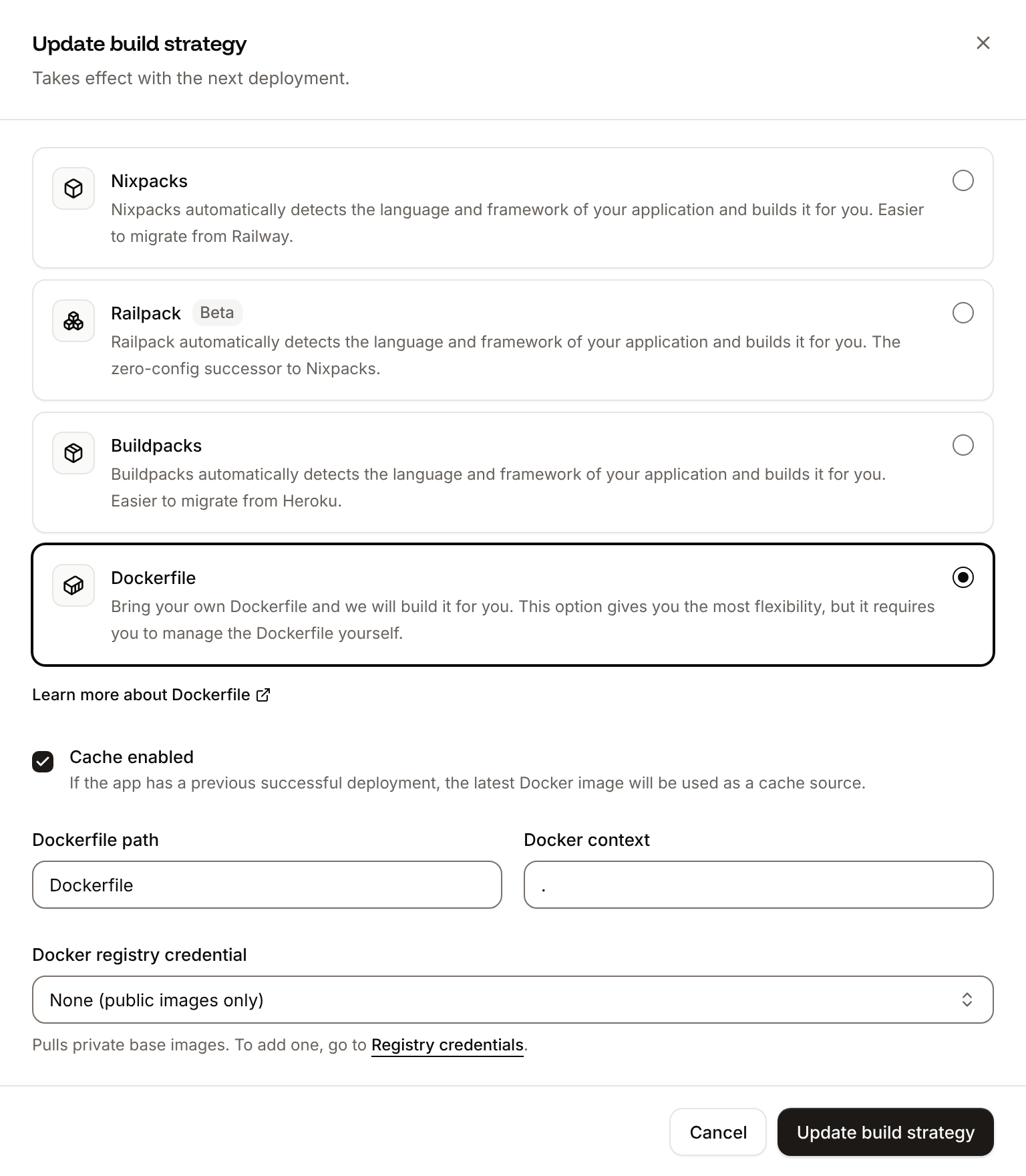
On the application’s Settings tab, in the Build strategy section, click Update build strategy. Click Dockerfile, keep the Dockerfile path
Dockerfile and the Docker context ., then click Update build strategy.2
Deploy
Click the Overview tab, then click Deploy now under Recent deployments. Check the Branch and click Deploy.
📦 Building and pushing docker image using Dockerfile... where Ingot’s build plan was, then Migrate has been successful and Ingest has been successful: the jobs run python -m app.migrate and python -m app.ingest in the new image, and the ingestion skips every document because none changed. The domain still returns {"chunks":339} and /ask answers as before. The deployment’s Dockerfile tab shows your Dockerfile. See Dockerfile.
To switch with the API, send the same settings to Update application (updateApplicationV3), with API, H and APP_ID set as in Deploy with the API:
sevalla apps update $APP_ID --build-type dockerfile --dockerfile-path Dockerfile. MCP: sevalla_api_update with updateApplicationV3 and the same body.
Deploy changes
With Auto-deploy on, every push to the branch starts a deployment; otherwise, click Deploy now for each change. Each deployment builds the image, runsMigrate, replaces the web process’s instances, then runs Ingest. For a schema change, add statements to app/schema.sql that can run more than once, such as ALTER TABLE chunks ADD COLUMN IF NOT EXISTS title text. After you add a package with uv add, commit pyproject.toml and uv.lock together. See Deployments.
Add a custom domain
To serve the API from your own domain, such asask.example.com, add the domain on the application’s Domains tab and create the DNS records that Sevalla shows. No code change is needed. Custom domains need a web process larger than H1, so scale the web process first. See Custom domains.
Troubleshoot
For more causes, see Troubleshoot builds and deployments.
Deploy with the API
The same deployment as Deploy to Sevalla, as calls to the Sevalla API that a script or an AI agent runs in order. Each step names the matching CLI command and Sevalla MCP server tool. The sequence needs:- An API key with the Company developer role, or the capabilities to create applications and databases, in
SEVALLA_API_KEY. - The repository pushed to GitHub, and a GitHub account with access to it connected to Sevalla. The API has no call that reports the connection: if no connected account can read the repository, the step that creates the application fails with
400and a message that starts withCannot access repositoryand links to where to connect one. OPENAI_API_KEYandANTHROPIC_API_KEYset in the shell, pluscurl,jqandopenssl.
1
Choose the location
List clusters (CLI:
listClustersV3) returns every location with its region ID in location, such as eu-frankfurt-1 for Frankfurt, Germany. Pick one by region ID, not by display_name, which differs between environments. Locations lists the region IDs:sevalla resources clusters. MCP: get_platform_options.2
Look up the sizes and the PostgreSQL version
List database resource types (CLI:
listDatabaseResourceTypesV3), List process resource types (listProcessResourceTypesV3) and List database versions (listDatabaseVersionsV3) give the IDs of DB1 and H1 and the newest PostgreSQL version in the location:sevalla resources db-types, sevalla resources process-types and sevalla resources db-versions. MCP: get_platform_options.3
Create the database
Create database (The database starts as CLI: not available, because
createDatabaseV3) with extensions.enable_vector set to true, the API’s name for Enable pgvector extension. You choose the password, and the API never returns it, so keep it in a variable for the connection URL:creating. Wait for ready, with Get database (getDatabaseV3):sevalla databases create has no option for the extension. MCP: create_database with extensions: {"vector": true}; it generates a password it never returns, so pass connect_to_application_id and env_var_name: "DB_URL" once the application exists, and leave the DB_* variables out of the environment variables step. The MCP server writes the URL as postgresql://..., which psycopg reads as well as postgres://.4
Create the application
Create application (CLI:
createApplicationV3) creates it with a web process and doesn’t deploy it:sevalla apps create --name askdocs --cluster $CLUSTER_ID --source privateGit --git-type github --repository $REPO_URL --branch $BRANCH. MCP: create_application with deploy: false.5
Size the web process and add the readiness probe
The API creates the web process at S1, not the dashboard’s H1. List processes (CLI:
listProcessesV3) finds it, and Update process (updateProcessV3) sets H1 and the readiness probe. Send timeoutSeconds: a probe set through the API without it waits 120 seconds, not the dashboard’s 1:sevalla apps processes update $WEB_ID --app-id $APP_ID --resource-type $H1_ID; the CLI has no option for the probe. MCP: scale_process with size_id for the size, and sevalla_api_update with updateProcessV3 and the same body for the probe.6
Connect the database
Create internal connection (Unlike the dashboard, the API doesn’t add the connection’s environment variables. The next step adds them.CLI:
createApplicationInternalConnectionV3):sevalla apps internal-connections create $APP_ID --target-id $DB_ID --target-type database. MCP: sevalla_api_create with createApplicationInternalConnectionV3 and the same body.7
Add the environment variables
Create environment variable (It prints each key as it’s added. List environment variables (
createEnvironmentVariableV3) adds one variable per call. The loop adds the connection’s variables in the dashboard’s names and format, from Get database, then the API keys and a new ASK_TOKEN, all for runtime only:listEnvironmentVariablesV3) returns the values, so you can read ASK_TOKEN back later; the MCP server’s tools withhold them.CLI: sevalla apps env-vars create $APP_ID --key ASK_TOKEN --value $ASK_TOKEN, once per variable; CLI 2.1.0 makes each variable available during build and runtime, with no option for runtime only. MCP: set_environment_variables with runtime: true and buildtime: false for each variable.8
Create the two jobs
Create process (CLI:
createProcessV3) needs the size, a scaling_strategy and, for a job, its job_start_policy:sevalla apps processes create $APP_ID --name Migrate --type job --resource-type $H1_ID --command "python -m app.migrate" --job-start-policy beforeDeployment, and the same for Ingest with afterSuccessDeployment. MCP: sevalla_api_create with createProcessV3 and the same body.9
Deploy
Trigger deployment (CLI:
triggerDeploymentV3):sevalla apps deployments trigger $APP_ID --branch $BRANCH. MCP: trigger_deployment.10
Wait for the deployment
Poll Get deployment (On
getDeploymentV3) until the status is success or failed. The status reaches success after the Ingest job, 2 to 3 minutes after the trigger:failed, read the build log with Get application deployment logs and see Troubleshoot. CLI: sevalla apps deployments get $DEPLOYMENT_ID --app-id $APP_ID and sevalla apps deployments logs $DEPLOYMENT_ID --app-id $APP_ID. MCP: get_deployment and get_deployment_logs.11
Turn on auto-deploy
Update application (CLI:
updateApplicationV3):sevalla apps update $APP_ID --data '{"auto_deploy": true}'. MCP: sevalla_api_update with updateApplicationV3 and the same body.12
Find the domain
List application domains (CLI:
listApplicationDomainsV3) returns the sevalla.app domain as the primary one:sevalla apps domains list --app-id $APP_ID. MCP: get_application.https://$APP_HOST as the domain.