

next build, and starts the web process with the start script, next start, which serves the site, the admin panel and the API on the port in the PORT environment variable. Its data lives in a Sevalla PostgreSQL database, whose schema a job migrates before each deployment, and uploaded files go to an object storage bucket, so they survive every deployment.
At a glance
Environment variables
The internal connection also adds
DB_HOST, DB_PORT, DB_DATABASE, DB_USERNAME and DB_PASSWORD, which Payload doesn’t read. The Migrate job gets the same variables as the web process.
Before you begin
- A Sevalla company with a payment method, and a GitHub, GitLab or Bitbucket account for the repository. See Git providers.
- Node.js 24.22.1 or later on your computer. Payload 3.92 needs Node.js 22.23.4 or later on the 22 line, or 24.22.1 or later.
-
PostgreSQL on your computer for development. With Docker:
Create the project
Create a project from Payload’s blank template with the PostgreSQL adapter, then update Next.js and sharp and add the S3 storage adapter:- The flags answer every question
create-payload-appwould ask. The command writesDATABASE_URLand a randomPAYLOAD_SECRETto.env, which.gitignorekeeps out of the repository. - The template pins Next.js 16.3.3 and sharp 0.35.4, which have published security fixes.
next@16andsharp@0.35install the newest release of each line. - The template has
UsersandMediacollections.Mediais the upload collection.
Prepare the project for Sevalla
Store uploads in object storage
Insrc/payload.config.ts, import the adapter and replace plugins: [], with the S3 storage plugin for the media collection:
src/payload.config.ts
auto. The plugin turns off local storage for media, uploads each file to the bucket, and serves it through Payload at /api/media/file/<filename>, so the collection’s access rules still apply and the bucket can stay private.
Create the first migration
On your computer,npm run dev changes the database schema to match your collections on its own. In production, Payload doesn’t: it applies migrations. Create the first one from the collections:
src/migrations/, with an index.ts that lists it. Commit the folder: the Migrate job you create in Deploy to Sevalla applies it. After each change to a collection, create another migration the same way.
Pin the Node.js version
The template’sengines.node, ^22.23.4 || >=24.22.1, lets Ingot build on its default line. Pin Node.js 24, from the first release Payload supports, so the build doesn’t change when a new Ingot release moves its default line:
Ingot detects Next.js and needs no other configuration:
next start listens on PORT, which Sevalla sets to 8080, on all interfaces, and the build needs no environment variables. The template’s Dockerfile is for a standalone build that this guide doesn’t use; Ingot ignores it, and Deploy with a Dockerfile replaces it. Run npm run dev and open http://localhost:3000/admin to check the project locally. Then commit everything and push it to your Git provider:
Deploy to Sevalla
These steps build with Ingot. To build from your own Dockerfile instead, see Deploy with a Dockerfile.1
Create the database
In the sidebar, click Databases, then click Create database. Under Database, choose PostgreSQL and the newest version. Enter
orders-db as the Display name, choose a Data center and a Size, then click Create database. See Create a database for every field.2
Create the bucket
In the sidebar, click Object storage, then click Create object storage. Enter
storefront-media as the Name, choose the Location closest to the database, and click Create object storage. See Create a bucket.3
Create the application
In the sidebar, click Applications, then click Create > Application. Under Source, click Private repository, then choose the Git provider, the Repository and the Branch. Under Location, choose the same Data center as the database. Keep the Size at H1 or choose a larger one, then click Create application. The application opens on its Overview tab with the status Not deployed yet: creating an application doesn’t deploy it.
4
Connect the database
Click the Networking tab. Under Connected services, click Add internal connection. Choose
orders-db as the Service and turn on Add environment variables to the application. In the list of variables, change the key DB_URL to DATABASE_URL, then click Add internal connection. See Connect an application.5
Add the environment variables
Click the Environment variables tab, then click Add environment variables. Add these variables and click Add environment variables:
See Connect with the S3 API for where each bucket value is.
6
Create the migration job
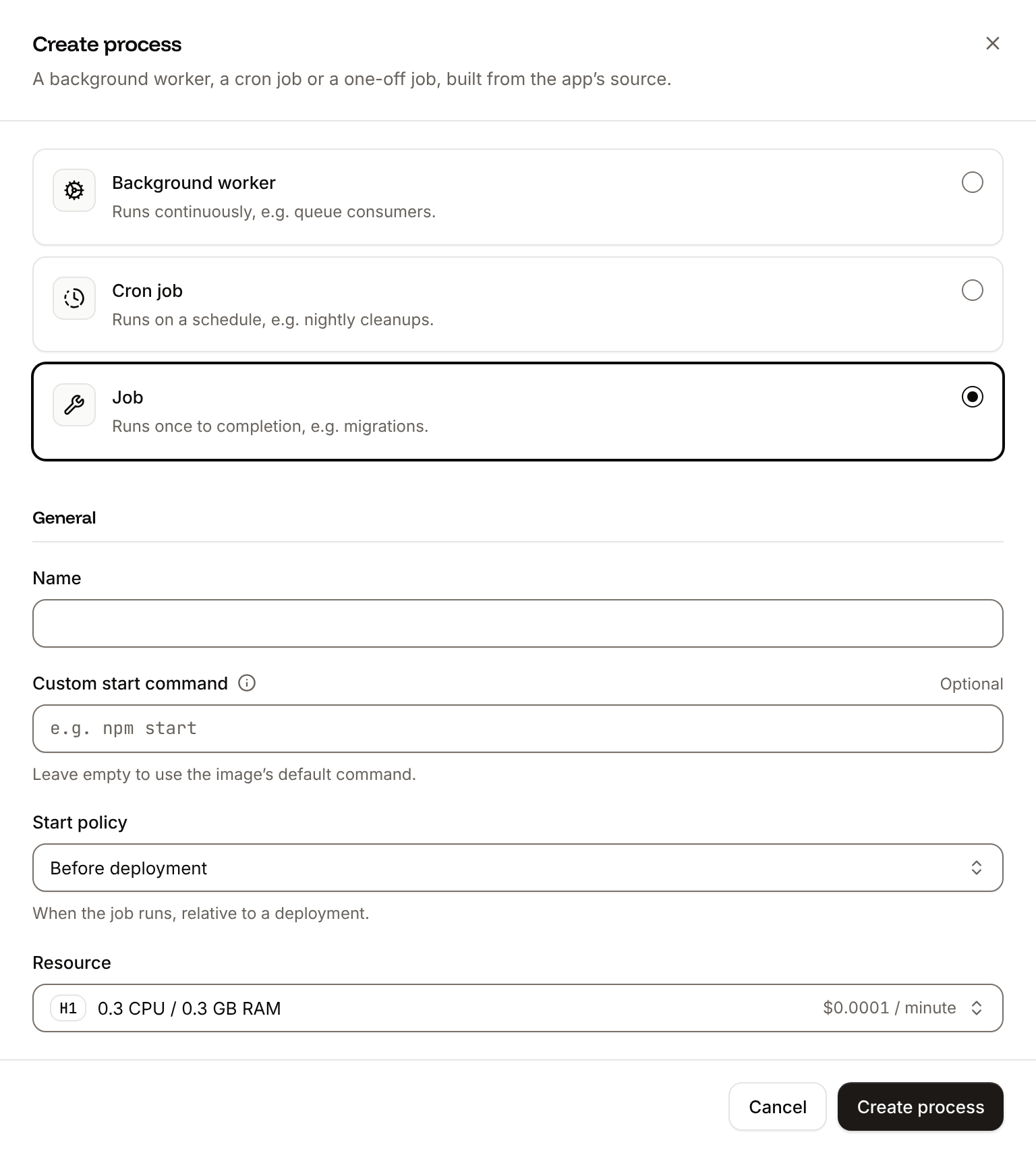
Click the Processes tab, then click Create process. Choose Job, enter
Migrate as the Name and npx payload migrate as the Custom start command. Keep the Start policy at Before deployment, choose S1 as the Resource, then click Create process. payload migrate loads your whole configuration and needs more memory than the 300 MB of H1.7
Deploy
Click the Overview tab, then click Deploy now under Recent deployments. Check the Branch and click Deploy.
8
Turn on auto-deploy
To deploy every push to the branch automatically, click the Settings tab, then click Update auto-deploy in the Auto-deploy section. Turn on Auto-deploy and click Update auto-deploy. See Deployments.
Verify the deployment
-
On the Deployments tab, click the deployment. Its Build log shows Ingot’s build plan: Node.js 24 from
engines.node, npm frompackage-lock.json, Next.js, the start command from thestartscript, and dev dependencies removed after the build.During the rollout, the build log showsBuild logMigrate has been successful. On the Logs tab, theMigrateprocess’s output listsMigrating: <timestamp>_initial, thenDone. - Wait for the deployment’s status to change to Deployed. The application’s status next to its name changes to Running.
-
Open the application’s domain followed by
/admin, for examplehttps://storefront-x7k2m.sevalla.app/admin. Payload opens its Create first user form. Enter an Email and a Password, confirm the password, and click Create. -
Click Media, then Create New. Choose an image with Select a file, enter an Alt text, and click Save. The file is on the bucket’s Objects tab, and opens at
https://storefront-x7k2m.sevalla.app/api/media/file/<filename>. - Deploy again with Deploy now. When the deployment is Deployed, the image is still in Media and still opens: the record is in PostgreSQL and the file in the bucket, not on the instance’s disk, which each deployment replaces.
first-register works only while the project has no users. With mug.png in the current folder:
ana@example.com. The output:


Deploy with a Dockerfile
Ingot needs no Dockerfile. Write your own when you want full control of the image: the base image, the system packages and every layer. Replace the template’sDockerfile and add a .dockerignore at the root of the repository:
Dockerfile
.dockerignore
Dockerfile, so you can keep it in a repository that builds with Ingot, but it adds the .dockerignore patterns to its own, and its build plan lists them in an Ignored row. Then switch the application to the Dockerfile build strategy:
1
Choose the Dockerfile build strategy
On the application’s Settings tab, in the Build strategy section, click Update build strategy. Click Dockerfile, keep the Dockerfile path
Dockerfile and the Docker context ., then click Update build strategy.2
Deploy
Click the Overview tab, then click Deploy now under Recent deployments. Check the Branch and click Deploy.
📦 Building and pushing docker image using Dockerfile... instead of Ingot’s build plan, then Migrate has been successful, and its Dockerfile tab shows your Dockerfile. When the deployment is Deployed, the admin panel opens and the images in Media still load. See Dockerfile for build arguments and private base images.
Deploy changes
With Auto-deploy on, every push to the branch starts a deployment; otherwise, click Deploy now for each change. Each deployment builds the image, runs theMigrate job, then replaces the web process’s instances. When you change a collection, run npx payload migrate:create on your computer and commit the new migration with the code. See Deployments.
Use environment variables
Add configuration on the application’s Environment variables tab and read it withprocess.env in src/payload.config.ts and in server code. Variables apply at the next deployment. Variables that start with NEXT_PUBLIC_ are built into the browser code by next build, so they must be Available during buildtime, and a change needs a new build. See Environment variables.
Add a custom domain
To serve the application from your own domain, such ascms.example.com, add the domain on the application’s Domains tab and create the DNS records that Sevalla shows. Custom domains need a web process larger than H1, so scale the web process first. See Custom domains.
Troubleshoot
Deploy with the API
This sequence creates the same deployment as Deploy to Sevalla through the Sevalla API, so an agent or a script can run it as is. Each step names the operation, shows thecurl command, and gives the matching CLI command and MCP server tool.
You need:
- An API key with the Company developer role, in the
SEVALLA_API_KEYenvironment variable. The CLI reads the same key fromSEVALLA_API_TOKEN. curl,jqandopenssl, and the project pushed to GitHub as in Prepare the project for Sevalla.- A GitHub account that can read the repository, connected to Sevalla. See Git providers. The API can’t list connected accounts: when none can read the repository, Create application fails with
400andCannot access repository https://github.com/acme/storefront: Repository not found or you don't have access.
status and message instead of the resource, and jq -r .id prints null: stop and read the message.
1
Look up the location and the sizes
List clusters (CLI:
listClustersV3) returns every location your company can use, with its region ID. This guide uses Frankfurt, Germany, eu-frankfurt-1. List process resource types (listProcessResourceTypesV3) and List database resource types (listDatabaseResourceTypesV3) return the sizes.sevalla resources clusters, sevalla resources process-types and sevalla resources db-types. MCP: get_platform_options.2
Create the application
Create application (CLI:
createApplicationV3) creates the application with a web process and doesn’t deploy it.sevalla apps create --name storefront --cluster "$CLUSTER_ID" --source privateGit --git-type github --repository https://github.com/acme/storefront --branch main. MCP: create_application with deploy set to false.3
Size the web process
The API creates the web process at S1, while the dashboard creates it at H1, which runs CLI:
next start. List processes (listProcessesV3) returns the web process, and Update process (updateProcessV3) sets its size. Keep S1, and skip this step, to add a custom domain later.sevalla apps processes update "$WEB_ID" --app-id "$APP_ID" --resource-type "$H1_ID". MCP: scale_process with size_id and apply_now set to false.4
Create the database
Create database (CLI:
createDatabaseV3) starts creating a PostgreSQL 18 database with a password you generate. List database versions (listDatabaseVersionsV3) lists the versions of a location.sevalla databases create --name orders-db --type postgresql --db-version 18 --cluster "$CLUSTER_ID" --resource-type "$DB_SIZE_ID" --db-name storefront --db-user storefront --db-password "$DB_PASSWORD". MCP: create_database, which generates the password and doesn’t return it; with connect_to_application_id and env_var_name set to DATABASE_URL, it also does the next step and stores the connection URL as postgresql://..., which Payload reads like postgres://.5
Connect the database
Create internal connection (CLI:
createDatabaseInternalConnectionV3) connects the database to the application over the private network. Unlike the dashboard, it adds no environment variables: a later step adds DATABASE_URL.sevalla databases connections internal-create "$DB_ID" --target-id "$APP_ID" --target-type app. MCP: sevalla_api_create with createDatabaseInternalConnectionV3.6
Create the bucket
Create object storage bucket (CLI:
createObjectStorageV3) creates a private bucket in Western Europe (weur), close to Frankfurt. Payload serves the files itself, so the bucket needs no public access.sevalla object-storage create --name storefront-media --location weur. MCP: sevalla_api_create with createObjectStorageV3 and the same body.7
Read the database and bucket details
Get database (CLI:
getDatabaseV3) returns the database’s internal hostname and port, once its status is ready. Get object storage bucket (getObjectStorageV3) returns the bucket’s endpoint, name and keys.sevalla databases get "$DB_ID" --json and sevalla object-storage get "$BUCKET_ID" --json. MCP: get_database, and sevalla_api_read with getObjectStorageV3.8
Add the environment variables
Create environment variable (List environment variables (
createEnvironmentVariableV3) adds one variable per call. add_var sends each one as available during runtime only, since the build needs none. DATABASE_URL has the format the dashboard uses:listEnvironmentVariablesV3) returns the value later; the MCP server’s tools don’t. Don’t change PAYLOAD_SECRET afterwards: a new one signs every user out.CLI: sevalla apps env-vars create "$APP_ID" --key PAYLOAD_SECRET --value "$PAYLOAD_SECRET", once per variable; the CLI makes each one available during the build too. MCP: set_environment_variables with all the variables in one call, each with runtime true and buildtime false.9
Create the migration job
Create process (CLI:
createProcessV3) adds the Migrate job. A job needs scaling_strategy and job_start_policy; beforeDeployment is the dashboard’s Before deployment.sevalla apps processes create "$APP_ID" --name Migrate --type job --resource-type "$S1_ID" --command "npx payload migrate" --job-start-policy beforeDeployment. MCP: sevalla_api_create with createProcessV3 and the same body.10
Turn on auto-deploy
Update application (CLI:
updateApplicationV3) with auto_deploy deploys every push to the branch.sevalla apps update "$APP_ID" --data '{"auto_deploy": true}'. MCP: sevalla_api_update with updateApplicationV3.11
Deploy
Trigger deployment (CLI:
triggerDeploymentV3) builds the latest commit of the branch and rolls it out.sevalla apps deployments trigger "$APP_ID". MCP: trigger_deployment.12
Wait for the deployment
Get deployment (CLI:
getDeploymentV3) returns the deployment’s status: waiting, then inProgress, then success or failed. The loop polls every 15 seconds for up to 30 minutes and keeps polling through a failed request.sevalla apps deployments get "$DEPLOYMENT_ID" --app-id "$APP_ID". MCP: get_deployment.13
Check the deployment
Get application deployment logs (The build log includes
getApplicationDeploymentLogsV3) returns the build log, which starts with the build plan in Verify the deployment and, on a failed deployment, ends with the error. Get application runtime logs (getApplicationRuntimeLogsV3) returns what the Migrate job printed. List application domains (listApplicationDomainsV3) returns the application’s domain:✅ Migrate has been successful, the runtime logs show a line such as [05:11:53] INFO: Migrating: 20261029_190828_initial, and the last command prints 200. Then run the checks in Verify the deployment with $APP_URL as the domain.CLI: sevalla apps deployments logs "$DEPLOYMENT_ID" --app-id "$APP_ID", sevalla apps logs runtime "$APP_ID" --search Migrating and sevalla apps domains list --app-id "$APP_ID". MCP: get_deployment_logs, search_runtime_logs and get_application.