

public/ on the port that Sevalla sets in the PORT environment variable. A job runs CodeIgniter’s migrations before each deployment, and the data lives in a Sevalla PostgreSQL database.
At a glance
Environment variables
CI_ENVIRONMENT isn’t set, so CodeIgniter runs in its production environment: it hides error details from visitors and logs only errors.
Before you begin
- A Sevalla company with a payment method, and a GitHub, GitLab or Bitbucket account for the repository. See Git providers.
- PHP 8.5 with the
intlandpgsqlextensions, and Composer 2, on your computer. CodeIgniter 4.7 needs PHP 8.2 or later.
Create the project
Create a CodeIgniter project from the app starter:.gitignore, which keeps vendor/, the local .env file and the files in writable/ out of the repository.
Add a products table. Create a migration:
app/Database/Migrations/ whose name starts with the current date and time. Replace its contents with a migration that creates the table and adds one product:
app/Database/Migrations/2026-10-30-075934_CreateProducts.php
app/Models/ProductModel.php
app/Controllers/Products.php
app/Config/Routes.php: /products, and /catalog, which redirects to it:
app/Config/Routes.php
/catalog shows whether the application knows its own domain.
Prepare the project for Sevalla
Pin the PHP version and the PostgreSQL extension
require.phppins the PHP line: Ingot builds on PHP 8.5 and follows its patch releases. The app starter’s^8.2would build on Ingot’s default line, which a new Ingot release can move. See Pin the PHP version.- CodeIgniter’s PostgreSQL driver,
Postgre, uses PHP’spgsqlextension. CodeIgniter doesn’t require it in its owncomposer.json, so Ingot installs it only when yourcomposer.jsondoes.
Connect to the database from environment variables
CodeIgniter reads its database settings fromapp/Config/Database.php. In the class’s constructor, after parent::__construct();, point the default connection group at PostgreSQL with the variables that Sevalla adds when you connect the database:
app/Config/Database.php
.env file, which CodeIgniter loads and Git ignores.
Set the base URL
CodeIgniter builds the URLs ofsite_url(), base_url() and redirects from app.baseURL, which is http://localhost:8080/ in app/Config/App.php. CodeIgniter reads an environment variable for any setting in a configuration class, with the dot written as an underscore, so you set app_baseURL on Sevalla to the application’s address and leave the file as it is.
Send the logs to the runtime logs
CodeIgniter writes its log to files inwritable/logs/, which Sevalla resets on every deployment. Write it to PHP’s error log instead, which FrankenPHP prints to the runtime logs. In app/Config/Logger.php, import ErrorlogHandler in place of FileHandler, and replace the $handlers array:
app/Config/Logger.php
production, the $threshold in the same file logs errors and the levels above them.
What Ingot reads
How Ingot builds and starts the project
The project needs no build or start configuration. Ingot doesn’t recognize CodeIgniter by name, and doesn’t need to:- Runs
composer install --no-dev --optimize-autoloaderand installs theintlandpgsqlextensions. - Starts FrankenPHP, which serves
public/onPORT(8080by default). A request for a path without a file of its own goes toindex.php, which runs CodeIgniter’s router. Files that start with a dot, such as.htaccess, are never served. - Passes HTTPS and the visitor’s IP address from Sevalla’s proxy to PHP: FrankenPHP sets
HTTPSfor requests that reached Sevalla over HTTPS, andREMOTE_ADDRto the visitor’s address. - Lets the application write to its own folder, so CodeIgniter’s cache, sessions and debug files work in
writable/. What it writes there lasts until the next deployment and stays on the instance that wrote it. - Doesn’t run migrations: you create a job for them.
Deploy to Sevalla
These steps build with Ingot. To build from your own Dockerfile instead, see Deploy with a Dockerfile.1
Create the database
In the sidebar, click Databases, then click Create database. Under Database, click PostgreSQL and choose version 18. Enter
storefront-db as the Display name, choose a Data center and a Size, then click Create database. See Create a database for every field.2
Create the application
In the sidebar, click Applications, then click Create > Application. Under Source, click Private repository, then choose the Git provider, the Repository and the Branch. Under Location, choose the same Data center as the database. Keep the Size at H1 or choose a larger one, then click Create application. The application opens on its Overview tab with the status Not deployed yet: creating an application doesn’t deploy it.
3
Connect the database
Click the Networking tab. Under Connected services, click Add internal connection. Choose
storefront-db as the Service, turn on Add environment variables to the application, and click Add internal connection. Sevalla adds DB_HOST, DB_PORT, DB_DATABASE, DB_USERNAME, DB_PASSWORD and DB_URL, the first five of which app/Config/Database.php reads. See Connect an application.4
Add the base URL
Click the Environment variables tab, then click Add environment variables. Enter
app_baseURL as the Key and the application’s URL with a trailing slash as the Value, for example https://storefront-x7k2m.sevalla.app/. The domain is under the application’s name in the page header. Click Add environment variables.5
Create the migration job
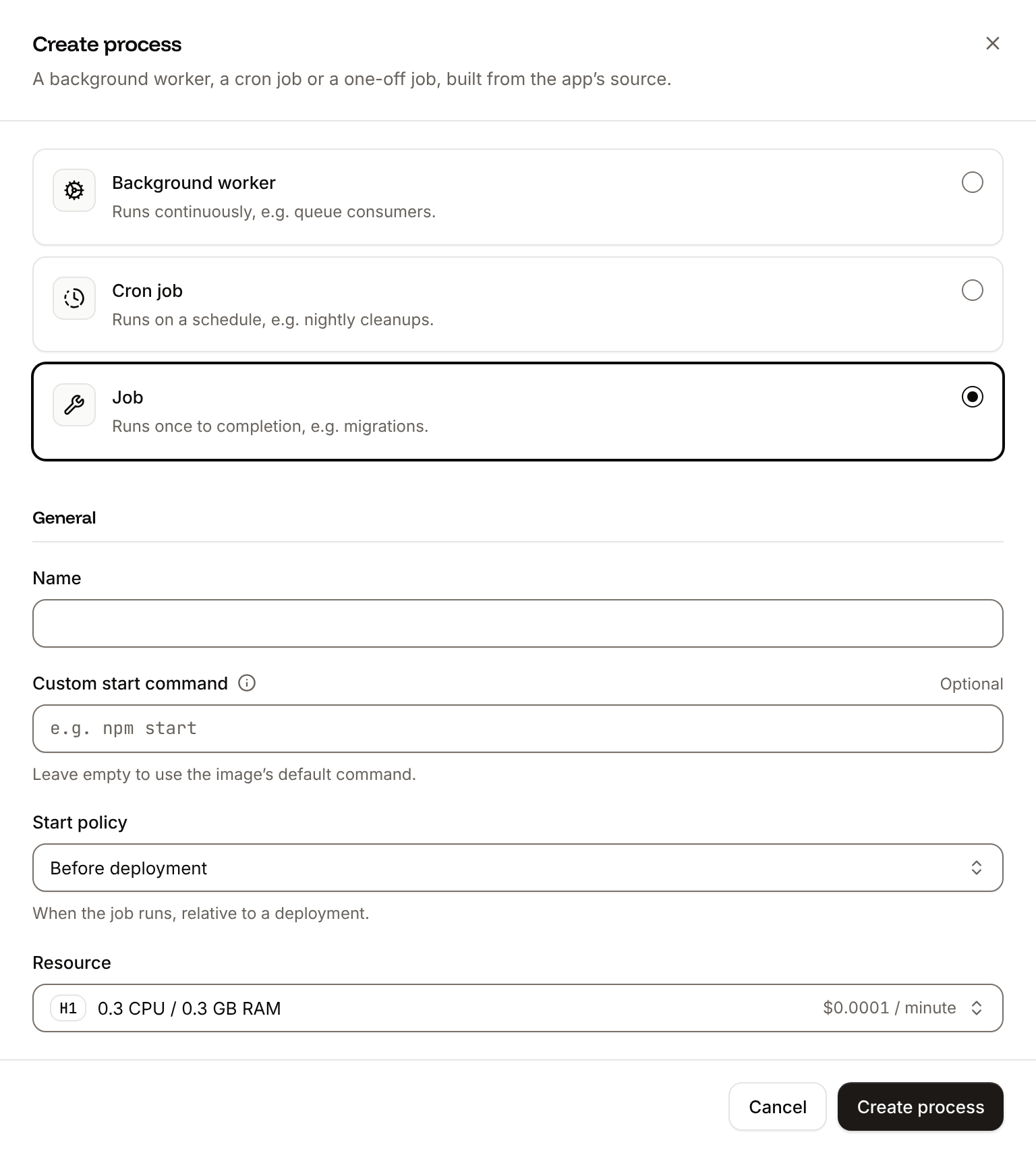
Click the Processes tab, then click Create process. Choose Job, enter
Migrate as the Name and php spark migrate --all as the Custom start command. Keep the Start policy at Before deployment and the Resource at H1, then click Create process.6
Deploy
Click the Overview tab, then click Deploy now under Recent deployments. Check the Branch and click Deploy.
7
Turn on auto-deploy
To deploy every push to the branch automatically, click the Settings tab, then click Update auto-deploy in the Auto-deploy section. Turn on Auto-deploy and click Update auto-deploy. See Deployments.
Verify the deployment
-
On the Deployments tab, click the deployment. Its Build log shows Ingot’s build plan: PHP 8.5 from
composer.json, thepgsqlandintlextensions and where each comes from, andpublic/as the document root.Later, during the rollout, the build log showsBuild logMigrate has been successful. If the job fails, the deployment fails and nothing changes for visitors. - Wait for the deployment’s status to change to Deployed. The application’s status next to its name changes to Running.
-
Click the domain under the application’s name, for example
storefront-x7k2m.sevalla.app. CodeIgniter’s welcome page opens, and its footer showsEnvironment: production. Add/productsto the address: the page shows the product that the migration added.


Check from a terminal
These checks need no dashboard. The API calls useAPI, H, APP_ID and DEPLOYMENT_ID as set in Deploy with the API.
-
The deployment’s status, from Get deployment (
getDeploymentV3): -
The rollout’s results in the build log, from Get application deployment logs (
getApplicationDeploymentLogsV3). The messages carry terminal color codes, whichgsubremoves, andselectdrops the lines of the image build, which start with#: -
The migration job’s output, from Get application runtime logs (
getApplicationRuntimeLogsV3), which searches the last hour by default: -
The products, read from PostgreSQL, with your domain:
-
The redirect from
/catalog, whose address CodeIgniter builds fromapp_baseURL: -
The environment, from the welcome page:
Read the logs
With theErrorlogHandler from Send the logs to the runtime logs, every message CodeIgniter logs appears on the application’s Logs tab. For example, when the application can’t reach the database, /products returns 500 and the runtime logs show:
Runtime logs
production, CodeIgniter logs error and the levels above it, critical, alert and emergency. To log warning, notice, info or debug messages from log_message() too, raise $threshold in app/Config/Logger.php. See Logs.
Deploy with a Dockerfile
Ingot needs no Dockerfile. Write your own when you want full control of the image: the base image, the PHP extensions, the system packages and every layer. Add aDockerfile, a Caddyfile and a .dockerignore to the root of the repository:
Dockerfile
The
Caddyfile configures FrankenPHP the way Ingot does, and runs no PHP file but index.php:
Caddyfile
- FrankenPHP listens on the port in
PORTand servespublic/. Files that start with a dot get404, and so does every PHP file exceptindex.php. - Requests from Sevalla’s proxy that arrived over HTTPS reach CodeIgniter with
HTTPSon, andREMOTE_ADDRis the visitor’s address from theCF-Connecting-IPheader rather than the proxy’s.
.dockerignore
.dockerignore keeps installed packages, your local .env, the files CodeIgniter wrote to writable/ on your computer and the tests out of the build. The index.html files in writable/ stay, so its folders exist in the image.
Commit and push the three files. Ingot doesn’t build from your Dockerfile or use your Caddyfile, and it adds the patterns in .dockerignore to its own (the build plan shows Ignored 11 patterns from .dockerignore), so you can keep the files in a repository that builds with Ingot. Then switch the application to the Dockerfile build strategy:
1
Choose the Dockerfile build strategy
On the application’s Settings tab, in the Build strategy section, click Update build strategy. Click Dockerfile, keep the Dockerfile path
Dockerfile and the Docker context ., then click Update build strategy.2
Deploy
Click the Overview tab, then click Deploy now under Recent deployments. Check the Branch and click Deploy.
📦 Building and pushing docker image using Dockerfile... instead of Ingot’s build plan, then Migrate has been successful, and its Dockerfile tab shows your file. When the deployment’s status is Deployed, /products and /catalog answer as in Check from a terminal. The Migrate job and the environment variables work unchanged. See Dockerfile.
Deploy changes
With Auto-deploy on, every push to the branch starts a deployment; otherwise, click Deploy now for each change. Each deployment builds the image, runs theMigrate job, then replaces the web process’s instances. For a schema change, create a migration with php spark make:migration and commit it with the code. When you add a package, commit composer.lock with it. See Deployments.
Use environment variables
CodeIgniter reads an environment variable for any property of a configuration class inapp/Config/: the class name in lower case, an underscore, then the property, as in app_baseURL for $baseURL in App.php or email_SMTPHost for $SMTPHost in Email.php. Add them on the application’s Environment variables tab instead of committing a .env file. Changes apply at the next deployment. See Environment variables.
Add a custom domain
To serve the application from your own domain, such asshop.example.com, add the domain on the application’s Domains tab and create the DNS records that Sevalla shows, then set app_baseURL to https://shop.example.com/ and deploy. Custom domains need a web process larger than H1, so scale the web process first. See Custom domains.
Troubleshoot the deployment
For more causes, see Troubleshoot Ingot builds and Troubleshoot builds and deployments.
Deploy with the API
The same deployment as Deploy to Sevalla, as calls to the Sevalla API that a script or an AI agent runs in order. Each step names the matching CLI command and Sevalla MCP server tool. The sequence needs:- An API key with the Company developer role, or the capabilities to create, read and update applications and databases, in
SEVALLA_API_KEY. - The repository pushed to GitHub, and a GitHub account with access to it connected to Sevalla. Connecting one is a dashboard step, and the API has no call that reports it: if no connected account can read the repository, the step that creates the application fails with
400and a message that starts withCannot access repositoryand says where to connect one. curl,jqandopenssl.
1
Choose the location
List clusters (CLI:
listClustersV3) returns every location your company can use, with its region ID in location. Pick one by region ID, here Frankfurt, Germany (eu-frankfurt-1); Locations lists the others. Display names differ between environments, so don’t select by them:sevalla resources clusters. MCP: get_platform_options.2
Look up the sizes
List database resource types (CLI:
listDatabaseResourceTypesV3) and List process resource types (listProcessResourceTypesV3) give the IDs of DB1 and H1:sevalla resources db-types and sevalla resources process-types. MCP: get_platform_options.3
Create the database
Create database (The database starts as CLI:
createDatabaseV3) with PostgreSQL 18. You choose the password, and the API never returns it, so keep it in a variable for the environment variables:creating. Poll Get database (getDatabaseV3) until it’s ready. On error, delete the database and create it again:sevalla databases create --name storefront-db --type postgresql --db-version 18 --cluster $CLUSTER_ID --resource-type $DB1_ID --db-name storefront --db-user storefront --db-password $DB_PASSWORD. MCP: not available for this step. create_database generates a password that it never returns, and app/Config/Database.php needs it in DB_PASSWORD: run this call with the API or the CLI.4
Create the application
Create application (Sevalla adds the domain about 2 seconds after it creates the application, so the loop waits for it. Without the wait, the variable can be empty, and
createApplicationV3) creates it with a web process and doesn’t deploy it. List application domains (listApplicationDomainsV3) returns its sevalla.app domain as the primary one, for app_baseURL:app_baseURL would be https:///.CLI: sevalla apps create --name storefront --cluster $CLUSTER_ID --source privateGit --git-type github --repository $REPO_URL --branch $BRANCH, then sevalla apps domains list --app-id $APP_ID. MCP: create_application with deploy: false, then get_application.5
Size the web process
The API creates the web process at S1, not the dashboard’s H1. List processes (CLI:
listProcessesV3) finds it, and Update process (updateProcessV3) sets H1:sevalla apps processes update $WEB_ID --app-id $APP_ID --resource-type $H1_ID. MCP: scale_process with size_id and apply_now: false.6
Connect the database
Create internal connection (It prints the connection’s ID. If it prints nothing or
createApplicationInternalConnectionV3):null, the connection wasn’t created: run the call again, because without it the application can’t reach the database. Unlike the dashboard, the API doesn’t add the connection’s environment variables. The next step adds them.CLI: sevalla apps internal-connections create $APP_ID --target-id $DB_ID --target-type database. MCP: sevalla_api_create with createApplicationInternalConnectionV3 and the same body.7
Add the environment variables
Create environment variable (It prints each of the 7 keys as it’s added. The build reads none of them.CLI:
createEnvironmentVariableV3) adds one variable per call. The loop adds the connection’s variables in the dashboard’s names and format, from Get database, then app_baseURL, all for runtime only:sevalla apps env-vars create $APP_ID --key app_baseURL --value https://$APP_HOST/, once per variable; the CLI makes each variable available during build and runtime, with no option for runtime only. MCP: set_environment_variables with runtime: true and buildtime: false for each variable.8
Create the migration job
Create process (CLI:
createProcessV3) needs the size, a scaling_strategy and, for a job, its job_start_policy:sevalla apps processes create $APP_ID --name Migrate --type job --resource-type $H1_ID --command "php spark migrate --all" --job-start-policy beforeDeployment. MCP: sevalla_api_create with createProcessV3 and the same body.9
Deploy
Trigger deployment (CLI:
triggerDeploymentV3):sevalla apps deployments trigger $APP_ID --branch $BRANCH. MCP: trigger_deployment.10
Wait for the deployment
Poll Get deployment (CLI:
getDeploymentV3) until the status is final: success, failed, cancelled or skipped. The loop keeps polling through a failed request and stops after 30 minutes:sevalla apps deployments get $DEPLOYMENT_ID --app-id $APP_ID. MCP: get_deployment.11
Read the build log
Get application deployment logs (CLI:
getApplicationDeploymentLogsV3) returns the build log, oldest line first: the build plan from Verify the deployment, the build, the Migrate job and the rollout. Without limit, it returns only the latest 1,000 lines. When the status is failed, the last lines say why; see Troubleshoot the deployment:sevalla apps deployments logs $DEPLOYMENT_ID --app-id $APP_ID. MCP: get_deployment_logs.12
Turn on auto-deploy
Update application (To build from the Dockerfile instead of Ingot, send
updateApplicationV3):{"build_type": "dockerfile", "dockerfile_path": "Dockerfile", "docker_context": "."} with the same call before you deploy. CLI: sevalla apps update $APP_ID --data '{"auto_deploy": true}'. MCP: sevalla_api_update with updateApplicationV3 and the same body.$APP_HOST as the domain.