

apps/backend workspace with medusa build. The web process runs medusa start in server mode, which serves the store and admin APIs and the admin dashboard on the port in the PORT environment variable; a background worker runs medusa start in worker mode for subscribers and scheduled jobs; and a job applies the database migrations before each deployment. Medusa keeps its data in a Sevalla PostgreSQL database, its sessions, events and workflows in a Sevalla Redis database, and uploaded images in an object storage bucket with public access.
At a glance
Environment variables
Environment variables belong to the application, so the web process, the worker and the job all get them. The internal connections also add
DB_HOST, DB_PORT, DB_DATABASE, DB_USERNAME, DB_PASSWORD, REDIS_HOST, REDIS_PORT and REDIS_PASSWORD, which Medusa doesn’t read.
Before you begin
- A Sevalla company with a payment method, and a GitHub, GitLab or Bitbucket account for the repository. See Git providers.
- Node.js 24 on your computer. The Medusa 2.22 project needs Node.js 22.23.4 or later.
Create the project
Create a Medusa project with npm and without the Next.js storefront:create-medusa-appasks whether to install the storefront and has no option to answer no, soyes nanswers it.--skip-dbskips creating a local database; theMigratejob sets up the one on Sevalla.- The project is an npm workspace with the Medusa backend in
apps/backend. Medusa 2.22.1 is the latest release when this guide was tested. apps/backend/.envholds development values, including secrets, and.gitignorekeeps it out of the repository.
Prepare the project for Sevalla
Configure Medusa for production
Replaceapps/backend/medusa-config.ts with a configuration that reads the worker mode, keeps sessions, events, workflows, locks and the cache in Redis, and stores uploads in the bucket:
apps/backend/medusa-config.ts
The Redis modules read
REDIS_URL with ioredis, which accepts redis:// URLs. A Sevalla Valkey database works too, but its internal connection adds a REDIS_URL that starts with valkey://, which ioredis doesn’t parse: replace valkey:// with redis:// in the variable’s value.
Log the events the worker handles
To see the worker at work, add a subscriber that logs every new product:apps/backend/src/subscribers/product-created.ts
product.created when you create a product, and the worker runs the subscriber.
Tell Ingot which package to build
The repository holds an npm workspace, so Ingot needs to know which package is the application, and how Medusa starts aftermedusa build. Create ingot.json at the root of the repository:
ingot.json
appmakes Ingot install the whole workspace from the root’spackage-lock.json, buildapps/backendwith Turborepo, remove the devDependencies, and run the processes fromapps/backend.medusa buildcompiles the backend and the admin dashboard intoapps/backend/.medusa/server, and Medusa runs from there:medusa startandmedusa db:migrateload the compiledmedusa-config.jsand serve the admin frompublic/adminin the directory they run in.execmakes Medusa the container’s main process, so it receivesSIGTERMand shuts down cleanly.
Pin the Node.js version
Pin Node.js 24 in the rootpackage.json, where Ingot reads it, so the build doesn’t change when a new Ingot release moves its default line:
Commit everything and push it to your Git provider:
Deploy to Sevalla
These steps build with Ingot. To build from your own Dockerfile instead, see Deploy with a Dockerfile.1
Create the databases
In the sidebar, click Databases, then click Create database. Under Database, choose PostgreSQL and the newest version. Enter
storefront-db as the Display name, choose a Data center and a Size, then click Create database. Create a second database the same way with Redis, the newest version and the Display name storefront-redis, in the same Data center. See Create a database for every field.2
Create the bucket
In the sidebar, click Object storage, then click Create object storage. Enter
storefront-media as the Name, choose the Location closest to the databases, and click Create object storage. On the bucket’s Settings tab, under Public access, click Enable public access and confirm. See Create a bucket.3
Create the application
In the sidebar, click Applications, then click Create > Application. Under Source, click Private repository, then choose the Git provider, the Repository and the Branch. Under Location, choose the same Data center as the databases. Choose S1 (1 GB of memory) as the Size, then click Create application. The application opens on its Overview tab with the status Not deployed yet: creating an application doesn’t deploy it.
4
Connect the databases
Click the Networking tab. Under Connected services, click Add internal connection. Choose
storefront-db as the Service and turn on Add environment variables to the application. In the list of variables, change the key DB_URL to DATABASE_URL, then click Add internal connection. Add a second internal connection to storefront-redis the same way, and keep its keys: Medusa reads REDIS_URL. See Connect an application.5
Add the environment variables
Click the Environment variables tab, then click Add environment variables. Add these variables and click Add environment variables:
See Connect with the S3 API for where each bucket value is.
6
Create the migration job
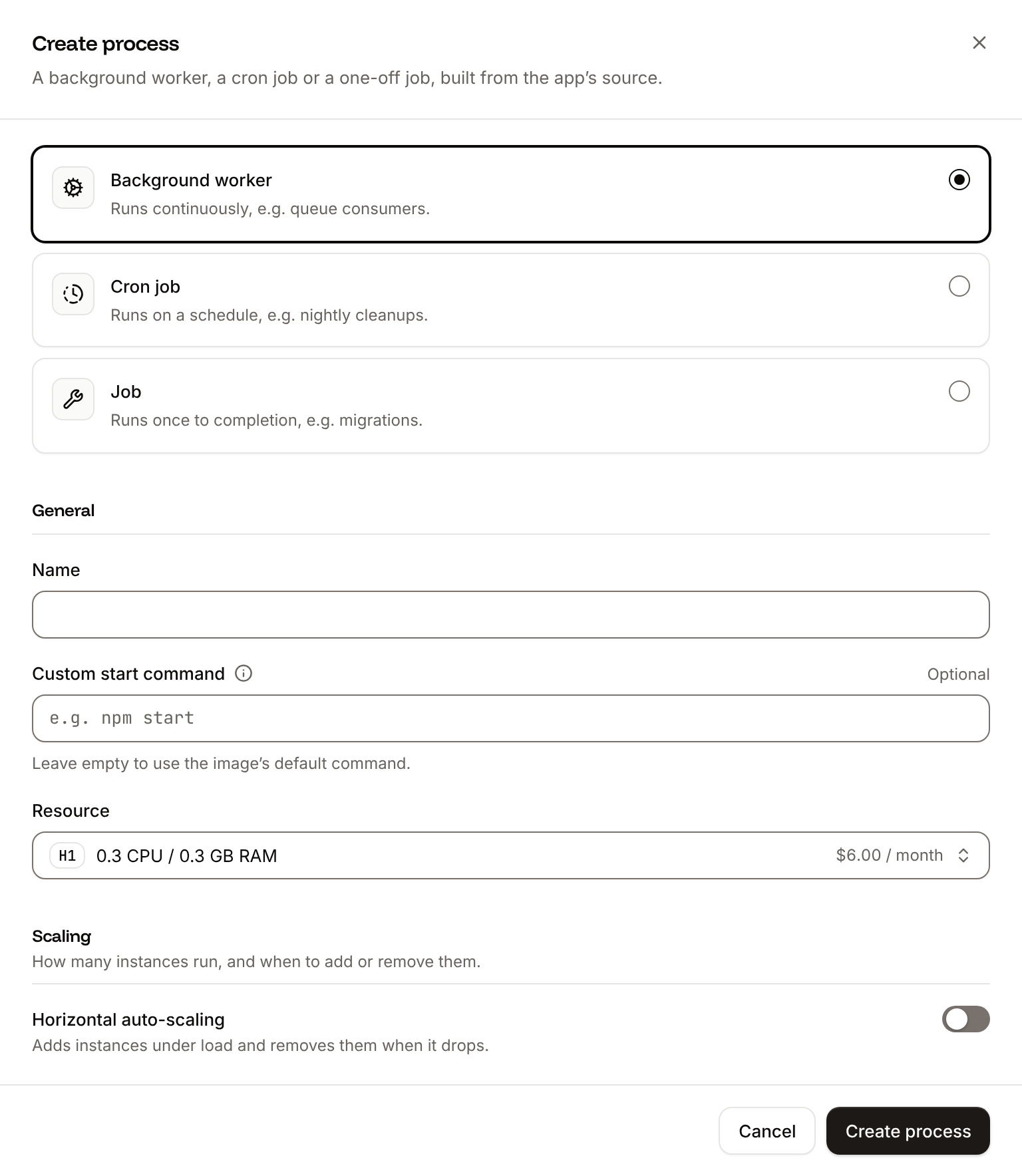
Click the Processes tab, then click Create process. Choose Job, enter
Migrate as the Name and cd .medusa/server && medusa db:migrate as the Custom start command. Keep the Start policy at Before deployment, choose S1 as the Resource, then click Create process.7
Create the background worker
Click Create process again. Choose Background worker, enter
Worker as the Name and cd .medusa/server && MEDUSA_WORKER_MODE=worker exec medusa start as the Custom start command. Choose S1 as the Resource, keep the instance count at 1, then click Create process.8
Turn on the readiness probe
On the Processes tab, open the web process’s menu and click Update process. Under Health checks, turn on Readiness probe with the Path
/health, then click Update process.9
Deploy
Click the Overview tab, then click Deploy now under Recent deployments. Check the Branch and click Deploy.
10
Turn on auto-deploy
To deploy every push to the branch automatically, click the Settings tab, then click Update auto-deploy in the Auto-deploy section. Turn on Auto-deploy and click Update auto-deploy. See Deployments.
/bin/sh -l -c from apps/backend, so cd .medusa/server moves to the built application first. MEDUSA_WORKER_MODE=worker before exec sets the variable for the worker only, and exec makes Medusa the container’s main process, which receives SIGTERM. The Migrate job runs after the build and before the new version gets traffic: medusa db:migrate creates or updates Medusa’s tables, syncs the links between modules and runs the project’s migration scripts, which seed a store, regions and demo products the first time. If it fails, the deployment fails and the previous version keeps serving. The readiness probe sends traffic to a new web instance only once Medusa answers /health, about 10 seconds after it starts. See Health checks.
Verify the deployment
-
On the Deployments tab, click the deployment. Its Build log shows Ingot’s build plan: the
apps/backendpackage fromingot.json, Node.js 24 fromengines.node, npm frompackageManager, the Turborepo build, the start command fromingot.json, and dev dependencies removed after the build.During the rollout, the build log showsBuild logMigrate has been successful,Web has been deployed successfully.andWorker has been deployed successfully.On the Logs tab, theMigrateprocess’s output ends withMigration scripts completed. - Wait for the deployment’s status to change to Deployed. The application’s status next to its name changes to Running.
-
Check the server and the admin dashboard from a terminal:
-
Create the first admin user. Click the Web terminal tab, and in the shell that opens in the web process, run this with your email and a password:
The command prints
User created successfully.See Web terminal. -
Open the application’s domain followed by
/app, for examplehttps://storefront-x7k2m.sevalla.app/app, and sign in with the email and password from step 4. In Products, create a product and add an image under Media. The image is on the bucket’s Objects tab, and its URL is on the bucket’s public domain, such ashttps://storefront-media-q8w2e.sevalla.storage/mug-01M65XE7WVCTWW96FAPMVT6WQE.png. -
On the application’s Logs tab, choose the
Workerprocess. It logsProduct created: prod_...with the new product’s ID: the web process emitted the event, and the worker ran the subscriber. See Runtime logs.
mug.png in the current folder and the password from step 4:


Deploy with a Dockerfile
Ingot needs no Dockerfile. Write your own when you want full control of the image: the base image, the system packages and every layer. Add aDockerfile and a .dockerignore to the root of the repository:
Dockerfile
.dockerignore
Dockerfile, so you can keep it in a repository that builds with Ingot, but it adds the .dockerignore patterns to its own, and its build plan lists them in an Ignored row. Then switch the application to the Dockerfile build strategy:
1
Choose the Dockerfile build strategy
On the application’s Settings tab, in the Build strategy section, click Update build strategy. Click Dockerfile, keep the Dockerfile path
Dockerfile and the Docker context ., then click Update build strategy.2
Deploy
Click the Overview tab, then click Deploy now under Recent deployments. Check the Branch and click Deploy.
📦 Building and pushing docker image using Dockerfile... instead of Ingot’s build plan, then Migrate has been successful, and its Dockerfile tab shows your Dockerfile. When the deployment is Deployed, the checks in Verify the deployment print the same lines. See Dockerfile for build arguments and private base images, and Deploy with the API to switch the build strategy with the API.
Deploy changes
With Auto-deploy on, every push to the branch starts a deployment; otherwise, click Deploy now for each change. Each deployment builds the image, runs theMigrate job, then replaces the instances of the web process and the worker. When you add or change a data model in a custom module, generate its migration on your computer with npx medusa db:generate <module> in apps/backend and commit it with the code. Events that the web process emits during a deployment wait in Redis until a worker takes them. See Deployments.
Use environment variables
Add configuration on the application’s Environment variables tab and read it withprocess.env in medusa-config.ts and in server code. Variables apply at the next deployment. Admin customizations can only read variables that start with VITE_, and medusa build builds them into the admin dashboard, so they must be Available during buildtime, and a change needs a new build. See Environment variables.
Add a custom domain
To serve the store API and the admin dashboard from your own domain, such asshop-api.example.com, add the domain on the application’s Domains tab and create the DNS records that Sevalla shows. The web process runs on S1, larger than H1, as custom domains need. See Custom domains. A storefront on another domain calls the store API from the browser: add its URL, such as https://shop.example.com, to STORE_CORS and AUTH_CORS, then deploy.
Troubleshoot
Deploy with the API
This sequence creates the same deployment as Deploy to Sevalla through the Sevalla API, so an agent or a script can run it as is. Each step names the operation, shows thecurl command, and gives the matching CLI command and MCP server tool.
You need:
- An API key with the Company developer role, in the
SEVALLA_API_KEYenvironment variable. The CLI reads the same key fromSEVALLA_API_TOKEN. curl,jqandopenssl, the project pushed to GitHub as in Prepare the project for Sevalla, andmug.png, any PNG image, in the current folder for the last check.- A GitHub account that can read the repository, connected to Sevalla. See Git providers. The API can’t list connected accounts: when none can read the repository, Create application fails with
400andCannot access repository https://github.com/acme/storefront: Repository not found or you don't have access.
status and message instead of the resource, and jq -r .id prints null: stop and read the message.
1
Look up the location and the sizes
List clusters (CLI:
listClustersV3) returns every location your company can use, with its region ID. This guide uses Frankfurt, Germany, eu-frankfurt-1. List process resource types (listProcessResourceTypesV3) and List database resource types (listDatabaseResourceTypesV3) return the sizes.sevalla resources clusters, sevalla resources process-types and sevalla resources db-types. MCP: get_platform_options.2
Create the application
Create application (CLI:
createApplicationV3) creates the application with a web process at S1, the size this guide needs, and doesn’t deploy it.sevalla apps create --name storefront --cluster "$CLUSTER_ID" --source privateGit --git-type github --repository https://github.com/acme/storefront --branch main. MCP: create_application with deploy set to false.3
Create the databases
Create database (CLI:
createDatabaseV3) starts creating a PostgreSQL 18 database and a Redis 8.6 database, each with a password you generate. List database versions (listDatabaseVersionsV3) lists the versions of a location.sevalla databases create --name storefront-db --type postgresql --db-version 18 --cluster "$CLUSTER_ID" --resource-type "$DB_SIZE_ID" --db-name storefront --db-user storefront --db-password "$DB_PASSWORD", and the same with --type redis --db-version 8.6 for storefront-redis. MCP: create_database, which generates the password and doesn’t return it; with connect_to_application_id, it also makes the internal connection.4
Connect the databases
Create internal connection (CLI:
createDatabaseInternalConnectionV3) connects each database to the application over the private network. Unlike the dashboard, it adds no environment variables: a later step adds DATABASE_URL and REDIS_URL.sevalla databases connections internal-create "$DB_ID" --target-id "$APP_ID" --target-type app, once per database. MCP: sevalla_api_create with createDatabaseInternalConnectionV3.5
Create the bucket
Create object storage bucket (CLI:
createObjectStorageV3) creates the bucket in Western Europe (weur), close to Frankfurt, with public access on, so browsers load product images from its public domain.sevalla object-storage create --name storefront-media --location weur, then sevalla object-storage cdn-domain enable "$BUCKET_ID" for public access. MCP: sevalla_api_create with createObjectStorageV3 and the same body.6
Read the database and bucket details
Get database (CLI:
getDatabaseV3) returns each database’s internal hostname and port, once its status is ready. Get object storage bucket (getObjectStorageV3) returns the bucket’s public domain, endpoint, name and keys.sevalla databases get "$DB_ID" --json and sevalla object-storage get "$BUCKET_ID" --json. MCP: get_database, and sevalla_api_read with getObjectStorageV3.7
Add the environment variables
Create environment variable (List environment variables (
createEnvironmentVariableV3) adds one variable per call. add_var sends each one as available during runtime only, since the build needs none. DATABASE_URL and REDIS_URL have the formats the dashboard’s internal connections use:listEnvironmentVariablesV3) returns the values later; the MCP server’s tools don’t.CLI: sevalla apps env-vars create "$APP_ID" --key MEDUSA_WORKER_MODE --value server, once per variable; the CLI makes each one available during the build too. MCP: set_environment_variables with all the variables in one call, each with runtime true and buildtime false.8
Turn on the readiness probe
List processes (CLI:
listProcessesV3) returns the web process, and Update process (updateProcessV3) gives it a readiness probe on /health. Send timeoutSeconds: without it, the API sets 120 seconds.sevalla apps processes list --app-id "$APP_ID"; the CLI can’t set probes. MCP: get_application, then sevalla_api_update with updateProcessV3 and the same body.9
Create the migration job and the worker
Create process (CLI:
createProcessV3) adds the Migrate job and the Worker background worker. Every process needs scaling_strategy, and a job needs job_start_policy: beforeDeployment is the dashboard’s Before deployment.sevalla apps processes create "$APP_ID" --name Migrate --type job --resource-type "$S1_ID" --command "cd .medusa/server && medusa db:migrate" --job-start-policy beforeDeployment, and the same with --name Worker --type worker and the worker’s command. MCP: sevalla_api_create with createProcessV3 and the same bodies.10
Turn on auto-deploy
Update application (CLI:
updateApplicationV3) with auto_deploy deploys every push to the branch.sevalla apps update "$APP_ID" --data '{"auto_deploy": true}'. MCP: sevalla_api_update with updateApplicationV3.11
Deploy
Trigger deployment (CLI:
triggerDeploymentV3) builds the latest commit of the branch and rolls it out.sevalla apps deployments trigger "$APP_ID". MCP: trigger_deployment.12
Wait for the deployment
Get deployment (CLI:
getDeploymentV3) returns the deployment’s status: waiting, then inProgress, then success or failed. The loop polls every 15 seconds for up to 30 minutes and keeps polling through a failed request. The first deployment takes about 6 minutes.sevalla apps deployments get "$DEPLOYMENT_ID" --app-id "$APP_ID". MCP: get_deployment.13
Check the deployment
Get application deployment logs (The build log’s messages carry terminal color codes around the text.CLI:
getApplicationDeploymentLogsV3) returns the build log, which starts with the build plan in Verify the deployment and, on a failed deployment, ends with the error; grep keeps the rollout’s result lines. Get application runtime logs (getApplicationRuntimeLogsV3) returns what the Migrate job printed. List application domains (listApplicationDomainsV3) returns the application’s domain:sevalla apps deployments logs "$DEPLOYMENT_ID" --app-id "$APP_ID", sevalla apps logs runtime "$APP_ID" --search "Migration scripts completed" and sevalla apps domains list --app-id "$APP_ID". MCP: get_deployment_logs, search_runtime_logs and get_application.14
Create the admin user
Run a command in a process (Keep
execProcessCommandV3) runs medusa user in the web process, as step 4 of Verify the deployment does in the web terminal. The call has no shell, so the command is sh -c; it waits up to 60 seconds.PASSWORD to sign in as ana@example.com. CLI: sevalla apps processes exec "$WEB_ID" --app-id "$APP_ID" --timeout 60 -- sh -c "cd .medusa/server && medusa user -e ana@example.com -p $PASSWORD". MCP: sevalla_api_update with execProcessCommandV3.15
Add a product with an image
Medusa’s admin API signs in, uploads CLI:
mug.png to the bucket and creates a product with it. The worker’s subscriber logs the new product, which Get application runtime logs finds:sevalla apps logs runtime "$APP_ID" --search "Product created: $PRODUCT_ID". MCP: search_runtime_logs.Build from the Dockerfile with the API
After you push theDockerfile from Deploy with a Dockerfile, Update application (updateApplicationV3) switches the build strategy. Then repeat the Deploy, Wait for the deployment and Check the deployment steps:
sevalla apps update "$APP_ID" --data '{"build_type":"dockerfile","dockerfile_path":"Dockerfile","docker_context":"."}'. MCP: sevalla_api_update with updateApplicationV3.