

build/ with node ace build, and the web process runs the compiled server, node build/bin/server.js. Its data lives in a Sevalla PostgreSQL database that the application reaches over an internal connection, and a job runs the Lucid migrations before each deployment.
At a glance
Environment variables
Before you begin
- A Sevalla company with a payment method, and a GitHub, GitLab or Bitbucket account for the repository. See Git providers.
- Node.js 24 or later on your computer. AdonisJS 7 needs Node.js 24.
- PostgreSQL on your computer for local development, with a database for the project.
Create the project
Create a project from the Hypermedia starter kit, which renders pages on the server with Edge templates and comes with sign-up and login, Lucid and Vite:.env file with a new APP_KEY for local development, and sets Lucid up with SQLite. Replace SQLite with PostgreSQL, and make the Lucide icon set a production dependency:
start/view.ts loads the Lucide icons on every start, but the kit lists @iconify-json/lucide in devDependencies, which a production install leaves out. Without the last command, the server and the migration job stop with Cannot find package '@iconify-json/lucide' imported from /app/build/start/view.js.
Connect Lucid to PostgreSQL
Replaceconfig/database.ts with a PostgreSQL connection that reads the variables Sevalla adds when you connect the database:
config/database.ts
start/env.ts lists when it starts. Add the database variables at the end of the list in start/env.ts, after SESSION_DRIVER:
start/env.ts
.env, which stays on your computer, for example:
.env
database/schema.ts, which the models use:
Prepare the project for Sevalla
Pin the Node.js version inpackage.json:
How Ingot builds and starts the application
Ingot detects AdonisJS from@adonisjs/core in package.json, and then:
- Installs every dependency, runs the
buildscript,node ace build, which compiles TypeScript and builds the Vite assets intobuild/, then removes the devDependencies. - Starts the web process with
node build/bin/server.js. The kit’sstartscript,node bin/server.js, is meant to run insidebuild/, so Ingot runs the compiled server from there instead. - Sets
HOSTto0.0.0.0, so the server listens on all network interfaces, on the port inPORT, which Sevalla sets (8080by default). - Doesn’t run migrations. A job runs them once per deployment, before the new version starts, with the compiled
acecommand inbuild/.
bin/server.ts already calls app.terminate() on SIGTERM, so the server stops accepting connections and closes its database connections when Sevalla stops an instance. See How processes run.
Run npm run dev and open http://localhost:3333 to check the application locally. Then commit everything and push it to your Git provider. The kit’s .gitignore keeps .env, node_modules and build out of the repository:
Deploy to Sevalla
These steps build with Ingot. To build from your own Dockerfile instead, see Deploy with a Dockerfile.1
Create the database
In the sidebar, click Databases, then click Create database. Under Database, choose PostgreSQL and the newest version. Enter
storefront-db as the Display name, choose a Data center and a Size, then click Create database. See Create a database for every field.2
Create the application
In the sidebar, click Applications, then click Create > Application. Under Source, click Private repository, then choose the Git provider, the Repository and the Branch. Under Location, choose the same Data center as the database. Keep the Size at H1 or choose a larger one, then click Create application. The application opens on its Overview tab with the status Not deployed yet: creating an application doesn’t deploy it.
3
Connect the database
Click the Networking tab. Under Connected services, click Add internal connection. Choose
storefront-db as the Service, turn on Add environment variables to the application, and click Add internal connection. Sevalla adds DB_HOST, DB_PORT, DB_USERNAME, DB_PASSWORD, DB_DATABASE and DB_URL to the application, the names config/database.ts reads. See Connect an application.4
Add the environment variables
Click the Environment variables tab, then click Add environment variables. Add the other variables that
start/env.ts checks, then click Add environment variables:Ingot’s image sets
NODE_ENV and HOST, and Sevalla sets PORT.5
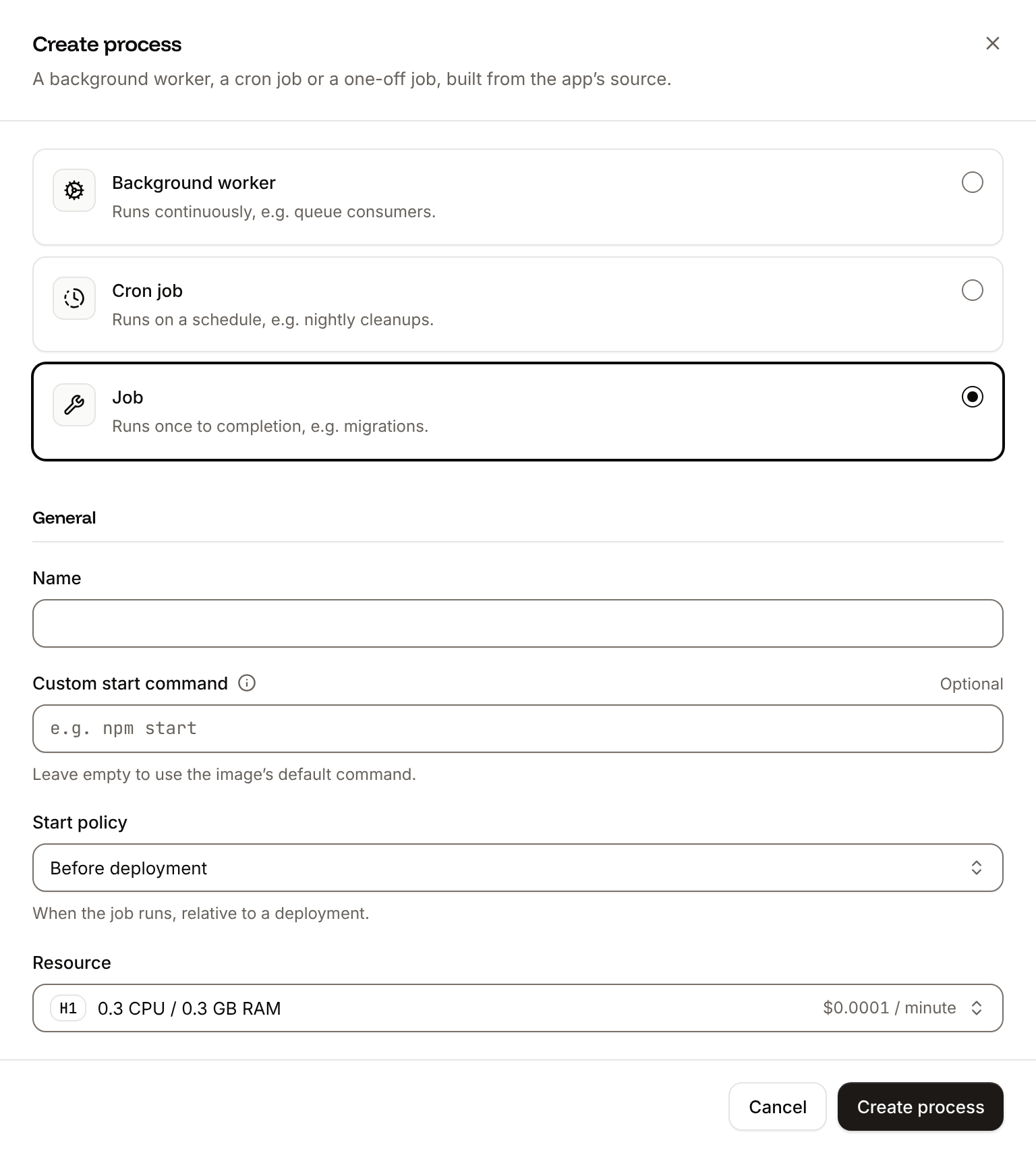
Create the migration job
Click the Processes tab, then click Create process. Choose Job, enter
Migrate as the Name and node build/ace.js migration:run --force as the Custom start command. Keep the Start policy at Before deployment and the Resource at H1, then click Create process. --force lets Lucid run migrations with NODE_ENV set to production.6
Deploy
Click the Overview tab, then click Deploy now under Recent deployments. Check the Branch and click Deploy.
7
Turn on auto-deploy
To deploy every push to the branch automatically, click the Settings tab, then click Update auto-deploy in the Auto-deploy section. Turn on Auto-deploy and click Update auto-deploy. See Deployments.
Verify the deployment
-
On the Deployments tab, wait for the deployment’s status to change to Deployed. The application’s status next to its name changes to Running. Open the deployment to read its build log. Ingot’s build plan comes first:
The plan is followed by the warningBuild log
! AdonisJS validates the variables start/env.ts lists, such as APP_KEY and LOG_LEVEL, when it starts: set them for the app, which the variables you added take care of. Later, during the rollout, the log showsMigrate has been successful. If the job fails, the deployment fails and nothing changes for visitors. - Click the domain under the application’s name. The starter kit’s home page opens with its styles, which shows that the Vite assets load.
-
Add
/signupto the address, and create an account. AdonisJS saves the user in PostgreSQL, signs you in and opens/dashboard, which showsYour dashboard is ready.
/signup does in a browser. Use a new email address each time:
Deploy with a Dockerfile
Ingot needs no Dockerfile. Write your own when you want full control of the image: the base image, the system packages and every layer. The Dockerfile on this page copies only the compiledbuild/ folder into the image, so first make the server find the Vite manifest inside it. Replace config/vite.ts:
config/vite.ts
manifestFile is the relative path public/assets/.vite/manifest.json, which @adonisjs/vite reads from the folder the process starts in, /app. Ingot’s image keeps the whole project, including the public/assets/ that node ace build also leaves in it, so the relative path works there. An image with only build/ has no /app/public/assets/, and every page fails with Missing manifest file. Make sure to first create a build. app.makePath() resolves the path from the application’s own folder, build/, so the change works with both build strategies.
Then add a Dockerfile and a .dockerignore to the root of the repository:
Dockerfile
.dockerignore
.dockerignore keeps your local .env, with its development APP_KEY, out of the image.
Commit and push the three files. Ingot doesn’t use the Dockerfile, so you can keep it in a repository that builds with Ingot, but it adds the .dockerignore patterns to its own: its build plan then shows Ignored 8 patterns from .dockerignore, and the Ingot build still passes because none of these patterns removes a file it needs. Then switch the application to the Dockerfile build strategy:
1
Choose the Dockerfile build strategy
On the application’s Settings tab, in the Build strategy section, click Update build strategy. Click Dockerfile, keep the Dockerfile path
Dockerfile and the Docker context ., then click Update build strategy.2
Deploy
Click the Overview tab, then click Deploy now under Recent deployments. Check the Branch and click Deploy.
📦 Building and pushing docker image using Dockerfile... instead of Ingot’s build plan, then Migrate has been successful, and its Dockerfile tab shows your file. The Migrate job and the environment variables stay as they are. When the deployment’s status is Deployed, the home page and /signup work as before. See Dockerfile.
Deploy changes
With Auto-deploy on, every push to the branch starts a deployment; otherwise, click Deploy now for each change. Each deployment builds the image, runs theMigrate job, then replaces the web process’s instances. For a schema change, create a migration with node ace make:migration, run it locally, and commit it with the code. See Deployments.
Without a readiness probe, Sevalla sends requests to a new instance as soon as its container starts, before AdonisJS has booted, so a request can fail with 503 during a deployment. To avoid that, add a readiness probe to the web process: on the Processes tab, click ⋯ on the web process, click Update process, and in Health checks turn on the Readiness probe with the Path /. New instances then get traffic only once they answer. See Health checks.
Use environment variables
Add a variable to the list instart/env.ts, read it with env.get(), and add it on the application’s Environment variables tab. Variables apply at the next deployment, and AdonisJS stops at start if one that start/env.ts requires is missing. See Environment variables.
Add a custom domain
Add the domain on the application’s Domains tab, then setAPP_URL to it, for example https://shop.example.com, and deploy. Custom domains need a web process larger than H1, so scale the web process first.
Troubleshoot
For more causes, see Troubleshoot Ingot builds and Troubleshoot builds and deployments.
Deploy with the API
The Sevalla API makes the same deployment as Deploy to Sevalla without the dashboard. Run the steps in order in one shell: each step is one API call, and saves the IDs that later steps need in shell variables. Each step also names the CLI command and the MCP server tool that do the same. A variable that holdsnull means the call failed: run the curl command without its jq part to read the error.
You need:
- An API key with the Company developer role, or the
APP:CREATE,APP:READ,APP:UPDATE,DATABASE:CREATE,DATABASE:READandDATABASE:UPDATEpermissions, in theSEVALLA_API_KEYenvironment variable. The CLI reads the key fromSEVALLA_API_TOKEN. - The repository on GitHub, GitLab or Bitbucket, and a Git account that can read it connected to your Sevalla user, which only the dashboard can do. See Git providers. Creating the application checks the access: if Sevalla can’t read the repository, the call returns
400withCannot access repository https://github.com/acme/storefront: Repository not found or you don't have access., followed by where to grant the access. openssl, to generate the database password andAPP_KEY.curlandjq.
1
Find the location
List clusters (CLI:
listClustersV3) returns every location with its id, its name in display_name and its region ID in location. Pick one by its region ID, here eu-frankfurt-1 for Frankfurt, Germany. Locations lists them all.sevalla resources clusters. MCP: get_platform_options.2
Find the database size
List database resource types (CLI:
listDatabaseResourceTypesV3) returns the ID of each database size. Pick DB1, the smallest, or a larger one:sevalla resources db-types. MCP: get_platform_options.3
Find the newest PostgreSQL version
List database versions (CLI:
listDatabaseVersionsV3) returns the versions the location offers, oldest first:sevalla resources db-versions --cluster "$CLUSTER_ID" --type postgresql. MCP: create_database picks the newest version when you leave out version.4
Create the database
Create database (CLI:
createDatabaseV3) creates storefront-db with the database storefront, the user storefront and a password you generate. The API doesn’t return the password later, and the application’s DB_PASSWORD needs it, so keep it in DB_PASSWORD:sevalla databases create --name storefront-db --type postgresql --db-version "$PG_VERSION" --cluster "$CLUSTER_ID" --resource-type "$DB_SIZE_ID" --db-name storefront --db-user storefront --db-password "$DB_PASSWORD". MCP: create_database generates the password itself and never returns it, so the application can’t get DB_PASSWORD from it: create the database with the API or the CLI.5
Wait for the database
Get database (
getDatabaseV3) returns the database’s status, creating until it’s ready, and its internal hostname and port, which the application’s variables need. Poll it until the database is ready:internal_port is a string, such as "5432". CLI: sevalla databases get "$DB_ID". MCP: get_database.6
Create the application
Create application (CLI:
createApplicationV3) creates the application with the Ingot build strategy and a web process, and doesn’t deploy it.sevalla apps create --name storefront --cluster "$CLUSTER_ID" --source privateGit --git-type github --repository https://github.com/acme/storefront --branch main. MCP: create_application with deploy set to false.7
Find the web process
List processes (CLI:
listProcessesV3) returns the web process that Create application added:sevalla apps processes list --app-id "$APP_ID". MCP: get_application, in processes.8
Find the H1 size
The API creates the web process with the S1 size, where the dashboard picks H1. List process resource types (CLI:
listProcessResourceTypesV3) returns the ID of each size:sevalla resources process-types. MCP: get_platform_options.9
Set the web process size and readiness probe
Update process (CLI:
updateProcessV3) sets the size and adds the readiness probe from Deploy changes, so a new instance gets requests only once AdonisJS answers on /. The probe’s values are the dashboard’s defaults. Send timeoutSeconds: a probe set through the API without it waits 120 seconds for an answer, not the dashboard’s 1.sevalla apps processes update "$WEB_ID" --app-id "$APP_ID" --resource-type "$H1_ID" sets the size; the CLI has no option for probes. MCP: sevalla_api_update with updateProcessV3 and the same body.10
Find the domain
List application domains (CLI:
listApplicationDomainsV3) returns the application’s domains. APP_URL needs the primary one. Sevalla adds the domain a few seconds after it creates the application, so the loop asks until the domain is there:sevalla apps domains list --app-id "$APP_ID". MCP: get_application, in domains.11
Connect the database
Create internal connection (CLI:
createApplicationInternalConnectionV3) lets the application reach storefront-db over the private network. Unlike the dashboard, it adds no environment variables: the next step adds them.sevalla apps internal-connections create "$APP_ID" --target-id "$DB_ID" --target-type database. MCP: sevalla_api_create with createApplicationInternalConnectionV3 and the same body.12
Add the environment variables
Create environment variable (CLI:
createEnvironmentVariableV3) adds one variable per call. The first six are the variables the dashboard adds with the internal connection, with the same names and formats. APP_KEY gets a new random key, sent once and never printed. Every variable is read when the server or the Migrate job starts, so they need to be available at runtime only. The add_var function sends each one, with jq building the JSON body:sevalla apps env-vars create "$APP_ID" --key <key> --value <value> for each variable, which makes it available during both the build and runtime. MCP: set_environment_variables with all the variables in one call, runtime set to true and buildtime set to false.13
Create the migration job
Create process (CLI:
createProcessV3) adds the Migrate job, which runs the Lucid migrations before each deployment. The API needs the size in resource_type_id, the scaling_strategy, and the job_start_policy that the dashboard calls Before deployment:sevalla apps processes create "$APP_ID" --name Migrate --type job --resource-type "$H1_ID" --command "node build/ace.js migration:run --force" --job-start-policy beforeDeployment. MCP: sevalla_api_create with createProcessV3 and the same body.14
Turn on auto-deploy
Update application (CLI:
updateApplicationV3) with auto_deploy deploys every push to the branch:sevalla apps update "$APP_ID" --data '{"auto_deploy":true}'. MCP: sevalla_api_update with updateApplicationV3, the application ID as path_params.id and the same body.15
Choose the Dockerfile build strategy
Skip this step to build with Ingot. To build from the Dockerfile instead, Update application (CLI:
updateApplicationV3) sets the build strategy:sevalla apps update "$APP_ID" --data '{"build_type":"dockerfile","dockerfile_path":"Dockerfile","docker_context":"."}'. MCP: sevalla_api_update with updateApplicationV3 and the same body.16
Deploy
Trigger deployment (CLI:
triggerDeploymentV3) deploys the latest commit of the branch:sevalla apps deployments trigger "$APP_ID". MCP: trigger_deployment.17
Wait for the deployment
Get deployment (The loop asks every 15 seconds, for up to 30 minutes, and keeps asking through an empty or failed reply.
getDeploymentV3) returns the deployment’s status: waiting, inProgress, then success, failed, cancelled or skipped. Poll it until the deployment ends:success means the application is deployed. CLI: sevalla apps deployments get "$DEPLOYMENT_ID" --app-id "$APP_ID". MCP: get_deployment.18
Read the build log
Get application deployment logs (With a Dockerfile, the log shows
getApplicationDeploymentLogsV3) returns the build log, one line per entry. With Ingot, the Start row of the build plan shows the start command, and the rollout reports the Migrate job:📦 Building and pushing docker image using Dockerfile... in place of the build plan. The Migrate has been successful line shows with both build strategies. When the job fails, the log ends with Migrate has failed, the deployment fails, and the runtime logs hold the job’s error. For any other failure, the end of this log says why. CLI: sevalla apps deployments logs "$DEPLOYMENT_ID" --app-id "$APP_ID". MCP: get_deployment_logs.19
Read the Migrate job output
Get application runtime logs (When the job fails, the same logs hold its error, such as
getApplicationRuntimeLogsV3) returns what the processes print, the Migrate job included. Lucid ends a run with Migrated in and the time it took, or with Already up to date when there was nothing to migrate:EnvValidationException: Validation failed for one or more environment variables. CLI: sevalla apps logs runtime "$APP_ID" --search "Migrated in". MCP: search_runtime_logs with search set to Migrated in.20
Check the application
Request the home page, then create an account the way
/signup does in a browser. A new account saves a user in PostgreSQL and opens /dashboard. Use a new email address each time: