

uv.lock and starts FastAPI with Uvicorn. You don’t need LangChain’s hosting, LangSmith Deployment (formerly LangGraph Platform): the graph runs inside your own application.
This guide builds a support agent for a store with Claude. It looks up orders with one tool and refunds them with another, which pauses the thread until a staff member approves the refund in a second request.
At a glance
Environment variables
The dashboard makes the connection’s variables available during the build too; the build doesn’t need them.
Before you begin
- A Sevalla company with a payment method, and a GitHub, GitLab or Bitbucket account for the repository. See Git providers.
- An Anthropic API key. Set a spend limit on the account, so an agent stuck in a loop can’t run up the bill.
- Python 3.14 and uv 0.13 or later on your computer.
- Docker, to run PostgreSQL on your computer while you develop.
Create the project
Create the project with uv and add LangGraph, its PostgreSQL checkpointer, the Claude chat model and FastAPI:uv init writes pyproject.toml, a .python-version with 3.14, a .gitignore that keeps out .venv, and a Git repository. uv add installs the packages into .venv and pins every version in uv.lock:
Build the graph
app/graph.py
- The graph has 2 nodes.
agentsends the conversation to Claude. When Claude asks for a tool,tools_conditionroutes totools, which runs it, and the result goes back toagent. The run ends when Claude answers without a tool call. MessagesStateholds the conversation. A thread is one conversation, and the checkpointer saves its state after every step.interrupt(...)pauses the thread and hands its value to the caller. The thread waits, for as long as it takes, until a request resumes it with a decision. LangGraph then runsrefund_orderagain from the start, and this timeinterruptreturns the decision. Code beforeinterruptruns twice, so issue the refund after it.parallel_tool_calls=Falsemakes Claude call one tool per step. A request to refund 2 orders then pauses twice, once for each order.claude-haiku-5-5is fast and costs $0.10 per 1M input tokens and $0.50 per 1M output tokens: a question that calls one tool uses about 1,100 input and 60 output tokens. Change the model name to use another, such asclaude-sonnet-5-5for harder tasks.ChatAnthropicreads the key from theANTHROPIC_API_KEYenvironment variable.
Create the checkpointer tables
app/migrate.py
setup() creates the tables checkpoints, checkpoint_blobs, checkpoint_writes and checkpoint_migrations, and runs the migrations that a newer version of the package adds. Running it again changes nothing. On Sevalla, a job runs it before each deployment, so the tables are ready before the new code starts, and 2 instances never race to create them. DB_URL is the variable Sevalla adds when you connect the database, and psycopg accepts its postgres:// scheme as it is.
Serve the graph
app/main.py
- The checkpointer. The application opens a pool of PostgreSQL connections when it starts and compiles the graph with an
AsyncPostgresSaveron it. Every request reads and writes its thread in PostgreSQL, and nothing about a thread stays in the instance’s memory. - The token. Every route needs the header
Authorization: Bearerfollowed by the value of theAPI_TOKENenvironment variable. Without the header, FastAPI answers401with{"detail":"Not authenticated"}; with another token,401with{"detail":"Invalid token"}. - Threads. A thread ID is any string you choose, such as a conversation’s ID in your own database. A new ID starts a new thread.
- Durability.
durability="sync"saves each step before the next one starts. If a deployment stops a run midway, the thread keeps every step that finished, andthread_stateruns the remaining steps before the thread’s next message. Without that, Claude would reject the thread’s next message, because a tool call would have no result.
The streams send 4 kinds of Server-Sent Events, each with its data encoded as JSON:
EventSourceResponse sets Content-Type: text/event-stream and Cache-Control: no-cache, and while the graph sends nothing, it sends a : ping comment every 15 seconds, which keeps the connection open through Cloudflare. Sevalla passes each event to the client as the application writes it.
Run the agent on your computer
Start PostgreSQL in Docker, set the variables the code reads, and create the tables:ANTHROPIC_API_KEY to your key. fastapi dev finds the application in app/main.py and serves it on http://127.0.0.1:8000. In a second terminal, ask about an order in the thread order-help:
-N turns off curl’s buffering, so the events print as they arrive:
Ctrl+C to stop the server.
Prepare the project for Sevalla
The project already has what Ingot needs:
Uvicorn listens on all interfaces, on the port in the
PORT environment variable that Sevalla sets (8080 by default). The job runs its own command in the same image, which you set when you create it. See Run workers and jobs.
Commit everything and push it to your Git provider. uv init already created the repository:
Deploy to Sevalla
These steps build with Ingot. To build from your own Dockerfile instead, see Deploy with a Dockerfile.1
Create the database
In the sidebar, click Databases, then click Create database. Under Database, choose PostgreSQL and the newest version. Enter
storefront-db as the Display name, choose a Data center and a Size, then click Create database. See Create a database for every field.2
Create the application
In the sidebar, click Applications, then click Create > Application. Under Source, click Private repository, then choose the Git provider, the Repository and the Branch. Under Location, choose the same Data center as the database. Keep the Size at H1 or choose a larger one, then click Create application. The application opens on its Overview tab with the status Not deployed yet: creating an application doesn’t deploy it.
3
Connect the database
Click the Networking tab. Under Connected services, click Add internal connection. Choose
storefront-db as the Service, turn on Add environment variables to the application, and click Add internal connection. Sevalla adds DB_URL and the other connection variables to the application. See Connect an application.4
Add the Anthropic key and the API token
Click the Environment variables tab, then click Add environment variables. Add
ANTHROPIC_API_KEY with your Anthropic API key, click Add another, and add API_TOKEN with a long random value, for example the output of openssl rand -hex 32. Under Availability, keep Available during runtime selected and clear Available during buildtime, so the build never sees the secrets. Click Add environment variables.5
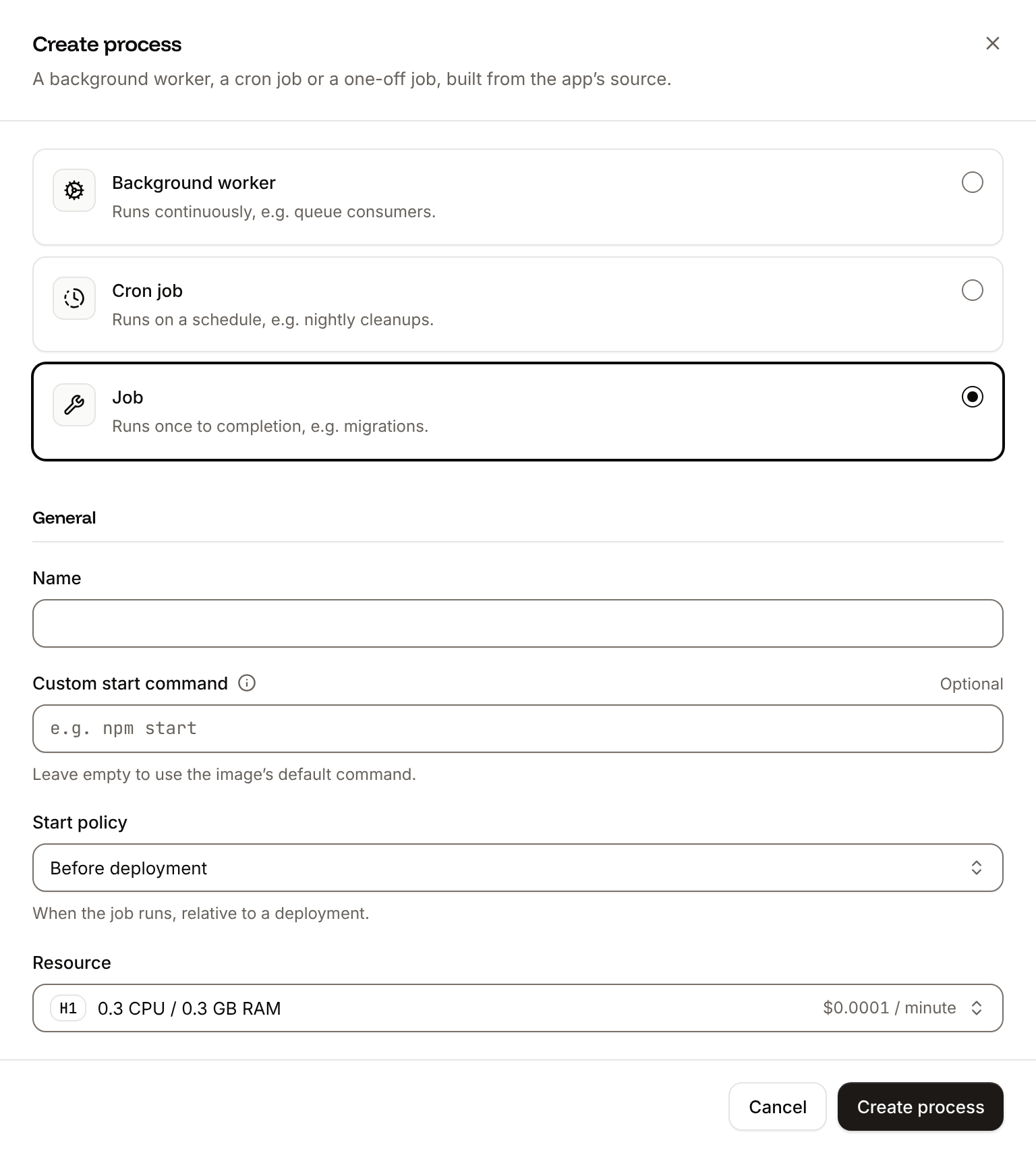
Create the migration job
Click the Processes tab, then click Create process. Choose Job, enter
Migrate as the Name and python -m app.migrate as the Custom start command. Keep the Start policy at Before deployment and the Resource at H1, then click Create process.6
Deploy
Click the Overview tab, then click Deploy now under Recent deployments. Check the Branch and click Deploy.
7
Turn on auto-deploy
To deploy every push to the branch automatically, click the Settings tab, then click Update auto-deploy in the Auto-deploy section. Turn on Auto-deploy and click Update auto-deploy. See Deployments.
Verify the deployment
-
On the Deployments tab, click the deployment. Its build log shows Ingot’s build plan:
After the build, the log showsBuild log
Migrate has been successful, thenWeb has been deployed successfully. -
Wait for the deployment’s status to change to Deployed. The application’s status next to its name changes to Running. With the API, Get deployment (
getDeploymentV3) returns the status, and Get application deployment logs (getApplicationDeploymentLogsV3) searches the build log, with the IDs from Deploy with the API: -
Copy the domain under the application’s name, for example
storefront-agent-x7k2m.sevalla.app. A request without the token gets no further than FastAPI: -
Ask about an order, with your
API_TOKEN. Thegrepcommands keep the name of the tool Claude calls:Without thegrepcommands, the whole stream prints: thetoolevent after 1 to 2 seconds, then the answer’sdeltaevents, which say that order 1001 has shipped, anddone.


Approve a refund
A refund takes 2 requests: the customer’s message pauses the thread, and a staff member’s decision resumes it. In your product, the decision comes from your own admin tool, which calls/resume with the token; never let the customer’s client call it.
1
Ask for a refund
tool with refund_order, then interrupt with {"action": "refund_order", "order_id": "1002", "reason": "Customer reports the item arrived broken."}, and done. Claude writes the reason, so its wording can differ. The run stops there.2
Check what the thread waits for
waiting_for holds the refund. Until a decision arrives, a new message to the thread is refused:409. The thread waits in PostgreSQL, through deployments and restarts, for as long as the decision takes.3
Approve it
delta events. Send {"decision": "reject"} instead to decline it. Read the tool’s result and what the thread waits for now:GET /threads/order-help now shows the whole conversation. A second /resume answers 409 with {"detail":"The thread has no decision to make"}.
Resume threads after a deployment and on other instances
Sevalla doesn’t keep a client’s requests on one instance, and a deployment replaces every instance. Neither matters here, because each thread lives in PostgreSQL. In testing, a thread paused at a refund before a deployment was resumed after it, on 2 instances: itsGET requests reached both, /resume reached one, and the thread finished. To add instances, update the web process’s Instance count. See Set the number of instances.
When a deployment stops an instance, Sevalla waits 5 seconds and sends SIGTERM. Uvicorn stops accepting connections and lets the streams in progress run for up to 25 seconds more, then Sevalla stops the instance. A stream cut that way ends without its done event. The thread keeps every finished step, and its next message first runs the steps the cut run didn’t. See How processes run.
Deploy with a Dockerfile
Ingot needs no Dockerfile. Write your own when you want full control of the image: the base image, the system packages and every layer. Add aDockerfile and a .dockerignore to the root of the repository:
Dockerfile
.dockerignore
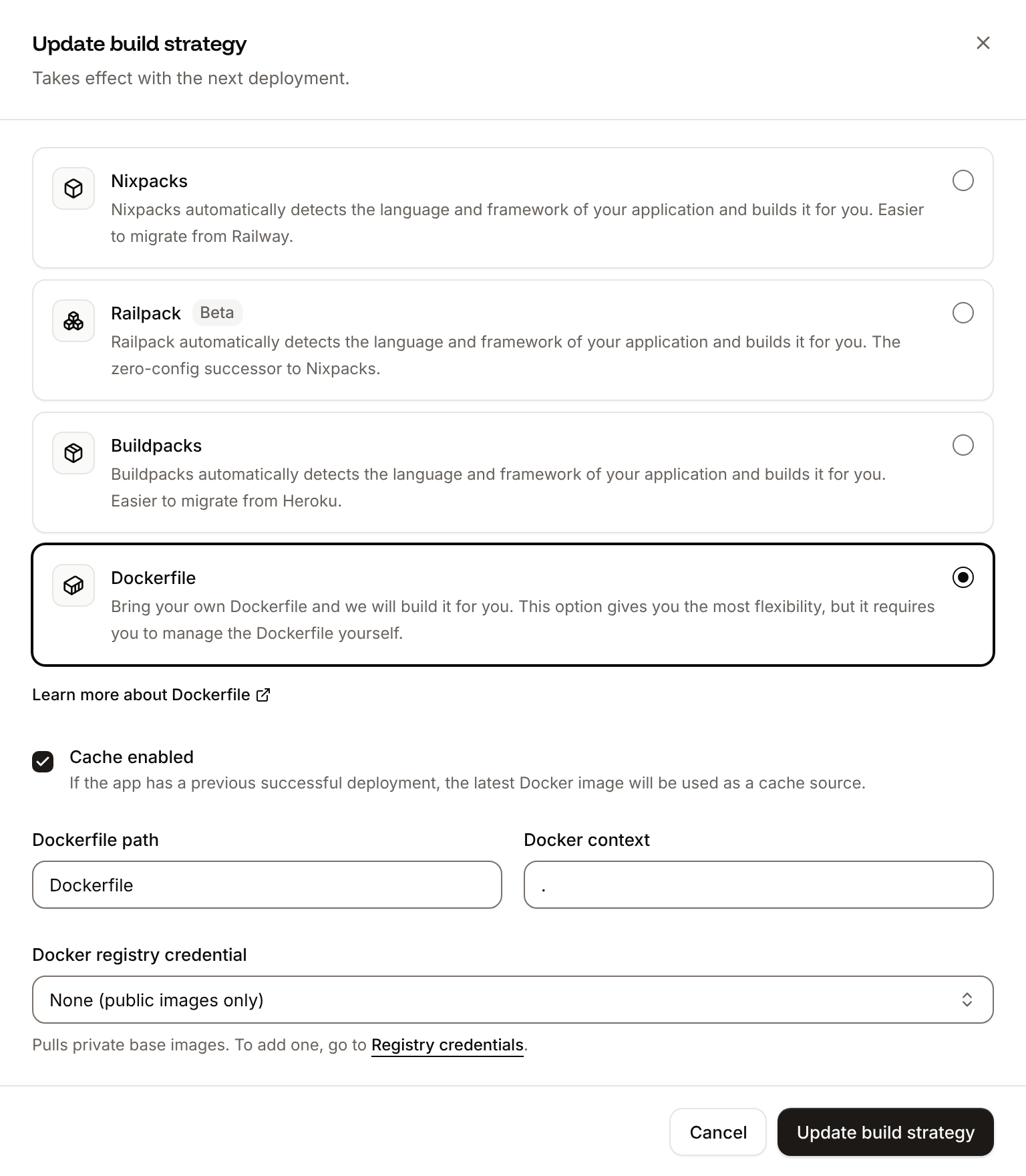
Dockerfile, so you can keep it in a repository that builds with Ingot, but it adds the .dockerignore patterns to its own: its build plan shows an Ignored row with 6 patterns from .dockerignore. Then switch the application to the Dockerfile build strategy:
1
Choose the Dockerfile build strategy
On the application’s Settings tab, in the Build strategy section, click Update build strategy. Click Dockerfile, keep the Dockerfile path
Dockerfile and the Docker context ., then click Update build strategy.2
Deploy
Click the Overview tab, then click Deploy now under Recent deployments. Check the Branch and click Deploy.
📦 Building and pushing docker image using Dockerfile... where Ingot’s build plan was, then Migrate has been successful: the job runs python -m app.migrate in the new image. With the API, for the new deployment’s ID:
GET /threads/order-help still returns the conversation from before, and new messages work the same. The deployment’s Dockerfile tab shows your Dockerfile. See Dockerfile.
Deploy changes
With Auto-deploy on, every push to the branch starts a deployment; otherwise, click Deploy now for each change. Each deployment builds the image, runs theMigrate job, then replaces the web process’s instances; threads carry on. After you add a package with uv add, commit pyproject.toml and uv.lock together. See Deployments.
Add a custom domain
To serve the agent from your own domain, such asagent.example.com, add the domain on the application’s Domains tab and create the DNS records that Sevalla shows. Custom domains need a web process larger than H1, so scale the web process first. See Custom domains.
Troubleshoot
For more causes, see Troubleshoot builds and deployments.
Deploy with the API
This sequence makes the same deployment as Deploy to Sevalla with the Sevalla API, for a script or an AI agent: each step is one call, and later steps use the IDs that earlier ones save in shell variables. It needscurl, jq and openssl, and:
- An API key with the Company developer role, or the
APP:CREATE,APP:READ,APP:UPDATE,DATABASE:CREATEandDATABASE:READpermissions. - The repository pushed to GitHub, with the Git account that can read it connected to Sevalla. If Sevalla can’t read the repository, the Create the application step fails with
400and a message that startsCannot access repositoryand says where to grant access. - Your Anthropic API key.
@sevalla/cli 2.1.0, which reads SEVALLA_API_TOKEN) and the MCP server can run each step too; each step names the command and the tool.
1
Pick a location
List clusters (CLI:
listClustersV3) returns every location with its display_name and location. This picks Frankfurt, Germany (eu-frankfurt-1):sevalla resources clusters. MCP: get_platform_options.2
Look up the sizes
List process resource types (CLI:
listProcessResourceTypesV3) and List database resource types (listDatabaseResourceTypesV3) return the sizes by name:sevalla resources process-types and sevalla resources db-types. MCP: get_platform_options.3
Create the database
Create database (CLI:
createDatabaseV3) needs the password you choose. The API never returns it, so keep it for DB_URL:sevalla databases create --name storefront-db --type postgresql --db-version 18 --cluster $CLUSTER_ID --resource-type $DB1_ID --db-name storefront --db-user storefront --db-password $DB_PASSWORD. MCP: create_database, which generates the password itself and never returns it; called after the application exists, with connect_to_application_id and env_var_name set to DB_URL, it also does the work of the internal connection step and adds DB_URL in the postgresql:// form, which psycopg accepts too.4
Wait for the database
Get database (CLI:
getDatabaseV3) reports status creating, then ready, with the internal hostname and port:sevalla databases get $DB_ID. MCP: get_database.5
Create the application
Create application (CLI:
createApplicationV3) creates the application with a web process and doesn’t deploy it:sevalla apps create --name storefront-agent --cluster $CLUSTER_ID --source privateGit --git-type github --repository $REPO --branch main. MCP: create_application with deploy set to false.6
Find the web process
List processes (CLI:
listProcessesV3):sevalla apps processes list --app-id $APP_ID. MCP: get_application.7
Set the web process to H1
The API creates the web process at S1, not the dashboard’s H1. Update process (It prints
updateProcessV3) sets the size:h1. CLI: sevalla apps processes update $WEB_ID --app-id $APP_ID --resource-type $H1_ID. MCP: scale_process with size_id and apply_now set to false.8
Connect the database
Create internal connection (CLI:
createApplicationInternalConnectionV3) opens the private network path. Unlike the dashboard, it adds no environment variables:sevalla apps internal-connections create $APP_ID --target-id $DB_ID --target-type database. MCP: sevalla_api_create with createApplicationInternalConnectionV3 and the same body.9
Add the environment variables
Create environment variable (CLI:
createEnvironmentVariableV3), once per variable, available during runtime only. DB_URL has the format the dashboard uses. Keep API_TOKEN for the checks.sevalla apps env-vars create $APP_ID --key API_TOKEN --value $API_TOKEN, which also makes the variable available during the build. MCP: set_environment_variables with runtime set to true and buildtime set to false.10
Create the migration job
Create process (CLI:
createProcessV3) needs resource_type_id and scaling_strategy for every type, and job_start_policy for a job. Without scaling_strategy, it answers 400 with Request doesn't match the schema; a job without job_start_policy gets jobStartPolicy must be provided if the process type is job.sevalla apps processes create $APP_ID --name Migrate --type job --resource-type $H1_ID --command "python -m app.migrate" --job-start-policy beforeDeployment. MCP: sevalla_api_create with createProcessV3 and the same body.11
Deploy
Trigger deployment (CLI:
triggerDeploymentV3) deploys the latest commit of the branch:sevalla apps deployments trigger $APP_ID. MCP: trigger_deployment.12
Wait for the deployment
Get deployment (It prints
getDeploymentV3) until status is success, or failed, cancelled or skipped:success. On failed, Get application deployment logs (getApplicationDeploymentLogsV3) returns the build log: curl -s "$API/applications/$APP_ID/deployments/$DEPLOYMENT_ID/logs?limit=5000" -H "$AUTH" | jq -r '.[].message'. CLI: sevalla apps deployments get $DEPLOYMENT_ID --app-id $APP_ID and sevalla apps deployments logs $DEPLOYMENT_ID --app-id $APP_ID. MCP: get_deployment and get_deployment_logs.13
Run the checks
List application domains (Then run the checks in Verify the deployment with
listApplicationDomainsV3) returns the domain:$HOST in place of storefront-agent-x7k2m.sevalla.app. CLI: sevalla apps domains list --app-id $APP_ID. MCP: get_application.