

uv.lock, finds app.py and runs it with python app.py, after setting GRADIO_SERVER_NAME to 0.0.0.0 and GRADIO_SERVER_PORT to the port in the PORT environment variable. demo.launch() reads both, so the app listens where Sevalla sends traffic. The browser calls the app’s functions through Gradio’s queue, over server-sent events that Sevalla’s proxy passes through.
At a glance
Environment variables
Before you begin
- A Sevalla company with a payment method, and a GitHub, GitLab or Bitbucket account for the repository. See Git providers.
- Python 3.14 and uv 0.13 or later on your computer.
Create the project
Create the project with uv and add Gradio:uv init writes pyproject.toml, a .python-version with 3.14, a .gitignore that keeps out .venv, and a Git repository. --no-package keeps the project a script rather than a package to install. uv add installs Gradio 6.31 into .venv and pins every package in uv.lock. The app replaces the main.py that uv init writes:
app.py
flagging_mode="never" removes the Flag button. Flagged examples go to .gradio/flagged in the app’s folder, and Sevalla resets an application’s files on every deployment, so they wouldn’t last.
Run it with uv run app.py and open http://127.0.0.1:7860. Set Quantity to 3 and click Submit: Quote shows Total: $29.97. Press Ctrl+C to stop it.
Prepare the project for Sevalla
The project already has what Ingot needs:
Ingot starts the web process with:
- Gradio listens on all interfaces, on the port that Sevalla sets in
PORT(8080by default). Calldemo.launch()withoutserver_nameorserver_port: arguments tolaunch()win over the variables. - Don’t set
share=True. It creates a temporary public link through Gradio’s own servers; on Sevalla, the application’s domain is the link. The runtime logs still printTo create a public link, set share=True in launch(), which you can ignore.
uv init already created the repository:
Deploy to Sevalla
These steps build with Ingot. To build from your own Dockerfile instead, see Deploy with a Dockerfile.1
Create the application
In the sidebar, click Applications, then click Create > Application. Under Source, click Private repository, then choose the Git provider, the Repository and the Branch. Under Location, choose a Data center. Keep the Size at H1 or choose a larger one, then click Create application. The application opens on its Overview tab with the status Not deployed yet: creating an application doesn’t deploy it.
2
Deploy
Click the Overview tab, then click Deploy now under Recent deployments. Check the Branch and click Deploy.
3
Turn on auto-deploy
To deploy every push to the branch automatically, click the Settings tab, then click Update auto-deploy in the Auto-deploy section. Turn on Auto-deploy and click Update auto-deploy. See Deployments.
Verify the deployment
-
On the Deployments tab, click the deployment. Its Build log shows Ingot’s build plan: Python 3.14 from
.python-version, uv fromuv.lock, and Gradio with the start command forapp.py.Build log -
Wait for the deployment’s status to change to Deployed. The application’s status next to its name changes to Running, and the web process’s runtime logs show
* Running on local URL: http://0.0.0.0:8080. -
Click the domain under the application’s name, for example
quote-tool-x7k2m.sevalla.app. Set Quantity to3and click Submit: Quote showsTotal: $29.97. -
Call the same function from your computer with
gradio_client, which comes with Gradio. Use your application’s domain:It printsLoaded as API: https://quote-tool-x7k2m.sevalla.app/, thenTotal: $29.97. Gradio names each function’s endpoint after the function, soquoteis/quote. -
To check the deployment through the API, use
APP_IDandDEPLOYMENT_IDfrom Deploy with the API. Get deployment (getDeploymentV3) returnssuccess, and Get application runtime logs (getApplicationRuntimeLogsV3) finds Gradio’s start line:The first command printssuccess, and the second* Running on local URL: http://0.0.0.0:8080. The CLI hassevalla apps deployments getandsevalla apps logs runtime, and the MCP serverget_deploymentandsearch_runtime_logs.


Keep the web process at one instance
Gradio keeps its queue in the memory of the instance that runs it: a call joins the queue with one request, then reads its result from a second, long-lived request. Sevalla doesn’t keep a visitor’s requests on one instance, so with 2 or more instances a call whose second request reaches another instance fails, and its event stream reports404: Not Found. Keep the web process at 1 instance, and choose a larger size when the app needs more CPU or memory. See Scaling.
Add a health check
Gradio takes a few seconds to import and start. Without a readiness probe, a new instance receives traffic as soon as its container starts, and requests in those seconds fail with503. Point the probe at /, which answers once Gradio listens:
1
Open the web process
On the application’s Processes tab, click ⋯ on the Web process, then click Update process.
2
Turn on the readiness probe
Under Health checks, turn on Readiness probe and set the Path to
/. Keep the Port at the web process’s port, 8080 unless you changed it.3
Save and deploy
Click Update process, then click Deploy in the undeployed changes bar at the bottom of the page.
Deploy with a Dockerfile
Ingot needs no Dockerfile. Write your own when you want full control of the image: the base image, the system packages and every layer. Add aDockerfile and a .dockerignore to the root of the repository:
Dockerfile
.dockerignore
Dockerfile, so you can keep it in a repository that builds with Ingot, but it adds the .dockerignore patterns to its own: its build plan shows an Ignored row with 6 patterns from .dockerignore. Then switch the application to the Dockerfile build strategy:
1
Choose the Dockerfile build strategy
On the application’s Settings tab, in the Build strategy section, click Update build strategy. Click Dockerfile, keep the Dockerfile path
Dockerfile and the Docker context ., then click Update build strategy.2
Deploy
Click the Overview tab, then click Deploy now under Recent deployments. Check the Branch and click Deploy.
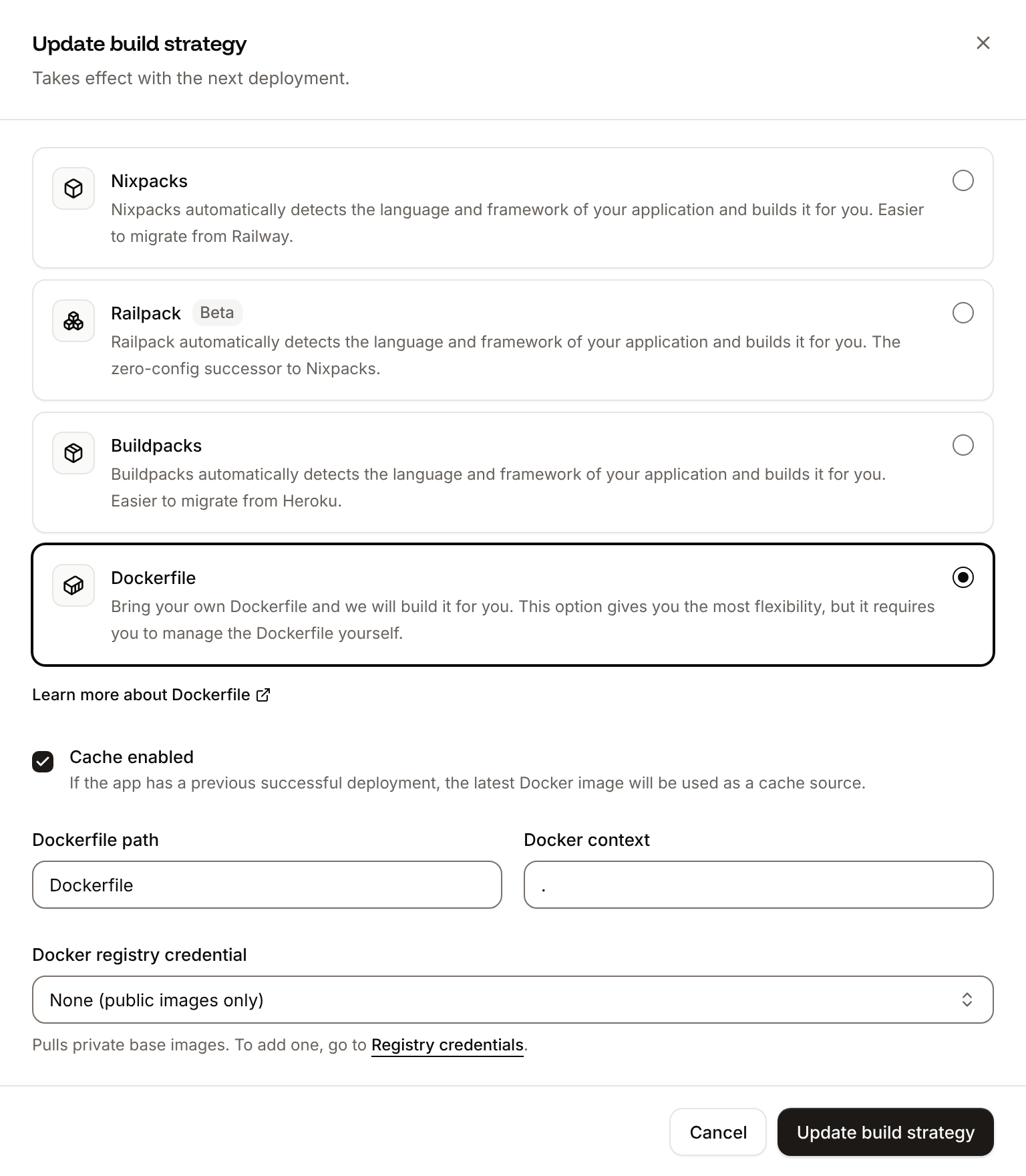
📦 Building and pushing docker image using Dockerfile... where Ingot’s build plan was. The app and gradio_client return Total: $29.97 as before, and the deployment’s Dockerfile tab shows your Dockerfile. See Dockerfile.
Deploy changes
With Auto-deploy on, every push to the branch starts a deployment; otherwise, click Deploy now for each change. Each deployment builds the image, then replaces the web process’s instance. After you add a package withuv add, commit pyproject.toml and uv.lock together. See Deployments.
Use environment variables
Keep API keys and other secrets, such as a model provider’s key, in environment variables and read them withos.environ, for example os.environ["SALES_API_TOKEN"]. Add them on the application’s Environment variables tab, keep Available during runtime selected, and deploy: variables apply with the next deployment.
Gradio reads its own settings from variables that start with GRADIO_. For example, GRADIO_ANALYTICS_ENABLED set to False turns off the usage analytics Gradio sends by default.
Add a custom domain
To serve the app from your own domain, such asquote.example.com, add the domain on the application’s Domains tab and create the DNS records that Sevalla shows. No code change is needed. Custom domains need a web process larger than H1, so scale the web process first. See Custom domains.
Deploy with the API
These calls make the same deployment as Deploy to Sevalla, in an order that an agent or a script runs as is. Each step names the API operation, then the CLI command and the MCP tool that do the same. The CLI reads the key fromSEVALLA_API_TOKEN and prints tables; with --json it prints the API’s JSON, except that lists are bare arrays rather than the API’s data field.
Before you start:
- Put an API key in
SEVALLA_API_KEY. The key needs the Company developer role or Company admin; see API keys. The commands usecurlandjq. - Push the repository and connect its Git account to Sevalla, as in Before you begin. No API call reports whether the account is connected: if it isn’t, or Sevalla’s GitHub App can’t see the repository, creating the application fails with
400and a message that starts withCannot access repository https://github.com/acme/quote-tool: Repository not found or you don't have access.and says where to grant access. - Look up the location and the size. The first command picks the location by its region ID, here
eu-frankfurt-1(Frankfurt, Germany); see Locations for the others. List clusters (listClustersV3) and List process resource types (listProcessResourceTypesV3) return them; the CLI hassevalla resources clustersandsevalla resources process-types, and the MCP serverget_platform_options.
null, run its curl command without jq: the response’s message says what went wrong.
1
Create the application
Create application (CLI:
createApplicationV3). It creates the web process and doesn’t deploy:sevalla apps create --name quote-tool --cluster "$CLUSTER_ID" --source privateGit --git-type github --repository https://github.com/acme/quote-tool --branch main. MCP: create_application with deploy set to false; by default it starts a deployment before the size and the probe are set.2
Set the size and the readiness probe
The API creates the web process at S1, not the dashboard’s H1, and without health checks. List processes (It prints
listProcessesV3) finds the web process, and Update process (updateProcessV3) sets H1 and the readiness probe from Add a health check. Send every probe field, timeoutSeconds included: a probe set through the API without it waits up to 120 seconds for an answer, not the dashboard’s 1 second. The values are the dashboard’s defaults:{"size":"h1","readiness":"/","timeout":1}. The process keeps 1 instance, which Keep the web process at one instance explains. CLI: sevalla apps processes update "$WEB_ID" --app-id "$APP_ID" --resource-type "$H1_ID" sets the size; the CLI can’t set probes. MCP: sevalla_api_update with updateProcessV3 and the same body.3
Deploy
Trigger deployment (CLI:
triggerDeploymentV3) deploys the latest commit on the branch:sevalla apps deployments trigger "$APP_ID". MCP: trigger_deployment.4
Wait for the deployment
Get deployment (It prints
getDeploymentV3) until status is success or failed:success when the deployment finishes, or failed; after 30 minutes without either, it prints the status it last read. On failed, read the build log with Get application deployment logs (getApplicationDeploymentLogsV3), as in Verify the deployment. CLI: sevalla apps deployments get "$DEPLOYMENT_ID" --app-id "$APP_ID". MCP: get_deployment, then get_deployment_logs.5
Turn on auto-deploy
Update application (It prints
updateApplicationV3):true. CLI: sevalla apps update "$APP_ID" --data '{"auto_deploy": true}'. MCP: sevalla_api_update with updateApplicationV3 and the same body.listApplicationDomainsV3) returns the domain to run the checks in Verify the deployment against:
200. To build from the Dockerfile instead, send {"build_type": "dockerfile", "dockerfile_path": "Dockerfile", "docker_context": "."} to Update application, then deploy and wait again. CLI: sevalla apps update "$APP_ID" --build-type dockerfile --dockerfile-path Dockerfile.