

jekyll build turns Markdown, Liquid templates and the theme into HTML in the _site folder. Sevalla publishes that folder as a static site, served from Cloudflare’s edge and free up to 100 GB of bandwidth a month. The static site build runs on Node.js and has no Ruby, so the project’s build script installs Ruby and the gems with rv, a Ruby version and gem manager, before it runs Jekyll. To run the site as an application instead, build it from a Dockerfile.
At a glance
Environment variables
The site needs no environment variables, as a static site or as an application. The build setsJEKYLL_ENV=production itself.
Before you begin
- A Sevalla company with a payment method, and a GitHub, GitLab or Bitbucket account for the repository. See Git providers.
- Ruby 4.0 and Git on your computer. See Install Jekyll.
- Node.js 24 or later on your computer, to write
package-lock.json.
Create the project
Install Jekyll and Bundler, then create a site with Jekyll’s default theme, Minima:jekyll new writes _config.yml, a Gemfile and Gemfile.lock (Jekyll 4.4.1, Minima 2.5), a home page, an about page, a 404 page and a first post, and runs bundle install. Name the site: in _config.yml, change title and description:
_config.yml
bundle exec jekyll serve and open http://localhost:4000 to check the site locally.
Prepare the project for Sevalla
A static site’s build always installs npm packages first and stops when there’s nopackage.json, so the project gets one, with a build script that runs build.sh. Pin the Ruby version, and add the npm files:
build.sh, which installs rv, a pinned release whose checksum it checks, then Ruby, the gems and the site:
build.sh
_config.yml. Jekyll still leaves out the Gemfile, Gemfile.lock and node_modules by default.
_config.yml
Commit everything and push it to your Git provider.
jekyll new doesn’t create a Git repository, and its .gitignore already leaves out _site and .jekyll-cache:
Deploy as a static site
1
Choose the repository
In the sidebar, click Static sites, then click Create static site. Under Source, click Private repository, then choose the Git provider, the Repository and the Branch.
2
Set the build settings
Under Build settings, Sevalla fills in
npm run build and dist from package.json. Jekyll builds to _site, so change the Publish directory:3
Create the static site
Enter a Name under Details, then click Create static site. Sevalla starts the first deployment right away, and deploys every push to the branch while Auto-deploy is on.
/tmp/rv.tar.xz: OK, then Installed Ruby version 4.0.9, the gems rv installed, and Jekyll’s summary ending in done in. The build takes about 30 seconds. rv also logs warnings about /etc/pki/tls/certs and ERROR rv::update: Self-update failed: Unable to load receipt for app rv: it can’t update itself in the build container, and the build goes on. See Build settings for every field.
Verify the static site
- On the Deployments tab, wait for the deployment’s status to change to Deployed. The site’s Status on the Overview tab changes to Live.
- On the Overview tab, click Visit site. The Minima home page opens with the title Storefront and the post Welcome to Jekyll!.
-
From a terminal, with your site’s domain:
With the API, Get static site deployment returns the deployment’s status; see Deploy with the API.


404.html instead, see Custom 404 pages. If the deployment fails, open it on the Deployments tab and read its build log, then see Troubleshoot.
Deploy with a Dockerfile
Ingot, the default build strategy for applications, can’t serve a Jekyll site: it finds no server to start and stops with✗ No start command found. A Jekyll site runs as an application only from a Dockerfile. Use one when the site needs something only applications have, such as promoting one build through the stages of a pipeline. Add a Dockerfile, a Caddyfile and a .dockerignore to the root of the repository:
Dockerfile
Caddyfile
.dockerignore
build.sh or rv, so the site builds the same way with or without the static site setup. Commit and push the three files, then create the application:
1
Create the application
In the sidebar, click Applications, then click Create > Application. Under Source, click Private repository, then choose the Git provider, the Repository and the Branch. Under Location, choose a Data center. Keep the Size at H1 or choose a larger one, then click Create application. The application opens on its Overview tab with the status Not deployed yet: creating an application doesn’t deploy it.
2
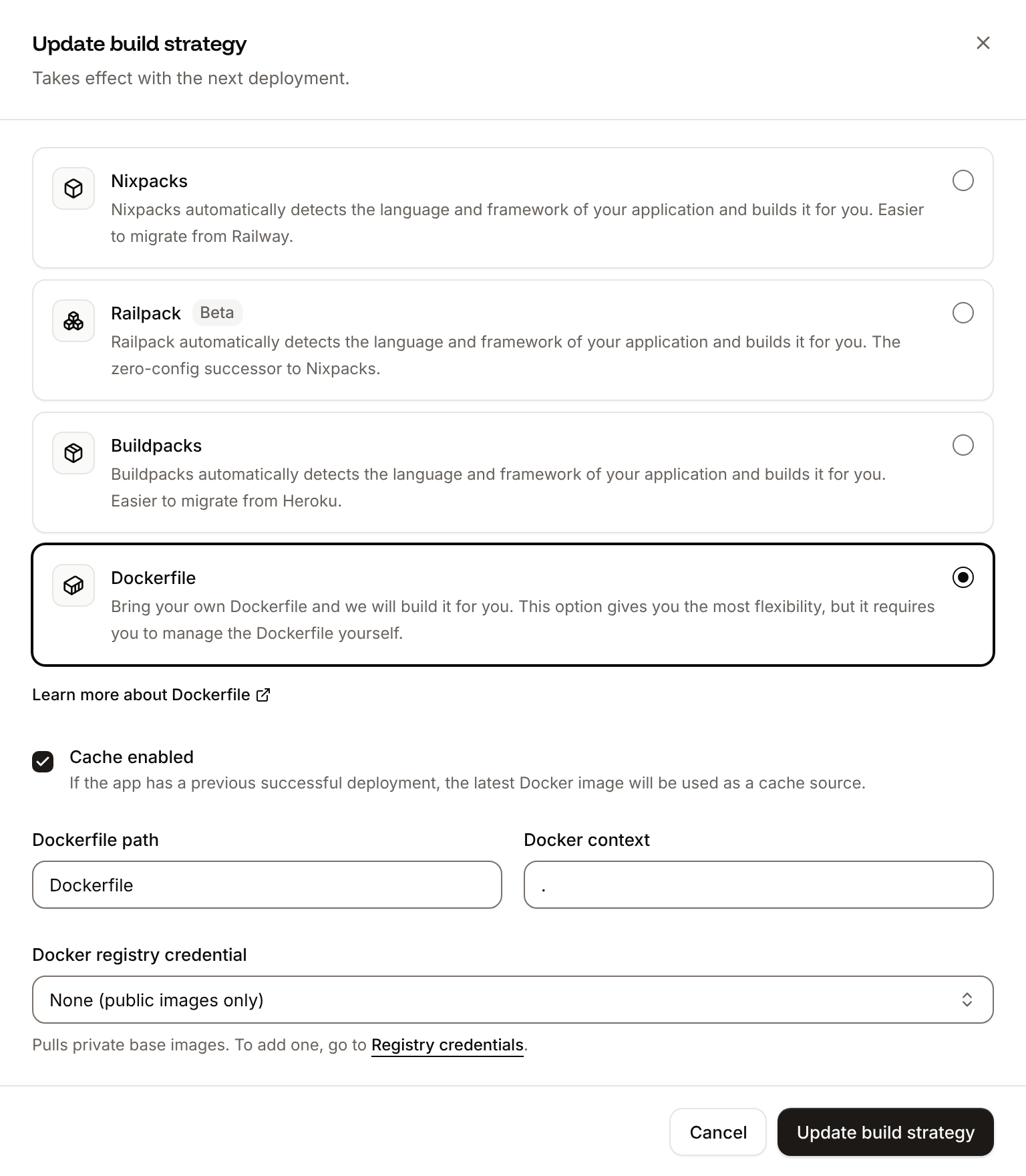
Choose the Dockerfile build strategy
On the Settings tab, in the Build strategy section, click Update build strategy. Click Dockerfile, keep the Dockerfile path
Dockerfile and the Docker context ., then click Update build strategy.3
Deploy
Click the Overview tab, then click Deploy now under Recent deployments. Check the Branch and click Deploy.
📦 Building and pushing docker image using Dockerfile..., then Bundler’s install and Jekyll’s summary, and its Dockerfile tab shows your file. When the status changes to Deployed, click the domain under the application’s name: the Minima home page opens. From a terminal:
✗ No start command found: switch to Dockerfile and deploy again. See Dockerfile.
Deploy changes
With Auto-deploy on, every push to the branch starts a deployment of the static site or the application; otherwise, deploy each change from the Deployments tab. To move to a newer Jekyll or theme release, runbundle update, check the site locally, and commit Gemfile.lock. See Static site deployments and Deployments.
Add a custom domain
To serve the site from your own domain, such asblog.example.com, add the domain on the static site’s Domains tab and create the DNS records that Sevalla shows, then set url in _config.yml to https://blog.example.com, so the feed and the canonical links use it. Applications have a Domains tab too, but custom domains need a web process larger than H1. See Custom domains.
Troubleshoot
For more causes, see Troubleshoot static sites and Troubleshoot builds and deployments.
Deploy with the API
This sequence creates the static site from Deploy as a static site and the application from Deploy with a Dockerfile through the Sevalla API, so an agent or a script can run it as is. Run the first four steps for the static site, the rest for the application. Each step names the operation, shows thecurl command, and gives the matching CLI command and MCP server tool.
You need:
- An API key with the Company developer role, in the
SEVALLA_API_KEYenvironment variable. The CLI reads the same key fromSEVALLA_API_TOKEN. curlandjq, and the project pushed to GitHub as in Prepare the project for Sevalla, with the files from Deploy with a Dockerfile.- A GitHub account that can read the repository, connected to Sevalla. See Git providers. The API can’t list connected accounts: when none can read the repository, Create static site and Create application fail with
400andCannot access repository https://github.com/acme/storefront: Repository not found or you don't have access.
status and message instead of the resource, and jq -r .id prints null: stop and read the message.
1
Create the static site
Create static site (CLI:
createStaticSiteV3) takes the build settings: node_version lts is the dashboard’s Latest LTS, and published_directory is the Publish directory.sevalla static-sites create --name storefront-blog --repository https://github.com/acme/storefront --branch main --source privateGit --git-type github --build-command "npm run build" --publish-directory _site --node-version lts. MCP: create_static_site with the same fields.2
Deploy the static site
Deploy static site (CLI:
deployStaticSiteV3) starts the first deployment. Unlike the dashboard, creating a static site through the API doesn’t start one.sevalla static-sites deployments trigger "$SITE_ID". MCP: trigger_deployment with service_type static_site.3
Wait for the static site deployment
Get static site deployment (If it’s
getStaticSiteDeploymentV3) returns the deployment’s status: waiting, then inProgress, then success or failed. The loop polls every 15 seconds for up to 30 minutes and keeps polling through a failed request.failed, Get static site deployment logs (getStaticSiteDeploymentLogsV3) returns the build log. CLI: sevalla static-sites deployments get "$SITE_DEPLOYMENT_ID" --site-id "$SITE_ID" and sevalla static-sites deployments logs "$SITE_DEPLOYMENT_ID" --site-id "$SITE_ID". MCP: get_deployment and get_deployment_logs with service_type static_site.4
Check the static site
Get static site (CLI:
getStaticSiteV3) returns the site’s domain in hostname. Right after a deployment reports success, Cloudflare’s edge can answer with Sevalla’s 404 page for a short time, so the loop waits up to 2 minutes for 200 before the check:sevalla static-sites get "$SITE_ID". MCP: get_static_site.5
Look up the location and the size
List clusters (CLI:
listClustersV3) returns every location your company can use, with its region ID. This guide uses Frankfurt, Germany, eu-frankfurt-1. List process resource types (listProcessResourceTypesV3) returns the process sizes.sevalla resources clusters and sevalla resources process-types. MCP: get_platform_options.6
Create the application
Create application (CLI:
createApplicationV3) creates the application with a web process and doesn’t deploy it.sevalla apps create --name storefront --cluster "$CLUSTER_ID" --source privateGit --git-type github --repository https://github.com/acme/storefront --branch main. MCP: create_application with deploy set to false.7
Size the web process
The API creates the web process at S1, while the dashboard creates it at H1, which is enough for Caddy. List processes (CLI:
listProcessesV3) returns the web process, and Update process (updateProcessV3) sets its size. Keep S1, and skip this step, to add a custom domain later.sevalla apps processes update "$WEB_ID" --app-id "$APP_ID" --resource-type "$H1_ID". MCP: scale_process with size_id and apply_now set to false.8
Choose the Dockerfile build strategy
Update application (The same call turns on auto-deploy. CLI:
updateApplicationV3) sets the build strategy. Ingot can’t serve the site, so deploy only after this step.sevalla apps update "$APP_ID" --data with the same body. MCP: sevalla_api_update with updateApplicationV3 and the same body.9
Deploy
Trigger deployment (CLI:
triggerDeploymentV3) builds the latest commit of the branch and rolls it out.sevalla apps deployments trigger "$APP_ID". MCP: trigger_deployment.10
Wait for the deployment
Get deployment (CLI:
getDeploymentV3) returns the deployment’s status: waiting, then inProgress, then success or failed. The loop polls every 15 seconds for up to 30 minutes and keeps polling through a failed request.sevalla apps deployments get "$DEPLOYMENT_ID" --app-id "$APP_ID". MCP: get_deployment.11
Check the application
Get application deployment logs (After the build log, the output is the same title as for the static site, then
getApplicationDeploymentLogsV3) returns the build log, which shows Jekyll’s summary and, on a failed deployment, ends with the error. List application domains (listApplicationDomainsV3) returns the application’s domain. Right after a deployment reports success, the domain can answer 503 for a few seconds while traffic moves to the new instance, so the loop waits up to 1 minute for 200 before the checks:404 from Caddy for a missing page.CLI: sevalla apps deployments logs "$DEPLOYMENT_ID" --app-id "$APP_ID" and sevalla apps domains list --app-id "$APP_ID". MCP: get_deployment_logs and get_application.