

mastra build bundles your agents, tools and workflows into a Hono server in .mastra/output, and the web process runs it with node .mastra/output/index.mjs. The agent keeps its conversation memory and workflow runs in a Sevalla PostgreSQL database, and a token protects its HTTP API. This guide builds a weather agent that answers with a forecast tool, plans activities with a two-step workflow and remembers each conversation.
At a glance
Environment variables
Before you begin
- A Sevalla company with a payment method, and a GitHub, GitLab or Bitbucket account for the repository. See Git providers.
- Node.js 24 or later on your computer.
- An Anthropic API key from the Claude Console. Set a spending limit on the account: every agent call spends from it.
Create the project
Create an empty Mastra project, then add Mastra’s memory, its PostgreSQL storage and Zod:--empty creates the project without example code, --no-skills leaves out the Mastra skills it otherwise adds for AI coding assistants, and --no-install leaves the installation to the npm install that follows. The project has Mastra 1 (@mastra/core 1.80 and the mastra command 1.36), TypeScript 6 and a Git repository.
The project’s tsconfig.json doesn’t load the Node.js types, so your editor doesn’t know process. Add "types": ["node"] to it:
tsconfig.json
Add a tool
The tool gets a 3-day forecast from Open-Meteo, which needs no API key:src/mastra/tools/weather-tool.ts
encodeURIComponent keeps it inside the query string, and the tool can only read a forecast.
Add the agent
src/mastra/agents/weather-agent.ts
modeluses Claude Haiku 5.5, the least expensive current Claude model. Mastra reads the key fromANTHROPIC_API_KEY. For harder tasks, useanthropic/claude-sonnet-5-5. To use OpenAI, setopenai/gpt-5.4-miniand anOPENAI_API_KEYvariable instead.memorykeeps the last 20 messages of each conversation in the storage thatsrc/mastra/index.tssets up, PostgreSQL here.
Add a workflow
The workflow runs two steps in a fixed order: it fetches the forecast with the same function as the tool, then asks the agent to suggest an activity for each day.src/mastra/workflows/weather-workflow.ts
Configure storage and the server
Replacesrc/mastra/index.ts:
src/mastra/index.ts
Prepare the project for Sevalla
Start the built server with Node.js and pin the Node.js version:
The template’s
.gitignore already keeps node_modules, .mastra and .env out of the repository.
To try the agent on your computer, put ANTHROPIC_API_KEY, MASTRA_API_TOKEN and the DB_URL of a local PostgreSQL database in .env, and run npm run dev. Studio, Mastra’s UI for chatting with agents and running workflows, opens at http://localhost:4111. It asks you to sign in: open http://localhost:4111/?auth_header=Bearer%20<token> with your MASTRA_API_TOKEN instead.
Then commit everything and push it to your Git provider:
Deploy to Sevalla
These steps build with Ingot. To build from your own Dockerfile instead, see Deploy with a Dockerfile. To run them with the API, see Deploy with the API.1
Create the database
In the sidebar, click Databases, then click Create database. Under Database, choose PostgreSQL and the newest version. Enter
weather-db as the Display name, choose a Data center and a Size, then click Create database. See Create a database for every field.2
Create the application
In the sidebar, click Applications, then click Create > Application. Under Source, click Private repository, then choose the Git provider, the Repository and the Branch. Under Location, choose the same Data center as the database. Keep the Size at H1 or choose a larger one, then click Create application. The application opens on its Overview tab with the status Not deployed yet: creating an application doesn’t deploy it.
3
Connect the database
Click the Networking tab. Under Connected services, click Add internal connection. Choose
weather-db as the Service, turn on Add environment variables to the application, and click Add internal connection. Sevalla adds DB_URL and the other connection variables to the application. See Connect an application.4
Add the API key and the token
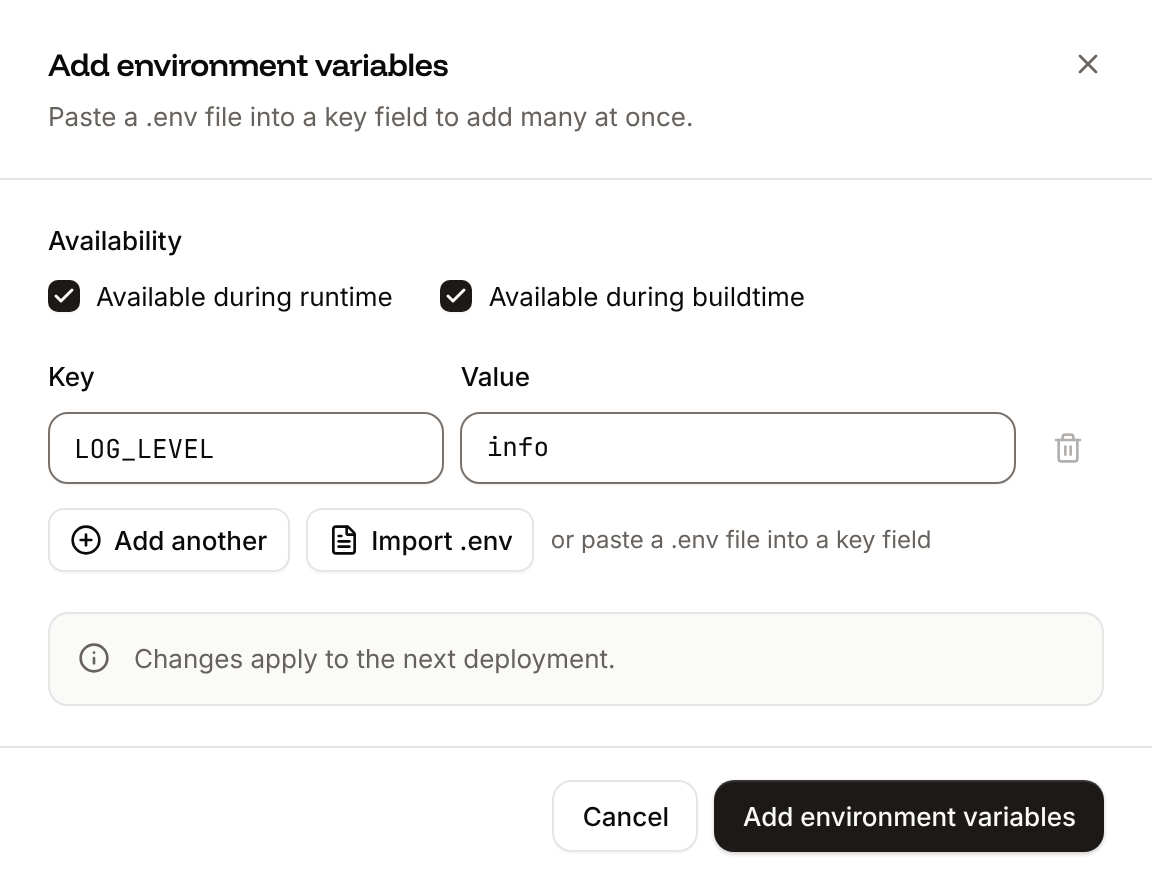
Click the Environment variables tab, then click Add environment variables. Add
ANTHROPIC_API_KEY with your Anthropic API key and MASTRA_API_TOKEN with a long random value, for example from node -e "console.log(crypto.randomUUID())". Clear Available during buildtime so that they’re available during runtime only, and click Add environment variables. Keep a copy of the token: you send it with every API request.5
Deploy
Click the Overview tab, then click Deploy now under Recent deployments. Check the Branch and click Deploy.
6
Turn on auto-deploy
To deploy every push to the branch automatically, click the Settings tab, then click Update auto-deploy in the Auto-deploy section. Turn on Auto-deploy and click Update auto-deploy. See Deployments.
Verify the deployment
-
On the Deployments tab, wait for the deployment’s status to change to Deployed. The application’s status next to its name changes to Running. Open the deployment to read its build log. Ingot’s build plan comes first:
Later, theBuild log
mastra buildstep ends withBuild successful, you can now deploy the .mastra/output directory to your target platform. -
Click the domain under the application’s name, for example
weather-agent-x7k2m.sevalla.app. The Mastra Server page opens with the server’s endpoints. -
Check the health endpoint and the token from a terminal, with
MASTRA_API_TOKENset in your shell to the token:


getDeploymentV3) returns the deployment’s status, success when it’s deployed, and Get application deployment logs (getApplicationDeploymentLogsV3) returns its build log; see Deploy with the API.
Call the agent over HTTP
The Mastra server exposes each agent at/api/agents/<agent-id>. stream sends the answer as server-sent events while the agent works; generate waits and returns it in one response. Send a memory object with a thread, one conversation, and a resource, the user or customer it belongs to, so the agent remembers earlier messages:
data: events: a tool-call for weatherTool with {"city":"Lisbon"}, its tool-result, then text-delta events with the answer in small pieces. To print only the answer as it arrives, pipe the stream through jq:
Run the workflow
start-async runs the workflow and returns when it’s done:
result.plan holds one activity per day, and steps the output of fetch-forecast and plan-activities. A run that takes longer than a request should wait starts in the background instead: create a run, start it, and ask for its status until it’s success:
start returns {"message":"Workflow run started"} right away, and the run’s status changes from running to success a few seconds later. Mastra keeps the run in PostgreSQL, so any instance can answer the status request.
Use Studio safely
Studio has full access to the agents, workflows and memory of the server it connects to. The production build doesn’t include it, so the deployed application serves only:
To look at the deployed agent’s threads, traces and workflow runs in Studio, run Studio on your computer and connect it to the application:
http://localhost:3000/?auth_header=Bearer%20<token> with your MASTRA_API_TOKEN. Studio keeps the token in memory for the session and removes it from the address bar. Don’t build with mastra build --studio for a public application: it serves Studio to anyone who finds the address.
The token gives full access to every agent, workflow and conversation. Keep it in the services that call the agent, never in a browser. For one account per user, replace SimpleAuth with one of Mastra’s authentication providers, such as JSON Web Tokens. Content the agent reads, such as a web page or a ticket, can carry instructions meant for the model: give the agent tools that read, and let your own code, not the model, take any step you can’t undo.
Add a health check
A readiness probe makes each new instance wait for/health to answer before it gets traffic, so a deployment switches over only to instances that serve requests. /health needs no token.
1
Open the web process
On the application’s Processes tab, click ⋯ on the Web process, then click Update process.
2
Turn on the readiness probe
Under Health checks, turn on Readiness probe and set the Path to
/health. Keep the Port at the web process’s port, 8080 unless you changed it.3
Save and deploy
Click Update process, then click Deploy in the undeployed changes bar at the bottom of the page.
/health. See Health checks.
How the agent runs on Sevalla
Streaming. Sevalla and Cloudflare pass the server-sent events through as Mastra writes them, without buffering. In a test, the first event arrived after 0.3 seconds, the tool call after 1.1 seconds and the first words of the answer after 3.3 seconds. Time limits. Cloudflare ends a request with error524 when the application sends nothing for too long. A stream keeps sending events while the agent works, but generate and start-async send nothing until they’re done. For runs that can take minutes, use stream, or start the workflow with create-run and start and ask for its status. See 504 Gateway Timeout and Cloudflare error 524.
Deployments. Sevalla sends SIGTERM to each instance it replaces. The server logs Shutting down Mastra server, finishes the requests in progress for up to drainTimeout, then exits. A stream that runs longer is cut off: the client sees the response end early and can ask again, because the conversation is in PostgreSQL.
Several instances. Sevalla spreads requests across the web process’s instances. Memory and workflow runs live in PostgreSQL, so any instance can continue a conversation or report a run. You can scale the web process to more instances without other changes.
Size. H1 runs this agent: in tests it used up to 256 MB of its 300 MB of memory. Choose S1 or larger for more traffic or more agents.
Deploy with a Dockerfile
Ingot needs no Dockerfile. Write one when you want full control of the image: the base image, the system packages and every layer. Add aDockerfile and a .dockerignore to the root of the repository:
Dockerfile
The API key and the token are runtime-only environment variables, so they never enter the image.
.dockerignore
Dockerfile, so you can keep it in a repository that builds with Ingot, but it adds the .dockerignore patterns to its own: its build plan shows an Ignored row with 7 patterns from .dockerignore. Then switch the application to the Dockerfile build strategy:
1
Choose the Dockerfile build strategy
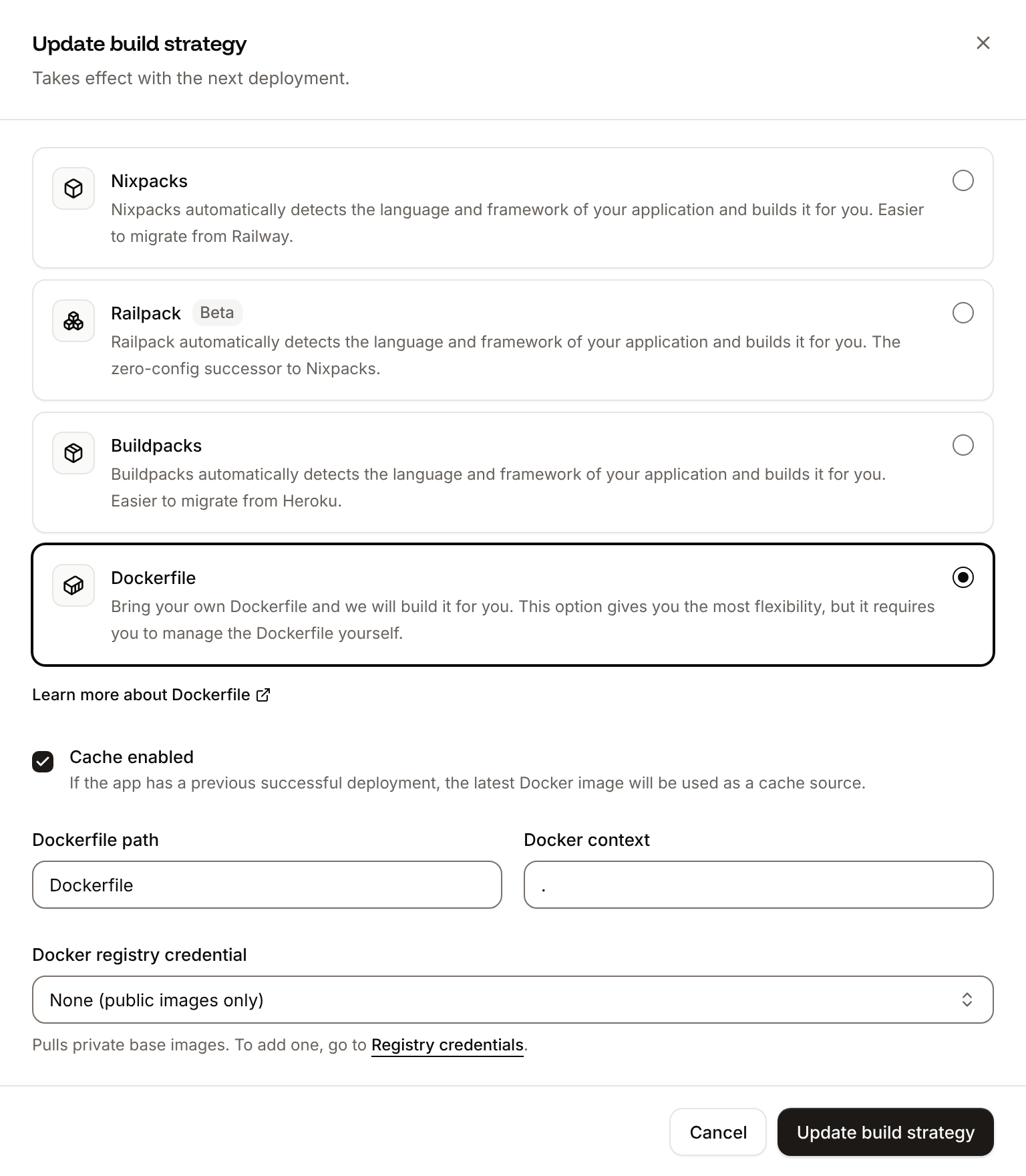
On the application’s Settings tab, in the Build strategy section, click Update build strategy. Click Dockerfile, keep the Dockerfile path
Dockerfile and the Docker context ., then click Update build strategy.2
Deploy
Click the Overview tab, then click Deploy now under Recent deployments. Check the Branch and click Deploy.
📦 Building and pushing docker image using Dockerfile... where Ingot’s build plan was. When the deployment is Deployed, /health returns {"success":true} and the agent answers as before, with the conversations it had before: they’re in PostgreSQL. The deployment’s Dockerfile tab shows your Dockerfile. See Dockerfile.
Deploy changes
With Auto-deploy on, every push to the branch starts a deployment; otherwise, click Deploy now for each change. Each deployment builds the image, then replaces the web process’s instances. When a new Mastra version changes its tables, Mastra updates them the first time it uses the database. See Deployments.Add a custom domain
To serve the agent’s API from your own domain, such asagent.example.com, add the domain on the application’s Domains tab and create the DNS records that Sevalla shows. Custom domains need a web process larger than H1, so scale the web process first. See Custom domains.
Troubleshoot
For build failures, see Troubleshoot Ingot builds.
Deploy with the API
These calls create the same database, application, variables and health check as Deploy to Sevalla and Add a health check, and deploy them. Run them in order in one shell: each step saves the IDs that the next steps use. Before you start:- Create an API key that can create applications and databases, and set it as
SEVALLA_API_KEY. SetANTHROPIC_API_KEYto your Anthropic API key andMASTRA_API_TOKENto the agent’s token, for example fromnode -e "console.log(crypto.randomUUID())". - Push the project to GitHub, GitLab or Bitbucket, and connect that Git account to Sevalla. If Sevalla can’t read the repository, the Create the application step fails with
400andCannot access repository <url>: Repository not found or you don't have access., followed by where to grant access. - Install
curl,jqandopenssl.
1
Find the location
List clusters (CLI:
listClustersV3) returns every location you can use. Pick one by its region ID from Locations, here Frankfurt, Germany:sevalla resources clusters --json. MCP: get_platform_options.2
Find the H1 size
List process resource types (CLI:
listProcessResourceTypesV3):sevalla resources process-types --json. MCP: get_platform_options.3
Find the smallest database size
List database resource types (CLI:
listDatabaseResourceTypesV3):sevalla resources db-types --json. MCP: get_platform_options.4
Create the database
Create database (The database starts with the status
createDatabaseV3). The API doesn’t generate a password, so generate one:creating. CLI: sevalla databases create --name weather-db --type postgresql --db-version 18 --cluster $CLUSTER_ID --resource-type $DB1_ID --db-name weather --db-user weather --db-password $DB_PASSWORD. MCP: create_database, which generates the password and doesn’t return it.5
Create the application
Create application (CLI:
createApplicationV3) creates the application with a web process and doesn’t deploy it:sevalla apps create --name weather-agent --cluster $CLUSTER_ID --source privateGit --git-type github --repository https://github.com/acme/weather-agent --branch main. MCP: create_application with deploy: false.6
Find the web process
List processes (CLI:
listProcessesV3):sevalla apps processes list --app-id $APP_ID --json. MCP: get_application.7
Set the size and the health check
The API creates the web process at S1, where the dashboard defaults to H1. Update process (It prints
updateProcessV3) sets the size and the readiness probe in one call. Send timeoutSeconds: without it, the API sets 120 seconds, where the dashboard sets 1:{"size":"h1","path":"/health"}. CLI: sevalla apps processes update $WEB_ID --app-id $APP_ID --resource-type $H1_ID sets the size; the CLI has no option for health checks. MCP: sevalla_api_update with updateProcessV3 and the same body.8
Connect the database
Create internal connection (CLI:
createApplicationInternalConnectionV3). Unlike the dashboard, it adds no environment variables:sevalla apps internal-connections create $APP_ID --target-id $DB_ID --target-type database. MCP: sevalla_api_create with createApplicationInternalConnectionV3 and the same body.9
Build the database URL
Get database (CLI:
getDatabaseV3) returns the internal hostname and port. Build DB_URL in the format the dashboard uses:sevalla databases get $DB_ID --json. MCP: get_database.10
Add the environment variables
Create environment variable (It prints the three keys. CLI:
createEnvironmentVariableV3), once for each variable, available during runtime only:sevalla apps env-vars create $APP_ID --key MASTRA_API_TOKEN --value $MASTRA_API_TOKEN makes a variable available during build and runtime, with no option for runtime only. MCP: set_environment_variables with runtime: true and buildtime: false.11
Wait for the database
Get database (CLI:
getDatabaseV3) until its status is ready:sevalla databases get $DB_ID --json. MCP: get_database.12
Deploy
Trigger deployment (CLI:
triggerDeploymentV3) deploys the latest commit of the branch:sevalla apps deployments trigger $APP_ID. MCP: trigger_deployment.13
Wait for the deployment
Get deployment (It checks every 15 seconds for up to 30 minutes, keeps going when a request fails, and prints
getDeploymentV3) until its status is success or failed:success when the deployment is done. While the deployment runs, its status is waiting, then inProgress. CLI: sevalla apps deployments get $DEPLOYMENT_ID --app-id $APP_ID. MCP: get_deployment.14
Check the build
Get application deployment logs (It prints a line that ends with
getApplicationDeploymentLogsV3) with a search returns the end of the mastra build step:Build successful, you can now deploy the .mastra/output directory to your target platform., between color codes. If the deployment failed, run it without --data-urlencode to read the whole log. CLI: sevalla apps deployments logs $DEPLOYMENT_ID --app-id $APP_ID --search "Build successful". MCP: get_deployment_logs with search.15
Get the domain
List application domains (CLI:
listApplicationDomainsV3):sevalla apps domains list --app-id $APP_ID --json. MCP: get_application.16
Turn on auto-deploy
Update application (It prints
updateApplicationV3):true. CLI: sevalla apps update $APP_ID --data '{"auto_deploy": true}'. MCP: sevalla_api_update with updateApplicationV3 and the same body.https://$HOST: