

local disk, in storage/app, by default, and Sevalla resets an application’s filesystem on every deployment. With Laravel’s s3 disk, Laravel saves them in a Sevalla object storage bucket instead, through its S3-compatible API, so every instance and every deployment sees the same files.
At a glance
What this guide adds to the application from Deploy a Laravel application:Environment variables
The application’s other variables are in Deploy a Laravel application.
Before you begin
- A Laravel application deployed on Sevalla, as in Deploy Laravel.
Create a bucket
1
Create the bucket
In the sidebar, click Object storage, then click Create object storage. Enter
storefront-media as the Name, choose the Location closest to the application, and click Create object storage.2
Decide who can read the files
Keep the bucket private to serve each file through a link that expires. To serve files to anyone with a permanent URL, click the bucket’s Settings tab, click Enable public access under Public access, then click Enable public access in the dialog.
Install the S3 driver
Laravel’ss3 disk needs Flysystem’s S3 adapter, which installs the AWS SDK for PHP:
Add the bucket details to the application
Laravel’sconfig/filesystems.php reads the s3 disk’s settings from these variables, so the configuration files don’t change. The values come from the bucket’s Settings tab; see Connect with the S3 API for each one.
Leave
AWS_USE_PATH_STYLE_ENDPOINT unset: the bucket accepts requests with the bucket name in the host name, as Laravel sends them by default.
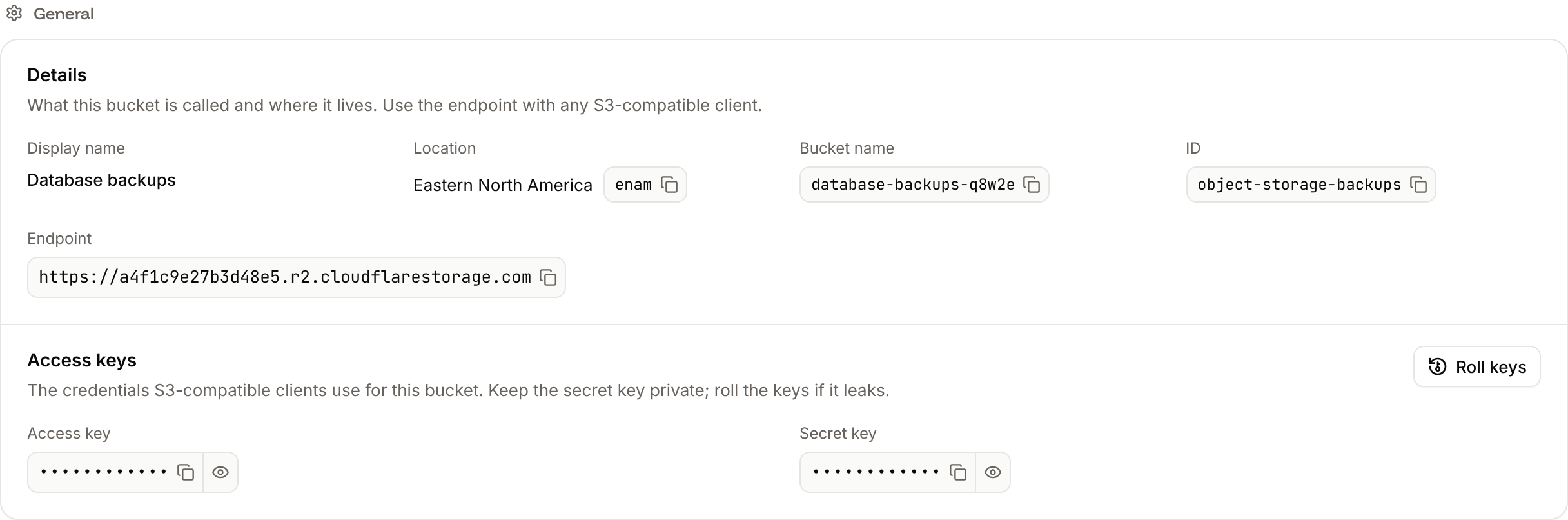
1
Open the environment variables
In the sidebar, click Applications, then click the application. Click the Environment variables tab.
2
Add the variables
Click Add environment variables. Add the variables and click Add environment variables. They apply with the next deployment.
Store uploads
Add a route that saves an uploaded photo in the bucket and returns a link to it:routes/web.php
store('photos')saves the file on the default disk, the bucket, underphotos/with a random name, and returns its path, for examplephotos/lMI1BYDbMqPcsYKXrHX2n5qT5ZGQBOXfrOd74drU.png. Save the path with your model.max:10240limits uploads to 10 MB. Ingot’s PHP accepts uploads up to 64 MB.- Send the file from a form with
enctype="multipart/form-data", a file field namedphotoand@csrf, as everyPOSTroute inroutes/web.phpneeds a CSRF token.
composer.json and composer.lock included: Ingot installs the S3 adapter on the next build. If Auto-deploy is off, click Deploy now on the application’s Overview tab.
Link to the files
For a private bucket,Storage::temporaryUrl($path, now()->addHour()) returns a presigned URL that works for 1 hour, up to 7 days. Create it when you show the page, not when you save the file.
For a public bucket with AWS_URL set, Storage::url($path) returns a permanent URL on the bucket’s public domain, for example https://storefront-media-q8w2e.sevalla.storage/photos/lMI1BYDbMqPcsYKXrHX2n5qT5ZGQBOXfrOd74drU.png. Public access applies to the whole bucket: the bucket doesn’t keep per-file visibility, so Storage::getVisibility() fails with GetObjectAcl not implemented. Keep private files in a second, private bucket, with a second disk in config/filesystems.php. See Public URLs.
Update the Dockerfile
If the application builds from the Dockerfile in the deploy guide, raise PHP’s upload limits, which are 2 MB per file in PHP’s productionphp.ini, to Ingot’s 64 MB. Add a line to the php.ini settings of the first RUN instruction, before the > "$PHP_INI_DIR/conf.d/production.ini" line:
Dockerfile
curl and the root certificates the image already installs.
Verify
When the deployment’s status is Deployed, click the application’s Web terminal tab, and in the shell that opens in the Web process, save a test file through Laravel’s storage:Hello from Sevalla. For a public bucket, Storage::url('hello.txt') prints https://storefront-media-q8w2e.sevalla.storage/hello.txt, which shows the same text. In the sidebar, click Object storage, click the bucket, and the Objects tab lists hello.txt. To remove it, run Storage::delete('hello.txt') the same way, or delete it on the Objects tab. See Manage objects.
If Storage::put() returns false, Laravel couldn’t write to the bucket: its s3 disk doesn’t throw errors by default. Check the variables, and set 'throw' => true for the s3 disk in config/filesystems.php to see the error.
Check from a terminal
These checks need no dashboard.API, H, APP_ID, WEB_ID and BUCKET_ID are set as in Deploy with the API.
-
Save a file and get its temporary URL, with Run a command in a process (
execProcessCommandV3) in the web process, the API’s counterpart of the web terminal. The command runs without a shell, and the key needs write access to the application. Then open the URL: -
The file in the bucket, from List objects (
listObjectStorageObjectsV3):
Storage::delete('hello.txt') the same way, or call Delete objects. CLI: sevalla object-storage objects list --bucket-id $BUCKET_ID. MCP: sevalla_api_update with execProcessCommandV3, and sevalla_api_read with listObjectStorageObjectsV3.
Deploy with the API
The same steps as Create a bucket and Add the bucket details to the application, as calls to the Sevalla API.APP_ID and WEB_ID are the application and its web process from Deploy with the API in the deploy guide, with API and H set as there. The API key also needs the capabilities to create and read object storage. Push the S3 driver and the route first: the deployment builds the branch as it is.
1
Create the bucket
Create object storage bucket (The response holds the secret key, so the command prints only the other fields. CLI:
createObjectStorageV3) returns the bucket’s name, endpoint and keys. location is the region hint closest to the application, here weur (Western Europe) for Frankfurt; send "public_access": true for a public bucket:sevalla object-storage create --name storefront-media --location weur. MCP: sevalla_api_create with createObjectStorageV3 and the same body.2
Add the environment variables
Create environment variable (For a public bucket, add
createEnvironmentVariableV3), once per variable, from the bucket’s details, for runtime only:AWS_URL with https:// and the bucket’s domain too. CLI: sevalla apps env-vars create $APP_ID --key FILESYSTEM_DISK --value s3, once per variable, for build and runtime. MCP: set_environment_variables with runtime: true and buildtime: false.3
Deploy
Trigger deployment (CLI:
triggerDeploymentV3):sevalla apps deployments trigger $APP_ID. MCP: trigger_deployment.4
Wait for the deployment
Poll Get deployment (CLI:
getDeploymentV3) until the status is final: success, failed, cancelled or skipped. The loop keeps polling through a failed request and stops after 30 minutes:sevalla apps deployments get $DEPLOYMENT_ID --app-id $APP_ID. MCP: get_deployment.