

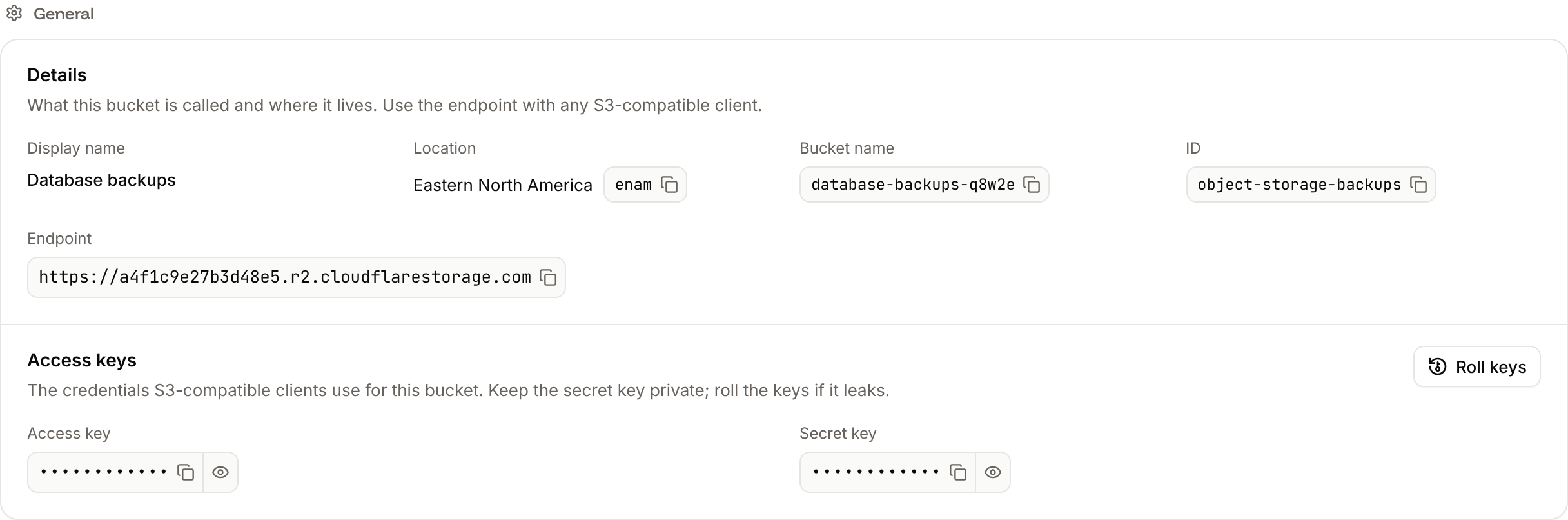
rclone, or your framework’s S3 storage library. A client needs five values: the endpoint, the bucket name, the region auto, the access key and the secret key.
Connection values
Find them on the bucket’s Settings tab: in the sidebar, click Object storage, click the bucket, then click Settings.
The keys are hidden until you click the eye icon; the copy icon copies them without showing them.
What the keys can do
The keys read, write, list and delete objects in this one bucket. They can’t list, create or delete buckets, and they can’t change bucket settings such as CORS rules or public access: do that on the bucket’s Settings tab or with the Sevalla API. Always name the bucket in requests: a command that lists all buckets, such asaws s3 ls on its own, fails.
Store the values as environment variables
Keep the values out of your code. For a Sevalla application, add them on the application’s Environment variables tab, then deploy the application so its processes get them. See Environment variables..env
Connect with the AWS SDK for JavaScript
Install the S3 client, the multipart upload helper and the URL presigner (Node.js 20 or later):s3.mjs
WHEN_REQUIRED options stop the SDK from adding checksums that only some operations need: without them, it signs the checksum of an empty body into presigned upload URLs, and R2 rejects the real upload. Run the script with the four environment variables set and a logo.png next to it: node s3.mjs. For a complete Node.js application, see Use object storage from Node.js.
Connect with Python (boto3)
Install boto3:s3.py
python s3.py. For Django and FastAPI, see Store Django media in object storage and Use object storage from FastAPI.
Connect with the AWS CLI
Save the bucket’s values in a profile namedsevalla. AWS CLI 2.13 and later read endpoint_url from the profile; with an older version, add --endpoint-url https://<account-id>.r2.cloudflarestorage.com to every command instead.
s3://<bucket-name>/ paths with --profile sevalla:
Share files with presigned URLs
A presigned URL gives anyone who has it access to one object, without the keys, until it expires. Every example on this page creates one that works for an hour (3600 seconds); the longest allowed is 7 days (604800 seconds). Use presigned URLs for private files, such as invoices or user uploads, and public access for files anyone may read.
Presigned URLs also let browsers upload straight to the bucket. Create one for PutObject on your server, with the s3 client and Bucket from the JavaScript example:
fetch(uploadUrl, { method: "PUT", body: file, headers: { "Content-Type": "image/png" } }). For that request to pass the browser’s checks, the bucket needs a CORS rule that allows PUT from your site’s origin, such as https://shop.example.com, and the Content-Type header.
Public URLs
With public access on, every object has a public URL on the bucket’s public domain:https://product-images-x7k2m.sevalla.storage/images/logo.png. Anyone can read objects this way, without keys, and Cloudflare’s CDN caches them. After you replace a file, purge the cache if visitors still get the old version. The public domain is read-only: uploads and deletions always go through the S3 endpoint with the keys.