

php artisan queue:work runs them in a background worker: a process that runs from the same image as the web process with its own start command. Laravel’s scheduler runs in a second background worker.
At a glance
What this guide adds to the application from Deploy a Laravel application:Environment variables
The workers read the same variables as the web process, listed in Deploy a Laravel application.
Before you begin
- A Laravel application deployed on Sevalla, as in Deploy Laravel.
Create a job
Create a job class:app/Jobs/SendOrderConfirmation.php
SendOrderConfirmation::dispatch($order->id). Laravel 13’s queue connection is database unless QUEUE_CONNECTION says otherwise, and the deploy guide’s migrations created the jobs table, so the job waits in PostgreSQL with no other configuration. Commit and push the job.
Run the worker on Sevalla
1
Create the background worker
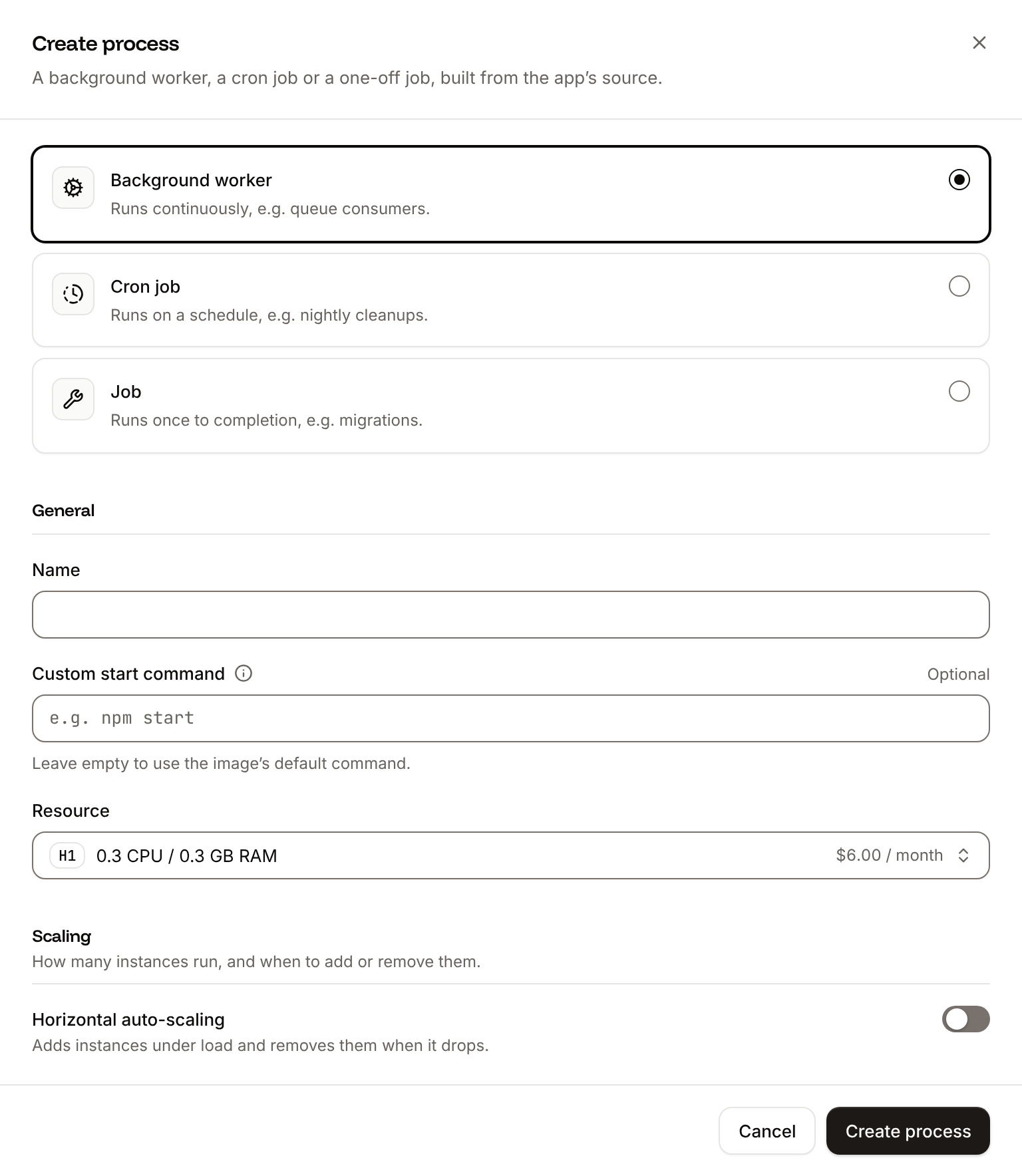
On the application’s Processes tab, click Create process. Choose Background worker, enter Choose a Resource and click Create process.
Queue worker as the Name and this Custom start command:2
Deploy
Click Deploy in the undeployed changes bar at the bottom of the page.
Stop the worker cleanly on deployments
Sevalla runs a custom start command with/bin/sh -l -c. exec replaces that shell with the worker, so the worker receives the SIGTERM that Sevalla sends when it stops an instance, for example during a deployment: it finishes the job it’s running, logs Worker STOPPED Interrupted, and exits. The worker handles the signal with PHP’s pcntl extension, which Ingot installs for Laravel.
Without exec, the shell receives the signal and ignores it. The worker keeps taking jobs until Sevalla stops the instance, 30 seconds after the shutdown began, often in the middle of a job. That job stays reserved until retry_after (90 seconds) has passed, and then fails with App\Jobs\SendOrderConfirmation has been attempted too many times.
Sevalla sends SIGTERM 5 seconds after the shutdown begins, so a job has about 25 seconds to finish. Split longer work into smaller jobs, or start the worker with --tries=3 so that a job stopped with its instance runs again. See How processes run.
Use Redis for the queue
The database queue works without another service, but every worker queries thejobs table for new jobs, every 3 seconds while the queue is empty. A Redis queue takes that load off PostgreSQL.
1
Create the database
In the sidebar, click Databases, then click Create database. Under Database, choose Redis, or Valkey: this guide works with both. Enter
storefront-redis as the Display name, choose the same Data center as the application and a Size, then click Create database.2
Connect it to the application
In the sidebar, click Applications, then click the application. Click the Networking tab. Under Connected services, click Add internal connection. Choose
storefront-redis as the Service, turn on Add environment variables to the application, and click Add internal connection. Sevalla adds REDIS_HOST, REDIS_PORT, REDIS_PASSWORD and REDIS_URL, the names Laravel’s config/database.php reads. See Connect an application.3
Switch the queue connection
Click the Environment variables tab, then click Add environment variables. Add
QUEUE_CONNECTION with the value redis, and click Add environment variables.4
Deploy
Click the Overview tab, then click Deploy now under Recent deployments. Check the Branch and click Deploy.
redis PHP extension (phpredis), its default client, which Ingot installs for Laravel. It reads the valkey:// URL that Sevalla adds for a Valkey database too. Jobs still waiting in the jobs table stay there: let the worker finish them before you switch, or run php artisan queue:work database --stop-when-empty in the web terminal to work through them.
Run the scheduler
Laravel’s scheduler runs the tasks you define inroutes/console.php. Add one that runs every minute, so you can see it work:
routes/console.php
1
Create the background worker
On the application’s Processes tab, click Create process. Choose Background worker, enter
Scheduler as the Name and exec php artisan schedule:work as the Custom start command. Choose a Resource, keep the instances at 1, and click Create process.2
Deploy
Click Deploy in the undeployed changes bar at the bottom of the page.
schedule:work rather than a cron job that runs php artisan schedule:run every minute:
schedule:workchecks the schedule at the start of every minute in a process that’s already running. A cron job starts a new instance for each run and boots Laravel before it checks: a cron job that runs only the scheduler takes 4 to 9 seconds a run.schedule:workstarts each minute’s tasks in a process of their own, so a task that takes 5 minutes doesn’t hold up the next minute’s tasks. A cron job skips its next run while the previous one is still active, the default of its If the previous run is still active setting.
php artisan schedule:run and the schedule * * * * * instead.
Update the Dockerfile
If the application builds from the Dockerfile in the deploy guide, install thepcntl extension, which lets the worker stop cleanly, and the redis extension for the Redis queue. Ingot installs both on its own. Change the first RUN line:
Dockerfile
ldd line finds the libraries the redis extension loads, so the final stage installs them with no other change. The start commands are the same with both build strategies: the image has /bin/sh, and php is on the PATH of the login shell Sevalla starts them with.
Verify
-
When the deployment’s status is Deployed, click the Web terminal tab, and in the shell that opens in the Web process, queue a job:
-
Click the Logs tab and look at the
Queue workerprocess’s runtime logs. They show the job running, the line it logs, andDONE:Runtime logs -
The
Schedulerprocess’s runtime logs show a line every minute:Runtime logs
QUEUE_CONNECTION is the same for the web process and the worker: both read it from the application’s environment variables. To see jobs that failed, run php artisan queue:failed in the web terminal.
Check from a terminal
These checks need no dashboard.API, H, APP_ID and WEB_ID are set as in Deploy with the API.
-
Queue a job in the web process with Run a command in a process (
execProcessCommandV3), the API’s counterpart of the web terminal. The command runs without a shell, as a list of arguments, and the key needs write access to the application: -
A few seconds later, the line the job logs, from Get application runtime logs (
getApplicationRuntimeLogsV3), which searches the last hour by default: -
The scheduler’s last run of
inspire:
sevalla apps processes exec $WEB_ID --app-id $APP_ID --timeout 30 -- php artisan tinker --execute 'App\Jobs\SendOrderConfirmation::dispatch(42);', then sevalla apps logs runtime $APP_ID --search "order 42". MCP: sevalla_api_update with execProcessCommandV3, and search_runtime_logs.
Deploy with the API
The same steps as Run the worker on Sevalla and Run the scheduler, as calls to the Sevalla API.APP_ID, WEB_ID and H1_ID are the application, its web process and the H1 size from Deploy with the API in the deploy guide, with API and H set as there. Push the job and the schedule first: the deployment builds the branch as it is.
1
Create the two workers
Create process (CLI:
createProcessV3) with type worker needs the size and a scaling_strategy. Keep exec in both start commands:sevalla apps processes create $APP_ID --name "Queue worker" --type worker --resource-type $H1_ID --command "exec php artisan queue:work", and the same for Scheduler. MCP: sevalla_api_create with createProcessV3 and the same body.2
Deploy
Trigger deployment (CLI:
triggerDeploymentV3):sevalla apps deployments trigger $APP_ID. MCP: trigger_deployment.3
Wait for the deployment
Poll Get deployment (CLI:
getDeploymentV3) until the status is final: success, failed, cancelled or skipped. The loop keeps polling through a failed request and stops after 30 minutes:sevalla apps deployments get $DEPLOYMENT_ID --app-id $APP_ID. MCP: get_deployment.QUEUE_CONNECTION=redis in place of CACHE_STORE=redis, then deploy. Then run the checks in Check from a terminal.