

ingot.json file or INGOT_* environment variables.
How Ingot builds your application
Every deployment that builds runs two steps in the build log:- Generate. Ingot reads the files in the build path and writes a Dockerfile and a
.dockerignorefor them. The build log prints📦 Generating Dockerfile using ingot..., then the build plan: each decision and the file it came from. See Read the build plan. - Build. Sevalla builds the generated Dockerfile with the build path as the context and pushes the image. The build log prints
📦 Building and pushing docker image using the generated Dockerfile..., then the Docker build.
INGOT_* variable takes effect with the next deployment. Restarts and rollbacks reuse an existing image and don’t run Ingot.
What makes Ingot different from the other builders:
- The same input gives the same Dockerfile. Ingot never runs your code and never uses the network while it plans. Language versions come from a catalog built into each Ingot release, so the same commit always produces the same Dockerfile.
- Official images, maintained lines. Builds use the official image of each language, such as
node:24-trixie-slimorpython:3.14-slim-trixie(FrankenPHP’s for PHP). Images name a version line, not a patch release, so each new build picks up the line’s latest security fixes. - Dependencies from your lock file. Installs hold to the lock file, as
npm ciand frozen pnpm, Yarn and Bun installs do. - Small, unprivileged images. The final image has no compilers or build tools, runs as user
1000:1000instead of root, and starts undertini. Build-time variables reach the build as a BuildKit secret, so they never land in an image layer.
Dockerfile isn’t used or changed: Ingot writes its files outside the repository. To build your own Dockerfile, use the Dockerfile build strategy.
Supported languages
Ingot tries the languages in a fixed order and builds with the first one that recognizes the application. If it detects the wrong one, set
INGOT_PROVIDER (see Configure the build). If it recognizes none, the build fails; use a Dockerfile instead.
Use Ingot
1
Open the build strategy
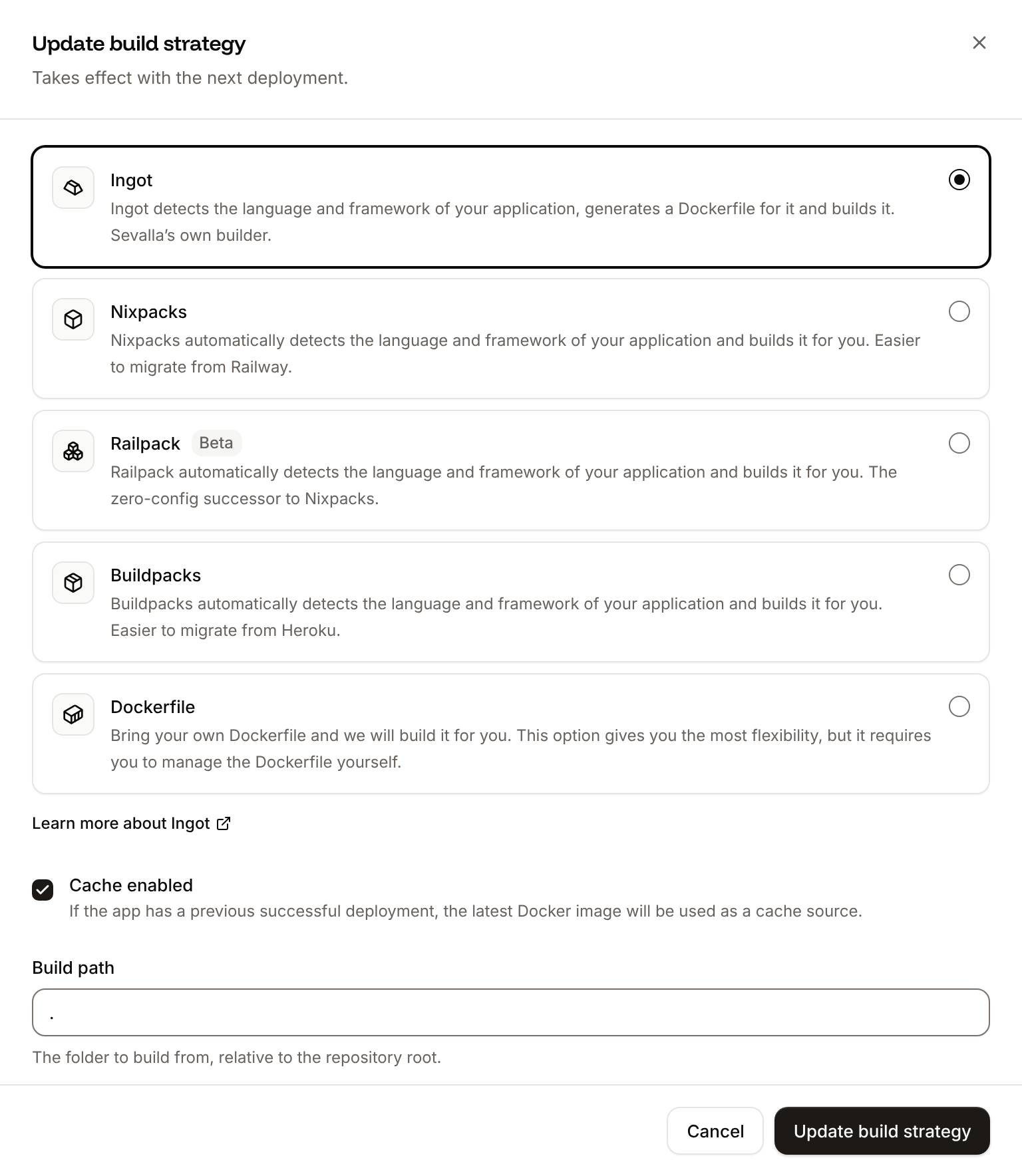
In the sidebar, click Applications, then click the application. On the Settings tab, in the Build strategy section, click Update build strategy.
2
Choose Ingot
Click Ingot (the first option). Set the Build path if the application isn’t at the repository root. For a workspace in a monorepo, leave it at
. and read Build an application in a monorepo.3
Save and deploy
Click Update build strategy, then deploy the application.
Read the build plan
Before it builds, Ingot prints its plan in the build log: what it detected, the file each decision came from, and the image it builds. For a Node.js application with apackage-lock.json and no Node.js version set:
Build log
- The rows at the top are the decisions, each with its source: a file (
package-lock.json), a field in it (package.json scripts.start), a variable you set, ordefaultwhen nothing in the repository decided it. - The Image rows are the image Ingot builds in and the image the application runs in, the user it runs as, its init process and its port.
- The last line names the Ingot version Sevalla ran.
! after the plan are warnings: the build continues, but something deserves a look. For example, composer.lock is missing, so Composer chooses dependency versions during the build; commit composer.lock to deploy what you tested.
When Ingot can’t plan the build, the build log shows a line starting with ✗ and what to do about it on the next line, and the deployment fails. For example:
Build log
See the Dockerfile Ingot generated
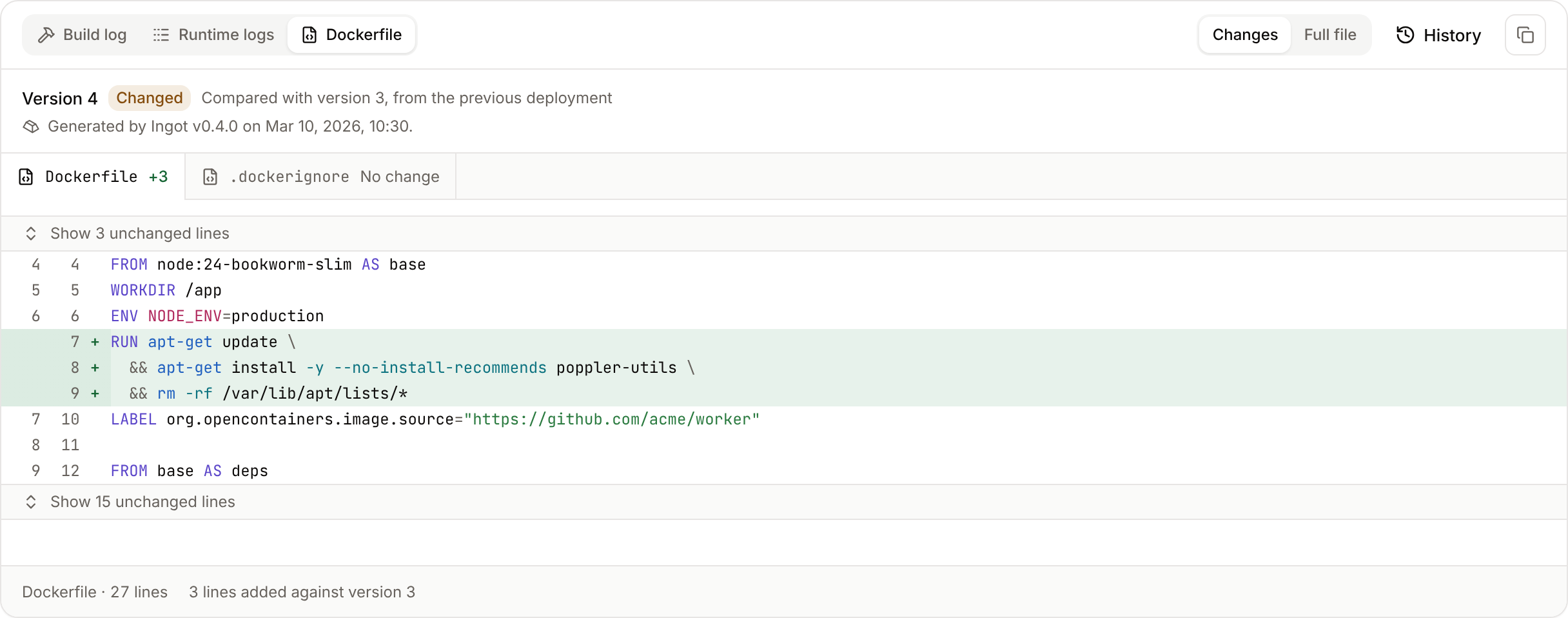
Sevalla keeps every Dockerfile Ingot generates, with its.dockerignore. On a deployment’s page, the Dockerfile tab (next to Build log) shows the Dockerfile the deployment’s image was built from and its version. When it differs from the previous deployment’s, it’s marked Changed and Changes shows what changed. Click Full file to read it whole, or History to open the application’s Dockerfile history and compare any two versions.
The tab fills in when the build is done. A new Ingot release can change the Dockerfile without a change to your code: each version shows the Ingot version that generated it.
Set the language version
Ingot takes the version from the first source in this order:INGOT_<LANGUAGE>_VERSION, such asINGOT_NODE_VERSION, set as an environment variable marked Available during buildtime.versionsin ingot.json, such as"versions": { "node": "22" }.- The files in this table, in the order listed.
- The default line of the Ingot release Sevalla runs. The plan shows
defaultas the source.
Version files are read from the build path, then from each folder above it up to the repository root, the nearest first, as version managers read them. Write versions the way each ecosystem does:
22 or ^22 for Node.js, >=3.12 for Python, ~8.3.0 for PHP.
How Ingot treats the version you set:
- A line follows its patch releases.
22or3.12builds on the line’s image tag, such asnode:22-trixie-slim, which moves to each new patch release, so rebuilding picks up security fixes. - An exact release stays on that release.
22.11.0orpython-3.12.8builds on that release only, with a warning that its image won’t get security rebuilds. If the catalog has no image for that patch release, such aspython-3.8.10, Ingot builds on the newest patch release of the same minor release and warns about it. - End-of-life lines still build, with a warning. Ranges such as
>=18prefer maintained lines. - A version nothing satisfies fails the build. Ingot doesn’t fall back to another line. The error names the newest version the release knows, for example
no python version in this Ingot release satisfies ">=3.16" (newest known: 3.15.2).
composer.lock supports, and says which package limited it. For Python with no version set, if requirements.txt pins a release that has no Linux wheels for the default Python, such as psycopg2-binary==2.9.10 on 3.14, Ingot builds on the newest Python line those pins have wheels for and says which pin chose it.
Configure the build
Most applications build with no configuration. To override what Ingot detects, add aningot.json file to the build path. Comments are allowed:
ingot.json
INGOT_ and that are marked Available during buildtime.
Commands in
install and build run with /bin/sh in the build image, with your build-time variables set.
Set the start command
Ingot takes the start command from the first of these:- The web process’s start command on the Processes tab. Sevalla passes it to Ingot as
INGOT_START_CMD, so it also wins over anINGOT_START_CMDvariable you set. - An
INGOT_START_CMDenvironment variable. startiningot.json.- The
webentry of aProcfilein the build path. - What Ingot detects: the framework’s production server (for example Gunicorn for Django and Flask, Uvicorn for FastAPI, FrankenPHP for PHP), or the
startscript inpackage.json.
/bin/sh, from the application’s folder in /app, as user 1000:1000. When the application has nothing that serves HTTP and the Procfile has a single other process, such as worker: python bot.py, Ingot runs that process and warns that you should deploy the application as a background worker.
Build an application in a monorepo
There are two ways to build one application of a repository that holds several. Use the one that matches how the application installs its dependencies.
With
INGOT_APP, Ingot installs the workspace’s dependencies at the root with its lock file, builds the application and the workspace packages it depends on (with Turborepo or Nx when the workspace uses them), and starts the application from its own folder. An ingot.json in the application’s folder configures that application on top of the root’s.
Create one Sevalla application per application in the repository, each with its own INGOT_APP.
Environment variables during the build
The build gets every environment variable marked Available during buildtime, and the variables Sevalla sets, such asSVL_DEPLOYMENT_COMMIT_SHA. Sevalla passes them to the Docker build as a BuildKit secret named ingot_env, and the generated Dockerfile reads it in the steps that install dependencies and build the application.
- Variables never land in an image layer or the image’s history. The running application gets its variables from Sevalla at runtime, not from the image.
- Only variables whose names are valid shell names reach the build: letters, digits and underscores, not starting with a digit. A variable such as
spring.profiles.activeis left out of the build, but still set at runtime. PORTisn’t set during the build, only at runtime.
NEXT_PUBLIC_* in Next.js or VITE_* in Vite, mark it Available during buildtime and deploy again after you change it.
The image Ingot builds
Ingot’s
.dockerignore keeps files the image doesn’t need out of the build, such as .git, node_modules, logs, editor folders and .env.local, plus every pattern in your own .dockerignore.
Run workers and jobs
Ingot builds one image for the application. Sevalla runs its start command as the web process; every other process runs from the same image with its own start command. Create them on the Processes tab, for example:
Ingot doesn’t create processes, and doesn’t run a
Procfile’s release entry. Get Dockerfile returns the processes Ingot recommends for the application in processes, such as a queue worker or a migration job; create the ones you need.
Build cache
With Cache enabled, Sevalla stores the build’s layers in the application’s registry and reuses them on the next build. A step whose inputs didn’t change, such as installing dependencies from an unchanged lock file, comes from the cache. The steps that build your application run on every deployment, because they read the build-time variables, which include the deployment’s ownSVL_* variables. To force a clean build, redeploy without the build cache.
Move to Ingot
Ingot builds most applications from the same repository with no changes. It doesn’t readnixpacks.toml, railpack.json, project.toml or NIXPACKS_* and RAILPACK_* variables. Before you switch a production application:
-
Pin your language version in the repository, for example with
engines.node,.python-versionorrequire.php, so it doesn’t depend on any builder’s default. -
Translate the settings you rely on:
-
Check what your application writes to disk while it runs. It runs as user
1000:1000, not root: it can write to/appand/tmp. - Switch a staging copy first, or watch the first deployment’s build log. If it fails, switch back and deploy again.
Troubleshoot Ingot builds
Ingot’s messages in the build log say what failed and how to fix it. The common ones:
For anything else, Troubleshoot builds and deployments covers failures every builder shares.
API and CLI
Each Dockerfile version in the API has
source ingot, the ingot_version that generated it, and what Ingot detected: language (such as node or php), facts (the decisions of the build plan, each with its source) and processes (the processes it recommends). A deployment’s dockerfile_id names the version its image was built from.