

sevalla.app domain.
How caching works
Every request to the application’s domains passes through Cloudflare. With the CDN or edge caching on, Cloudflare answers aGET request from its cache when it has a copy, and otherwise forwards it to your application and stores the response if it can.
What is never cached
Sevalla always forwards these requests to your application, with or without caching:- Requests with a method other than
GET, such asPOST,PUTandDELETE. - Requests with an
Authorizationheader. - Range requests (a
Rangeheader), for example for video seeking, and WebSocket upgrades. - Responses with a status other than
200,301,302or303. - Responses that set a cookie (
Set-Cookie). For files with a cached extension, Sevalla first removes Cloudflare’s own__cf_bmbot-management cookie, so those files can still be cached.
How long responses stay cached
If your response has aCache-Control header, Sevalla leaves it as it is and Cloudflare follows it: no-store or private keeps the response out of the cache, and s-maxage or max-age sets how long it stays. If the response has no Cache-Control header, Sevalla adds one:
For HTML pages, the added header lets Cloudflare keep the page for that time but tells browsers to check again on every visit (
public, max-age=0, must-revalidate, s-maxage=<time>). Other files get the same time for browsers and Cloudflare (public, max-age=<time>, s-maxage=<time>).
The cache key is the full URL, including the query string: /app.js?v=2 and /app.js?v=3 are cached separately.
When the cache is cleared
Sevalla purges the cache of every domain of the application after every successful deployment, so visitors get the new version. You can also purge it yourself at any time. Cached copies of your files and pages are stored on Cloudflare’s network, outside the application’s location, for as long as they stay in the cache.Turn on the CDN or edge caching
1
Open the caching settings
In the sidebar, click Applications, then click the application. Click the Networking tab, then click Update settings in CDN & Edge caching.
2
Switch them on
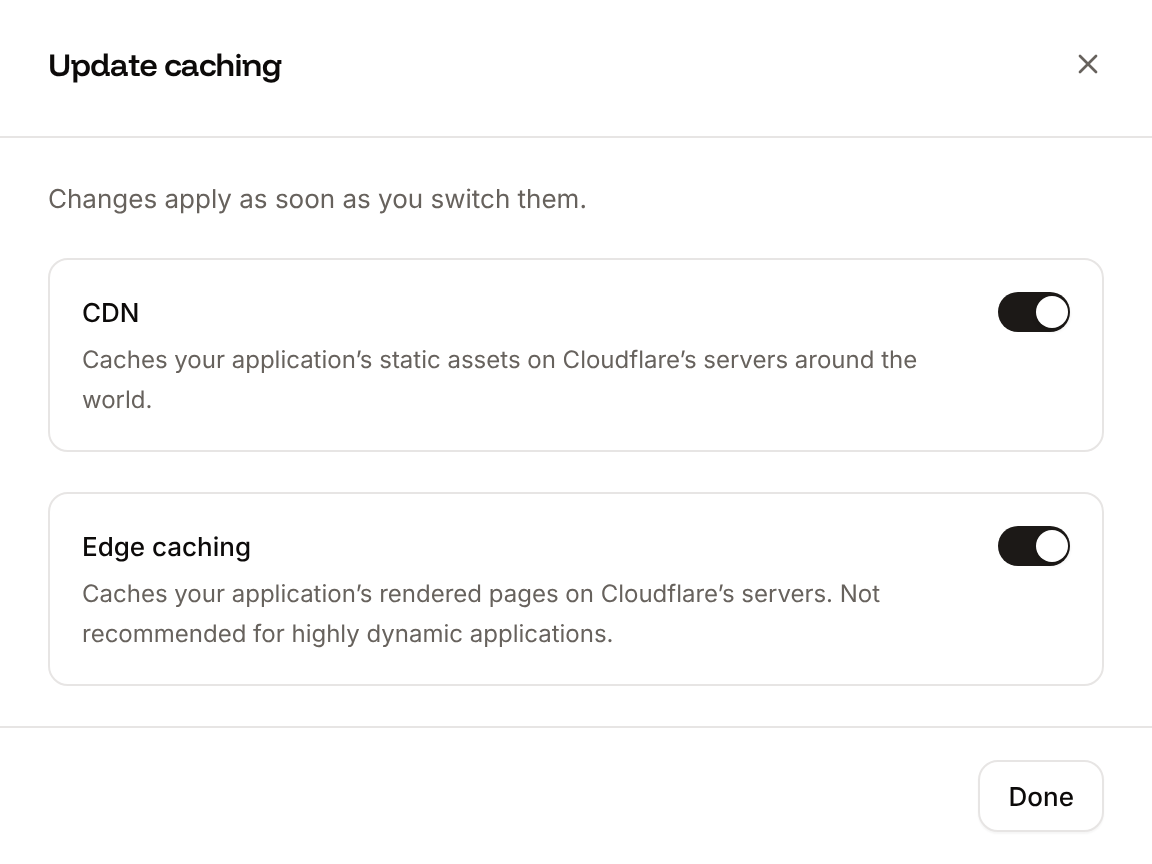
Turn on CDN, Edge caching, or both. Each switch applies as soon as you flip it, without a deployment.
3
Close the sheet
Click Done.
Purge the cache
Purging removes every cached response of every domain of the application, for the CDN and edge caching together. The next requests go to your application and fill the cache again. On the application’s Networking tab, click Purge cache in CDN & Edge caching. There’s no confirmation: the dashboard shows Cache purged. when it’s done.Control caching from your application
- Keep a response out of the cache: send
Cache-Control: no-storeorCache-Control: private, or set a cookie in the response. - Cache a response for a set time: send
Cache-Control: public, s-maxage=<seconds>.s-maxageapplies to Cloudflare;max-ageapplies to browsers, and to Cloudflare when there’s nos-maxage. - Change a file without waiting for its cache to expire: give it a new URL (
app.3f9c2.jsorapp.js?v=3), or purge the cache. - Bypass the cache for API calls: send them with an
Authorizationheader, or use a method other thanGET.
Cached file extensions
With only the CDN on, Sevalla caches requests whose path ends in one of these extensions (matched without regard to case; the file’s content type doesn’t matter):7z, afm, apk, avi, avif, bmp, bz2, cff, css, cur, data, dmg, doc, docx, eot, epub, exe, ffil, flac, flv, gif, gz, heic, heif, ico, img, iso, jfif, jpeg, jpg, js, json, lwfn, m4a, m4v, map, md, mid, midi, mkv, mov, mp3, mp4, mpga, odp, ods, odt, ogg, ogv, otf, pdf, pfb, pfm, png, ppt, pptx, pro, qt, rar, rtf, scss, std, svg, svgz, tar, tgz, tif, tiff, ttf, txt, wasm, wav, webm, webp, wmv, woff, woff2, xls, xlsx, xml, xsf, zip, zst.
Edge caching doesn’t use this list: it caches every path.
API and CLI
The toggle operations switch the current state: calling one twice turns the feature back off.