

Connect a client
Claude Code
Add the server with
claude mcp add.Claude desktop and web
Add Sevalla as a custom connector.
Codex
Add the server with
codex mcp add.Cursor
Add the server to
mcp.json.Windsurf (Devin Desktop)
Add the server to
mcp_config.json.OpenCode
Add the server to
opencode.json.https://mcp.sevalla.com/mcp and let it sign in with OAuth, or send an API key.
How it works
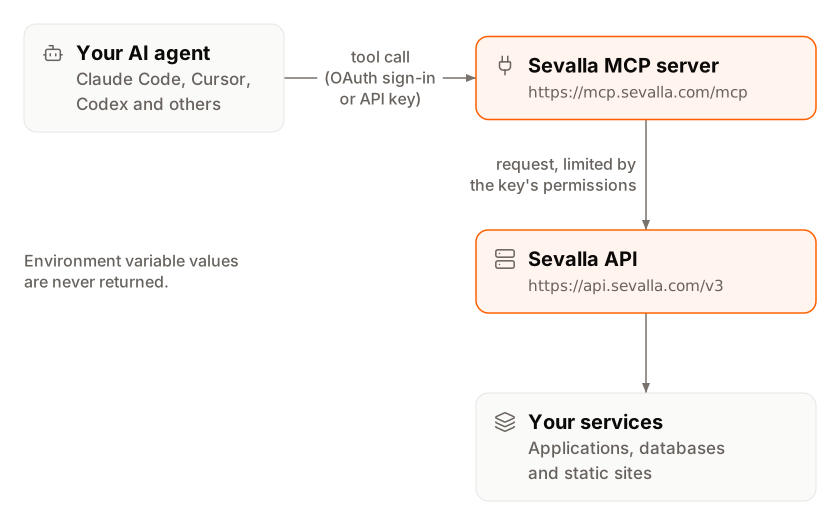
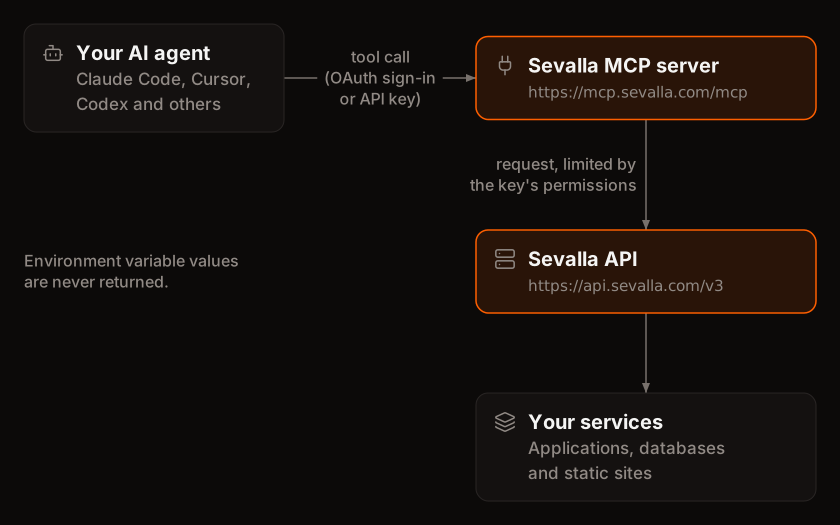 The MCP client sends each tool call to
 https://mcp.sevalla.com/mcp with a bearer token. The server checks the token, turns the call into one or more Sevalla API requests made with the API key behind the token, and returns the result to the agent.
Sign in with OAuth
OAuth is the default: you add the URL to your client and sign in through the Sevalla dashboard, with no secret in the client’s configuration.1
Start the sign-in from the client
Add the server to your client and start its sign-in (each client page says how). The client opens
app.sevalla.com in your browser. If you aren’t signed in to Sevalla, sign in first.2
Pick the company
The page is titled Authorize followed by the client’s name. If you belong to more than one company, select the company the agent works in. The agent can only reach that company.
3
Set the permissions
Under Set permissions, choose Predefined role and pick a role, or choose Custom capabilities and tick individual permissions, optionally limited to specific resources. These are the same choices as for any API key. Pick Company viewer to keep the agent read-only.
4
Authorize
Click Authorize. The page shows Authorization successful and sends you back to the client. To refuse, click Deny.
Sevalla MCP followed by the client and the time you approved it, and it’s listed under Tools > API keys. The client receives an access token that wraps this key: it works until you disable or delete the key, or until the old token expires after you rotate it. Then sign in again from the client.
The request expires 5 minutes after the client starts it. If the page says This device code has expired, start the sign-in again from the client.
Use an API key instead
Clients that can’t do OAuth, CI jobs and scripts can send a Sevalla API key directly:Tools
The server has 27 tools: 22 for everyday tasks, and 5 generic tools that run the rest of the Sevalla API by operation ID. Every tool has a title (clients show it when they ask for approval) and explicit annotations.Discovery
Deployments
Observability
Configuration
Create
Rest of the API
The generic tools accept only operation IDs from a reviewed list generated from the API reference. The server, not the model, picks the HTTP method and path, and each tool runs only operations of its own kind:
sevalla_api_read can’t run a delete. Operations that have a dedicated tool, such as deployments, must go through that tool. Three operations aren’t available at all: creating and polling device codes (part of sign-in) and the interactive terminal session (it needs a WebSocket).
Annotations
Each tool’s kind sets its MCP annotations. Clients use them to decide which calls run without asking and which need your confirmation.
Three tools differ from their kind:
set_environment_variables and scale_process have idempotentHint: true, and scale_process and create_database have openWorldHint: false.
Permissions and secrets
The agent can do exactly what the API key behind the connection allows, nothing more. A tool call that needs a permission the key doesn’t have fails with the API’s403 message, for example This API key is missing the APP:UPDATE permission. Grant it to the key or use a key that has it. To change what an agent can do, update the key’s permissions.
Example prompts
- “Why did the latest deployment of storefront fail?”
- “Deploy the main branch of storefront and tell me when it’s live.”
- “Summarize the errors in storefront’s runtime logs from the last hour.”
- “Create a PostgreSQL database called orders-db in Frankfurt and connect it to storefront.”
- “Add shop.example.com to storefront and tell me which DNS records to create.”
- “Which of my applications returned the most 5xx responses today?”
Disconnect an agent
Removing the server from a client stops that client from calling it. Each client page has the steps under Remove the server. Removing the server doesn’t delete the API key in Sevalla: to revoke access everywhere the key is used, disable or delete the key under Tools > API keys. From then on, every tool call made with the key fails with401 Unauthorized.
Self-host the server
The server is open source and runs on Node.js 24 or later. To run it yourself, or locally over stdio with an API key inSEVALLA_API_KEY, follow the repository README. Most people use the hosted server.