

How static sites work
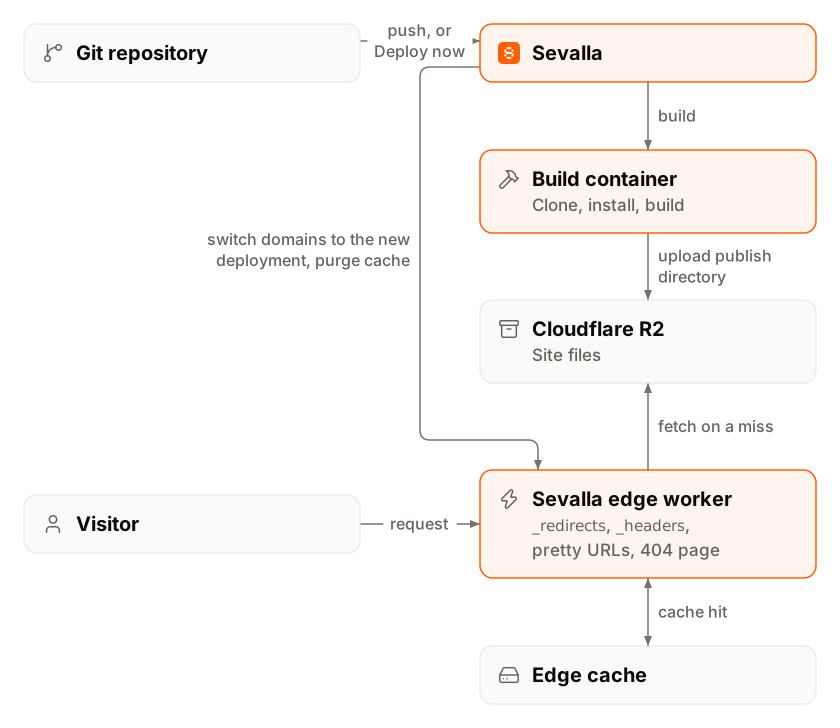
- A deployment starts when you push to the site’s default branch (with Auto-deploy on), push to another branch (with pull request previews on), or click Deploy now.
- Sevalla builds the site in an isolated container: it clones the repository, installs dependencies with the package manager your lockfile names, and runs your build command with the Node.js version you chose. Without a build command, it publishes the repository’s files as they are.
- Sevalla uploads the publish directory to Cloudflare R2 storage. Files that didn’t change since an earlier deployment are reused, not uploaded again.
- The new version goes live in one step. When every file is uploaded, Sevalla points the site’s domains at the new deployment and purges the edge cache. Visitors never see a half-uploaded site.
- Cloudflare serves every request from the edge location closest to the visitor. A Sevalla worker at the edge maps the URL to a file, applies your
_redirectsand_headersrules and pretty URLs, and caches the response.
 A static site has no location to choose: it’s served from every Cloudflare edge location. Every site gets a free
 <name>.sevalla.page domain, for example acme-shop-k3x9p.sevalla.page, and you can add custom domains with free SSL certificates.
What you can do
Create a static site
Connect a repository, set the build, and publish the first deployment.
Build settings
Build command, Node.js version, root and publish directories, framework defaults.
Deployments
Deploy on push or by hand, filter by changed paths, preview pull requests.
Environment variables
Values the build reads, for production and previews.
Redirects
The
_redirects file, rewrites, custom 404 pages and pretty URLs.Custom headers
The
_headers file for security, caching and CORS headers.Custom domains
Add your domain, verify it and get an SSL certificate.
Networking and caching
How the edge cache works and how to purge it.
Logs
Every request the edge served, searchable and live.
Analytics
Requests, bandwidth, response times, status codes and countries.
Settings
Every setting on the Settings tab, renaming and deleting a site.
Go-live checklist
What to check before you send real traffic.
Pricing and free allowances
Static sites have no monthly fee. Each company gets a free allowance every billing month, shared by all of its static sites, including pull request previews:
Prices exclude tax. See Pricing for every price and Usage for what the company has used.
The Static sites page shows the Monthly resource usage card, with the share of each allowance used this billing month: Bandwidth per month, Build minutes per month and Sites. Only people who can view the company’s billing see it.
Limits
Site status
The status next to the site’s name, on the Static sites list and on the Overview tab, follows the latest production deployment. Preview deployments never change it.
The Overview tab’s Details card shows the site’s primary Domain, its Status and its Source (repository and default branch). Click Visit site to open the site. The Recent deployments card lists the latest deployments, with View all and Deploy now.


When to use an application instead
Static site hosting serves files. Use an application when your site needs any of these:- Server-side rendering, API routes or anything that runs code for each request.
- A database connection, sessions or server-side sign-in.
- A build that needs more than Node.js and the tools in the build environment, such as PHP or Python.