Group applications into ordered stages such as Dev and Production, promote a tested build from one stage to the next without rebuilding, and add preview apps for pull requests.
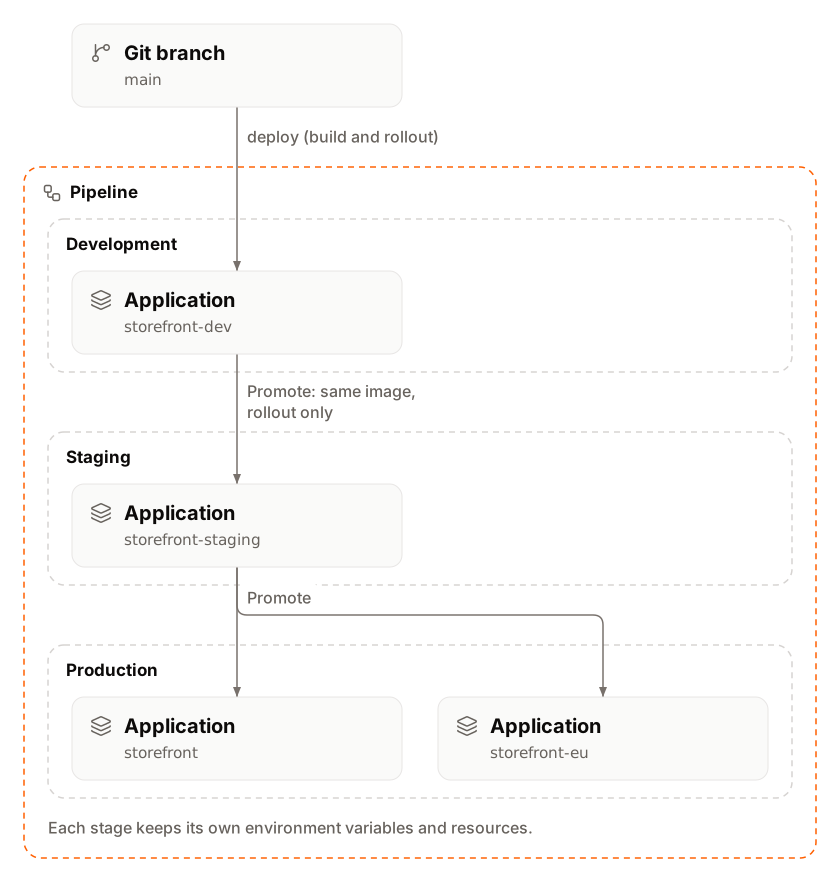
A pipeline groups applications into ordered stages, such as Dev, Staging and Production, so a change moves through them in one direction. On a trunk-based pipeline you promote an application’s build to the next stage: each application there rolls out the same Docker image with its own settings, without rebuilding. A pipeline can also have a preview stage that creates a short-lived preview app for each pull request.
A pipeline holds stages, and each stage holds applications. An application belongs to one pipeline stage at most. Pipelines and stages cost nothing: you pay for the applications in them as for any other application.
Part
What it is
Stage
A column on the pipeline board, with any number of applications. A new pipeline starts with two stages, Dev and Production.
Release strategy
Trunk-based development or Git flow: decides whether changes move between stages by promotion.
Promotion
Rolls out the source application’s last successful build on the applications you pick in the next stage. Trunk-based pipelines only.
Preview stage
An optional first column with a preview app per pull request or branch. Turned on with Enable preview apps.
The first stage deploys from a branch (usually main). Later stages get changes only by promotion.
Yes, from each stage to the next one
Yes
Git flow
Each stage’s applications deploy from their own branch (for example dev, next, main) with automatic deployments.
No
No, only existing applications
On a Git flow pipeline the board shows where each branch is deployed; Sevalla doesn’t move code between stages. You can switch the release strategy at any time in pipeline settings. Switching changes nothing in the applications: it only shows or hides Promote.
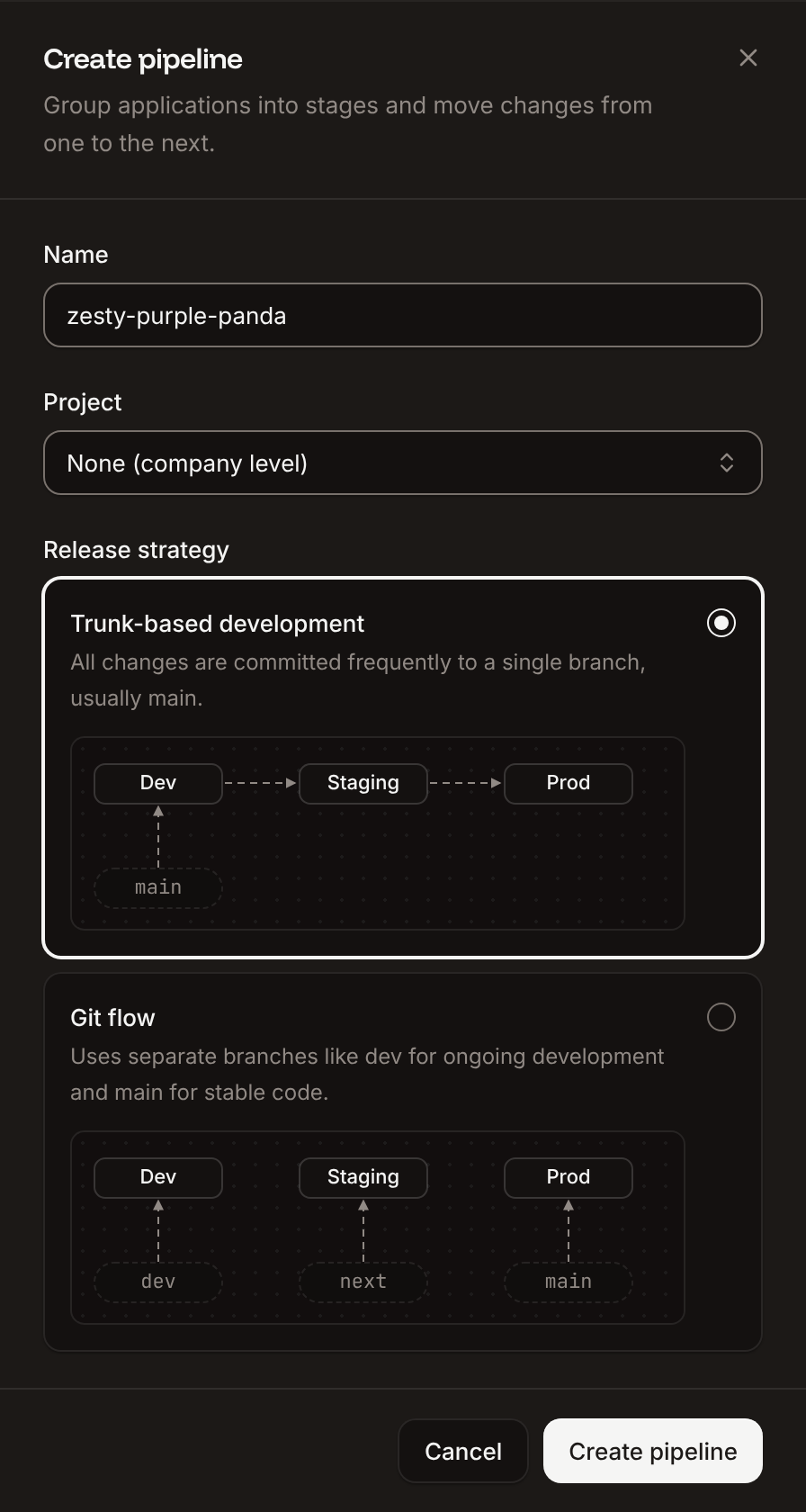
In the sidebar, click Applications. Click Create, then click Pipeline. From a project, click Create pipeline on its Services tab instead.
2
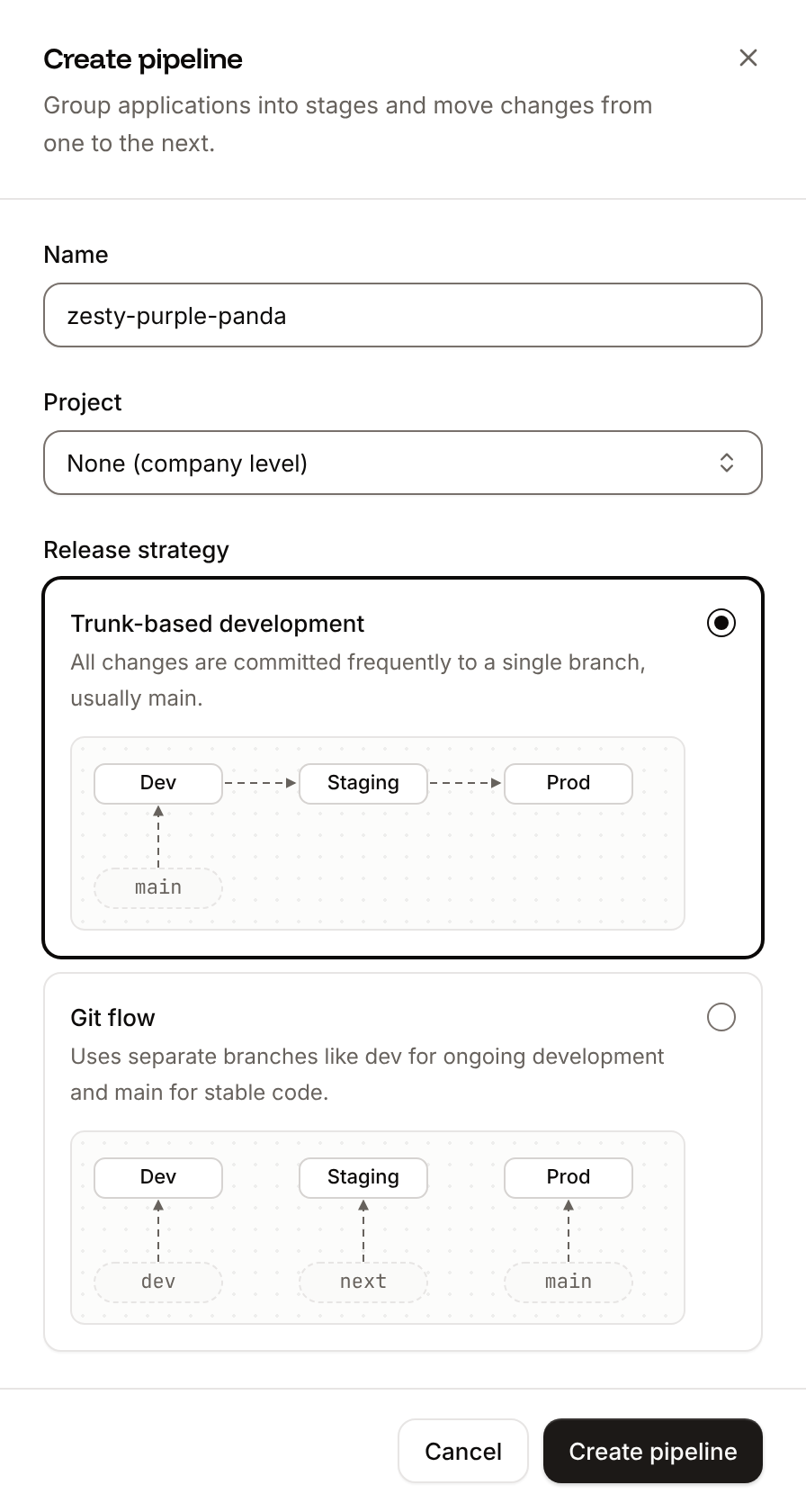
Name the pipeline
In Name, keep the generated name (like brave-olive-tiger) or enter your own, such as storefront.
3
Choose a project
In Project, pick a project, or None (company level) to keep the pipeline outside projects. The field shows only when your company has projects. If your role applies to projects only, picking a project is required.
4
Choose the release strategy
Pick Trunk-based development (the default) or Git flow. See Release strategies.
5
Create it
Click Create pipeline.
Sevalla opens the new pipeline’s board with the stages Dev and Production and no applications. The pipeline also shows in the Applications list, with its applications under it.
The board is the pipeline’s page. To open it, click Applications in the sidebar, then click the pipeline.
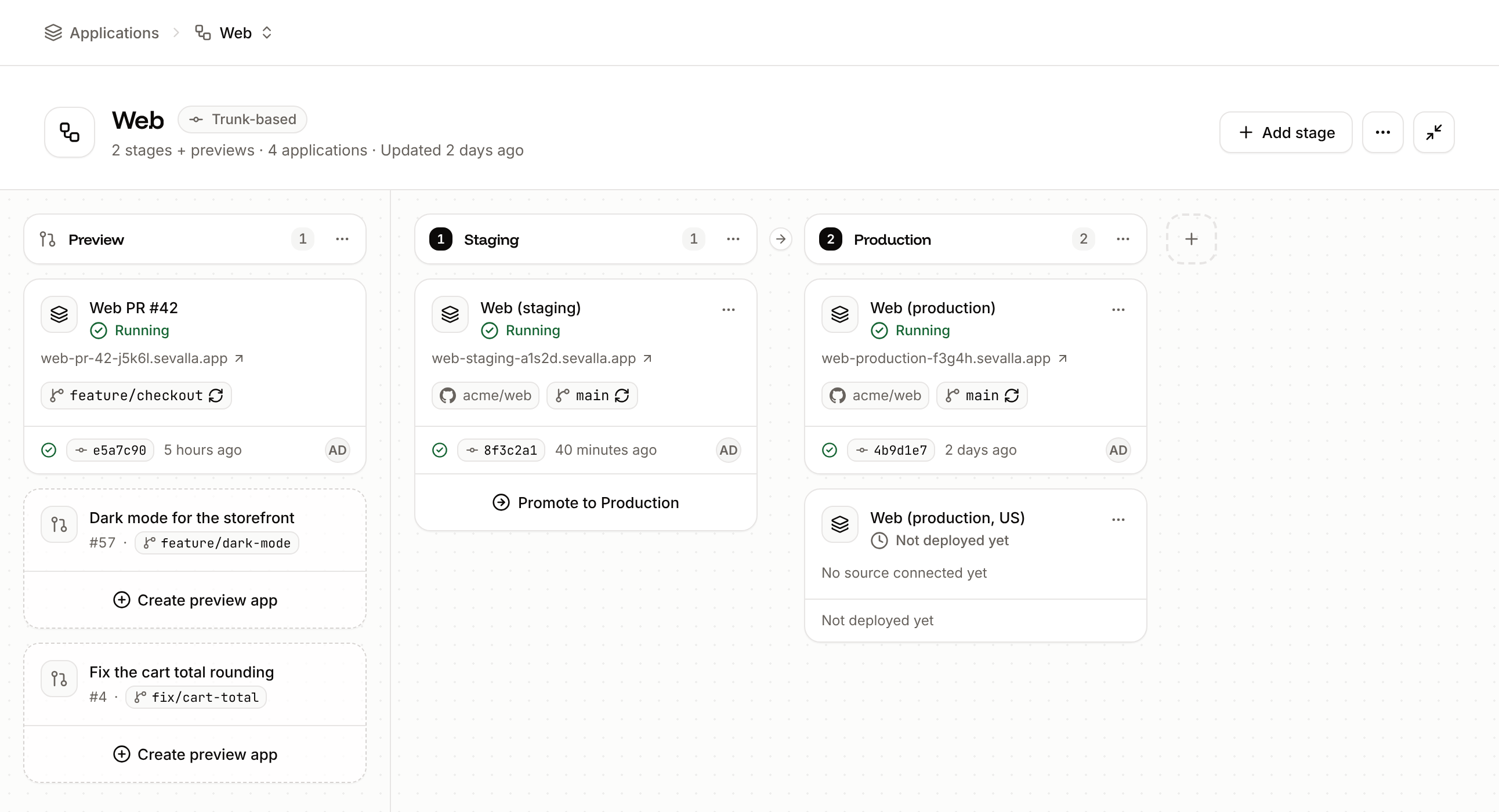
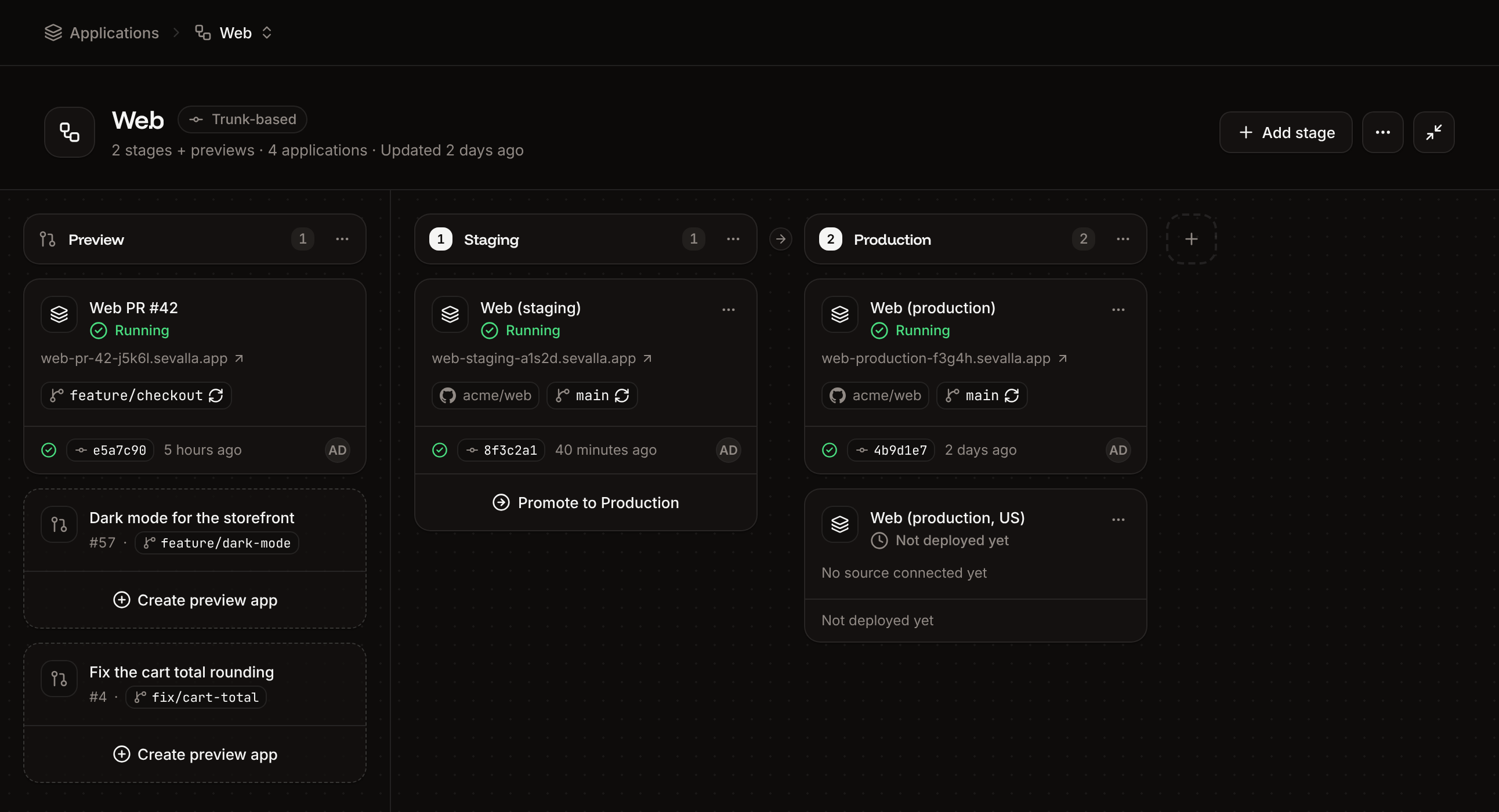
Part
What it shows and does
Header
The name, the release strategy (Trunk-based or Git flow), the number of stages and applications, Add stage, and the Pipeline actions (⋯) menu: Pipeline settings, Enable preview apps or Preview app settings, Delete pipeline
Preview column
First on the board. Without preview apps, a card with Enable preview apps. See Preview apps.
Stage columns
Numbered, left to right. The ⋯ menu of a stage has Add app and Delete stage. An empty stage shows Add app.
Application card
The application’s name (opens it), status, primary domain, repository and branch (with a refresh icon when automatic deployments are on) or Docker image, and the last deployment: status, commit, time and author. Its ⋯ menu has Remove from stage.
Promote to button
Under each application of a trunk-based pipeline that has a next stage. See Promote changes.
On GitHub, every deployment of an application in a pipeline also shows as a GitHub deployment, in an environment named after its stage (for example Production). See GitHub.
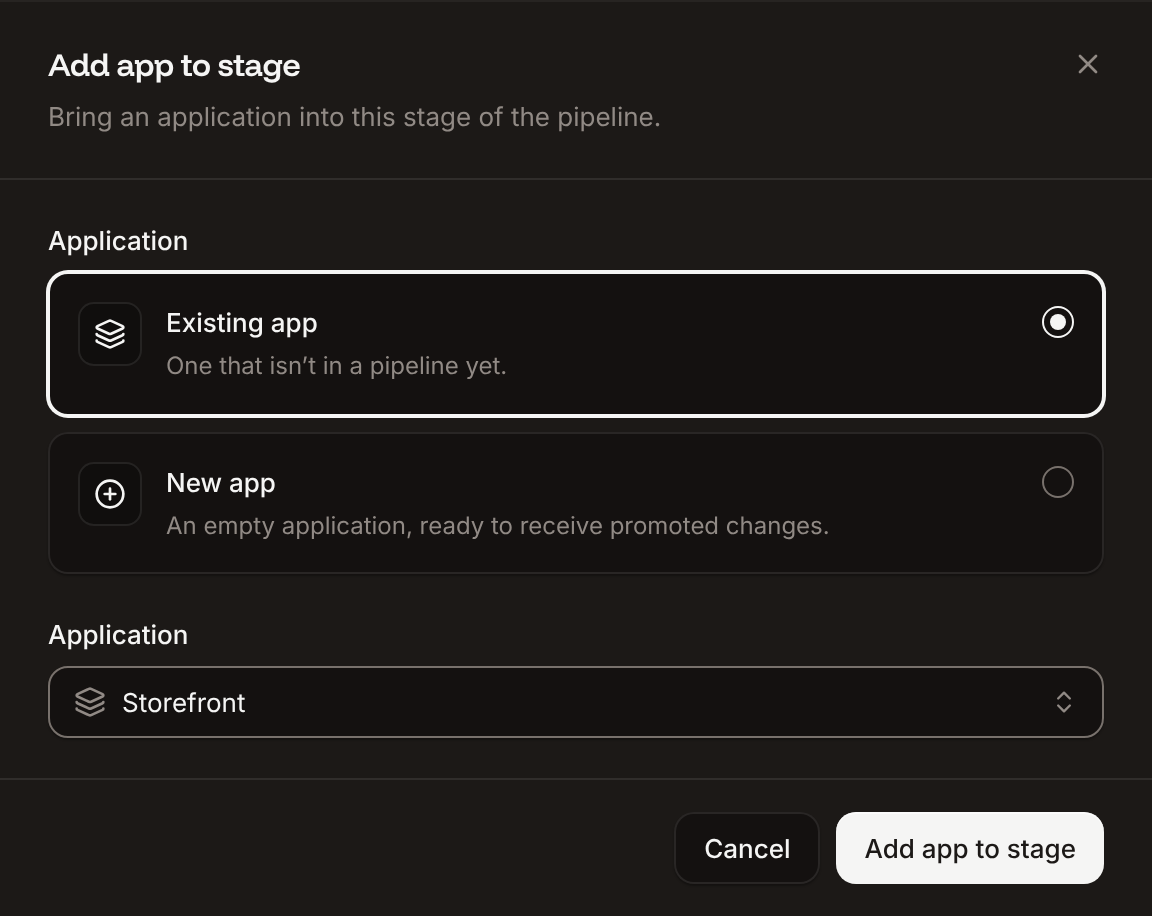
On the pipeline board, click Add app in an empty stage, or open the stage’s ⋯ menu and click Add app.
2
Choose an existing or a new application
On a trunk-based pipeline, pick Existing app or New app. A Git flow pipeline takes existing applications only.
3
Pick or create the application
For Existing app, pick it in Application. The list holds every application of the company that isn’t in a pipeline yet. For New app, enter a Name and pick a Location (Sevalla preselects the one closest to you).
4
Add it
Click Add app to stage.
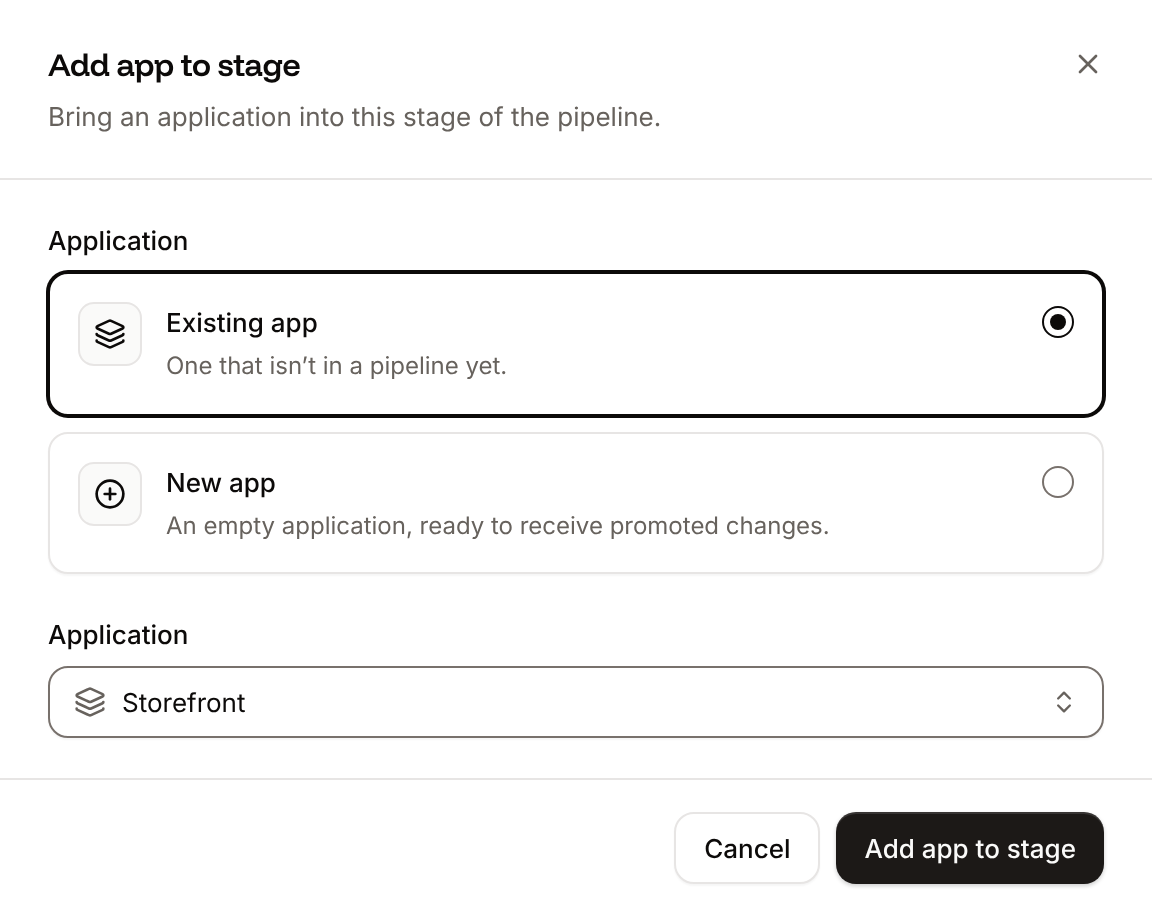
The application’s card appears in the stage. What happens to it:
Existing app: it moves to the pipeline’s project, or out of its project when the pipeline isn’t in one. Its source, settings and deployments don’t change.
New app: Sevalla creates an empty application with a default web process and no source. It runs nothing until the first promotion reaches it, which also sets its build strategy to the source’s. Its card says No source connected yet.
New app is locked without a valid payment method, unless the company has credits and no applications yet: the card says Add a payment method to create more applications.On a trunk-based pipeline, put an application that deploys from your repository in the first stage, and add new or existing applications to the later stages. Each application of a later stage can run in its own location with its own environment variables, processes, domains and scaling.
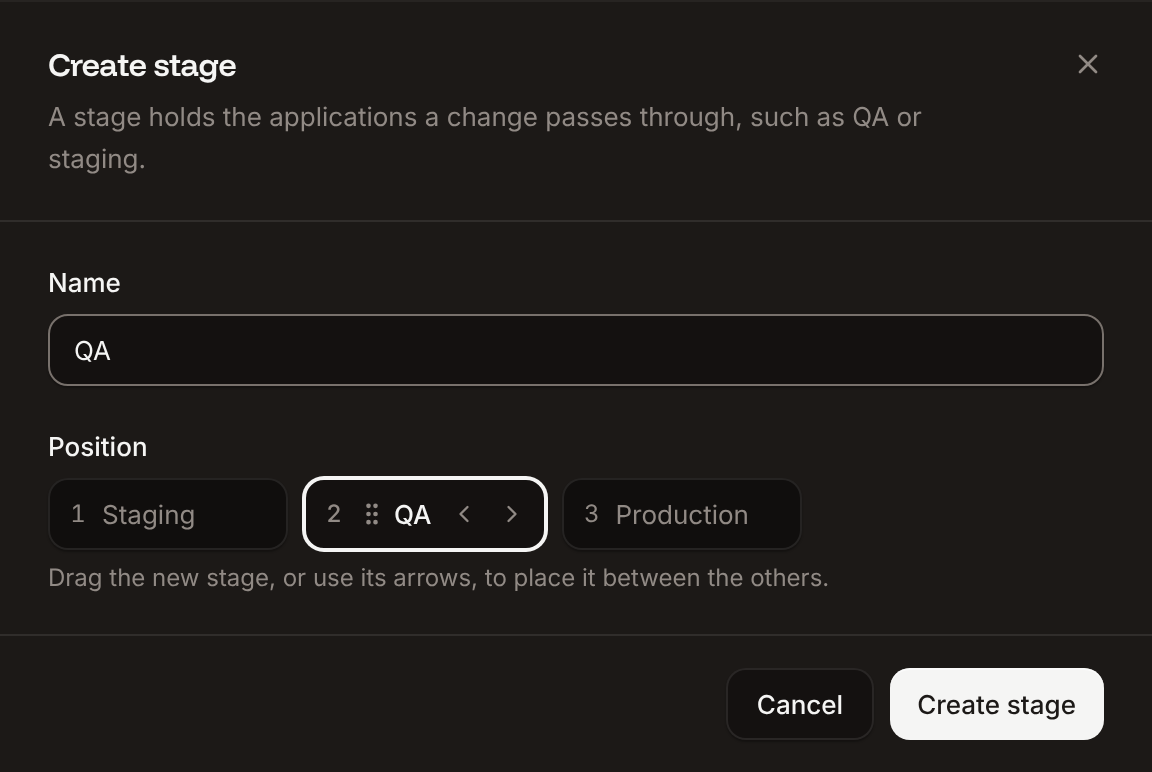
On the pipeline board, click Add stage in the header, or the dashed + tile after the last stage.
2
Name the stage
In Name, enter a name such as QA.
3
Place the stage
In Position, drag the new stage, or use its arrows, to put it between the others. It goes last unless you move it.
4
Create it
Click Create stage.
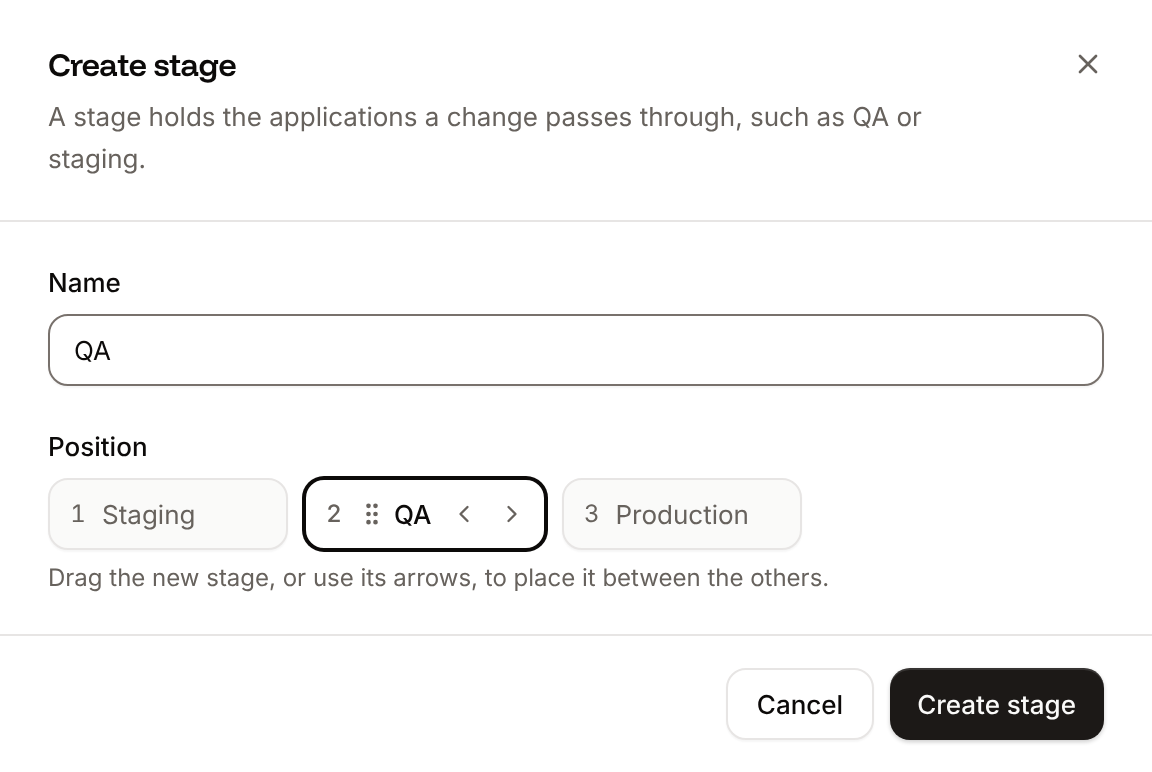
The new stage appears on the board at that position, empty. On a trunk-based pipeline, promotion now goes through it: the stage before it promotes to the new stage, and the new stage promotes to the next one.
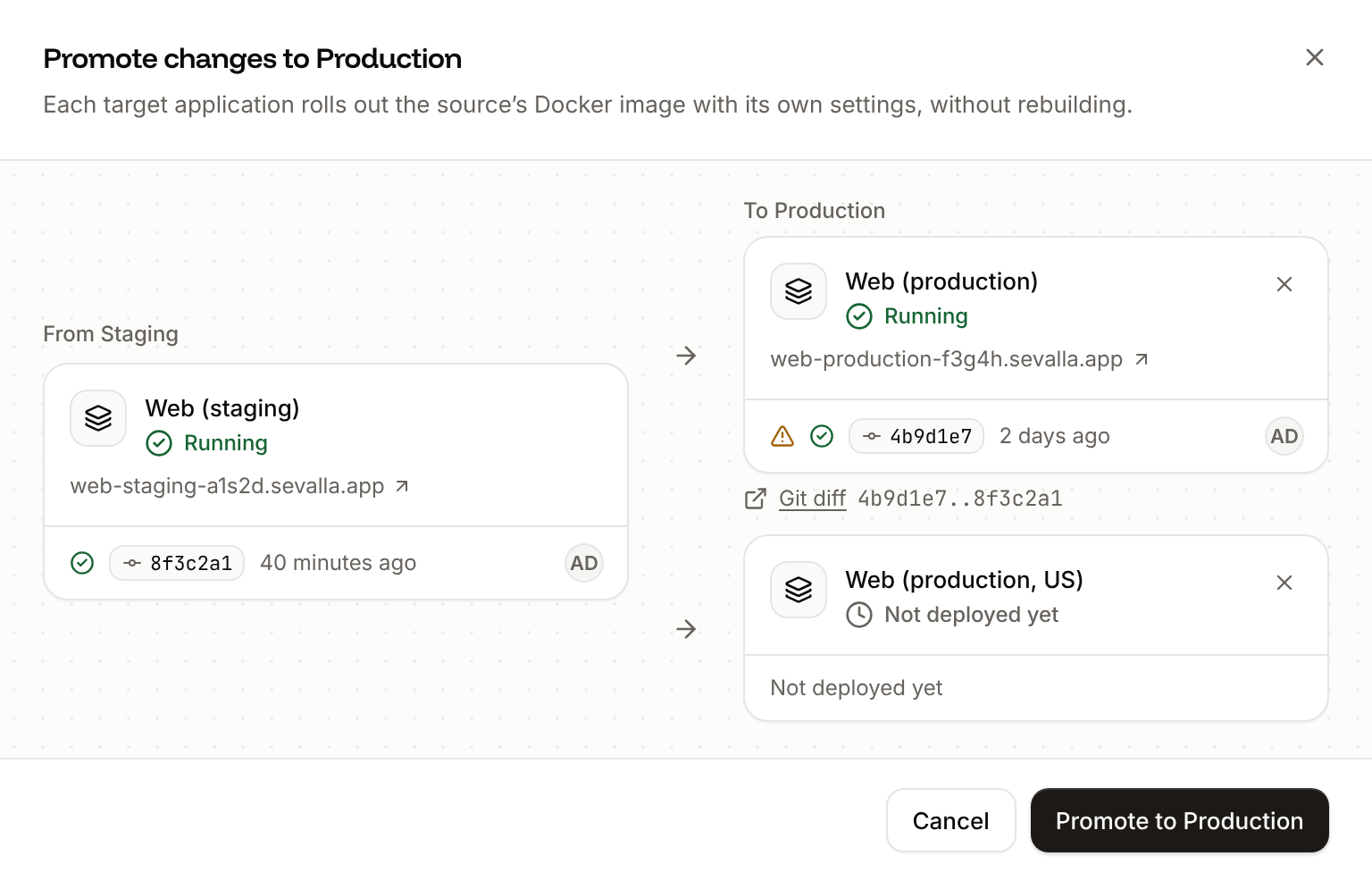
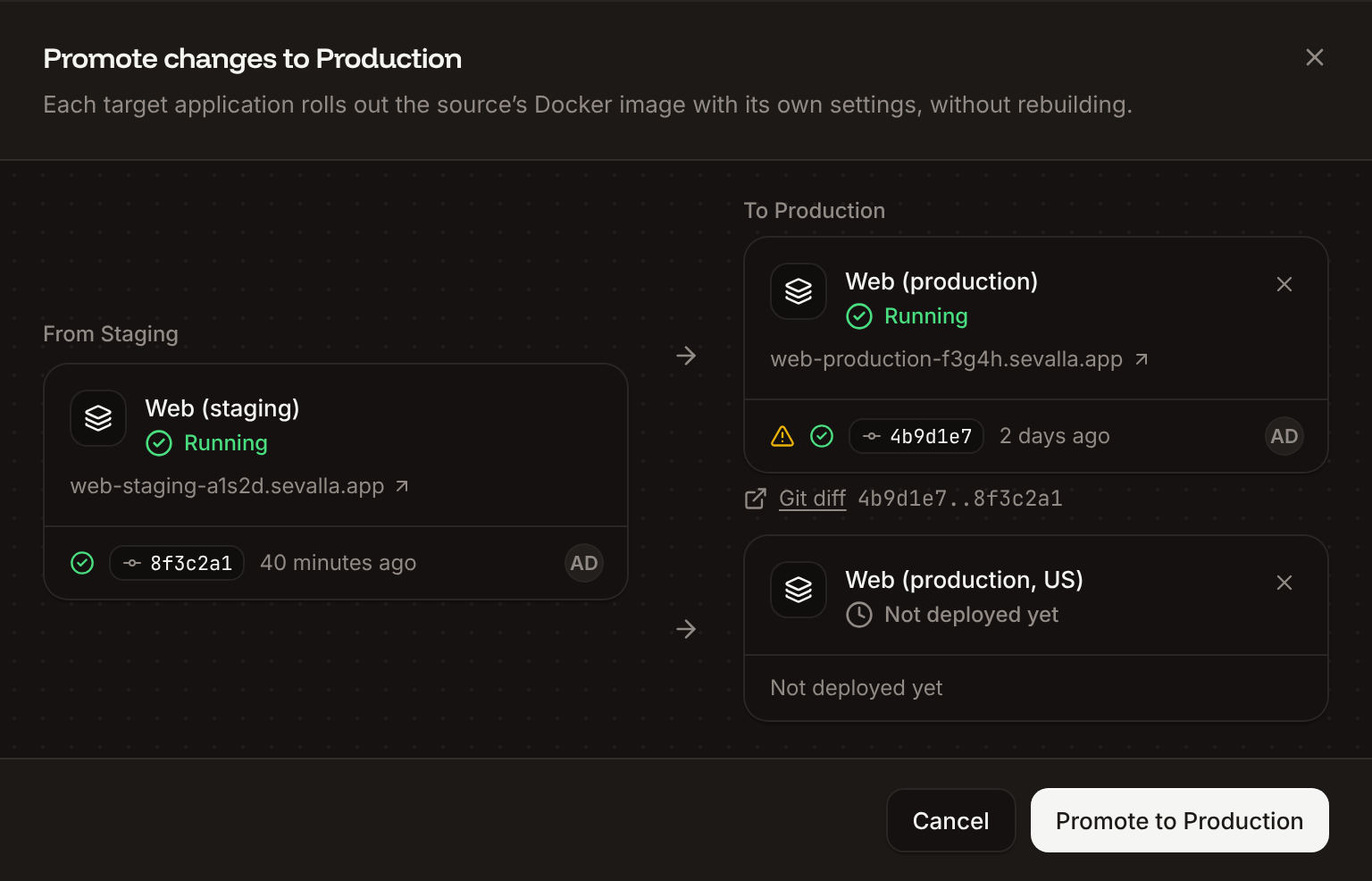
Promoting takes the source application’s last successful deployment and rolls out its Docker image on applications of the next stage. Nothing is rebuilt, so each target runs exactly the build you tested. Promotion is available on trunk-based pipelines, from a stage to the stage right after it.
1
Open the Promote sheet
On the pipeline board, click Promote tonext stage under the application you tested, for example Promote to Production.
2
Choose the targets
Every application of the next stage is a target. To leave one out, click its ✕ (Don’t promote toapplication). At least one target stays.
3
Check the warnings and the diff
A warning icon on a target explains a risk: see Promotion warnings. Git diff opens the provider’s comparison between the target’s commit and the source’s.
4
Promote
Click Promote tostage.
Each target starts a deployment right away. On the target’s Deployments tab, its trigger reads Promoted from the source application, and its card on the board shows the promoted commit.
Set on a new empty application. Other targets keep theirs, but don’t rebuild.
The target keeps its own runtime environment variables, processes and resources, disks, domains, networking and location. Values your build step bakes into the image come from the source, because the target doesn’t rebuild: build-time environment variables of the target don’t apply. For a frontend that embeds variables at build time (for example NEXT_PUBLIC_* in Next.js), set those values the same way in every stage or read them at runtime.
Auto-deploy is on for this application, so its next push replaces the promoted image.
The target also deploys its own branch on every push. Turn off automatic deployments on targets that should only get promotions.
The source and target repositories are different.
The target is connected to another repository than the source.
This application deploys from a Git repository, the source from a Docker image.
The target’s source type differs from the source’s.
This application deploys from a Docker image, the source from a Git repository.
The target’s source type differs from the source’s.
Promotion fails with No successful deployment found for application "<id>" when the source has no successful deployment, and with The promoted image was deployed with a Docker registry credential that no longer exists. Redeploy "<application>" with a valid credential and promote again. when the source deployed a private image whose registry credential was deleted.
On the pipeline board, open Pipeline actions (⋯) and click Pipeline settings.
2
Change what you need
Update the Name (Pipeline name is required when empty), the Release strategy, or the Stage order: drag a stage, or use its arrows. Stage order shows when the pipeline has more than one stage. The preview stage always comes first and isn’t part of the order.
3
Save
Click Update pipeline.
The board shows the new name and order. Reordering changes where promotion goes: each stage promotes to the stage to its right.
On the pipeline board, open the ⋯ menu on the application’s card.
2
Remove it
Click Remove from stage, then click Remove app.
The application leaves the pipeline and keeps running, with its project, settings and deployments unchanged. You can add it to another stage or pipeline. To delete it, use its settings.
Click Delete stage, then click Delete stage in the dialog.
The stage disappears from the board and the stages after it move up. Its applications aren’t deleted: they leave the pipeline and keep running. The dialog lists them first. To turn off the preview stage, see Disable preview apps.
Deleting a pipeline deletes its preview apps permanently. You can’t undo this.
1
Open the delete dialog
On the pipeline board, open Pipeline actions (⋯) and click Delete pipeline.
2
Check what happens to the applications
The dialog lists the applications that stay, detached from the pipeline, and the preview apps that will be deleted.
3
Confirm
Type the pipeline’s name, then click Delete pipeline.
Sevalla deletes the pipeline and its stages and goes back to the Applications list. The applications of its stages keep running, outside any pipeline. API keys with capabilities scoped to the pipeline lose those capabilities.
In the API, the release strategies are trunk (Trunk-based development) and branch (Git flow). Moving a pipeline to another project with the API moves its applications too. To promote from a CI workflow, use the GitHub Action or the API. Preview app operations are on Preview apps.
Was this page helpful?
{"docsConfig":{"theme":"aspen","$schema":"https://mintlify.com/docs.json","name":"Sevalla docs","description":"Sevalla is the platform for deploying applications, databases and static sites, without managing the infrastructure underneath.","colors":{"primary":"#d04000","light":"#ff8c2e","dark":"#d04000"},"logo":{"light":"https://assets.sevalla.com/brand/logo/svg/sevalla-logo-on-light.svg","dark":"https://assets.sevalla.com/brand/logo/svg/sevalla-logo-on-dark.svg"},"favicon":"https://mintcdn.com/sevalla/a3xHmYExJQcu1_oY/favicon.svg?fit=max\u0026auto=format\u0026n=a3xHmYExJQcu1_oY\u0026q=85\u0026s=d0379d73889766a06bf06424701b8ba2","appearance":{"default":"system"},"background":{"color":{"light":"#ffffff","dark":"#0c0a09"}},"navbar":{"links":[{"href":"https://api-docs.sevalla.com","label":"API reference"},{"href":"https://app.sevalla.com","label":"Dashboard"}],"primary":{"type":"button","label":"Sign up","href":"https://sevalla.com/signup/"}},"footer":{"socials":{"x":"https://x.com/sevalla_hosting","github":"https://github.com/sevalla","linkedin":"https://www.linkedin.com/company/sevalla","youtube":"https://www.youtube.com/@sevalla-hosting"}},"seo":{"indexing":"navigable"},"fonts":{"heading":{"family":"Funnel Display","weight":600},"body":{"family":"Inter","weight":400}},"icons":{"library":"lucide"},"styling":{"eyebrows":"breadcrumbs","codeblocks":{"theme":{"light":"github-dark-default","dark":"github-dark-default"}},"latex":true},"contextual":{"options":["copy","view","claude","chatgpt","cursor","vscode"],"display":"header"},"thumbnails":{"preset":"headline","appearance":"dark","background":"https://assets.sevalla.com/brand/social/og/docs-thumbnail-background.png?v=2","fonts":{"family":"Funnel Display"},"eyebrow":{"source":"group","style":"plain","color":"#a8a29e"}},"markdown":{"instructions":["These are the docs for Sevalla, a platform for deploying applications, databases, static sites, object storage and load balancers. The dashboard is at https://app.sevalla.com.","Bold text in steps is an exact dashboard label.","To act on a Sevalla account, prefer the Sevalla MCP server (https://mcp.sevalla.com/mcp, see https://docs.sevalla.com/ai-agents/overview.md), then the Sevalla CLI (https://docs.sevalla.com/developer-tools/cli.md), then the REST API (https://api-docs.sevalla.com, OpenAPI spec at https://api.sevalla.com/v3/openapi.json).","Every page index is at https://docs.sevalla.com/llms.txt."]},"navigation":{"pages":[]}},"deployment":{"deploymentMetadataValue":{"subdomain":"sevalla","hasAudioNarration":false,"actualSubdomain":"sevalla","customDomains":["docs.sevalla.com"],"gitSource":{"type":"github","owner":"sevalla","repo":"docs","deployBranch":"main","contentDirectory":"","isPrivate":true,"mountPath":"","label":"","_id":"6ae19ce71a8bce77f276b1a4"},"chroma":{"liveDeploymentHistoryId":"6ae384ce9da652e9bfd34c8d","collectionId":"339eee4b-17df-4773-90e5-3902ac4b1100","schemaVersion":"v3","latestBuiltDeploymentHistoryId":"6ae384ce9da652e9bfd34c8d"},"feedback":{"thumbs":true},"entitlements":{"AI_CHAT":{"status":"ENABLED"},"WEB_MCP":{"status":"ENABLED"},"NARRATION":{"status":"ENABLED"}},"buildId":"6ae384ce9da652e9bfd34c8d","clientVersion":"0.0.4021","searchFilterCounts":[{"language":"default","tag":"Docs","count":119},{"language":"default","tag":"Guides","count":38},{"language":"default","tag":"Applications","count":26},{"language":"default","tag":"Python","count":20},{"language":"default","tag":"JavaScript","count":17},{"language":"default","tag":"Databases","count":13},{"language":"default","tag":"Static sites","count":13},{"language":"default","tag":"Company","count":8},{"language":"default","tag":"Django","count":8},{"language":"default","tag":"Security and compliance","count":8}]},"assistantConfig":{},"basePath":"","hasChatPermissions":true,"hasWebMcpPermissions":true,"toggles":[{"name":"kill-isr","enabled":true,"variant":{"name":"disabled","enabled":false,"feature_enabled":true},"impressionData":false},{"name":"agent-mintlify-slack","enabled":true,"variant":{"name":"disabled","enabled":false,"feature_enabled":true},"impressionData":false},{"name":"agent-integrations-settings","enabled":true,"variant":{"name":"disabled","enabled":false,"feature_enabled":true},"impressionData":false},{"name":"automations-pr-grouping","enabled":true,"variant":{"name":"disabled","enabled":false,"feature_enabled":true},"impressionData":false},{"name":"custom-prefix","enabled":true,"variant":{"name":"disabled","enabled":false,"feature_enabled":true},"impressionData":false},{"name":"analytics-v7","enabled":true,"variant":{"name":"disabled","enabled":false,"feature_enabled":true},"impressionData":false},{"name":"user-flows-analytics","enabled":true,"variant":{"name":"disabled","enabled":false,"feature_enabled":true},"impressionData":false},{"name":"no-publish-flow","enabled":true,"variant":{"name":"disabled","enabled":false,"feature_enabled":true},"impressionData":false},{"name":"workos-onboarding","enabled":true,"variant":{"name":"disabled","enabled":false,"feature_enabled":true},"impressionData":false},{"name":"llms-txt-v2","enabled":true,"variant":{"name":"disabled","enabled":false,"feature_enabled":true},"impressionData":false},{"name":"pause-universal-search-reconcile","enabled":true,"variant":{"name":"disabled","enabled":false,"feature_enabled":true},"impressionData":false},{"name":"snapshot-serving-live","enabled":true,"variant":{"name":"disabled","enabled":false,"feature_enabled":true},"impressionData":false},{"name":"stripTemperatureMiddleware","enabled":true,"variant":{"name":"disabled","enabled":false,"feature_enabled":true},"impressionData":false},{"name":"per-site-search-delta","enabled":true,"variant":{"name":"disabled","enabled":false,"feature_enabled":true},"impressionData":false},{"name":"support-platform-pylon-zendesk","enabled":true,"variant":{"name":"disabled","enabled":false,"feature_enabled":true},"impressionData":false},{"name":"snapshot-serving","enabled":true,"variant":{"name":"disabled","enabled":false,"feature_enabled":true},"impressionData":false},{"name":"instant-rollback","enabled":true,"variant":{"name":"disabled","enabled":false,"feature_enabled":true},"impressionData":false},{"name":"granular-notifications-server","enabled":true,"variant":{"name":"disabled","enabled":false,"feature_enabled":true},"impressionData":false},{"name":"granular-notifications","enabled":true,"variant":{"name":"disabled","enabled":false,"feature_enabled":true},"impressionData":false},{"name":"editor-private-page-search","enabled":true,"variant":{"name":"disabled","enabled":false,"feature_enabled":true},"impressionData":false},{"name":"automations-fable","enabled":true,"variant":{"name":"disabled","enabled":false,"feature_enabled":true},"impressionData":false},{"name":"fixed-ai-action-pricing","enabled":true,"variant":{"name":"disabled","enabled":false,"feature_enabled":true},"impressionData":false},{"name":"automation-resolve-merge-conflict","enabled":true,"variant":{"name":"disabled","enabled":false,"feature_enabled":true},"impressionData":false},{"name":"scoped-publishing","enabled":true,"variant":{"name":"disabled","enabled":false,"feature_enabled":true},"impressionData":false},{"name":"mintql","enabled":true,"variant":{"name":"disabled","enabled":false,"feature_enabled":true},"impressionData":false},{"name":"page-level-analytics","enabled":true,"variant":{"name":"disabled","enabled":false,"feature_enabled":true},"impressionData":false},{"name":"editor-version-history-v2","enabled":true,"variant":{"name":"disabled","enabled":false,"feature_enabled":true},"impressionData":false},{"name":"billing-page-v2","enabled":true,"variant":{"name":"disabled","enabled":false,"feature_enabled":true},"impressionData":false},{"name":"workspace-projects","enabled":true,"variant":{"name":"disabled","enabled":false,"feature_enabled":true},"impressionData":false},{"name":"assistant-v5","enabled":true,"variant":{"name":"disabled","enabled":false,"feature_enabled":true},"impressionData":false},{"name":"byok-sep-25","enabled":true,"variant":{"name":"disabled","enabled":false,"feature_enabled":true},"impressionData":false},{"name":"fork-pr-previews","enabled":true,"variant":{"name":"disabled","enabled":false,"feature_enabled":true},"impressionData":false},{"name":"revalidation-jwt","enabled":true,"variant":{"name":"disabled","enabled":false,"feature_enabled":true},"impressionData":false},{"name":"vite-origin","enabled":true,"variant":{"name":"disabled","enabled":false,"feature_enabled":true},"impressionData":false},{"name":"billing-updated-9-15","enabled":true,"variant":{"name":"disabled","enabled":false,"feature_enabled":true},"impressionData":false},{"name":"workos-sso-scim","enabled":true,"variant":{"name":"disabled","enabled":false,"feature_enabled":true},"impressionData":false},{"name":"hobby-abuse-scan","enabled":true,"variant":{"name":"disabled","enabled":false,"feature_enabled":true},"impressionData":false},{"name":"dashboard-inbox","enabled":true,"variant":{"name":"disabled","enabled":false,"feature_enabled":true},"impressionData":false},{"name":"workos-signup","enabled":true,"variant":{"name":"disabled","enabled":false,"feature_enabled":true},"impressionData":false},{"name":"workos-enabled","enabled":true,"variant":{"name":"disabled","enabled":false,"feature_enabled":true},"impressionData":false}],"googleFontsInlined":true},"customCss":[{"filePath":"style.css","content":"/* cyrillic-ext */\n@font-face {\n font-family: 'JetBrains Mono';\n font-style: normal;\n font-weight: 400;\n font-display: swap;\n src: url(/_mintlify/assets/fonts/google/s/jetbrainsmono/v24/tDbv2o-flEEny0FZhsfKu5WU4zr3E_BX0PnT8RD8yKwBNntkaToggR7BYRbKPx3cwhsk.woff2) format('woff2');\n unicode-range: U+0460-052F, U+1C80-1C8A, U+20B4, U+2DE0-2DFF, U+A640-A69F, U+FE2E-FE2F;\n}\n/* cyrillic */\n@font-face {\n font-family: 'JetBrains Mono';\n font-style: normal;\n font-weight: 400;\n font-display: swap;\n src: url(/_mintlify/assets/fonts/google/s/jetbrainsmono/v24/tDbv2o-flEEny0FZhsfKu5WU4zr3E_BX0PnT8RD8yKwBNntkaToggR7BYRbKPxTcwhsk.woff2) format('woff2');\n unicode-range: U+0301, U+0400-045F, U+0490-0491, U+04B0-04B1, U+2116;\n}\n/* greek */\n@font-face {\n font-family: 'JetBrains Mono';\n font-style: normal;\n font-weight: 400;\n font-display: swap;\n src: url(/_mintlify/assets/fonts/google/s/jetbrainsmono/v24/tDbv2o-flEEny0FZhsfKu5WU4zr3E_BX0PnT8RD8yKwBNntkaToggR7BYRbKPxPcwhsk.woff2) format('woff2');\n unicode-range: U+0370-0377, U+037A-037F, U+0384-038A, U+038C, U+038E-03A1, U+03A3-03FF;\n}\n/* vietnamese */\n@font-face {\n font-family: 'JetBrains Mono';\n font-style: normal;\n font-weight: 400;\n font-display: swap;\n src: url(/_mintlify/assets/fonts/google/s/jetbrainsmono/v24/tDbv2o-flEEny0FZhsfKu5WU4zr3E_BX0PnT8RD8yKwBNntkaToggR7BYRbKPx_cwhsk.woff2) format('woff2');\n unicode-range: U+0102-0103, U+0110-0111, U+0128-0129, U+0168-0169, U+01A0-01A1, U+01AF-01B0, U+0300-0301, U+0303-0304, U+0308-0309, U+0323, U+0329, U+1EA0-1EF9, U+20AB;\n}\n/* latin-ext */\n@font-face {\n font-family: 'JetBrains Mono';\n font-style: normal;\n font-weight: 400;\n font-display: swap;\n src: url(/_mintlify/assets/fonts/google/s/jetbrainsmono/v24/tDbv2o-flEEny0FZhsfKu5WU4zr3E_BX0PnT8RD8yKwBNntkaToggR7BYRbKPx7cwhsk.woff2) format('woff2');\n unicode-range: U+0100-02BA, U+02BD-02C5, U+02C7-02CC, U+02CE-02D7, U+02DD-02FF, U+0304, U+0308, U+0329, U+1D00-1DBF, U+1E00-1E9F, U+1EF2-1EFF, U+2020, U+20A0-20AB, U+20AD-20C4, U+2113, U+2C60-2C7F, U+A720-A7FF;\n}\n/* latin */\n@font-face {\n font-family: 'JetBrains Mono';\n font-style: normal;\n font-weight: 400;\n font-display: swap;\n src: url(/_mintlify/assets/fonts/google/s/jetbrainsmono/v24/tDbv2o-flEEny0FZhsfKu5WU4zr3E_BX0PnT8RD8yKwBNntkaToggR7BYRbKPxDcwg.woff2) format('woff2');\n unicode-range: U+0000-00FF, U+0131, U+0152-0153, U+02BB-02BC, U+02C6, U+02DA, U+02DC, U+0304, U+0308, U+0329, U+2000-206F, U+20AC, U+2122, U+2191, U+2193, U+2212, U+2215, U+FEFF, U+FFFD;\n}\n/* cyrillic-ext */\n@font-face {\n font-family: 'JetBrains Mono';\n font-style: normal;\n font-weight: 500;\n font-display: swap;\n src: url(/_mintlify/assets/fonts/google/s/jetbrainsmono/v24/tDbv2o-flEEny0FZhsfKu5WU4zr3E_BX0PnT8RD8yKwBNntkaToggR7BYRbKPx3cwhsk.woff2) format('woff2');\n unicode-range: U+0460-052F, U+1C80-1C8A, U+20B4, U+2DE0-2DFF, U+A640-A69F, U+FE2E-FE2F;\n}\n/* cyrillic */\n@font-face {\n font-family: 'JetBrains Mono';\n font-style: normal;\n font-weight: 500;\n font-display: swap;\n src: url(/_mintlify/assets/fonts/google/s/jetbrainsmono/v24/tDbv2o-flEEny0FZhsfKu5WU4zr3E_BX0PnT8RD8yKwBNntkaToggR7BYRbKPxTcwhsk.woff2) format('woff2');\n unicode-range: U+0301, U+0400-045F, U+0490-0491, U+04B0-04B1, U+2116;\n}\n/* greek */\n@font-face {\n font-family: 'JetBrains Mono';\n font-style: normal;\n font-weight: 500;\n font-display: swap;\n src: url(/_mintlify/assets/fonts/google/s/jetbrainsmono/v24/tDbv2o-flEEny0FZhsfKu5WU4zr3E_BX0PnT8RD8yKwBNntkaToggR7BYRbKPxPcwhsk.woff2) format('woff2');\n unicode-range: U+0370-0377, U+037A-037F, U+0384-038A, U+038C, U+038E-03A1, U+03A3-03FF;\n}\n/* vietnamese */\n@font-face {\n font-family: 'JetBrains Mono';\n font-style: normal;\n font-weight: 500;\n font-display: swap;\n src: url(/_mintlify/assets/fonts/google/s/jetbrainsmono/v24/tDbv2o-flEEny0FZhsfKu5WU4zr3E_BX0PnT8RD8yKwBNntkaToggR7BYRbKPx_cwhsk.woff2) format('woff2');\n unicode-range: U+0102-0103, U+0110-0111, U+0128-0129, U+0168-0169, U+01A0-01A1, U+01AF-01B0, U+0300-0301, U+0303-0304, U+0308-0309, U+0323, U+0329, U+1EA0-1EF9, U+20AB;\n}\n/* latin-ext */\n@font-face {\n font-family: 'JetBrains Mono';\n font-style: normal;\n font-weight: 500;\n font-display: swap;\n src: url(/_mintlify/assets/fonts/google/s/jetbrainsmono/v24/tDbv2o-flEEny0FZhsfKu5WU4zr3E_BX0PnT8RD8yKwBNntkaToggR7BYRbKPx7cwhsk.woff2) format('woff2');\n unicode-range: U+0100-02BA, U+02BD-02C5, U+02C7-02CC, U+02CE-02D7, U+02DD-02FF, U+0304, U+0308, U+0329, U+1D00-1DBF, U+1E00-1E9F, U+1EF2-1EFF, U+2020, U+20A0-20AB, U+20AD-20C4, U+2113, U+2C60-2C7F, U+A720-A7FF;\n}\n/* latin */\n@font-face {\n font-family: 'JetBrains Mono';\n font-style: normal;\n font-weight: 500;\n font-display: swap;\n src: url(/_mintlify/assets/fonts/google/s/jetbrainsmono/v24/tDbv2o-flEEny0FZhsfKu5WU4zr3E_BX0PnT8RD8yKwBNntkaToggR7BYRbKPxDcwg.woff2) format('woff2');\n unicode-range: U+0000-00FF, U+0131, U+0152-0153, U+02BB-02BC, U+02C6, U+02DA, U+02DC, U+0304, U+0308, U+0329, U+2000-206F, U+20AC, U+2122, U+2191, U+2193, U+2212, U+2215, U+FEFF, U+FFFD;\n}\n:root{--sv-ink:#0c0a09;--sv-text:#44403c;--sv-quiet:#67625d;--sv-border:#e7e5e4;--sv-surface:#f5f5f4;--sv-sand:#eeedec;--sv-brand-text:#b33a0a;--sv-ring:#d04000;--sv-code-bg:#0c0a09;--sv-code-border:transparent;--sv-code-text:#d6d3d1;--sv-inline-code-bg:#f5f5f4;--sv-inline-code-border:#e7e5e4;--sv-success:#15803d;--sv-warning:#a16207;--sv-failed:#dc2626;--sv-mono:'JetBrains Mono', ui-monospace, SFMono-Regular, Menlo, monospace;--content-width:41.5rem}html.dark{--sv-ink:#f5f5f4;--sv-text:#d6d3d1;--sv-quiet:#918a85;--sv-border:rgb(255 255 255 / 0.09);--sv-surface:#141110;--sv-sand:#221f1d;--sv-brand-text:#ff8c2e;--sv-ring:#ff5f00;--sv-code-bg:#141110;--sv-code-border:rgb(255 255 255 / 0.07);--sv-code-text:#d6d3d1;--sv-inline-code-bg:#221f1d;--sv-inline-code-border:rgb(255 255 255 / 0.09);--sv-success:#22c55e;--sv-warning:#eab308;--sv-failed:#ef4444}html:root{--gray-50:250 250 249;--gray-100:245 245 244;--gray-200:231 229 228;--gray-300:214 211 209;--gray-400:168 162 158;--gray-500:120 113 108;--gray-600:87 83 78;--gray-700:68 64 60;--gray-800:41 37 36;--gray-900:28 25 23;--gray-950:12 10 9}@media (min-width:1024px){:root{--sv-page-width:101rem;--sv-page-offset:max(0px, calc((100vw - var(--sv-page-width)) / 2))}#body-content,#navbar>.max-w-8xl{margin-left:var(--sv-page-offset);margin-right:0;max-width:min(var(--sv-page-width),calc(100% - var(--sv-page-offset)))}#content-container{margin-left:0;max-width:71.5rem}#content-area{margin-left:0;margin-right:auto}html[data-assistant-state=open] #content-side-layout:empty{display:none}html[data-assistant-state=open] #content-container:has(>#content-side-layout:empty)>#content-area{width:100%}html[data-assistant-state=open] #content-container:has(>#content-side-layout:empty){padding-right:1.5rem}}#content{font-size:16px;line-height:1.65;color:var(--sv-text);font-variant-numeric:tabular-nums}#content h1,#content h2,#content h3,#content h4,#page-title{color:var(--sv-ink);font-weight:600}#page-title{letter-spacing:-.018em}#content h2{letter-spacing:-.01em}#content h3{letter-spacing:-.005em}#content-area .prose-lg,#page-title+*{color:var(--sv-quiet)}.eyebrow,.sidebar-group-header .sidebar-title{font-family:var(--sv-mono);font-size:11px;font-weight:500;letter-spacing:.06em;text-transform:uppercase;color:var(--sv-quiet)}#sidebar-content li>a{color:var(--sv-text)}#sidebar-content li>a:hover{color:var(--sv-ink)}#sidebar-content li[data-active]>a{color:var(--sv-brand-text);font-weight:500;background-color:transparent}.toc-item[data-active],.toc-item[data-active]>a{color:var(--sv-text)!important}.toc-item[data-active-deepest],.toc-item[data-active-deepest]>a{color:var(--sv-brand-text)!important}#content a.link,#content li a,#content span[data-as=p] a,#content td a{color:var(--sv-brand-text);text-decoration-line:underline;text-decoration-thickness:1px;text-underline-offset:3px;text-decoration-color:color-mix(in srgb,var(--sv-brand-text) 40%,transparent);border-bottom:0;font-weight:inherit}#content a.link:hover,#content li a:hover,#content span[data-as=p] a:hover,#content td a:hover{text-decoration-color:var(--sv-brand-text)}.code-block,.code-block *,code,kbd,pre{font-family:var(--sv-mono)!important;font-variant-ligatures:none}.code-block,.code-group{background-color:var(--sv-code-bg)!important;border:1px solid var(--sv-code-border)!important;border-radius:10px}.code-block pre,.code-group pre{background-color:transparent!important;font-size:13px;line-height:22px}#content :not(pre)>code{background-color:var(--sv-inline-code-bg);border:1px solid var(--sv-inline-code-border);color:var(--sv-ink);border-radius:6px;padding:.1em .35em;font-size:.875em;font-weight:400}#content :not(pre)>code::after,#content :not(pre)>code::before{content:none}#content table{font-size:15px}#content th{color:var(--sv-quiet);font-weight:500}#content td,#content th,.card{border-color:var(--sv-border)}.card:hover{border-color:color-mix(in srgb,var(--sv-ring) 55%,var(--sv-border))}.card [data-component-part=card-icon] svg{background-color:var(--sv-ink)!important}[data-component-part=card-title]{color:var(--sv-ink)}[data-component-part=card-content]{color:var(--sv-quiet)}.callout{border-radius:10px}.callout[data-callout-type=info],.callout[data-callout-type=note]{background-color:var(--sv-surface);border-color:var(--sv-border);color:var(--sv-text)}.callout[data-callout-type=check],.callout[data-callout-type=tip]{background-color:color-mix(in srgb,var(--sv-success) 6%,transparent);border-color:color-mix(in srgb,var(--sv-success) 30%,transparent)}.callout[data-callout-type=warning]{background-color:color-mix(in srgb,var(--sv-warning) 8%,transparent);border-color:color-mix(in srgb,var(--sv-warning) 35%,transparent)}.callout[data-callout-type=danger]{background-color:color-mix(in srgb,var(--sv-failed) 6%,transparent);border-color:color-mix(in srgb,var(--sv-failed) 30%,transparent)}.frame{border-color:var(--sv-border);background-color:var(--sv-surface);border-radius:12px}#content a:focus-visible,#sidebar-content a:focus-visible,.card:focus-visible{outline:2px solid var(--sv-ring);outline-offset:2px;border-radius:4px}[data-component-part=code-block-header]{color:#a8a29e;background-color:transparent!important;border-bottom:1px solid rgb(255 255 255/.07)}[data-component-part=code-block-header-filename]{color:#d6d3d1}.breadcrumb-item,.breadcrumb-list{font-family:var(--sv-mono);font-size:11px;font-weight:500;letter-spacing:.06em;text-transform:uppercase;color:var(--sv-quiet)}[data-component-part=step-indicator],[data-component-part=step-number] [data-component-part=step-indicator]>div{font-family:var(--sv-mono)}[data-component-part=step-indicator]>div{background-color:var(--sv-sand)!important;color:var(--sv-ink)!important}.callout [data-component-part=callout-content]{color:var(--sv-text)!important}.callout[data-callout-type=info] [data-component-part=callout-icon] svg,.callout[data-callout-type=note] [data-component-part=callout-icon] svg{color:var(--sv-quiet)!important}.callout[data-callout-type=check] [data-component-part=callout-icon] svg,.callout[data-callout-type=tip] [data-component-part=callout-icon] svg{color:var(--sv-success)!important}.callout[data-callout-type=warning] [data-component-part=callout-icon] svg{color:var(--sv-warning)!important}.callout[data-callout-type=danger] [data-component-part=callout-icon] svg{color:var(--sv-failed)!important}:root{--sv-bullet:#a8a29e;--sv-button:#1c1917;--sv-button-text:#fafaf9}html.dark{--sv-bullet:#57534e;--sv-button:#f5f5f4;--sv-button-text:#1c1917;--sv-method-get:#4ade80;--sv-method-post:#76aef5;--sv-method-change:#facc15;--sv-method-delete:#f87171}#content{--tw-prose-body:var(--sv-text);--tw-prose-headings:var(--sv-ink);--tw-prose-lead:var(--sv-quiet);--tw-prose-bold:var(--sv-ink);--tw-prose-counters:var(--sv-quiet);--tw-prose-bullets:var(--sv-bullet);--tw-prose-hr:var(--sv-border);--tw-prose-quotes:var(--sv-ink);--tw-prose-quote-borders:var(--sv-border);--tw-prose-captions:var(--sv-quiet);--tw-prose-th-borders:var(--sv-border);--tw-prose-td-borders:var(--sv-border)}[data-component-part=code-block-root]{background-color:var(--sv-code-bg)!important}.code-block [class*=bg-codeblock],.code-group [class*=bg-codeblock]{background-color:transparent!important;--shiki-dark-bg:transparent!important}#topbar-cta-button a>span:first-child{background-color:var(--sv-button)!important}#topbar-cta-button a,#topbar-cta-button a *{color:var(--sv-button-text)!important}[data-component-part=update-label]{background-color:var(--sv-sand)!important;color:var(--sv-ink)!important;font-variant-numeric:tabular-nums}[data-component-part=step-title]{font-weight:600!important;color:var(--sv-ink)!important}[data-component-part=card-title]{font-family:'Inter',ui-sans-serif,system-ui,sans-serif!important;letter-spacing:0!important}@media (min-width:1024px){#content-container:has(#api-playground-2-operation-page){max-width:none}html[data-assistant-state=open] #content-container:has(#api-playground-2-operation-page)>#content-side-layout{display:none}html[data-assistant-state=open] #content-container:has(#api-playground-2-operation-page)>#content-area{width:100%}html[data-assistant-state=open] #content-container:has(#api-playground-2-operation-page){padding-right:1.5rem}}@media (min-width:1280px){#content-container:has(#api-playground-2-operation-page) #content-side-layout>[class*='xl:w-[28rem]']{width:clamp(22rem,100vw - 64rem,28rem)}}:root{--sv-method-get:#166534;--sv-method-post:#115caf;--sv-method-change:#854d0e;--sv-method-delete:#b91c1c}.method-nav-pill [class*=bg-green],.method-pill[class*=green]{color:var(--sv-method-get)!important;background-color:color-mix(in srgb,var(--sv-method-get) 12%,transparent)!important}.method-nav-pill [class*=bg-blue],.method-pill[class*=blue]{color:var(--sv-method-post)!important;background-color:color-mix(in srgb,var(--sv-method-post) 12%,transparent)!important}.method-nav-pill [class*=bg-orange],.method-nav-pill [class*=bg-yellow],.method-pill[class*=orange],.method-pill[class*=yellow]{color:var(--sv-method-change)!important;background-color:color-mix(in srgb,var(--sv-method-change) 14%,transparent)!important}.method-nav-pill [class*=bg-red],.method-pill[class*=red]{color:var(--sv-method-delete)!important;background-color:color-mix(in srgb,var(--sv-method-delete) 12%,transparent)!important}#sidebar-content li[data-active] .method-nav-pill span,.method-pill[class*='bg-[#']{background-color:var(--sv-sand)!important;color:var(--sv-ink)!important}.method-nav-pill span,.method-pill{font-family:var(--sv-mono)}.tryit-button{background-color:var(--sv-button)!important;color:var(--sv-button-text)!important}.tryit-button svg{background-color:var(--sv-button-text)!important}[data-component-part=field-name]{color:var(--sv-ink)!important;font-family:var(--sv-mono);font-weight:500}.code-group [data-component-part=code-group-tab-bar] button,.code-group [data-component-part=code-group-tab-bar] button *,.code-group [role=tab],.code-group [role=tab] *{color:#a8a29e!important}.code-group [role=tab][aria-selected=true],.code-group [role=tab][aria-selected=true] *{color:#ff8c2e!important}.code-group [data-component-part=code-group-tab-bar]>div>span{color:#fafaf9!important}[data-component-part=field-info-pill],[data-component-part=field-required-pill]{font-family:var(--sv-mono)!important}[data-component-part=field-required-pill]{color:var(--sv-ink)!important;background-color:var(--sv-sand)!important}"}],"page":{"pagePath":"pipelines/overview","slug":"/pipelines/overview","pageMetadata":{"title":"Pipelines","sidebarTitle":"Overview","description":"Group applications into ordered stages such as Dev and Production, promote a tested build from one stage to the next without rebuilding, and add preview apps for pull requests.","keywords":["promote","staging","production","trunk-based development","git flow","release pipeline","environments","stages"],"href":"/pipelines/overview"},"description":{"compiledSource":"\"use strict\";\nconst {jsx: _jsx} = arguments[0];\nconst {useMDXComponents: _provideComponents} = arguments[0];\nfunction _createMdxContent(props) {\n const _components = {\n p: \"p\",\n ..._provideComponents(),\n ...props.components\n };\n return _jsx(_components.p, {\n children: \"Group applications into ordered stages such as Dev and Production, promote a tested build from one stage to the next without rebuilding, and add preview apps for pull requests.\"\n });\n}\nfunction MDXContent(props = {}) {\n const {wrapper: MDXLayout} = {\n ..._provideComponents(),\n ...props.components\n };\n return MDXLayout ? _jsx(MDXLayout, {\n ...props,\n children: _jsx(_createMdxContent, {\n ...props\n })\n }) : _createMdxContent(props);\n}\nreturn {\n default: MDXContent\n};\n","frontmatter":{},"scope":{}},"pageType":"default","mdx":{"mdxSource":{"compiledSource":"\"use strict\";const{Fragment:_Fragment,jsx:_jsx,jsxs:_jsxs}=arguments[0];const{useMDXComponents:_provideComponents}=arguments[0];function _createMdxContent(props){const _components={a:`a`,code:`code`,em:`em`,li:`li`,p:`p`,strong:`strong`,tbody:`tbody`,td:`td`,th:`th`,thead:`thead`,tr:`tr`,ul:`ul`,..._provideComponents(),...props.components},{Frame,Heading,OptimizedImage,Step,Steps,Table,Warning}=_components;if(!Frame)_missingMdxReference(`Frame`,true);if(!Heading)_missingMdxReference(`Heading`,true);if(!OptimizedImage)_missingMdxReference(`OptimizedImage`,true);if(!Step)_missingMdxReference(`Step`,true);if(!Steps)_missingMdxReference(`Steps`,true);if(!Table)_missingMdxReference(`Table`,true);if(!Warning)_missingMdxReference(`Warning`,true);return _jsxs(_Fragment,{children:[_jsxs(_components.p,{children:[`A pipeline groups applications into ordered stages, such as Dev, Staging and Production, so a change moves through them in one direction. On a trunk-based pipeline you promote an application’s build to the next stage: each application there rolls out the same Docker image with its own settings, without rebuilding. A pipeline can also have a preview stage that creates a short-lived `,_jsx(_components.a,{href:`/pipelines/preview-apps`,children:`preview app`}),` for each pull request.`]}),`\n`,_jsx(Heading,{level:`2`,id:`how-pipelines-work`,children:`How pipelines work`}),`\n`,_jsxs(_components.p,{children:[`A pipeline holds stages, and each stage holds applications. An application belongs to one pipeline stage at most. Pipelines and stages cost nothing: you pay for the applications in them as for any other `,_jsx(_components.a,{href:`/billing/pricing`,children:`application`}),`.`]}),`\n`,_jsxs(Table,{children:[_jsx(_components.thead,{children:_jsxs(_components.tr,{children:[_jsx(_components.th,{children:`Part`}),_jsx(_components.th,{children:`What it is`})]})}),_jsxs(_components.tbody,{children:[_jsxs(_components.tr,{children:[_jsx(_components.td,{children:`Stage`}),_jsxs(_components.td,{children:[`A column on the pipeline board, with any number of applications. A new pipeline starts with two stages, `,_jsx(_components.strong,{children:`Dev`}),` and `,_jsx(_components.strong,{children:`Production`}),`.`]})]}),_jsxs(_components.tr,{children:[_jsx(_components.td,{children:`Release strategy`}),_jsxs(_components.td,{children:[_jsx(_components.strong,{children:`Trunk-based development`}),` or `,_jsx(_components.strong,{children:`Git flow`}),`: decides whether changes move between stages by promotion.`]})]}),_jsxs(_components.tr,{children:[_jsx(_components.td,{children:`Promotion`}),_jsx(_components.td,{children:`Rolls out the source application’s last successful build on the applications you pick in the next stage. Trunk-based pipelines only.`})]}),_jsxs(_components.tr,{children:[_jsx(_components.td,{children:`Preview stage`}),_jsxs(_components.td,{children:[`An optional first column with a `,_jsx(_components.a,{href:`/pipelines/preview-apps`,children:`preview app`}),` per pull request or branch. Turned on with `,_jsx(_components.strong,{children:`Enable preview apps`}),`.`]})]})]})]}),`\n`,_jsx(OptimizedImage,{className:`mint-block dark:mint-hidden`,src:`https://assets.sevalla.com/brand/diagrams/docs/pipeline-promotion-light.svg`,alt:`A push to main builds and deploys the application in the Development stage. Promoting rolls the same image out to the next stage, Staging and then Production, without building it again, and each stage keeps its own environment variables and resources.`}),`\n`,_jsx(OptimizedImage,{className:`mint-hidden dark:mint-block`,src:`https://assets.sevalla.com/brand/diagrams/docs/pipeline-promotion-dark.svg`,alt:`A push to main builds and deploys the application in the Development stage. Promoting rolls the same image out to the next stage, Staging and then Production, without building it again, and each stage keeps its own environment variables and resources.`}),`\n`,_jsx(Heading,{level:`3`,id:`release-strategies`,children:`Release strategies`}),`\n`,_jsxs(Table,{children:[_jsx(_components.thead,{children:_jsxs(_components.tr,{children:[_jsx(_components.th,{children:`Strategy`}),_jsx(_components.th,{children:`How code reaches each stage`}),_jsx(_components.th,{children:`Promote`}),_jsx(_components.th,{children:`New empty applications in a stage`})]})}),_jsxs(_components.tbody,{children:[_jsxs(_components.tr,{children:[_jsx(_components.td,{children:_jsx(_components.strong,{children:`Trunk-based development`})}),_jsxs(_components.td,{children:[`The first stage deploys from a branch (usually `,_jsx(_components.code,{children:`main`}),`). Later stages get changes only by promotion.`]}),_jsx(_components.td,{children:`Yes, from each stage to the next one`}),_jsx(_components.td,{children:`Yes`})]}),_jsxs(_components.tr,{children:[_jsx(_components.td,{children:_jsx(_components.strong,{children:`Git flow`})}),_jsxs(_components.td,{children:[`Each stage’s applications deploy from their own branch (for example `,_jsx(_components.code,{children:`dev`}),`, `,_jsx(_components.code,{children:`next`}),`, `,_jsx(_components.code,{children:`main`}),`) with `,_jsx(_components.a,{href:`/applications/deployments`,children:`automatic deployments`}),`.`]}),_jsx(_components.td,{children:`No`}),_jsx(_components.td,{children:`No, only existing applications`})]})]})]}),`\n`,_jsxs(_components.p,{children:[`On a Git flow pipeline the board shows where each branch is deployed; Sevalla doesn’t move code between stages. You can switch the release strategy at any time in `,_jsx(_components.a,{href:`#update-pipeline-settings`,children:`pipeline settings`}),`. Switching changes nothing in the applications: it only shows or hides `,_jsx(_components.strong,{children:`Promote`}),`.`]}),`\n`,_jsx(Heading,{level:`3`,id:`limits`,children:`Limits`}),`\n`,_jsxs(Table,{children:[_jsx(_components.thead,{children:_jsxs(_components.tr,{children:[_jsx(_components.th,{children:`Limit`}),_jsx(_components.th,{children:`Value`})]})}),_jsxs(_components.tbody,{children:[_jsxs(_components.tr,{children:[_jsx(_components.td,{children:`Pipelines per company`}),_jsx(_components.td,{\"data-numeric\":`true`,children:`50`})]}),_jsxs(_components.tr,{children:[_jsx(_components.td,{children:`Stages per pipeline`}),_jsx(_components.td,{children:`10, the preview stage included`})]}),_jsxs(_components.tr,{children:[_jsx(_components.td,{children:`Stages per application`}),_jsx(_components.td,{children:`1: an application is in one pipeline stage at most`})]}),_jsxs(_components.tr,{children:[_jsx(_components.td,{children:`Names of pipelines and stages`}),_jsx(_components.td,{children:`1 to 255 characters`})]})]})]}),`\n`,_jsxs(_components.p,{children:[`At a limit, Sevalla refuses with `,_jsx(_components.code,{children:`Pipeline limit reached`}),` or `,_jsx(_components.code,{children:`Pipeline stage limit reached`}),`. To raise a limit, `,_jsx(_components.a,{href:`/support/get-help`,children:`contact support`}),`.`]}),`\n`,_jsx(Heading,{level:`3`,id:`who-can-do-what`,children:`Who can do what`}),`\n`,_jsxs(_components.p,{children:[`Pipelines use the permissions for applications, in the pipeline’s project or, for a pipeline outside projects, in the company. See `,_jsx(_components.a,{href:`/company/users-and-roles`,children:`Users and roles`}),`.`]}),`\n`,_jsxs(Table,{children:[_jsx(_components.thead,{children:_jsxs(_components.tr,{children:[_jsx(_components.th,{children:`Action`}),_jsx(_components.th,{children:`Permission needed`})]})}),_jsxs(_components.tbody,{children:[_jsxs(_components.tr,{children:[_jsx(_components.td,{children:`Create a pipeline`}),_jsx(_components.td,{children:`Create applications`})]}),_jsxs(_components.tr,{children:[_jsx(_components.td,{children:`Add stages, add and remove applications, promote, update settings, turn preview apps on or off`}),_jsx(_components.td,{children:`Update applications`})]}),_jsxs(_components.tr,{children:[_jsx(_components.td,{children:`Create preview apps`}),_jsx(_components.td,{children:`Create and update applications`})]}),_jsxs(_components.tr,{children:[_jsx(_components.td,{children:`Delete the pipeline`}),_jsx(_components.td,{children:`Delete applications`})]})]})]}),`\n`,_jsx(_components.p,{children:`Without the permission, the dashboard shows the action disabled with the reason.`}),`\n`,_jsx(Heading,{level:`2`,id:`create-a-pipeline`,children:`Create a pipeline`}),`\n`,_jsxs(Steps,{children:[_jsx(Step,{title:`Open the create sheet`,children:_jsxs(_components.p,{children:[`In the sidebar, click `,_jsx(_components.strong,{children:`Applications`}),`. Click `,_jsx(_components.strong,{children:`Create`}),`, then click `,_jsx(_components.strong,{children:`Pipeline`}),`. From a project, click `,_jsx(_components.strong,{children:`Create pipeline`}),` on its `,_jsx(_components.strong,{children:`Services`}),` tab instead.`]})}),_jsx(Step,{title:`Name the pipeline`,children:_jsxs(_components.p,{children:[`In `,_jsx(_components.strong,{children:`Name`}),`, keep the generated name (like `,_jsx(_components.code,{children:`brave-olive-tiger`}),`) or enter your own, such as `,_jsx(_components.code,{children:`storefront`}),`.`]})}),_jsx(Step,{title:`Choose a project`,children:_jsxs(_components.p,{children:[`In `,_jsx(_components.strong,{children:`Project`}),`, pick a project, or `,_jsx(_components.strong,{children:`None (company level)`}),` to keep the pipeline outside projects. The field shows only when your company has projects. If your role applies to projects only, picking a project is required.`]})}),_jsx(Step,{title:`Choose the release strategy`,children:_jsxs(_components.p,{children:[`Pick `,_jsx(_components.strong,{children:`Trunk-based development`}),` (the default) or `,_jsx(_components.strong,{children:`Git flow`}),`. See `,_jsx(_components.a,{href:`#release-strategies`,children:`Release strategies`}),`.`]})}),_jsx(Step,{title:`Create it`,children:_jsxs(_components.p,{children:[`Click `,_jsx(_components.strong,{children:`Create pipeline`}),`.`]})})]}),`\n`,_jsxs(Frame,{children:[_jsx(OptimizedImage,{className:`mint-block dark:mint-hidden`,src:`https://assets.sevalla.com/screenshots/light/app-list-pipeline-create.png`,alt:`The Create pipeline sheet with Name, Project and the two release strategies, Trunk-based development and Git flow`,width:`448`}),_jsx(OptimizedImage,{className:`mint-hidden dark:mint-block`,src:`https://assets.sevalla.com/screenshots/dark/app-list-pipeline-create.png`,alt:`The Create pipeline sheet with Name, Project and the two release strategies, Trunk-based development and Git flow`,width:`448`})]}),`\n`,_jsxs(_components.p,{children:[`Sevalla opens the new pipeline’s board with the stages `,_jsx(_components.strong,{children:`Dev`}),` and `,_jsx(_components.strong,{children:`Production`}),` and no applications. The pipeline also shows in the `,_jsx(_components.strong,{children:`Applications`}),` list, with its applications under it.`]}),`\n`,_jsx(Heading,{level:`2`,id:`the-pipeline-board`,children:`The pipeline board`}),`\n`,_jsxs(_components.p,{children:[`The board is the pipeline’s page. To open it, click `,_jsx(_components.strong,{children:`Applications`}),` in the sidebar, then click the pipeline.`]}),`\n`,_jsxs(Table,{children:[_jsx(_components.thead,{children:_jsxs(_components.tr,{children:[_jsx(_components.th,{children:`Part`}),_jsx(_components.th,{children:`What it shows and does`})]})}),_jsxs(_components.tbody,{children:[_jsxs(_components.tr,{children:[_jsx(_components.td,{children:`Header`}),_jsxs(_components.td,{children:[`The name, the release strategy (`,_jsx(_components.strong,{children:`Trunk-based`}),` or `,_jsx(_components.strong,{children:`Git flow`}),`), the number of stages and applications, `,_jsx(_components.strong,{children:`Add stage`}),`, and the `,_jsx(_components.strong,{children:`Pipeline actions`}),` (⋯) menu: `,_jsx(_components.strong,{children:`Pipeline settings`}),`, `,_jsx(_components.strong,{children:`Enable preview apps`}),` or `,_jsx(_components.strong,{children:`Preview app settings`}),`, `,_jsx(_components.strong,{children:`Delete pipeline`})]})]}),_jsxs(_components.tr,{children:[_jsx(_components.td,{children:`Preview column`}),_jsxs(_components.td,{children:[`First on the board. Without preview apps, a card with `,_jsx(_components.strong,{children:`Enable preview apps`}),`. See `,_jsx(_components.a,{href:`/pipelines/preview-apps`,children:`Preview apps`}),`.`]})]}),_jsxs(_components.tr,{children:[_jsx(_components.td,{children:`Stage columns`}),_jsxs(_components.td,{children:[`Numbered, left to right. The ⋯ menu of a stage has `,_jsx(_components.strong,{children:`Add app`}),` and `,_jsx(_components.strong,{children:`Delete stage`}),`. An empty stage shows `,_jsx(_components.strong,{children:`Add app`}),`.`]})]}),_jsxs(_components.tr,{children:[_jsx(_components.td,{children:`Application card`}),_jsxs(_components.td,{children:[`The application’s name (opens it), status, primary domain, repository and branch (with a refresh icon when automatic deployments are on) or Docker image, and the last deployment: status, commit, time and author. Its ⋯ menu has `,_jsx(_components.strong,{children:`Remove from stage`}),`.`]})]}),_jsxs(_components.tr,{children:[_jsxs(_components.td,{children:[_jsx(_components.strong,{children:`Promote to`}),` button`]}),_jsxs(_components.td,{children:[`Under each application of a trunk-based pipeline that has a next stage. See `,_jsx(_components.a,{href:`#promote-changes-to-the-next-stage`,children:`Promote changes`}),`.`]})]})]})]}),`\n`,_jsxs(Frame,{children:[_jsx(OptimizedImage,{className:`mint-block dark:mint-hidden`,src:`https://assets.sevalla.com/screenshots/light/pipeline-board-production-apps.png`,alt:`A pipeline board with a Preview column, a Staging stage with one application and a Promote to Production button, and a Production stage with two applications`,width:`1352`}),_jsx(OptimizedImage,{className:`mint-hidden dark:mint-block`,src:`https://assets.sevalla.com/screenshots/dark/pipeline-board-production-apps.png`,alt:`A pipeline board with a Preview column, a Staging stage with one application and a Promote to Production button, and a Production stage with two applications`,width:`1352`})]}),`\n`,_jsxs(_components.p,{children:[`On GitHub, every deployment of an application in a pipeline also shows as a GitHub deployment, in an environment named after its stage (for example `,_jsx(_components.code,{children:`Production`}),`). See `,_jsx(_components.a,{href:`/git/github#what-sevalla-does-in-your-repositories`,children:`GitHub`}),`.`]}),`\n`,_jsx(Heading,{level:`2`,id:`add-an-application-to-a-stage`,children:`Add an application to a stage`}),`\n`,_jsxs(Steps,{children:[_jsx(Step,{title:`Open the stage's Add app sheet`,children:_jsxs(_components.p,{children:[`On the pipeline board, click `,_jsx(_components.strong,{children:`Add app`}),` in an empty stage, or open the stage’s ⋯ menu and click `,_jsx(_components.strong,{children:`Add app`}),`.`]})}),_jsx(Step,{title:`Choose an existing or a new application`,children:_jsxs(_components.p,{children:[`On a trunk-based pipeline, pick `,_jsx(_components.strong,{children:`Existing app`}),` or `,_jsx(_components.strong,{children:`New app`}),`. A Git flow pipeline takes existing applications only.`]})}),_jsx(Step,{title:`Pick or create the application`,children:_jsxs(_components.p,{children:[`For `,_jsx(_components.strong,{children:`Existing app`}),`, pick it in `,_jsx(_components.strong,{children:`Application`}),`. The list holds every application of the company that isn’t in a pipeline yet. For `,_jsx(_components.strong,{children:`New app`}),`, enter a `,_jsx(_components.strong,{children:`Name`}),` and pick a `,_jsx(_components.strong,{children:`Location`}),` (Sevalla preselects the one closest to you).`]})}),_jsx(Step,{title:`Add it`,children:_jsxs(_components.p,{children:[`Click `,_jsx(_components.strong,{children:`Add app to stage`}),`.`]})})]}),`\n`,_jsxs(Frame,{children:[_jsx(OptimizedImage,{className:`mint-block dark:mint-hidden`,src:`https://assets.sevalla.com/screenshots/light/pipeline-stage-add-app.png`,alt:`The Add app to stage sheet with the Existing app and New app options and an Application picker`,width:`576`}),_jsx(OptimizedImage,{className:`mint-hidden dark:mint-block`,src:`https://assets.sevalla.com/screenshots/dark/pipeline-stage-add-app.png`,alt:`The Add app to stage sheet with the Existing app and New app options and an Application picker`,width:`576`})]}),`\n`,_jsx(_components.p,{children:`The application’s card appears in the stage. What happens to it:`}),`\n`,_jsxs(_components.ul,{children:[`\n`,_jsxs(_components.li,{children:[_jsx(_components.strong,{children:`Existing app`}),`: it moves to the pipeline’s project, or out of its project when the pipeline isn’t in one. Its source, settings and deployments don’t change.`]}),`\n`,_jsxs(_components.li,{children:[_jsx(_components.strong,{children:`New app`}),`: Sevalla creates an empty application with a default web process and no source. It runs nothing until the first promotion reaches it, which also sets its build strategy to the source’s. Its card says `,_jsx(_components.strong,{children:`No source connected yet`}),`.`]}),`\n`]}),`\n`,_jsxs(_components.p,{children:[_jsx(_components.strong,{children:`New app`}),` is locked without a valid payment method, unless the company has credits and no applications yet: the card says `,_jsx(_components.code,{children:`Add a payment method to create more applications.`})]}),`\n`,_jsxs(_components.p,{children:[`On a trunk-based pipeline, put an application that deploys from your repository in the first stage, and add new or existing applications to the later stages. Each application of a later stage can run in its own `,_jsx(_components.a,{href:`/platform/locations`,children:`location`}),` with its own `,_jsx(_components.a,{href:`/applications/environment-variables`,children:`environment variables`}),`, `,_jsx(_components.a,{href:`/applications/processes`,children:`processes`}),`, `,_jsx(_components.a,{href:`/domains/overview`,children:`domains`}),` and scaling.`]}),`\n`,_jsx(Heading,{level:`2`,id:`add-a-stage`,children:`Add a stage`}),`\n`,_jsxs(Steps,{children:[_jsx(Step,{title:`Open the Create stage sheet`,children:_jsxs(_components.p,{children:[`On the pipeline board, click `,_jsx(_components.strong,{children:`Add stage`}),` in the header, or the dashed `,_jsx(_components.strong,{children:`+`}),` tile after the last stage.`]})}),_jsx(Step,{title:`Name the stage`,children:_jsxs(_components.p,{children:[`In `,_jsx(_components.strong,{children:`Name`}),`, enter a name such as `,_jsx(_components.code,{children:`QA`}),`.`]})}),_jsx(Step,{title:`Place the stage`,children:_jsxs(_components.p,{children:[`In `,_jsx(_components.strong,{children:`Position`}),`, drag the new stage, or use its arrows, to put it between the others. It goes last unless you move it.`]})}),_jsx(Step,{title:`Create it`,children:_jsxs(_components.p,{children:[`Click `,_jsx(_components.strong,{children:`Create stage`}),`.`]})})]}),`\n`,_jsxs(Frame,{children:[_jsx(OptimizedImage,{className:`mint-block dark:mint-hidden`,src:`https://assets.sevalla.com/screenshots/light/pipeline-stage-create.png`,alt:`The Create stage sheet with the name QA and its position between Staging and Production`,width:`576`}),_jsx(OptimizedImage,{className:`mint-hidden dark:mint-block`,src:`https://assets.sevalla.com/screenshots/dark/pipeline-stage-create.png`,alt:`The Create stage sheet with the name QA and its position between Staging and Production`,width:`576`})]}),`\n`,_jsx(_components.p,{children:`The new stage appears on the board at that position, empty. On a trunk-based pipeline, promotion now goes through it: the stage before it promotes to the new stage, and the new stage promotes to the next one.`}),`\n`,_jsx(Heading,{level:`2`,id:`promote-changes-to-the-next-stage`,children:`Promote changes to the next stage`}),`\n`,_jsx(_components.p,{children:`Promoting takes the source application’s last successful deployment and rolls out its Docker image on applications of the next stage. Nothing is rebuilt, so each target runs exactly the build you tested. Promotion is available on trunk-based pipelines, from a stage to the stage right after it.`}),`\n`,_jsxs(Steps,{children:[_jsx(Step,{title:`Open the Promote sheet`,children:_jsxs(_components.p,{children:[`On the pipeline board, click `,_jsx(_components.strong,{children:`Promote to`}),` `,_jsx(_components.em,{children:`next stage`}),` under the application you tested, for example `,_jsx(_components.strong,{children:`Promote to Production`}),`.`]})}),_jsx(Step,{title:`Choose the targets`,children:_jsxs(_components.p,{children:[`Every application of the next stage is a target. To leave one out, click its `,_jsx(_components.strong,{children:`✕`}),` (`,_jsx(_components.strong,{children:`Don’t promote to`}),` `,_jsx(_components.em,{children:`application`}),`). At least one target stays.`]})}),_jsx(Step,{title:`Check the warnings and the diff`,children:_jsxs(_components.p,{children:[`A warning icon on a target explains a risk: see `,_jsx(_components.a,{href:`#promotion-warnings`,children:`Promotion warnings`}),`. `,_jsx(_components.strong,{children:`Git diff`}),` opens the provider’s comparison between the target’s commit and the source’s.`]})}),_jsx(Step,{title:`Promote`,children:_jsxs(_components.p,{children:[`Click `,_jsx(_components.strong,{children:`Promote to`}),` `,_jsx(_components.em,{children:`stage`}),`.`]})})]}),`\n`,_jsxs(Frame,{children:[_jsx(OptimizedImage,{className:`mint-block dark:mint-hidden`,src:`https://assets.sevalla.com/screenshots/light/pipeline-promote.png`,alt:`The Promote changes to Production sheet: the staging application on the left, two production applications on the right, each with a remove button, and a Git diff link`,width:`768`}),_jsx(OptimizedImage,{className:`mint-hidden dark:mint-block`,src:`https://assets.sevalla.com/screenshots/dark/pipeline-promote.png`,alt:`The Promote changes to Production sheet: the staging application on the left, two production applications on the right, each with a remove button, and a Git diff link`,width:`768`})]}),`\n`,_jsxs(_components.p,{children:[`Each target starts a deployment right away. On the target’s `,_jsx(_components.strong,{children:`Deployments`}),` tab, its trigger reads `,_jsx(_components.strong,{children:`Promoted`}),` from `,_jsx(_components.em,{children:`the source application`}),`, and its card on the board shows the promoted commit.`]}),`\n`,_jsx(Heading,{level:`3`,id:`when-promote-is-not-available`,children:`When Promote is not available`}),`\n`,_jsx(_components.p,{children:`The button is disabled, with the reason in its tooltip, when:`}),`\n`,_jsxs(Table,{children:[_jsx(_components.thead,{children:_jsxs(_components.tr,{children:[_jsx(_components.th,{children:`Reason`}),_jsx(_components.th,{children:`Tooltip`})]})}),_jsxs(_components.tbody,{children:[_jsxs(_components.tr,{children:[_jsx(_components.td,{children:`The source is deploying`}),_jsx(_components.td,{children:_jsx(_components.code,{children:`Wait for the current deployment to finish.`})})]}),_jsxs(_components.tr,{children:[_jsx(_components.td,{children:`The source was never deployed`}),_jsx(_components.td,{children:_jsx(_components.code,{children:`Deploy this application before promoting it.`})})]}),_jsxs(_components.tr,{children:[_jsx(_components.td,{children:`The next stage has no applications`}),_jsx(_components.td,{children:_jsx(_components.code,{children:`Add an application to \u003cstage> first.`})})]}),_jsxs(_components.tr,{children:[_jsx(_components.td,{children:`The application is in the last stage, or the pipeline uses Git flow`}),_jsx(_components.td,{children:`No button`})]})]})]}),`\n`,_jsx(Heading,{level:`3`,id:`what-a-promotion-copies`,children:`What a promotion copies`}),`\n`,_jsxs(Table,{children:[_jsx(_components.thead,{children:_jsxs(_components.tr,{children:[_jsx(_components.th,{children:`From the source`}),_jsx(_components.th,{children:`To each target`})]})}),_jsxs(_components.tbody,{children:[_jsxs(_components.tr,{children:[_jsx(_components.td,{children:`Docker image of its last successful deployment`}),_jsx(_components.td,{children:`Rolled out as is, without a build. If the source’s latest deployment failed, its most recent successful one is promoted.`})]}),_jsxs(_components.tr,{children:[_jsx(_components.td,{children:`Commit, branch, commit message, author, repository`}),_jsx(_components.td,{children:`Shown on the target’s deployment`})]}),_jsxs(_components.tr,{children:[_jsx(_components.td,{children:`Build strategy`}),_jsx(_components.td,{children:`Set on a new empty application. Other targets keep theirs, but don’t rebuild.`})]})]})]}),`\n`,_jsxs(_components.p,{children:[`The target keeps its own runtime `,_jsx(_components.a,{href:`/applications/environment-variables`,children:`environment variables`}),`, `,_jsx(_components.a,{href:`/applications/processes`,children:`processes`}),` and resources, `,_jsx(_components.a,{href:`/applications/disks`,children:`disks`}),`, `,_jsx(_components.a,{href:`/domains/overview`,children:`domains`}),`, `,_jsx(_components.a,{href:`/applications/networking`,children:`networking`}),` and location. Values your build step bakes into the image come from the source, because the target doesn’t rebuild: build-time environment variables of the target don’t apply. For a frontend that embeds variables at build time (for example `,_jsx(_components.code,{children:`NEXT_PUBLIC_*`}),` in Next.js), set those values the same way in every stage or read them at runtime.`]}),`\n`,_jsx(Heading,{level:`3`,id:`promotion-warnings`,children:`Promotion warnings`}),`\n`,_jsxs(Table,{children:[_jsx(_components.thead,{children:_jsxs(_components.tr,{children:[_jsx(_components.th,{children:`Warning`}),_jsx(_components.th,{children:`What it means`})]})}),_jsxs(_components.tbody,{children:[_jsxs(_components.tr,{children:[_jsx(_components.td,{children:_jsx(_components.code,{children:`Auto-deploy is on for this application, so its next push replaces the promoted image.`})}),_jsx(_components.td,{children:`The target also deploys its own branch on every push. Turn off automatic deployments on targets that should only get promotions.`})]}),_jsxs(_components.tr,{children:[_jsx(_components.td,{children:_jsx(_components.code,{children:`The source and target repositories are different.`})}),_jsx(_components.td,{children:`The target is connected to another repository than the source.`})]}),_jsxs(_components.tr,{children:[_jsx(_components.td,{children:_jsx(_components.code,{children:`This application deploys from a Git repository, the source from a Docker image.`})}),_jsx(_components.td,{children:`The target’s source type differs from the source’s.`})]}),_jsxs(_components.tr,{children:[_jsx(_components.td,{children:_jsx(_components.code,{children:`This application deploys from a Docker image, the source from a Git repository.`})}),_jsx(_components.td,{children:`The target’s source type differs from the source’s.`})]})]})]}),`\n`,_jsxs(_components.p,{children:[`Promotion fails with `,_jsx(_components.code,{children:`No successful deployment found for application \"\u003cid>\"`}),` when the source has no successful deployment, and with `,_jsx(_components.code,{children:`The promoted image was deployed with a Docker registry credential that no longer exists. Redeploy \"\u003capplication>\" with a valid credential and promote again.`}),` when the source deployed a private image whose `,_jsx(_components.a,{href:`/applications/docker-images`,children:`registry credential`}),` was deleted.`]}),`\n`,_jsx(Heading,{level:`2`,id:`update-pipeline-settings`,children:`Update pipeline settings`}),`\n`,_jsxs(Steps,{children:[_jsx(Step,{title:`Open the settings`,children:_jsxs(_components.p,{children:[`On the pipeline board, open `,_jsx(_components.strong,{children:`Pipeline actions`}),` (⋯) and click `,_jsx(_components.strong,{children:`Pipeline settings`}),`.`]})}),_jsx(Step,{title:`Change what you need`,children:_jsxs(_components.p,{children:[`Update the `,_jsx(_components.strong,{children:`Name`}),` (`,_jsx(_components.code,{children:`Pipeline name is required`}),` when empty), the `,_jsx(_components.strong,{children:`Release strategy`}),`, or the `,_jsx(_components.strong,{children:`Stage order`}),`: drag a stage, or use its arrows. `,_jsx(_components.strong,{children:`Stage order`}),` shows when the pipeline has more than one stage. The preview stage always comes first and isn’t part of the order.`]})}),_jsx(Step,{title:`Save`,children:_jsxs(_components.p,{children:[`Click `,_jsx(_components.strong,{children:`Update pipeline`}),`.`]})})]}),`\n`,_jsx(_components.p,{children:`The board shows the new name and order. Reordering changes where promotion goes: each stage promotes to the stage to its right.`}),`\n`,_jsx(Heading,{level:`2`,id:`remove-an-application-from-a-stage`,children:`Remove an application from a stage`}),`\n`,_jsxs(Steps,{children:[_jsx(Step,{title:`Open the application's menu`,children:_jsx(_components.p,{children:`On the pipeline board, open the ⋯ menu on the application’s card.`})}),_jsx(Step,{title:`Remove it`,children:_jsxs(_components.p,{children:[`Click `,_jsx(_components.strong,{children:`Remove from stage`}),`, then click `,_jsx(_components.strong,{children:`Remove app`}),`.`]})})]}),`\n`,_jsxs(_components.p,{children:[`The application leaves the pipeline and keeps running, with its project, settings and deployments unchanged. You can add it to another stage or pipeline. To delete it, use its `,_jsx(_components.a,{href:`/applications/settings`,children:`settings`}),`.`]}),`\n`,_jsx(Heading,{level:`2`,id:`delete-a-stage`,children:`Delete a stage`}),`\n`,_jsxs(Steps,{children:[_jsx(Step,{title:`Open the stage's menu`,children:_jsx(_components.p,{children:`On the pipeline board, open the stage’s ⋯ menu.`})}),_jsx(Step,{title:`Delete it`,children:_jsxs(_components.p,{children:[`Click `,_jsx(_components.strong,{children:`Delete stage`}),`, then click `,_jsx(_components.strong,{children:`Delete stage`}),` in the dialog.`]})})]}),`\n`,_jsxs(_components.p,{children:[`The stage disappears from the board and the stages after it move up. Its applications aren’t deleted: they leave the pipeline and keep running. The dialog lists them first. To turn off the preview stage, see `,_jsx(_components.a,{href:`/pipelines/preview-apps#disable-preview-apps`,children:`Disable preview apps`}),`.`]}),`\n`,_jsx(Heading,{level:`2`,id:`delete-a-pipeline`,children:`Delete a pipeline`}),`\n`,_jsx(Warning,{children:_jsx(_components.p,{children:`Deleting a pipeline deletes its preview apps permanently. You can’t undo this.`})}),`\n`,_jsxs(Steps,{children:[_jsx(Step,{title:`Open the delete dialog`,children:_jsxs(_components.p,{children:[`On the pipeline board, open `,_jsx(_components.strong,{children:`Pipeline actions`}),` (⋯) and click `,_jsx(_components.strong,{children:`Delete pipeline`}),`.`]})}),_jsx(Step,{title:`Check what happens to the applications`,children:_jsx(_components.p,{children:`The dialog lists the applications that stay, detached from the pipeline, and the preview apps that will be deleted.`})}),_jsx(Step,{title:`Confirm`,children:_jsxs(_components.p,{children:[`Type the pipeline’s name, then click `,_jsx(_components.strong,{children:`Delete pipeline`}),`.`]})})]}),`\n`,_jsxs(_components.p,{children:[`Sevalla deletes the pipeline and its stages and goes back to the `,_jsx(_components.strong,{children:`Applications`}),` list. The applications of its stages keep running, outside any pipeline. API keys with capabilities scoped to the pipeline lose those capabilities.`]}),`\n`,_jsx(Heading,{level:`2`,id:`api-and-cli`,children:`API and CLI`}),`\n`,_jsxs(Table,{children:[_jsx(_components.thead,{children:_jsxs(_components.tr,{children:[_jsx(_components.th,{children:`Task`}),_jsx(_components.th,{children:`API`}),_jsx(_components.th,{children:`CLI`})]})}),_jsxs(_components.tbody,{children:[_jsxs(_components.tr,{children:[_jsx(_components.td,{children:`List pipelines`}),_jsx(_components.td,{children:_jsx(_components.a,{href:`https://api-docs.sevalla.com/v3/pipelines/list-pipelines`,children:`List pipelines`})}),_jsx(_components.td,{children:_jsx(_components.code,{children:`sevalla pipelines list`})})]}),_jsxs(_components.tr,{children:[_jsx(_components.td,{children:`Get a pipeline and its stages`}),_jsx(_components.td,{children:_jsx(_components.a,{href:`https://api-docs.sevalla.com/v3/pipelines/get-pipeline`,children:`Get pipeline`})}),_jsx(_components.td,{children:_jsx(_components.code,{children:`sevalla pipelines get \u003cid>`})})]}),_jsxs(_components.tr,{children:[_jsx(_components.td,{children:`Create a pipeline`}),_jsx(_components.td,{children:_jsx(_components.a,{href:`https://api-docs.sevalla.com/v3/pipelines/create-pipeline`,children:`Create pipeline`})}),_jsx(_components.td,{children:_jsx(_components.code,{children:`sevalla pipelines create --name storefront --type trunk`})})]}),_jsxs(_components.tr,{children:[_jsx(_components.td,{children:`Rename, change the strategy or project, reorder stages`}),_jsx(_components.td,{children:_jsx(_components.a,{href:`https://api-docs.sevalla.com/v3/pipelines/update-pipeline`,children:`Update pipeline`})}),_jsxs(_components.td,{children:[_jsx(_components.code,{children:`sevalla pipelines update \u003cid> --name \u003cname>`}),` (name only)`]})]}),_jsxs(_components.tr,{children:[_jsx(_components.td,{children:`Delete a pipeline`}),_jsx(_components.td,{children:_jsx(_components.a,{href:`https://api-docs.sevalla.com/v3/pipelines/delete-pipeline`,children:`Delete pipeline`})}),_jsx(_components.td,{children:_jsx(_components.code,{children:`sevalla pipelines delete \u003cid> --confirm`})})]}),_jsxs(_components.tr,{children:[_jsx(_components.td,{children:`Add a stage`}),_jsx(_components.td,{children:_jsx(_components.a,{href:`https://api-docs.sevalla.com/v3/pipelines/create-pipeline-stage`,children:`Create pipeline stage`})}),_jsx(_components.td,{children:_jsx(_components.code,{children:`sevalla pipelines stages create \u003cpipeline-id> --name \u003cname>`})})]}),_jsxs(_components.tr,{children:[_jsx(_components.td,{children:`Delete a stage`}),_jsx(_components.td,{children:_jsx(_components.a,{href:`https://api-docs.sevalla.com/v3/pipelines/delete-pipeline-stage`,children:`Delete pipeline stage`})}),_jsx(_components.td,{children:_jsx(_components.code,{children:`sevalla pipelines stages delete \u003cpipeline-id> \u003cstage-id> --confirm`})})]}),_jsxs(_components.tr,{children:[_jsx(_components.td,{children:`Add an existing application to a stage`}),_jsx(_components.td,{children:_jsx(_components.a,{href:`https://api-docs.sevalla.com/v3/pipelines/add-application-to-pipeline-stage`,children:`Add application to pipeline stage`})}),_jsx(_components.td,{children:_jsx(_components.code,{children:`sevalla pipelines stages apps add \u003cpipeline-id> \u003cstage-id> \u003capp-id>`})})]}),_jsxs(_components.tr,{children:[_jsx(_components.td,{children:`Remove an application from a stage`}),_jsx(_components.td,{children:_jsx(_components.a,{href:`https://api-docs.sevalla.com/v3/pipelines/remove-application-from-pipeline-stage`,children:`Remove application from pipeline stage`})}),_jsx(_components.td,{children:_jsx(_components.code,{children:`sevalla pipelines stages apps remove \u003cpipeline-id> \u003cstage-id> \u003capp-id> --confirm`})})]}),_jsxs(_components.tr,{children:[_jsx(_components.td,{children:`Promote`}),_jsx(_components.td,{children:_jsx(_components.a,{href:`https://api-docs.sevalla.com/v3/pipelines/promote-pipeline`,children:`Promote pipeline`})}),_jsx(_components.td,{children:_jsx(_components.code,{children:`sevalla pipelines promote \u003cid> --source-app-id \u003cid> --target-app-ids \u003cid,id>`})})]})]})]}),`\n`,_jsxs(_components.p,{children:[`In the API, the release strategies are `,_jsx(_components.code,{children:`trunk`}),` (Trunk-based development) and `,_jsx(_components.code,{children:`branch`}),` (Git flow). Moving a pipeline to another project with the API moves its applications too. To promote from a CI workflow, use the `,_jsx(_components.a,{href:`/developer-tools/github-actions`,children:`GitHub Action`}),` or the API. Preview app operations are on `,_jsx(_components.a,{href:`/pipelines/preview-apps#api-and-cli`,children:`Preview apps`}),`.`]})]})}function MDXContent(props={}){const{wrapper:MDXLayout}={..._provideComponents(),...props.components};return MDXLayout?_jsx(MDXLayout,{...props,children:_jsx(_createMdxContent,{...props})}):_createMdxContent(props)}return{default:MDXContent};function _missingMdxReference(id,component){throw new Error(`Expected `+(component?`component`:`object`)+\" `\"+id+\"` to be defined: you likely forgot to import, pass, or provide it.\")}","frontmatter":{},"scope":{"codeStyling":{"theme":{"light":"github-dark-default","dark":"github-dark-default"}},"config":{},"pageMetadata":{"title":"Pipelines","sidebarTitle":"Overview","description":"Group applications into ordered stages such as Dev and Production, promote a tested build from one stage to the next without rebuilding, and add preview apps for pull requests.","keywords":["promote","staging","production","trunk-based development","git flow","release pipeline","environments","stages"],"href":"/pipelines/overview"}}},"mdxSourceWithNoJs":null},"mdxExtracts":{"tableOfContents":[{"title":"How pipelines work","slug":"how-pipelines-work","depth":2,"children":[{"title":"Release strategies","slug":"release-strategies","depth":3,"children":[]},{"title":"Limits","slug":"limits","depth":3,"children":[]},{"title":"Who can do what","slug":"who-can-do-what","depth":3,"children":[]}]},{"title":"Create a pipeline","slug":"create-a-pipeline","depth":2,"children":[]},{"title":"The pipeline board","slug":"the-pipeline-board","depth":2,"children":[]},{"title":"Add an application to a stage","slug":"add-an-application-to-a-stage","depth":2,"children":[]},{"title":"Add a stage","slug":"add-a-stage","depth":2,"children":[]},{"title":"Promote changes to the next stage","slug":"promote-changes-to-the-next-stage","depth":2,"children":[{"title":"When Promote is not available","slug":"when-promote-is-not-available","depth":3,"children":[]},{"title":"What a promotion copies","slug":"what-a-promotion-copies","depth":3,"children":[]},{"title":"Promotion warnings","slug":"promotion-warnings","depth":3,"children":[]}]},{"title":"Update pipeline settings","slug":"update-pipeline-settings","depth":2,"children":[]},{"title":"Remove an application from a stage","slug":"remove-an-application-from-a-stage","depth":2,"children":[]},{"title":"Delete a stage","slug":"delete-a-stage","depth":2,"children":[]},{"title":"Delete a pipeline","slug":"delete-a-pipeline","depth":2,"children":[]},{"title":"API and CLI","slug":"api-and-cli","depth":2,"children":[]}],"codeExamples":{}},"jsLinks":[],"dynamicCss":".mint-block {\n display: block\n}\n.mint-hidden {\n display: none\n}\n.dark\\:mint-block:is(.dark *) {\n display: block\n}\n.dark\\:mint-hidden:is(.dark *) {\n display: none\n}","subdomain":"sevalla","siteName":"Sevalla docs","title":"Pipelines - Sevalla docs","navMaps":{"firstHrefInVersion":{},"firstHrefInLanguage":{}},"lastModified":"2026-10-18T12:21:11.738Z","originalFileLocation":"pipelines/overview.mdx"},"headHtml":"\u003cscript data-mint-head>(function(){var d=document.documentElement,p=null;if(!p){try{p=localStorage.getItem(\"isDarkMode\")}catch(e){}if(p==='true')p='dark';else if(p==='false')p='light';if(p!=='light'\u0026\u0026p!=='dark'\u0026\u0026p!=='system')p=\"system\"}var r=p==='system'?(matchMedia(\"(prefers-color-scheme: dark)\").matches?'dark':'light'):p;d.classList.remove(r==='dark'?'light':'dark');d.classList.add(r);d.setAttribute(\"data-theme-preference\",p)})();\u003c/script>\u003cmeta data-mint-head name=\"description\" content=\"Group applications into ordered stages such as Dev and Production, promote a tested build from one stage to the next without rebuilding, and add preview apps for pull requests.\">\u003cmeta data-mint-head name=\"application-name\" content=\"Sevalla docs\">\u003cmeta data-mint-head name=\"generator\" content=\"Mintlify\">\u003clink data-mint-head rel=\"icon\" type=\"image/png\" sizes=\"192x192\" href=\"/mintlify-assets/_mintlify/favicons/sevalla/HCtwfG-rw9Cpgqfy/_generated/favicon/android-chrome-192x192.png\" media=\"(prefers-color-scheme: light)\">\u003clink data-mint-head rel=\"apple-touch-icon\" type=\"image/png\" sizes=\"180x180\" href=\"/mintlify-assets/_mintlify/favicons/sevalla/HCtwfG-rw9Cpgqfy/_generated/favicon/apple-touch-icon.png\">\u003clink data-mint-head rel=\"icon\" type=\"image/png\" sizes=\"16x16\" href=\"/mintlify-assets/_mintlify/favicons/sevalla/HCtwfG-rw9Cpgqfy/_generated/favicon/favicon-16x16.png\" media=\"(prefers-color-scheme: light)\">\u003clink data-mint-head rel=\"icon\" type=\"image/png\" sizes=\"32x32\" href=\"/mintlify-assets/_mintlify/favicons/sevalla/HCtwfG-rw9Cpgqfy/_generated/favicon/favicon-32x32.png\" media=\"(prefers-color-scheme: light)\">\u003clink data-mint-head rel=\"shortcut icon\" type=\"image/x-icon\" href=\"/mintlify-assets/_mintlify/favicons/sevalla/HCtwfG-rw9Cpgqfy/_generated/favicon/favicon.ico\" media=\"(prefers-color-scheme: light)\">\u003clink data-mint-head rel=\"icon\" type=\"image/png\" sizes=\"192x192\" href=\"/mintlify-assets/_mintlify/favicons/sevalla/HCtwfG-rw9Cpgqfy/_generated/favicon-dark/android-chrome-192x192.png\" media=\"(prefers-color-scheme: dark)\">\u003clink data-mint-head rel=\"icon\" type=\"image/png\" sizes=\"16x16\" href=\"/mintlify-assets/_mintlify/favicons/sevalla/HCtwfG-rw9Cpgqfy/_generated/favicon-dark/favicon-16x16.png\" media=\"(prefers-color-scheme: dark)\">\u003clink data-mint-head rel=\"icon\" type=\"image/png\" sizes=\"32x32\" href=\"/mintlify-assets/_mintlify/favicons/sevalla/HCtwfG-rw9Cpgqfy/_generated/favicon-dark/favicon-32x32.png\" media=\"(prefers-color-scheme: dark)\">\u003clink data-mint-head rel=\"shortcut icon\" type=\"image/x-icon\" href=\"/mintlify-assets/_mintlify/favicons/sevalla/HCtwfG-rw9Cpgqfy/_generated/favicon-dark/favicon.ico\" media=\"(prefers-color-scheme: dark)\">\u003cmeta data-mint-head property=\"og:title\" content=\"Pipelines - Sevalla docs\">\u003cmeta data-mint-head property=\"og:description\" content=\"Group applications into ordered stages such as Dev and Production, promote a tested build from one stage to the next without rebuilding, and add preview apps for pull requests.\">\u003cmeta data-mint-head property=\"og:site_name\" content=\"Sevalla docs\">\u003cmeta data-mint-head property=\"og:url\" content=\"https://docs.sevalla.com/pipelines/overview\">\u003cmeta data-mint-head property=\"og:type\" content=\"website\">\u003cmeta data-mint-head property=\"og:image\" content=\"https://sevalla.mintlify.app/_mintlify/api/og/v2?division=Pipelines\u0026amp;title=Pipelines\u0026amp;description=Group+applications+into+ordered+stages+such+as+Dev+and+Production%2C+promote+a+tested+build+from+one+stage+to+the+next+without+rebuilding%2C+and+add+preview+apps+fo\u0026amp;theme=1ae9367a4c0248ac0685ccf9\u0026amp;signature=f43a2e413c79fee7d1d24281f00d1f4ff4c0a3b373497e9b5f72eb5f5f93fa0b\">\u003cmeta data-mint-head property=\"og:image:width\" content=\"1200\">\u003cmeta data-mint-head property=\"og:image:height\" content=\"630\">\u003cmeta data-mint-head name=\"twitter:card\" content=\"summary_large_image\">\u003cmeta data-mint-head name=\"twitter:title\" content=\"Pipelines - Sevalla docs\">\u003cmeta data-mint-head name=\"twitter:description\" content=\"Group applications into ordered stages such as Dev and Production, promote a tested build from one stage to the next without rebuilding, and add preview apps for pull requests.\">\u003cmeta data-mint-head name=\"twitter:image\" content=\"https://sevalla.mintlify.app/_mintlify/api/og/v2?division=Pipelines\u0026amp;title=Pipelines\u0026amp;description=Group+applications+into+ordered+stages+such+as+Dev+and+Production%2C+promote+a+tested+build+from+one+stage+to+the+next+without+rebuilding%2C+and+add+preview+apps+fo\u0026amp;theme=1ae9367a4c0248ac0685ccf9\u0026amp;signature=f43a2e413c79fee7d1d24281f00d1f4ff4c0a3b373497e9b5f72eb5f5f93fa0b\">\u003cmeta data-mint-head name=\"twitter:image:width\" content=\"1200\">\u003cmeta data-mint-head name=\"twitter:image:height\" content=\"630\">\u003cmeta data-mint-head name=\"msapplication-config\" content=\"/mintlify-assets/_mintlify/favicons/sevalla/HCtwfG-rw9Cpgqfy/_generated/favicon/browserconfig.xml\">\u003cmeta data-mint-head name=\"apple-mobile-web-app-title\" content=\"Sevalla docs\">\u003cmeta data-mint-head name=\"msapplication-TileColor\" content=\"#d04000\">\u003clink data-mint-head rel=\"canonical\" href=\"https://docs.sevalla.com/pipelines/overview\">\u003clink data-mint-head rel=\"alternate\" type=\"application/xml\" href=\"/sitemap.xml\">\u003clink data-mint-head rel=\"alternate\" type=\"text/markdown\" href=\"/pipelines/overview.md\">\u003cscript data-mint-head type=\"application/ld+json\">{\"@context\":\"https://schema.org\",\"@graph\":[{\"@type\":\"Organization\",\"@id\":\"https://docs.sevalla.com/#organization\",\"name\":\"Sevalla docs\",\"url\":\"https://docs.sevalla.com\",\"logo\":{\"@type\":\"ImageObject\",\"url\":\"https://assets.sevalla.com/brand/logo/svg/sevalla-logo-on-light.svg\"}},{\"@type\":\"WebSite\",\"@id\":\"https://docs.sevalla.com#website\",\"name\":\"Sevalla docs\",\"url\":\"https://docs.sevalla.com\",\"publisher\":{\"@id\":\"https://docs.sevalla.com/#organization\"}},{\"@type\":\"WebPage\",\"@id\":\"https://docs.sevalla.com/pipelines/overview#webpage\",\"url\":\"https://docs.sevalla.com/pipelines/overview\",\"name\":\"Pipelines\",\"description\":\"Group applications into ordered stages such as Dev and Production, promote a tested build from one stage to the next without rebuilding, and add preview apps for pull requests.\",\"dateModified\":\"2026-10-18T12:21:11.738Z\",\"isPartOf\":{\"@id\":\"https://docs.sevalla.com#website\"},\"breadcrumb\":{\"@id\":\"https://docs.sevalla.com/pipelines/overview#breadcrumb\"}},{\"@type\":\"BreadcrumbList\",\"@id\":\"https://docs.sevalla.com/pipelines/overview#breadcrumb\",\"itemListElement\":[{\"@type\":\"ListItem\",\"position\":1,\"name\":\"Sevalla docs\",\"item\":\"https://docs.sevalla.com\"},{\"@type\":\"ListItem\",\"position\":2,\"name\":\"Pipelines\",\"item\":\"https://docs.sevalla.com/pipelines/overview\"}]},{\"@type\":[\"Article\",\"TechArticle\"],\"@id\":\"https://docs.sevalla.com/pipelines/overview#article\",\"headline\":\"Pipelines\",\"name\":\"Pipelines\",\"description\":\"Group applications into ordered stages such as Dev and Production, promote a tested build from one stage to the next without rebuilding, and add preview apps for pull requests.\",\"url\":\"https://docs.sevalla.com/pipelines/overview\",\"mainEntityOfPage\":{\"@id\":\"https://docs.sevalla.com/pipelines/overview#webpage\"},\"dateModified\":\"2026-10-18T12:21:11.738Z\",\"keywords\":\"promote, staging, production, trunk-based development, git flow, release pipeline, environments, stages\",\"publisher\":{\"@id\":\"https://docs.sevalla.com/#organization\"},\"isPartOf\":{\"@id\":\"https://docs.sevalla.com#website\"}}]}\u003c/script>\u003cscript data-mint-head type=\"application/ld+json\">{\"@context\":\"https://schema.org\",\"@type\":\"WebSite\",\"name\":\"Sevalla docs\",\"creator\":{\"@type\":\"Organization\",\"name\":\"Mintlify\",\"url\":\"https://mintlify.com\"}}\u003c/script>","siteName":"Sevalla docs","nav":{"global":null,"tabs":[{"tab":"Docs","groups":[{"group":"Get started","pages":[{"title":"Sevalla documentation","sidebarTitle":"Introduction","href":""},{"title":"Deploy your first application","sidebarTitle":"Quickstart","href":"/get-started/quickstart"},{"title":"How Sevalla works","href":"/get-started/how-sevalla-works"}]},{"group":"AI agents","pages":[{"title":"Sevalla MCP server","sidebarTitle":"Overview","href":"/ai-agents/overview"},{"title":"Claude Code","href":"/ai-agents/claude-code"},{"title":"Claude desktop and web","href":"/ai-agents/claude"},{"title":"Codex","href":"/ai-agents/codex"},{"title":"Cursor","href":"/ai-agents/cursor"},{"title":"Windsurf (Devin Desktop)","sidebarTitle":"Windsurf","href":"/ai-agents/windsurf"},{"title":"OpenCode","href":"/ai-agents/opencode"}]},{"group":"Applications","pages":[{"title":"Applications","sidebarTitle":"Overview","href":"/applications/overview"},{"title":"Create an application","href":"/applications/create"},{"title":"Deploy a Docker image","href":"/applications/docker-images"},{"group":"Builds","pages":[{"title":"Builds","sidebarTitle":"Overview","href":"/applications/builds/overview"},{"title":"Ingot","href":"/applications/builds/ingot"},{"title":"Nixpacks","href":"/applications/builds/nixpacks"},{"title":"Railpack","href":"/applications/builds/railpack"},{"title":"Buildpacks","href":"/applications/builds/buildpacks"},{"title":"Dockerfile","href":"/applications/builds/dockerfile"}]},{"title":"Deployments","href":"/applications/deployments"},{"title":"Processes","href":"/applications/processes"},{"title":"Scaling","href":"/applications/scaling"},{"title":"Environment variables","href":"/applications/environment-variables"},{"title":"Networking","href":"/applications/networking"},{"title":"CDN and edge caching","href":"/applications/caching"},{"title":"Persistent storage","href":"/applications/disks"},{"title":"Logs","href":"/applications/logs"},{"title":"Analytics","href":"/applications/analytics"},{"title":"Web terminal","href":"/applications/web-terminal"},{"title":"Maintenance mode","href":"/applications/maintenance-mode"},{"title":"Application settings","sidebarTitle":"Settings","href":"/applications/settings"},{"title":"Go-live checklist","href":"/applications/go-live-checklist"},{"group":"Troubleshooting","pages":[{"title":"Troubleshoot builds and deployments","sidebarTitle":"Builds and deployments","href":"/applications/troubleshooting/builds-and-deployments"},{"title":"Troubleshoot runtime errors","sidebarTitle":"Runtime errors","href":"/applications/troubleshooting/runtime-errors"},{"title":"Troubleshoot HTTP errors","sidebarTitle":"HTTP errors","href":"/applications/troubleshooting/http-errors"}]},{"title":"Request headers","description":"The HTTP headers Cloudflare and Sevalla add to requests before they reach an application, how to get the visitor's real IP and country, and the headers Sevalla adds to responses.","href":"/applications/http-headers"}]},{"group":"Pipelines","pages":[{"title":"Pipelines","sidebarTitle":"Overview","href":"/pipelines/overview"},{"title":"Preview apps","description":"Give every pull request its own short-lived application in a pipeline: turn preview apps on, set what each one runs, deploy branches by hand, and control when they're deleted.","href":"/pipelines/preview-apps"}]},{"group":"Databases","pages":[{"title":"Databases","sidebarTitle":"Overview","href":"/databases/overview"},{"title":"Create a database","sidebarTitle":"Create","href":"/databases/create"},{"title":"Connect to a database","sidebarTitle":"Connect","href":"/databases/connect"},{"title":"Backups","href":"/databases/backups"},{"title":"Database studio","sidebarTitle":"Studio","href":"/databases/studio"},{"group":"Import and export","pages":[{"title":"Import and export PostgreSQL","sidebarTitle":"PostgreSQL","href":"/databases/import-export/postgresql"},{"title":"Import and export MySQL","sidebarTitle":"MySQL","href":"/databases/import-export/mysql"},{"title":"Import and export MariaDB","sidebarTitle":"MariaDB","href":"/databases/import-export/mariadb"},{"title":"Import and export Redis","sidebarTitle":"Redis","href":"/databases/import-export/redis"},{"title":"Import and export Valkey","sidebarTitle":"Valkey","href":"/databases/import-export/valkey"}]},{"title":"Analytics","href":"/databases/analytics"},{"title":"Database settings","sidebarTitle":"Settings","href":"/databases/settings"},{"title":"Troubleshoot databases","sidebarTitle":"Troubleshooting","href":"/databases/troubleshooting"}]},{"group":"Static sites","pages":[{"title":"Static sites","sidebarTitle":"Overview","href":"/static-sites/overview"},{"title":"Create a static site","href":"/static-sites/create"},{"title":"Build settings","href":"/static-sites/build-settings"},{"title":"Deployments","href":"/static-sites/deployments"},{"title":"Environment variables","href":"/static-sites/environment-variables"},{"title":"Redirects","href":"/static-sites/redirects"},{"title":"Custom headers","sidebarTitle":"Headers","href":"/static-sites/headers"},{"title":"Networking and caching","sidebarTitle":"Networking","href":"/static-sites/networking"},{"title":"Logs","href":"/static-sites/logs"},{"title":"Analytics","href":"/static-sites/analytics"},{"title":"Static site settings","sidebarTitle":"Settings","href":"/static-sites/settings"},{"title":"Go-live checklist","href":"/static-sites/go-live-checklist"},{"title":"Troubleshoot static sites","sidebarTitle":"Troubleshooting","href":"/static-sites/troubleshooting"}]},{"group":"Object storage","pages":[{"title":"Object storage","sidebarTitle":"Overview","href":"/object-storage/overview"},{"title":"Create a bucket","href":"/object-storage/create"},{"title":"Manage objects","href":"/object-storage/objects"},{"title":"Connect with the S3 API","href":"/object-storage/connect"},{"title":"Bucket settings","sidebarTitle":"Settings","href":"/object-storage/settings"}]},{"group":"Load balancers","pages":[{"title":"Load balancers","sidebarTitle":"Overview","href":"/load-balancers/overview"},{"title":"Create a load balancer","href":"/load-balancers/create"},{"title":"Analytics","href":"/load-balancers/analytics"}]},{"group":"Domains","pages":[{"title":"Custom domains","href":"/domains/overview"},{"title":"Troubleshoot custom domains","sidebarTitle":"Troubleshooting","href":"/domains/troubleshooting"}]},{"group":"Git providers","pages":[{"title":"Git providers","sidebarTitle":"Overview","href":"/git/overview"},{"title":"GitHub","href":"/git/github"},{"title":"GitLab","href":"/git/gitlab"},{"title":"Bitbucket","href":"/git/bitbucket"}]},{"group":"Projects","pages":[{"title":"Projects","sidebarTitle":"Overview","href":"/projects/overview"},{"title":"Project access","sidebarTitle":"Access management","href":"/projects/access-management"}]},{"group":"Developer tools","pages":[{"title":"Sevalla API","sidebarTitle":"API","href":"/developer-tools/api"},{"title":"API keys","href":"/developer-tools/api-keys"},{"title":"Sevalla CLI","sidebarTitle":"CLI","href":"/developer-tools/cli"},{"title":"Webhooks","href":"/developer-tools/webhooks"},{"title":"Terraform provider","sidebarTitle":"Terraform","href":"/developer-tools/terraform"},{"title":"GitHub Actions","href":"/developer-tools/github-actions"}]},{"group":"Company","pages":[{"title":"Companies","sidebarTitle":"Overview","href":"/company/overview"},{"title":"Users and roles","href":"/company/users-and-roles"},{"group":"Single sign-on","pages":[{"title":"Single sign-on","sidebarTitle":"Overview","href":"/company/single-sign-on/overview"},{"title":"Google Workspace","href":"/company/single-sign-on/google-workspace"},{"title":"Microsoft Entra ID","href":"/company/single-sign-on/microsoft-entra-id"},{"title":"Okta","href":"/company/single-sign-on/okta"},{"title":"OneLogin","href":"/company/single-sign-on/onelogin"},{"title":"PingOne","href":"/company/single-sign-on/pingone"}]}]},{"group":"Billing","pages":[{"title":"How billing works","sidebarTitle":"Overview","href":"/billing/overview"},{"title":"Pricing","href":"/billing/pricing"},{"title":"Usage and usage alerts","sidebarTitle":"Usage","href":"/billing/usage"},{"title":"Payment methods and invoices","sidebarTitle":"Payments","href":"/billing/payments"},{"title":"Failed payments","href":"/billing/failed-payments"},{"title":"Taxes","href":"/billing/taxes"}]},{"group":"Account","pages":[{"title":"My account","sidebarTitle":"Overview","href":"/account/overview"},{"title":"Sign in and two-factor authentication","sidebarTitle":"Sign-in and 2FA","href":"/account/sign-in"},{"title":"Delete your account","href":"/account/delete"}]},{"group":"Platform","pages":[{"title":"Locations","href":"/platform/locations"},{"title":"Infrastructure","href":"/platform/infrastructure"},{"title":"Migration to Oracle Cloud Infrastructure","sidebarTitle":"OCI migration","href":"/platform/oci-migration"},{"title":"System status","href":"/platform/system-status"},{"title":"Uptime SLA","href":"/platform/uptime-sla"}]},{"group":"Security and compliance","pages":[{"title":"Security","sidebarTitle":"Overview","href":"/security/overview"},{"group":"Security advisories","pages":[{"title":"Security advisories","sidebarTitle":"Overview","href":"/security/advisories/overview"},{"title":"Protect PHP applications from CVE-2026-109618 and CVE-2026-109619","sidebarTitle":"PHP security advisory","href":"/security/advisories/php-cve-2026-109618"}]},{"title":"Shared responsibility","href":"/security/shared-responsibility"},{"title":"DDoS protection","href":"/security/ddos-protection"},{"title":"Web application firewall","href":"/security/web-application-firewall"},{"title":"Report a vulnerability","href":"/security/vulnerability-disclosure"},{"title":"Acceptable use","href":"/security/acceptable-use"}]},{"group":"Support","pages":[{"title":"Get help","href":"/support/get-help"},{"title":"AI support","href":"/support/ai-support"},{"title":"Scope of support","href":"/support/scope-of-support"}]}]},{"tab":"Guides","pages":[{"title":"Guides","href":"/guides/migrate-from-heroku"}]},{"tab":"Changelog","pages":[{"title":"Changelog","href":"/changelog"}]}]},"title":"Pipelines - Sevalla docs","buildId":"dpl_EnxDqhjaNc9a8MVa833TGULPd9uJ","deploymentId":"dpl_EnxDqhjaNc9a8MVa833TGULPd9uJ","dynamics":["a74be98ba7","07c022d89b"],"chunks":["zoom-image-lightbox-CVZVK4hN.js","lightbox-handle-r17bVUz3.js","Frame-CIbhtp2j.js","DynamicMarkdown-CtpgKJwj.js"]}