

bin/rails server in the web process, on the port in the PORT environment variable. A job runs bin/rails db:prepare before each deployment, and the data lives in a Sevalla PostgreSQL database that the application reaches over an internal connection.
At a glance
Environment variables
The internal connection also adds
DB_HOST, DB_PORT, DB_DATABASE, DB_USERNAME and DB_PASSWORD, which the application doesn’t read. Ingot sets RAILS_ENV to production in the image.
Before you begin
- A Sevalla company with a payment method, and a GitHub, GitLab or Bitbucket account for the repository. See Git providers.
- Ruby 4.0 and PostgreSQL on your computer, and Rails 8.1: install it with
gem install rails.
Create the project
Create a Rails application namedstorefront that uses PostgreSQL, then generate a Product resource with its pages, model and migration:
rails new also writes a Dockerfile and a .dockerignore. Ingot doesn’t use the Dockerfile; Deploy with a Dockerfile replaces it with one that runs on Sevalla.
Show the products on the home page. In config/routes.rb, replace the commented # root "posts#index" line with:
config/routes.rb
Prepare the project for Sevalla
Pin the Ruby version
Ingot builds on Ruby 4.0, its default line, unless the project sets a version. Pin the line in theGemfile, under the source line, so the build doesn’t change when a new Ingot release moves its default:
Gemfile
bundle install to record the Ruby version in Gemfile.lock. ~> 4.0.0 means any 4.0 release: Ingot builds on the newest one, and Bundler refuses to run the application on another line. Keep the .ruby-version file that rails new wrote for your version manager. See Pin the Ruby version.
Use one database
A Sevalla database is one PostgreSQL database with one user that can’t create other databases. Rails 8 keeps its cache (Solid Cache), its job queue (Solid Queue) and Action Cable’s messages (Solid Cable) in three more databases in production, so put their tables in the application’s database instead:-
In
config/database.yml, replace theproductionsection at the end of the file:config/database.yml -
In
config/environments/production.rb, delete the lineconfig.solid_queue.connects_to = { database: { writing: :queue } }. -
In
config/cache.yml, delete the linedatabase: cacheunderproduction. -
In
config/cable.yml, delete the threeconnects_tolines underproduction. -
Move the tables from the three schema files into a migration of the application’s database, then delete the files:
The commands copy each file’s
create_tableandadd_foreign_keystatements into the migration’schangemethod, which is what the Solid Queue and Solid Cable READMEs describe for a single database.
bin/rails db:prepare checks each one for a schema_migrations table, which they then share, and fails on a new database with PG::DuplicateTable: ERROR: relation "products" already exists.
DATABASE_URL is the variable you name when you connect the database. Development and test keep their own local databases from the same file.
Answer only for your domains
Rails’ production configuration already works behind Sevalla’s proxy, which terminates HTTPS:config.assume_ssl = truetreats every request as HTTPS, so redirects, cookies and the CSRF check of forms usehttps://URLs.config.force_ssl = truesends theStrict-Transport-Securityheader and marks cookies as secure. Because ofassume_ssl, it never redirects, so the readiness probe on/upgets a200.config.loggerwrites to standard output, which Sevalla collects as the runtime logs.
ALLOWED_HOSTS does, replace the commented config.hosts and config.host_authorization lines in config/environments/production.rb with:
config/environments/production.rb
/up is excluded. Requests for any other host get 403 and a Blocked hosts line in the runtime logs. When ALLOWED_HOSTS is empty or not set, Rails accepts every host.
How Ingot builds and starts the project
The project needs no build or start configuration:
From these files, Ingot:
- Installs the gems with
BUNDLE_DEPLOYMENTset, so the build fails ifGemfile.lockdoesn’t match theGemfile, and leaves out thedevelopmentandtestgroups. - Runs
bootsnap precompileandSECRET_KEY_BASE_DUMMY=1 bin/rails assets:precompile, so the assets are part of the image and the real secret isn’t needed during the build. - Adds the Debian packages the gems need at runtime, such as
libvipsfor Active Storage image variants, and setsRAILS_ENV=production. - Starts the web process with
bin/rails server --binding 0.0.0.0. Puma listens on the port in thePORTenvironment variable, which Sevalla sets to the web process’s port (8080by default). - Doesn’t touch the database. The
Migratejob runsbin/rails db:prepareonce per deployment, before the new version starts.
WEB_CONCURRENCY environment variable to the number of Puma processes, for example 2.
Run the application locally to check it, then open http://localhost:3000:
db:prepare creates the local database and runs the migrations, which writes db/schema.rb. Commit everything, db/schema.rb included, and push it to your Git provider:
rails new already ran git init, and its .gitignore keeps config/master.key, logs and temporary files out of the repository.
Deploy to Sevalla
These steps build with Ingot. To build from your own Dockerfile instead, see Deploy with a Dockerfile.1
Create the database
In the sidebar, click Databases, then click Create database. Under Database, choose PostgreSQL and the newest version. Enter
orders-db as the Display name, choose a Data center and a Size, then click Create database. See Create a database for every field.2
Create the application
In the sidebar, click Applications, then click Create > Application. Under Source, click Private repository, then choose the Git provider, the Repository and the Branch. Under Location, choose the same Data center as the database. Keep the Size at H1 or choose a larger one, then click Create application. The application opens on its Overview tab with the status Not deployed yet: creating an application doesn’t deploy it.
3
Connect the database
Click the Networking tab. Under Connected services, click Add internal connection. Choose
orders-db as the Service and turn on Add environment variables to the application. In the list of variables, rename DB_URL to DATABASE_URL, then click Add internal connection. See Connect an application.4
Add the environment variables
Click the Environment variables tab, then click Add environment variables. Add these variables and click Add environment variables:
5
Create the migration job
Click the Processes tab, then click Create process. Choose Job, enter
Migrate as the Name and bin/rails db:prepare as the Custom start command. Keep the Start policy at Before deployment and the Resource at H1, then click Create process.6
Turn on the readiness probe
On the Processes tab, click ⋯ on the Web process, then click Update process. Under Health checks, turn on Readiness probe and set the Path to
/up, then click Update process. Each new instance gets traffic only once Rails answers on /up.7
Deploy
Click the Overview tab, then click Deploy now under Recent deployments. Check the Branch and click Deploy.
8
Turn on auto-deploy
To deploy every push to the branch automatically, click the Settings tab, then click Update auto-deploy in the Auto-deploy section. Turn on Auto-deploy and click Update auto-deploy. See Deployments.
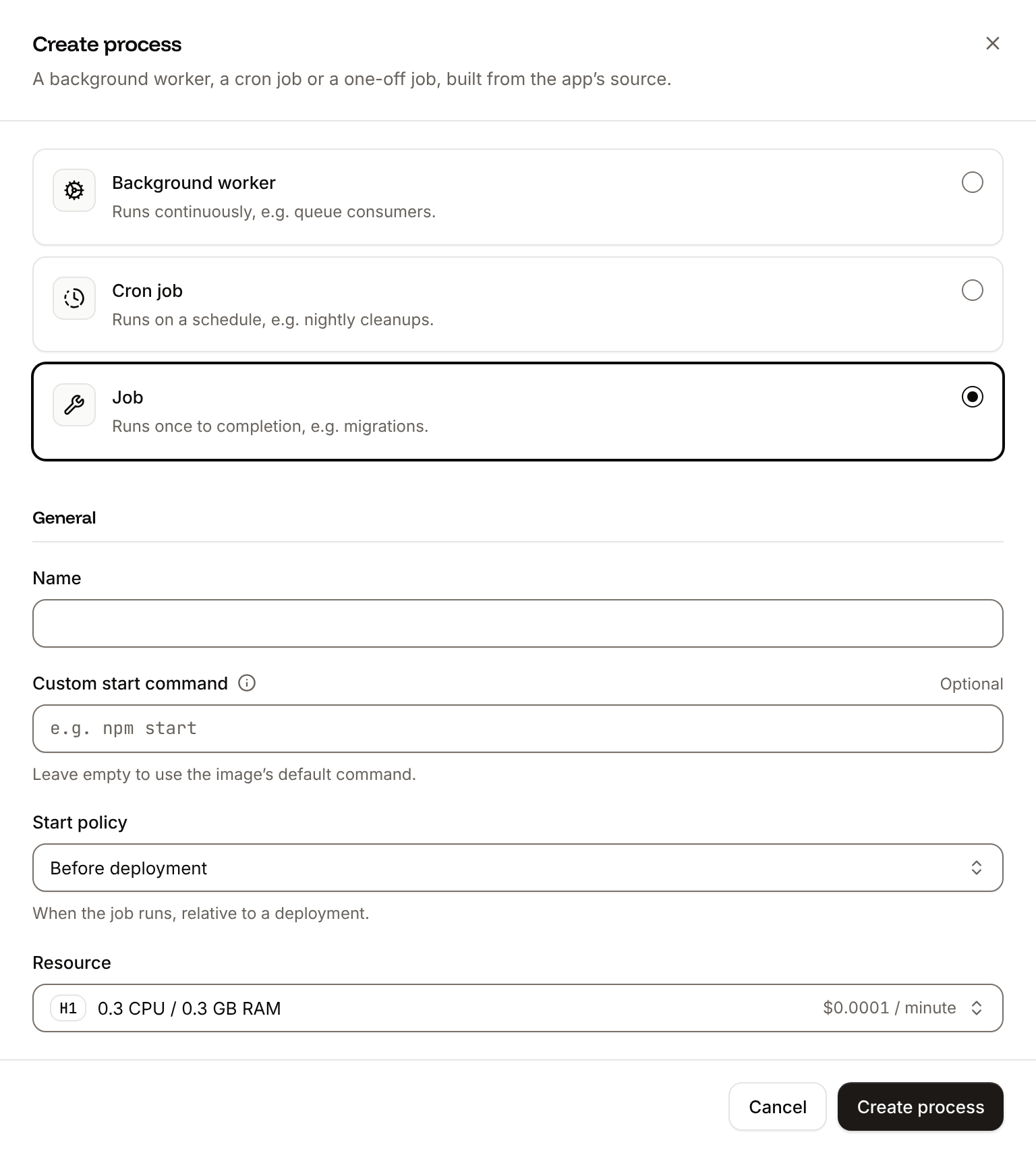
db:prepare rather than db:migrate. On the first deployment, the database is empty, and db:prepare loads db/schema.rb in one step and runs db/seeds.rb; on later deployments, it runs the pending migrations, as db:migrate does. It’s what Rails’ own container entrypoint runs, and the job that Ingot recommends for the application.
SECRET_KEY_BASE signs and encrypts Rails’ cookies and sessions. Rails reads it before the credentials in config/credentials.yml.enc, so you don’t need config/master.key on Sevalla, and every production secret lives in the application’s environment variables. If you keep other secrets in the credentials file, add RAILS_MASTER_KEY with the content of config/master.key instead.
Verify the deployment
-
On the Deployments tab, wait for the deployment’s status to change to Deployed. The application’s status next to its name changes to Running. Open the deployment to read its build log. Ingot’s build plan comes first:
The warning is a reminder:Build log
SECRET_KEY_BASEis set. Ignored counts the patterns of the.dockerignorethatrails newwrote, which Ingot applies to its own build. Later, the build log showsassets:precompilewriting the assets, and, during the rollout,Migrate has been successful. If the job fails, the deployment fails and nothing changes for visitors. -
Click the domain under the application’s name. The Products page opens. Click New product, enter a name, and click Create Product: the page shows
Product was successfully created., which shows that the database, the form’s CSRF check over HTTPS and the redirect work.


bin/rails console, click the Web terminal tab. The shell opens in /app in the Web process. See Web terminal.
Check from a terminal
These checks need no dashboard. The API calls useAPI, H, APP_ID and DEPLOYMENT_ID as set in Deploy with the API.
-
The deployment’s status, from Get deployment (
getDeploymentV3): -
The rollout’s results in the build log, from Get application deployment logs (
getApplicationDeploymentLogsV3). The messages carry terminal color codes, whichgsubremoves, andselectdrops the lines of the image build, which start with#: -
The health route that the readiness probe requests, with your domain:
-
A product created through the form, which needs the database, the CSRF check over HTTPS and the session cookie. The first command saves the form’s token and cookie, the second sends the form and follows the redirect:
Deploy with a Dockerfile
Ingot needs no Dockerfile. Use one when you want full control of the image: the base image, the system packages and every layer. Replace theDockerfile that rails new wrote with this one:
Dockerfile
Rails’
.dockerignore already keeps .git, .env*, config/master.key, logs, tmp, storage and compiled assets out of the build. Add the tests:
.dockerignore
Dockerfile, and it applies the .dockerignore patterns to its own build, so the repository still builds with Ingot. Then switch the application to the Dockerfile build strategy:
1
Choose the Dockerfile build strategy
On the application’s Settings tab, in the Build strategy section, click Update build strategy. Click Dockerfile, keep the Dockerfile path
Dockerfile and the Docker context ., then click Update build strategy.2
Deploy
Click the Overview tab, then click Deploy now under Recent deployments. Check the Branch and click Deploy.
📦 Building and pushing docker image using Dockerfile... instead of Ingot’s build plan, then Migrate has been successful. Create a product on the application’s domain as in Verify the deployment. The deployment’s Dockerfile tab shows the file the image was built from. See Dockerfile.
Deploy changes
With Auto-deploy on, every push to the branch starts a deployment; otherwise, click Deploy now for each change. Each deployment builds the image, runs theMigrate job, then replaces the web process’s instances. For a schema change, generate a migration locally with bin/rails generate migration, run bin/rails db:migrate, and commit the migration with db/schema.rb. When you add a gem, commit Gemfile.lock with it. See Deployments.
Use environment variables
Read settings withENV.fetch("NAME") in the code or in config/*.yml files with <%= ENV["NAME"] %>. Add them on the application’s Environment variables tab: they apply at the next deployment. Rails reads config/environments/production.rb during the build too, so give ENV.fetch a default there, or mark the variable Available during buildtime. See Environment variables.
Add a custom domain
Add the domain on the application’s Domains tab, then add it toALLOWED_HOSTS, for example storefront-x7k2m.sevalla.app,shop.example.com, and deploy. Custom domains need a web process larger than H1.
Troubleshoot
For more causes, see Troubleshoot Ingot builds and Troubleshoot builds and deployments. To run background jobs, store uploads or cache, see the Rails guides.
Deploy with the API
The same deployment as Deploy to Sevalla, as calls to the Sevalla API that a script or an AI agent runs in order. Each step names the matching CLI command and Sevalla MCP server tool. The sequence needs:- An API key with the Company developer role, or the capabilities to create, read and update applications and databases, in
SEVALLA_API_KEY. - The repository pushed to GitHub, and a GitHub account with access to it connected to Sevalla. Connecting one is a dashboard step, and the API has no call that reports it: if no connected account can read the repository, the step that creates the application fails with
400and a message that starts withCannot access repositoryand says where to connect one. curl,jqandopenssl.
1
Choose the location
List clusters (CLI:
listClustersV3) returns every location your company can use, with its region ID in location. Pick one by region ID, here Frankfurt, Germany (eu-frankfurt-1); Locations lists the others. Display names differ between environments, so don’t select by them:sevalla resources clusters. MCP: get_platform_options.2
Look up the sizes and the PostgreSQL version
List database resource types (CLI:
listDatabaseResourceTypesV3), List process resource types (listProcessResourceTypesV3) and List database versions (listDatabaseVersionsV3) give the IDs of DB1 and H1 and the newest PostgreSQL version in the location:sevalla resources db-types, sevalla resources process-types and sevalla resources db-versions --cluster $CLUSTER_ID. MCP: get_platform_options for the sizes, and sevalla_api_read with listDatabaseVersionsV3 for the version.3
Create the database
Create database (The database starts as CLI:
createDatabaseV3). You choose the password, and the API never returns it, so keep it in a variable for the environment variables:creating. Poll Get database (getDatabaseV3) until it’s ready. On error, delete the database and create it again:sevalla databases create --name orders-db --type postgresql --db-version $PG_VERSION --cluster $CLUSTER_ID --resource-type $DB1_ID --db-name storefront --db-user storefront --db-password $DB_PASSWORD. MCP: create_database generates a password that it never returns. Create the application first, then pass connect_to_application_id and env_var_name: "DATABASE_URL": the tool connects the database and stores its URL, in the form postgresql://<user>:<password>@<host>:<port>/<database>, which Rails accepts like postgres://. Then skip the connection step, and leave the connection’s variables out of the environment variables step.4
Create the application
Create application (Sevalla adds the domain about 2 seconds after it creates the application, so the loop waits for it. Without the wait, the variable can be empty, and an empty
createApplicationV3) creates it with a web process and doesn’t deploy it. List application domains (listApplicationDomainsV3) returns its sevalla.app domain as the primary one, for ALLOWED_HOSTS:ALLOWED_HOSTS makes Rails accept every host.CLI: sevalla apps create --name storefront --cluster $CLUSTER_ID --source privateGit --git-type github --repository $REPO_URL --branch $BRANCH, then sevalla apps domains list --app-id $APP_ID. MCP: create_application with deploy: false, then get_application.5
Size the web process and add the readiness probe
The API creates the web process at S1, not the dashboard’s H1. List processes (CLI:
listProcessesV3) finds it, and Update process (updateProcessV3) sets H1 and the readiness probe on /up. Send timeoutSeconds: a probe set through the API without it waits 120 seconds, not the dashboard’s 1:sevalla apps processes update $WEB_ID --app-id $APP_ID --resource-type $H1_ID; the CLI has no option for the probe. MCP: scale_process with size_id and apply_now: false for the size, and sevalla_api_update with updateProcessV3 and the same body for the probe.6
Connect the database
Create internal connection (It prints the connection’s ID. If it prints nothing or
createApplicationInternalConnectionV3):null, the connection wasn’t created: run the call again, because without it the application can’t reach the database. Unlike the dashboard, the API doesn’t add the connection’s environment variables. The next step adds them.CLI: sevalla apps internal-connections create $APP_ID --target-id $DB_ID --target-type database. MCP: sevalla_api_create with createApplicationInternalConnectionV3 and the same body.7
Add the environment variables
Create environment variable (It prints each key as it’s added.
createEnvironmentVariableV3) adds one variable per call. The loop adds the connection’s variables in the dashboard’s names and format, from Get database, with DB_URL renamed to DATABASE_URL, then a new SECRET_KEY_BASE and ALLOWED_HOSTS, all for runtime only:SECRET_KEY_BASE is 64 random bytes in hexadecimal, the format bin/rails secret prints. The build doesn’t need it: Ingot precompiles the assets with SECRET_KEY_BASE_DUMMY=1.CLI: sevalla apps env-vars create $APP_ID --key ALLOWED_HOSTS --value $APP_HOST, once per variable; the CLI makes each variable available during build and runtime, with no option for runtime only. MCP: set_environment_variables with runtime: true and buildtime: false for each variable.8
Create the migration job
Create process (CLI:
createProcessV3) needs the size, a scaling_strategy and, for a job, its job_start_policy:sevalla apps processes create $APP_ID --name Migrate --type job --resource-type $H1_ID --command "bin/rails db:prepare" --job-start-policy beforeDeployment. MCP: sevalla_api_create with createProcessV3 and the same body.9
Deploy
Trigger deployment (CLI:
triggerDeploymentV3):sevalla apps deployments trigger $APP_ID --branch $BRANCH. MCP: trigger_deployment.10
Wait for the deployment
Poll Get deployment (On
getDeploymentV3) until the status is final: success, failed, cancelled or skipped. The loop keeps polling through a failed request and stops after 30 minutes:failed, read the build log with Get application deployment logs and see Troubleshoot. CLI: sevalla apps deployments get $DEPLOYMENT_ID --app-id $APP_ID and sevalla apps deployments logs $DEPLOYMENT_ID --app-id $APP_ID. MCP: get_deployment and get_deployment_logs.11
Turn on auto-deploy
Update application (To build from the Dockerfile instead of Ingot, send
updateApplicationV3):{"build_type": "dockerfile", "dockerfile_path": "Dockerfile", "docker_context": "."} with the same call before you deploy. CLI: sevalla apps update $APP_ID --data '{"auto_deploy": true}'. MCP: sevalla_api_update with updateApplicationV3 and the same body.https://$APP_HOST as the domain.